 EN
EN Deutsch
 Español
 Français
 Italiano
 Português
 Nederlands
 Polski
 Bahasa Indonesia
 Русский
 Українська
 العربية
 עברית
עברית हिन्दी
 日本語
日本語 한국어
한국어2026-07-15 · Season 3
Azure Functions - Simply Explained
Show notes
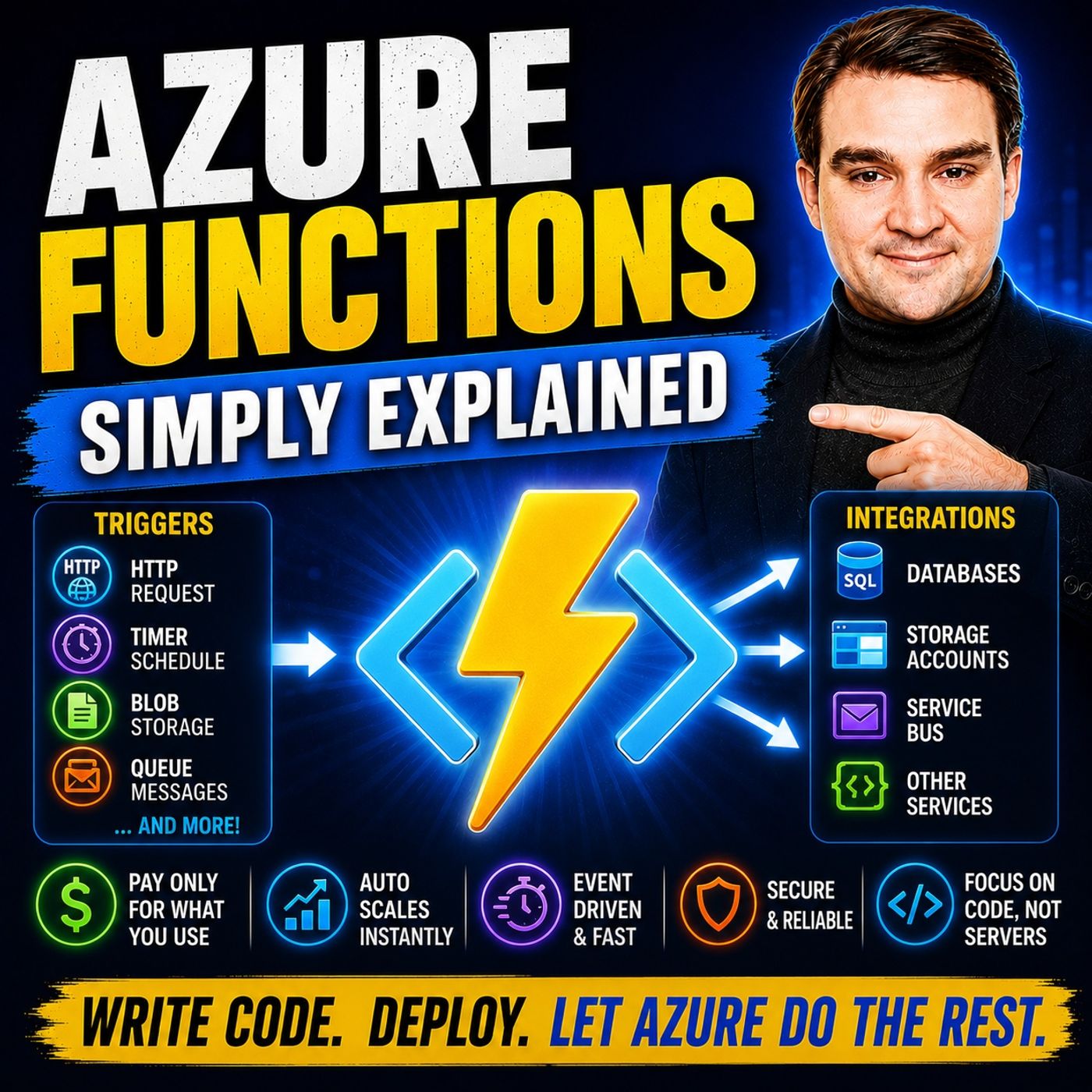
Serverless is one of the most talked-about concepts in cloud computing, yet it's also one of the most misunderstood. Many developers assume "serverless" means there are no servers involved, but the reality is quite different. In this episode of m365.fm, we explain Azure Functions in plain English and show why serverless computing has fundamentally changed how modern cloud applications are built. You'll learn what Azure Functions really are, how they work behind the scenes, how the pricing model actually works, and when serverless is the right architectural choice. Whether you're just starting with Azure or preparing for certification exams, this episode gives you a practical understanding of one of Microsoft's most important cloud services. WHAT SERVERLESS REALLY MEANS Despite its name, serverless doesn't eliminate servers—it eliminates the need for developers to manage them. We explain how Azure Functions abstracts away infrastructure, operating system maintenance, security updates, scaling, and availability so you can focus entirely on your application logic. Instead of paying for virtual machines that sit idle around the clock, Azure Functions only execute when they're needed, making serverless applications both simpler to operate and significantly more cost-efficient. Through relatable real-world analogies, you'll understand why event-driven computing has become the preferred architecture for modern cloud-native solutions. FUNCTIONS, TRIGGERS, AND BINDINGS EXPLAINED Every Azure Function is designed to perform one focused task in response to a specific event. This episode explains the core building blocks including Function Apps, individual Functions, triggers, bindings, and stateless execution. Learn how HTTP requests, Blob Storage uploads, queue messages, and timer schedules automatically trigger your code without constantly running background services. We also explore input and output bindings, showing how Azure Functions seamlessly integrate with Azure Storage, Service Bus, databases, and many other Azure services while dramatically reducing the amount of infrastructure code developers need to write. PRICING, SCALING, AND REAL-WORLD SCENARIOS One of the biggest advantages of Azure Functions is its consumption-based pricing model. We explain how executions, execution time, memory usage, and Microsoft's generous free tier work together to make serverless applications extremely affordable for many workloads. Through practical examples including automatic image compression, welcome email automation, scheduled maintenance tasks, webhook processing, API endpoints, and background data transformation, you'll discover why Azure Functions have become the backbone of many event-driven cloud architectures. We also compare the Consumption, Flex Consumption, Premium, and Dedicated hosting plans to help you choose the right option for your workload. WHEN TO USE AZURE FUNCTIONS — AND WHEN NOT TO Azure Functions are incredibly powerful, but they aren't the right solution for every scenario. This episode explores the ideal use cases for serverless computing while explaining where Azure App Service, Container Apps, Logic Apps, Durable Functions, or Virtual Machines may be better choices. We also cover common beginner mistakes including long-running executions, cold starts, authentication configuration, deployment strategies, monitoring with Application Insights, and storage account best practices. Whether you're building APIs, automating cloud workflows, integrating Azure services, or modernizing enterprise applications, this episode provides the practical foundation you need to confidently start building with Azure Functions and serverless computing. Become a supporter of this podcast: https://www.spreaker.com/podcast/m365-fm-microsoft-365-azure-cloud-power-platform-ai--6704921/support.
Apple Podcasts · Spotify · YouTube · YouTube Music · Deezer
Host: Mirko Peters
Related articles
Transcript
Read the full transcript
Today's topic is one that almost everyone has heard of, but almost nobody can explain. Serverless, what exactly is it? Is it really just code running on nothing? Or is it something much bigger? Let's get one thing straight. Serverless doesn't mean no servers. It means you don't think about them. And that distinction changes everything about how you build software. By the end of this episode, you'll understand what Azure Functions actually are, how the pricing really works, and when you should use them. We'll break this down into the building blocks, starting with the biggest myth. What serverless actually means? Let's clear up a few myths right away. The name serverless is the worst marketing term Microsoft ever came up with. It makes people think there's literally no server involved. That's not true. There are servers, lots of them. You just never have to touch them. 20 years ago, if you wanted to run a piece of code on the internet, you had to do a lot of work. You'd rent a virtual machine, install an operating system, configure a web server, and deploy your application. Then you'd spend every weekend patching security updates and making sure the thing didn't crash at three in the morning. And here's the thing. You paid for that server, whether your code was running or not. It sat there humming away, burning money while you slept. Serverless turns this whole model upside down. You write your code, upload it, and the platform handles everything else. The operating system, security patches, scaling, and availability. Your job is just to write the logic that matters. Think of it like the difference between running a restaurant kitchen and using a vending machine. A restaurant kitchen needs a full staff, constant supplies, and maintenance. It costs money every single day, even if nobody walks through the door. A vending machine? It sits there in the corner, doing nothing until someone presses a button. Then it springs to life, does its job, and goes back to sleep. You only pay for the electricity when it's actually working. That's serverless in a nutshell. Azure Functions is Microsoft's version of this. It runs small pieces of code in response to events. Your code is dormant until something wakes it up, then it runs, finishes, and goes back to sleep. So what does that code actually look like? What Azure Functions are? A function is a single piece of code that does one specific job. That's it. It's not an entire application with a login page, a database, and 20 screens. It's one focused task. Think of it like a light switch in your house. Either off or undoing work, then back off. A traditional web server is the opposite, like leaving every light in your house on 24 hours a day, seven days a week, even when nobody's home. Azure Functions support a bunch of different programming languages. You can use whatever you're comfortable with. JavaScript, Python, C, Java, PowerShell. There's no right answer here. Pick the language you already know. Now let's clear up a common confusion. The Function app is not the same thing as a function. The Function app is the container. Think of it like a toolbox. You create one function app, and inside that toolbox, you add multiple functions. Each function is a separate tool that does its own job. You might have one function that handles user signups, another that processes uploaded images, and a third that sends nightly reports. They all live in the same toolbox, but work independently. One more thing about functions. They're stateless by design. That means they don't remember anything between runs. If your function processes a file and finishes, that's it. The next time it runs, it starts fresh with no memory of last time. That sounds like a limitation, but it's actually the feature that makes them so powerful. Because functions don't hold on to memory or state, as your can spin up 100 copies of your function instantly when traffic spikes, and shut them down just as fast when traffic drops. That's how you get scalability without paying for idle servers. Here's the question. If a function just sits there doing nothing until something wakes it up, what actually wakes it up? That's where triggers come in. Triggers, the when. Every function must have exactly one trigger, and that's not optional. The trigger is the event that wakes your function up. Without it, your code is just sitting there doing absolutely nothing. Think of triggers like a doorbell. Your function is inside the house waiting. It could wait forever. Nothing happens until someone rings the doorbell. Then the function springs into action. Ansys the door does its job and goes back to waiting. There are four triggers that beginners run into most often. The HTTP trigger is the most common starting point. Someone visits a URL or makes an API call, and your function fires. That's how you build lightweight APIs without setting up a full web server. Then there's the timer trigger, which runs on a schedule. You set a chronic expression, something like run every hour or run at midnight every night. And your function fires at those exact times. Perfect for maintenance tasks, clean up jobs, or generating nightly reports. The blob trigger fires when a file is uploaded to Azure storage. Say someone uploads a PDF to a specific folder. The blob trigger detects that upload and runs your function automatically. This is huge for image processing, document conversion, and file validation. And the Q trigger fires when a message appears in a queue. Queues are a way to decouple different parts of your system. One service drops a message into a queue, and your function picks it up and processes it whenever it's ready. That prevents one slow service from blocking everything else. Here's the key point. When a trigger fires, it passes data into your function automatically. You don't have to pull for it or check if something happened. The trigger hands you everything you need, and your function just processes it. A function without a trigger is just code, sitting around doing nothing. The trigger is what gives it purpose. So the trigger tells your function when to run. But where does the data come from and where does it go? That's where bindings come in. Bindings, data in, data out. Bindings are a way to tell your function what data to read and where to send results without writing all the extra code. That's a mouthful. So let me simplify it. Two types exist. Input bindings bring data into your function. Output bindings send data out. Without bindings, you'd have to write SDK code. Every time you want to talk to a storage account, a database or a queue. You'd handle connection strings, manage retries, serialize data, de-serialize responses. That's a lot of boilerplate just to read a file. With bindings, you just declare what you need. You say, I want to read from this blob container or I want to write to this queue. The runtime takes care of the rest. It opens the connection, reads the data, and passes it to your function as a parameter. When your function finishes, it takes the return value and writes it wherever you specified. Think of bindings like pipes. You connect your function to a storage account, a database or a queue. The data flows through those pipes automatically. Your function doesn't need to know how the pipes work. It just receives what comes through and sends what needs to go out. Here's a concrete example. Say you have a blob input binding. When your function starts, it automatically reads a file from blob storage and hands it to you as a parameter. You don't write any storage SDK code. You just get the data and process it. Another example, a queue output binding. Your function process is something and at the end, you return a value. The runtime takes that value, serializes it, and drops it into the queue. You don't write any queue code. You just return a value. Bindings are optional. You can have zero, one or many. Some functions only need a trigger with no bindings at all. Others might have three or four bindings connecting to different services. The combination of triggers and bindings is what makes Azure Functions so powerful that you write the business logic, the actual decision making code, the platform handles all the integration. Your functions stay small, focused, and easy to understand. The pricing story. The pricing is what surprises most beginners. For most people, the consumption plan is the default choice and you should start with it 90% of the time. Here's how it works. You pay only when your function actually runs. When it's idle, you pay nothing. Zero, not a penny. Two components make up the bill. First, the number of executions, how many times your function fires? Second, the execution time measured in something called GBSeconds. That's basically how long your function ran multiplied by how much memory it used. The free grant is generous. You get 1 million executions per month and 400,000 GBSeconds, completely free. For most small projects, hobby apps, and prototypes, you'll never pay a cent. Ever. If you go over the free grant, the rates are still incredibly cheap. 20 cents per million executions. That's not a typo. 20 cents for a million runs. Think of it like paying for electricity only when you flip the switch on. There's no monthly base fee for having the wiring in your walls. You only pay for the power you actually use. Now there are other plans. Flex consumption is newer and gives you virtual network support. Premium keeps your functions always warm so there's no cold start delay. Dedicated gives you fixed capacity on a traditional app service plan. But forgetting started, consumption is the right choice almost every time. One warning though. The free grant is shared across all your function apps in the same subscription. If you have 10 function apps, they all dip into the same 1 million free executions. So keep an eye on that if you start building more than a few, pricing is great. But let's make this real with a concrete example. A real world scenario. Imagine you run a website where users upload profile pictures. Those images are huge like 10 megabytes each. And that causes a few real problems. Large files cost more to store. They slow down your website every time someone loads a page. And they frustrate your users who have to sit and wait for photos. So you need a way to shrink those images automatically. Without Azure Functions, you'd have to build a background worker from scratch. That means getting a separate server, setting up a queue to manage the workload, and writing code to handle all the moving pieces. That's a ton of unnecessary complexity for something as straightforward as shrinking an image. With Azure Functions, all you need is one blob trigger and one function. No service to worry about. Let me walk you through how it works. A user uploads a photo through your website, and that file lands in Azure Blob Storage. The moment it arrives, a blob trigger fires automatically. Your function wakes up, runs the compression code, and saves the smaller version back to storage. All of this happens within seconds. The user never waits because the entire process runs behind the scenes, completely invisible. Here's another everyday example. Sending a welcome email when someone signs up for your service. An HTTP trigger catches the signup request from your website. Your function fires, grabs the user's email address, sends a welcome message through Send Grid, and then it's done. The user gets the email almost instantly. No email server to set up, no Send queue to manage. Just one function, one job finished. These are the exact jobs as your functions was designed for, small, focused event-driven tasks. Not massive applications, not complex workflows, just one thing done well, triggered by something happening somewhere else. When to use Azure Functions. So when should you reach for a function and when should you use something else? Here's a quick way to decide. Ask yourself whether the task is short, whether it's event-driven and whether it's stateless. If you answered yes to all three, Azure Functions is probably the right tool. Let's start with the good use cases. APIs and webhooks are a perfect match. You need a lightweight endpoint that responds to an HTTP request, does one thing, and returns a result, and that's exactly what HTTP triggers are built for. File and image processing is another big one. A file lands in storage, your function fires, transforms it, and saves the result, all without a server. Scheduled tasks like nightly cleanup or report generation work great with timeout triggers. Data transformation for ETL pipelines is common too. And functions make perfect integration glue, connecting two services that don't naturally talk to each other. Now let's talk about when functions aren't a good fit. Long running processes are a problem because on the consumption plan, functions have a timeout limit of five minutes by default, up to 10 if you configure it. If your job takes longer than that, you need something else. Stateful applications are another mismatch. Functions don't remember anything between runs. If you need to maintain session state or track progress across steps, you're going against the design. Heavy compute workloads are also wrong. If you need sustained CPU for minutes or hours, a virtual machine or container is a better choice. And complex workflows where one task depends on another are better handled by durable functions or logic apps. Here's a quick overview of the alternatives. Azure Logic Apps is the no-code option for connecting services. If you don't need to write custom code, logic apps can do the job with a visual designer. Azure App Service is for full web applications that run 24/7. If you need a complete website or API that's always on, that's your tool. Azure Container Apps gives you containerized microservices with more control over the runtime. And Azure Virtual Machines gives you full control over the operating system if you need it. Here's a simple rule of thumb. If you can describe the job in one sentence, it's probably a good candidate for a function. Compress images when they're uploaded. Send a welcome email when someone signs up. Run a cleanup job every night at midnight. One sentence, one job, one function. Common beginner mistakes to avoid. Now, let's talk about a few things to watch out for. These are the mistakes that trip up almost everyone when they start. A common beginner mistake is thinking functions are always free. The free grant is generous. I know a million execution sounds like a lot. But if your function goes viral or gets hammered by a bot, those executions add up fast. So monitor your usage, set up a budget alert in Azure and don't get a surprise bill at the end of the month. Another mistake is ignoring cold starts. The first time your function runs after being idle, it takes longer. On the consumption plan that can be a few seconds. For most use cases, that's fine. But if you're building a latency sensitive API where every millisecond matters, consider the premium plan or enable always ready instances, then there's writing functions that run too long. The consumption plan has a timeout, five minutes default, 10 minutes maximum. If your function takes 15 minutes to process a file, it will get killed halfway through. Break that job into smaller pieces or use a different hosting plan. Another easy one to miss is not using run from package deployment. It's a simple configuration change that improves cold starts and makes deployments more reliable. Instead of copying individual files, you deploy a zip package. It's one checkbox in the portal. Do it. Exposing HTTP endpoints without authentication is another trap. It's easy to leave a function on anonymous while you're testing, then forget to lock it down. Set your authorization level correctly from the start. Use Function or admin keys. Don't leave the door open. Reusing storage accounts across multiple function apps is also a problem. In development, it's fine to share. In production, each function app should have its own storage account. Otherwise, you get noisy neighbor problems where one functions traffic slows down another. And finally, not enabling application insights without it, you're flying blind. You won't see failures, errors, or performance issues. You won't know if your function is running too long or failing silently. Enable it from day one. It takes 30 seconds and saves hours of debugging. The golden rule for all of this is to keep your functions small, focused, and stateless. One job per function. Nothing more. So that's the system. Azure Functions is serverless compute that runs small pieces of code in response to events. You only pay when your code runs. Triggers tell your function when to wake up. Bindings connected to the data it needs. And the consumption plan keeps it nearly free for small projects. Your single best move right now is to create a simple HTTP triggered function in the Azure portal. It takes five minutes and costs nothing. Subscribe to Microsoft Knowledge Nuggets for more plain English breakdowns and share this with someone who keeps asking what serverless means.