 EN
EN Deutsch
 Español
 Français
 Italiano
 Português
 Nederlands
 Polski
 Bahasa Indonesia
 Русский
 Українська
 العربية
 עברית
עברית हिन्दी
 日本語
日本語 한국어
한국어2025-11-23
Build a Governed Microsoft 365 Copilot Learning Center

Many organizations face frustration due to ineffective training methods. A staggering 67% of employees report dissatisfaction with traditional training approaches. This dissatisfaction stems from issues of relevancy and accessibility. It's time to Stop Training Your Users Wrong and seek a solution that not only addresses these concerns but also fosters continuous learning. The Copilot Learning Center transforms user experiences by providing ongoing training tailored to your needs. With features that enhance engagement, you can ensure that your users adopt Microsoft 365 Copilot effectively, leading to improved proficiency and confidence.
Key Takeaways
- Traditional training methods often lead to information overload, making it hard for users to retain knowledge.
- Continuous learning is essential to keep up with evolving tools like Microsoft 365 Copilot and to ensure effective usage.
- The Copilot Learning Center offers personalized learning paths that cater to individual roles, enhancing user engagement and skill acquisition.
- Interactive learning experiences, such as real-world exercises, improve retention and make training more enjoyable.
- Access to just-in-time resources reduces reliance on support tickets and empowers users to solve problems independently.
- A centralized knowledge hub ensures that users have quick access to updated information, boosting productivity and confidence.
- Implementing structured training programs can significantly reduce errors and improve overall employee morale.
- Embracing continuous training fosters a culture of learning, helping organizations adapt to changes and maximize the benefits of digital tools.
Issues with Traditional Training
Common Pitfalls
Traditional training often relies heavily on slide decks and one-off sessions. These methods overwhelm you with too much information at once, making it hard to remember key points. Many organizations compress weeks of content into a few days, which leads to information overload. When you attend a long training session, you might feel confident, but studies show you forget up to 70% of what you learned within 24 hours unless you revisit the material.
| Pitfall | Description |
|---|---|
| Information Overload | Overwhelming users with too much information at once instead of digestible, role-specific steps. |
| Outdated Materials | Failing to update onboarding materials as software evolves, leading to confusion. |
| Lack of User Feedback | Skipping user feedback opportunities, which can refine training flows. |
| Sole Reliance on Live Training | Relying only on live training without in-app reinforcement, causing frustration and poor retention. |
Many training programs use outdated materials that do not reflect the latest features or security and compliance best practices. This gap creates confusion, especially when you try to apply what you learned to Microsoft 365 Copilot. Without updated content, you risk mishandling sensitive data or sensitive information, which can lead to privacy and security risks.
Another common pitfall is the lack of user feedback. Training often happens without asking you what works or what you need. This approach misses chances to improve training and enablement. Also, relying only on live sessions without digital tools or prompts for just-in-time learning leaves you without support when you need it most.
Impact on Users
Ineffective training affects your productivity and confidence. When you do not fully understand how to use copilot tools, you spend more time figuring things out or correcting mistakes. This delay reduces your output and can cause frustration. Poor training also leads to more support tickets because users like you need help repeatedly with the same issues.
| Negative Impact | Description |
|---|---|
| Decreased Productivity | Employees lacking necessary skills take longer to complete tasks, leading to delays and reduced output. |
| Increased Employee Turnover | Insufficient training can make employees feel undervalued, prompting them to seek other job opportunities. |
| Quality Issues | Poor training increases the likelihood of errors, resulting in product defects and customer dissatisfaction. |
| Poor Employee Morale and Engagement | Lack of training can demotivate employees, leading to absenteeism and reduced commitment to company goals. |
When you feel unprepared, your morale drops. You may feel discouraged or disengaged, which can make you consider leaving your job. This situation hurts the whole organization because it loses skilled users who understand how to handle sensitive data and maintain compliance. Without proper training, you might also miss important security protocols, increasing risks for your company.
Need for Continuous Learning
Many people believe training ends once Microsoft 365 Copilot activates. This belief stops you from seeking further learning, but it creates a big problem. Copilot and AI tools evolve quickly. New features, security updates, and compliance rules appear regularly. Without continuous training, you cannot keep up with these changes or use copilot safely and effectively.
| Training Type | Knowledge Retention Effectiveness | Key Features |
|---|---|---|
| One-off Training | Less effective | Rapid forgetting without reinforcement. |
| Continuous Learning | More effective | Spaced repetition, microlearning, and integration into daily workflows enhance retention. |
Continuous learning gives you ongoing access to updated data, prompts, and best practices. It helps you apply what you learn immediately, improving your skills and confidence. Just-in-time learning tools and a secure knowledge repository support your daily work and reduce the need to ask for help. This approach lowers support ticket volume and speeds up adoption of copilot tools.
Tip: Stop training your users wrong by shifting from one-off sessions to a structured training system that supports continuous learning. This change helps you stay current with security, privacy, and compliance requirements while maximizing the value of your digital transformation.
By embracing continuous enablement, you protect sensitive information and reduce risks. You also improve your ability to use copilot prompts effectively, which boosts productivity and user satisfaction. Continuous training is essential to unlock the full potential of Microsoft 365 Copilot and ensure your organization thrives in a fast-changing digital world.
Introducing the Copilot Learning Center
The Copilot Learning Center serves as a revolutionary platform designed to enhance your training experience with Microsoft 365 Copilot. This centralized hub provides you with the resources and support you need to navigate the complexities of AI tools effectively. By integrating seamlessly with Microsoft applications, the Copilot Learning Center ensures that you have access to relevant, up-to-date information at your fingertips.
Overview of Features
The Copilot Learning Center offers a variety of features that cater to your learning needs. Here are some key aspects:
- Training Courses: Engage in hands-on training that integrates AI capabilities within Microsoft 365 applications. You will learn to leverage Copilot's features for drafting, summarizing, analyzing, automating tasks, and collaborating efficiently.
- Interactive Learning: Participate in real-world exercises and interactive lectures that enhance your understanding and retention of the material.
- Just-in-Time Resources: Access on-demand materials that provide guidance when you need it most, reducing the reliance on support tickets.
This structured training approach empowers you to use Microsoft 365 Copilot effectively across various applications, including Word, Excel, PowerPoint, Outlook, and Teams. You will quickly gain hands-on experience, enabling you to streamline content creation, meeting management, data analysis, and email communication.
Centralized Knowledge Hub
The Copilot Learning Center acts as a centralized knowledge hub, offering numerous advantages for organizational learning and knowledge sharing. Here’s how it benefits you:
| Advantage | Description |
|---|---|
| Faster onboarding | New hires can quickly become productive, reducing the time and resources needed for training. |
| Fewer errors | Accessible knowledge leads to correct application, enhancing safety and customer satisfaction. |
| Greater confidence | Employees feel empowered and engaged, improving morale and decision-making. |
| Less retraining | On-demand access to information reduces the need for repeated training sessions. |
| Business continuity | Captured knowledge remains within the organization, ensuring processes and best practices are retained. |
With this centralized hub, you can easily find the information you need, which enhances your ability to apply what you learn effectively. This approach not only improves your productivity but also fosters a culture of continuous learning within your organization.
Governance and Structure
The governance structure of the Copilot Learning Center ensures that the content remains accurate and relevant. Microsoft emphasizes employee training and empowerment, which is crucial for maintaining high standards. By providing comprehensive training on sensitivity labeling and data governance, you will better understand and apply the necessary guidelines in your daily tasks. This approach enhances the accuracy of the content generated and fosters a culture of accountability and compliance within your organization.
Tip: Embrace the structured training and governance provided by the Copilot Learning Center. This will help you stay informed about security, privacy, and compliance requirements while maximizing the value of your digital transformation.
Benefits of the Copilot Learning Center

Personalized Learning Paths
The Copilot Learning Center offers personalized learning paths tailored to your unique needs. This customization allows you to focus on specific skills relevant to your role. You can choose courses that align with your job responsibilities, ensuring that you gain the knowledge necessary to excel. By following a structured training approach, you can stop training your users wrong and instead engage in a learning experience that empowers you.
- Role-Specific Training: Access courses designed for your specific job functions.
- Flexible Learning: Learn at your own pace, allowing you to revisit materials as needed.
- Skill Assessment: Regular assessments help you track your progress and identify areas for improvement.
Enhanced User Engagement
Engagement plays a crucial role in effective training. The Copilot Learning Center fosters a more engaging environment, which leads to better training outcomes. Research shows that employees with high self-efficacy are more engaged in their work. This engagement encourages you to embrace challenges and actively pursue new skills. Moreover, reducing technostress allows you to learn in a relaxed environment, enhancing your overall training experience.
Tip: Engage with interactive content and real-world exercises to maximize your learning potential.
By alleviating technostressors, the Copilot Learning Center boosts your engagement. As you adapt to new tools, you will find it easier to learn and apply new skills. This shift not only enhances your confidence but also contributes to a culture of continuous learning within your organization.
Improved Productivity
The Copilot Learning Center significantly improves productivity among users. By automating low-value activities, you can focus on higher-value tasks. This shift leads to increased overall productivity. For instance, employees report that about 75% say AI improves the speed or quality of their work.
- Organizations implementing Microsoft 365 Copilot experience systemic improvements in team operations.
- Faster document creation and automated data analysis lead to reduced project timelines and cut administrative overhead.
You can expect measurable outcomes from using the Copilot Learning Center. Organizations have reported an average time savings of 10 hours per employee each month. This time savings translates to gaining an extra workday, allowing you to reallocate time from manual tasks to more productive activities, such as nurturing client relationships. This shift not only enhances individual productivity but also contributes to overall revenue growth.
Note: Embrace the Copilot Learning Center to unlock your full potential and drive your organization’s digital transformation.
Implementing the Copilot Learning Center
Assessing Training Needs
Before deploying the Copilot Learning Center, you must assess your organization's training needs. This step ensures that you tailor the training to fit your users' specific requirements. Follow these steps to effectively assess training needs:
- Establish baseline metrics before training begins to track progress during rollout.
- Assess user needs through surveys focusing on daily workflows, pain points, and expected Microsoft 365 Copilot use cases.
- Develop role-based and application-specific training content tailored to different departments and job functions.
- Pilot training with early adopters or champions to test materials and gather feedback.
- Use official Microsoft Learn paths as foundational content and customize them for your organization's environment.
- Schedule mandatory core training sessions before users receive Copilot licenses.
- Provide reference materials such as quick-reference guides, prompt libraries, and video tutorials for on-demand learning.
- Establish support channels like dedicated Teams channels or help desk categories for Copilot-related questions.
- Leverage usage analytics and user confidence surveys to identify training gaps and measure readiness.
- Plan training preparation at least one month before license deployment to ensure readiness.
By following these steps, you can stop training your users wrong and create a solid foundation for effective learning.
Setting Up Learning Paths
Creating effective learning paths is crucial for maximizing the benefits of the Copilot Learning Center. Here are some best practices to consider:
- Establish a clear, progressive curriculum structure starting with foundational knowledge, moving through role-based applications, and advancing to topics like prompt engineering.
- Use multi-modal training approaches, including micromodules (5-15 minute focused lessons), interactive tutorials, and sequenced learning paths to accommodate diverse learner needs.
- Integrate existing learning pathways like Viva Learning’s Copilot Academy with your centralized training portal to combine out-of-the-box and custom content.
- Implement continuous learning programs by maintaining an "Evergreen Copilot Hub" updated monthly with release notes and community-curated resources.
- Run regular learning rituals such as biweekly "Copilot Drop-Ins" to keep skills current and share wins.
These practices ensure that your users receive the training they need to navigate Microsoft 365 Copilot effectively.
Training Administrators
Training administrators is essential for managing and updating the Copilot Learning Center effectively. Here are key learning objectives for administrators:
| Learning Objectives | Description |
|---|---|
| Manage Microsoft 365 Copilot settings | Administrators will learn how to configure settings for optimal performance. |
| Manage web access for Microsoft 365 Copilot | Training includes controlling web access to enhance security. |
| Manage Copilot for Microsoft Teams meetings and events | Focus on integrating Copilot into Teams for better collaboration. |
| Identify Microsoft Purview data protections for AI apps | Understanding data protection measures is crucial for compliance. |
| Manage Microsoft Copilot on mobile devices | Training covers mobile management for flexibility. |
| Secure data for AI apps using Microsoft Purview Data Security Posture Management (DSPM) for AI | Emphasizes the importance of data security in AI applications. |
| Monitor the value of Microsoft 365 Copilot through the Copilot Dashboard | Administrators will learn to assess the effectiveness of Copilot. |
| Track Microsoft 365 Copilot readiness and usage across your organization | Training includes monitoring usage metrics for better management. |
| Monitor Microsoft 365 Copilot interactions using a communication compliance policy | Ensures compliance in communications involving Copilot. |
| Delete your Microsoft Copilot interaction history | Administrators will learn how to manage interaction data effectively. |
By focusing on these objectives, you can ensure that your administrators are well-equipped to support users and maintain the Copilot Learning Center effectively.
Success Stories with Copilot
Case Study Highlights
Organizations across various sectors have successfully implemented the Copilot Learning Center, leading to significant improvements in user training and productivity. Here are some notable case studies:
| Case Study | Description |
|---|---|
| A1 Inteligência em Viagens boosts efficiency and customer experience | This case shows how A1 Inteligência em Viagens improved team efficiency and customer experience using Copilot Studio. |
| ABN AMRO Bank enhances AI capabilities with Copilot Studio and Azure services | ABN AMRO improved customer and employee interactions through Copilot Studio. |
| The City of Montréal enhances citizen engagement with Copilot Studio | This illustrates how the City of Montréal used Copilot Studio to improve citizen engagement and information access. |
These examples highlight the versatility of the Copilot Learning Center in enhancing user experiences and operational efficiency.
User Testimonials
Users have shared their positive experiences after adopting the Copilot Learning Center. Here are some testimonials:
"The Copilot Learning Center transformed how we approach training. Our team feels more confident using Microsoft 365 Copilot, and we see fewer support tickets." - Sarah, Project Manager
"I used to struggle with understanding the tools. Now, I access resources on-demand, which makes my work much easier." - James, Data Analyst
These testimonials reflect the impact of the Copilot Learning Center on user confidence and engagement.
Measurable Outcomes
Organizations have reported impressive metrics after implementing the Copilot Learning Center. Here are some key improvements:
| Metric | Improvement |
|---|---|
| Reduction in coding time | 20% |
| Reduction in PR review time | 26% |
| Decrease in overall work time | 24% |
| Average time savings per ticket | 3 full workdays |
| Time savings range | 12% to 85% |
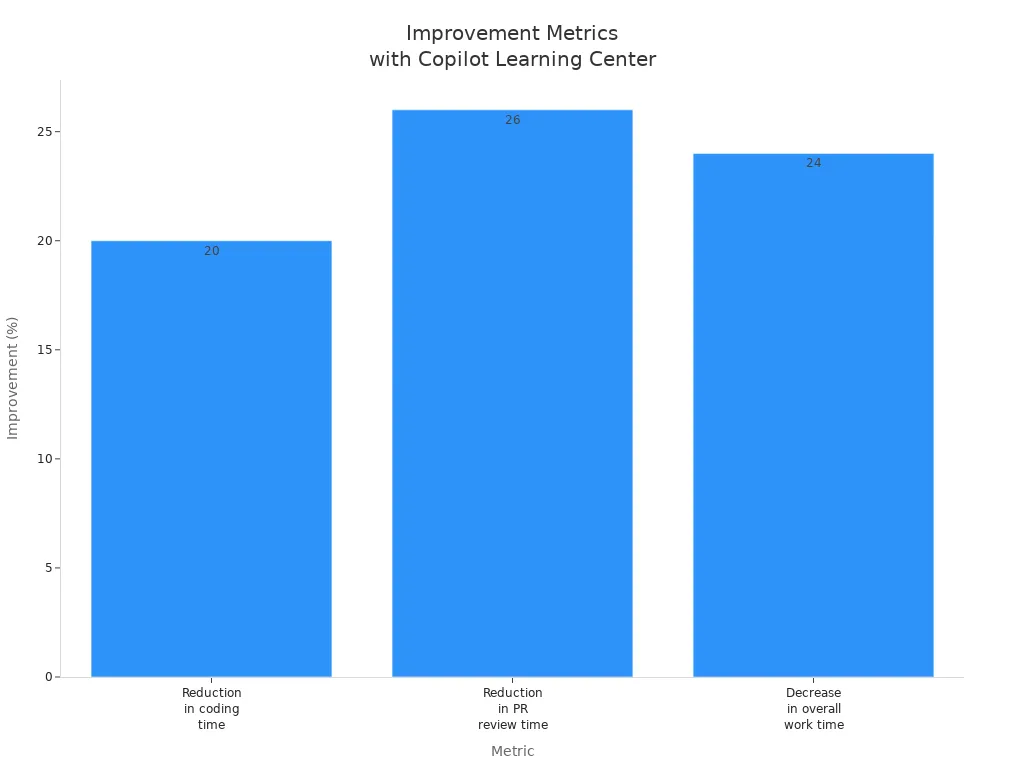
These measurable outcomes demonstrate how the Copilot Learning Center not only enhances training but also leads to tangible benefits like reduced support tickets and improved productivity. By embracing this innovative platform, you can stop training your users wrong and foster a culture of continuous learning and enablement.
The Copilot Learning Center revolutionizes your training experience. It offers role-based learning paths, ensuring you connect Copilot features to your daily tasks. Continuous learning strategies keep you informed about new updates and security measures.
Consider these long-term benefits:
- Contextual Learning: In-app walkthroughs enhance your skill acquisition.
- Role-Based Learning Paths: Customized training speeds up adoption.
- Continuous Reinforcement: Ongoing resources keep you engaged.
- Performance Analytics: Data-driven strategies refine training programs.
Embrace the Copilot Learning Center to enhance your user experience and foster a culture of continuous learning.
Remember, effective training is not a one-time event. It’s an ongoing journey that empowers you to navigate sensitive data and maintain compliance with confidence.
FAQ
What is the Copilot Learning Center?
The Copilot Learning Center is a centralized hub designed to enhance your training experience with Microsoft 365 Copilot. It provides access to resources, training courses, and just-in-time support for navigating AI tools effectively.
How does the Copilot Learning Center improve user training?
The Copilot Learning Center offers personalized learning paths, interactive content, and ongoing resources. This approach helps you stay updated on new features and security measures, ensuring you maximize your use of Copilot.
Can I access the Copilot Learning Center on mobile devices?
Yes, you can access the Copilot Learning Center on mobile devices. This flexibility allows you to learn and access important prompts and resources anytime, anywhere, enhancing your training experience.
How does the Copilot Learning Center ensure data security?
The Copilot Learning Center emphasizes security by providing training on sensitivity labeling and data governance. This training helps you understand how to handle sensitive data safely while using Copilot.
What types of prompts are available in the Copilot Learning Center?
The Copilot Learning Center offers a variety of prompts tailored to different applications within Microsoft 365. These prompts guide you in using Copilot effectively for tasks like drafting, summarizing, and automating workflows.
How can I assess my training needs before using the Copilot Learning Center?
You can assess your training needs by surveying users about their daily workflows and pain points. This feedback helps tailor the training content to fit specific roles and applications within your organization.
Is there ongoing support after initial training?
Yes, the Copilot Learning Center provides ongoing support through access to updated materials and resources. This ensures you can continuously improve your skills and stay informed about new features and best practices.
How can I track my progress in the Copilot Learning Center?
You can track your progress through regular assessments and usage analytics provided within the Copilot Learning Center. These tools help you identify areas for improvement and measure your readiness.
Apple Podcasts · Spotify · YouTube · YouTube Music
Host: Mirko Peters
Related articles
- Why Traditional M365 Training Fails (And How to Fix It)
- Teams vs Slack vs Zoom: Ultimate Comparison for Modern Collaboration
- Copilot Deployment Phases Explained
- Copilot Prompts for Viva: Complete Guide
- Copilot Prompts for Project Management: The Ultimate Guide for Microsoft 365
- Copilot Prompts for Marketing Teams: The Ultimate Guide