 EN
EN Deutsch
 Español
 Français
 Italiano
 Português
 Nederlands
 Polski
 Bahasa Indonesia
 Русский
 Українська
 العربية
 עברית
עברית हिन्दी
 日本語
日本語 한국어
한국어2026-05-26
Designing an Inclusive Hybrid Workplace with Onyinye Madubuko [MVP]
![Designing an Inclusive Hybrid Workplace with Onyinye Madubuko [MVP]](https://d3wo5wojvuv7l.cloudfront.net/t_rss_itunes_square_1400/images.spreaker.com/original/64563af8d97e4497262e074770b291b0.jpg)
Quick answer: inclusive hybrid workplace design with Microsoft 365 is covered in this M365 FM episode with a practical focus on how it works, where it fits, and the architecture, security, governance, or operational choices that matter in real Microsoft environments.
Picture this: You join a team meeting from your kitchen, while your coworker sits in a quiet office pod. You both want to share ideas and get things done—fast. You can make your hybrid workplace more collaborative and flexible by taking small, practical steps right now. With the right technology, like Microsoft 365, you boost teamwork and give everyone more freedom. Check out how the latest trends shape work:
| Evidence Description | Impact on Collaboration and Flexibility |
|---|---|
| Use of collaboration analytics | Enhances productivity and employee engagement in hybrid work settings |
| Regular check-ins with managers | Leads to a 30% increase in engagement scores for hybrid workers |
| Shift in employee expectations | Employees demand more independence and flexibility, prompting management to adapt their roles to be more supportive and coaching-oriented |
Think about how your space and your tools work together—both matter for your best work.
Key Takeaways
- Create a clear collaboration plan to boost team positivity and productivity.
- Hold regular check-ins to keep everyone connected and on track.
- Set guidelines for availability to ensure smooth communication.
- Use technology like Microsoft 365 to simplify teamwork and document sharing.
- Encourage virtual team-building activities to foster inclusion among remote workers.
- Collect feedback frequently to understand team needs and improve collaboration.
- Design your workspace with zones for focus, teamwork, and relaxation to enhance productivity.
- Implement flexible schedules to help employees balance work and personal life.
Key Strategies for the Hybrid Workplace
Immediate Actions for Teams
You can boost your team's success in a hybrid setting by taking a few simple steps right away. Many teams skip the basics, but these actions make a big difference:
- Create a clear collaboration plan. Almost half of hybrid workers say their teams do not have one, but teams with a plan feel more positive about their workplace.
- Set up regular team check-ins. These meetings help everyone stay connected and on track.
- Agree on guidelines for when people should be available. This keeps communication smooth and avoids confusion.
- Use technology to make teamwork easier. Tools like Microsoft 365 help you share documents, chat, and meet from anywhere.
- Encourage virtual team-building activities. These can help everyone feel included, even if you work from different places.
- Collect feedback often. Try quick pulse surveys or monthly open forums to hear what your team needs.
- Focus on results, not just hours spent online or in the office.
- Train managers to lead teams that work in different locations.
- Mix in-person and virtual activities to keep everyone engaged.
- Set flexible rules, but make sure some guidelines are clear and non-negotiable.
Tip: When you set up a collaboration plan and check in often, your team is more likely to feel connected and productive.
Why Collaboration and Flexibility Matter
You might wonder why these ideas matter so much. The answer is simple: they help everyone do their best work and feel happier at work. When you combine strong collaboration with flexible ways of working, you see big results.
| Statistic | Percentage |
|---|---|
| CEOs reporting improved productivity | 75% |
| Hybrid workers feeling more productive | 74% |
| Workers feeling more motivated | 76% |
| Employees reporting increased job satisfaction | 85% |
| Employees considering hybrid work a leading benefit | 88% |
| Employees only considering hybrid roles | 50% |
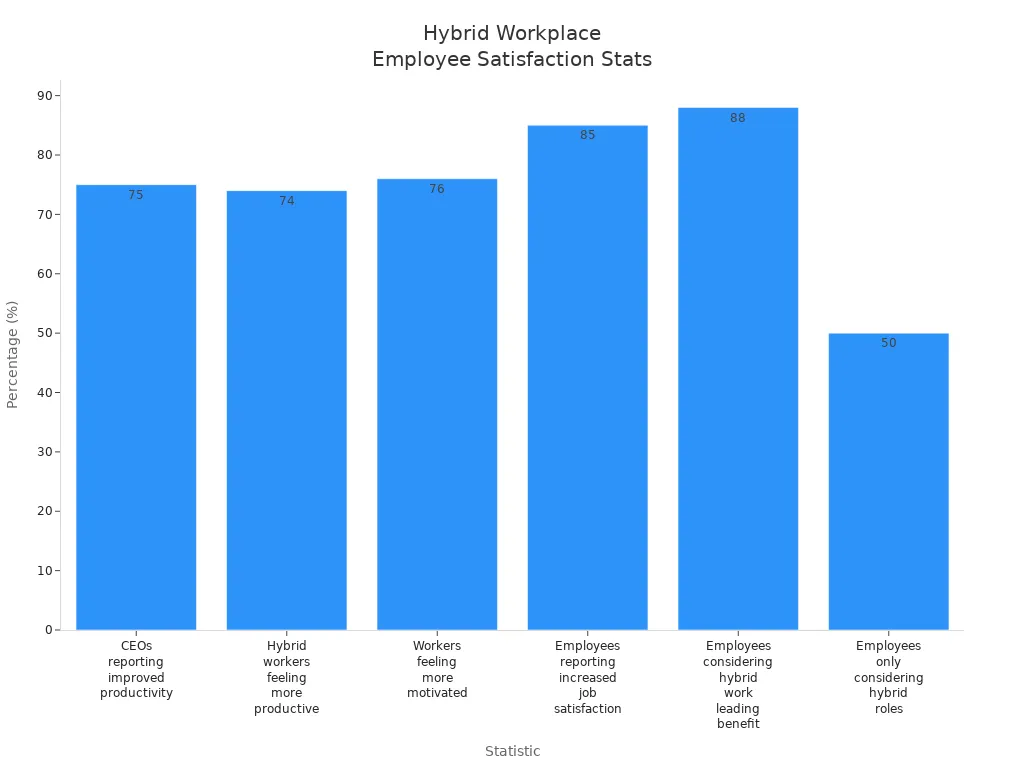
When you look at these numbers, you see that most people feel more productive and satisfied in a hybrid workplace. Many employees now expect flexibility and independence. If you give them these options, you help your team stay motivated and loyal.
Collaboration also boosts morale and engagement. When you work well together, you solve problems faster and make better decisions. Digital tools help you stay connected, but you still need clear plans and regular check-ins to avoid miscommunication.
Managers play a big role, too. They need to support both in-office and remote workers. When leaders use real-time data and feedback, they can make better choices for the whole team.
Note: The best hybrid teams use both smart technology and strong teamwork to reach their goals.
Hybrid Workplace Design

Creating an effective hybrid office design means thinking about both remote and in-office employees. You want everyone to feel included, focused, and ready to collaborate. Let’s break down how you can shape your space for every work style.
Zones for Focus and Collaboration
You need different areas for different tasks. Smart hybrid office design uses zones to support both deep focus and teamwork.
Quiet Work Areas
Sometimes, you just need to block out the noise and get things done. Quiet zones help you concentrate without distractions. These spaces often use soundproofing and acoustic panels to keep things peaceful. You might find private booths or small rooms where you can focus on important projects or calls.
Strategic office layout design directly impacts employee productivity, workflow efficiency, and workplace satisfaction.
Team Spaces
When it’s time to brainstorm or work together, team spaces make it easy. These areas use flexible and modular furniture so you can rearrange them for group meetings or quick huddles. Collaboration zones near team clusters encourage spontaneous discussions and help you solve problems faster.
True collaboration thrives when people can come together easily without disrupting others. Smart office layouts recognize that collaboration is situational.
Social Zones
Don’t forget about places to relax and recharge. Social zones give you a spot to take a break, chat with coworkers, or have informal meetings. These areas support well-being and help you build stronger connections with your team.
Smart layouts create gradients of privacy rather than a single dominant model, addressing the challenge of balancing focus with accessibility.
Inclusive Meeting Spaces
Hybrid office design should make meetings fair for everyone, whether you join from home or the office. You want every voice to count.
Equitable Access
Check out this table for features that make meeting spaces inclusive:
| Feature | Description |
|---|---|
| Audio Clarity | Advanced microphones and speakers help everyone hear clearly. |
| Visual Engagement | Smart whiteboards and displays let all participants see and share ideas in real time. |
| Technology Integration | Platforms like Microsoft Teams offer noise suppression and live transcription. |
| Interactivity | Tools like breakout rooms and smart cameras keep remote attendees engaged and visible. |
Virtual and Physical Integration
Blending virtual and physical meeting spaces gives you more flexibility. You can join from anywhere and still feel part of the team. This approach supports different needs and keeps everyone engaged, using features like polls and breakout sessions to boost participation.
- Integrating virtual and physical meeting spaces allows for greater flexibility and accessibility.
- It accommodates diverse participant preferences and needs, enhancing overall engagement.
- The hybrid approach promotes interaction through various methods such as breakout sessions and polls.
Workspace Personalization
Personal touches matter in hybrid office design. When you can adjust your workspace, you feel more comfortable and productive.
Adjustable Layouts
Arrange your desk or area to fit your work style. Use task-based layouts, add plants for a fresh vibe, or control your lighting for better focus. Modular furniture lets you switch between solo work and group tasks with ease.
Desk Booking Systems
In a hybrid office, you might not have the same desk every day. Desk booking systems help you reserve a spot that fits your needs, whether you want a quiet corner or a spot near your team. This flexibility supports both focus and collaboration.
- Employees who customize their workspaces feel a sense of ownership, leading to increased job satisfaction.
- Personalized workspaces enhance productivity by allowing employees to create a comfortable environment that minimizes distractions.
- Personalization fosters creativity, inspiring innovative thinking and problem-solving.
Companies with highly engaged workforces outperform their peers by 147% in earnings per share (Deloitte).
A thoughtful hybrid office design brings together zones for focus, collaboration, and relaxation. It uses technology to connect everyone and lets you personalize your space. When you design with both remote and in-office needs in mind, you create effective hybrid workspaces where everyone can do their best work.
Flexible Policies and Office Layouts
You want your hybrid workplace to feel open and adaptable. Flexible policies and smart office design help you create a space where everyone can thrive, whether they work from home or in the office.
Flexible Schedules
Flexible schedules give you more control over your day. You can balance work and life, reduce stress, and boost motivation.
Core vs. Flexible Hours
Some companies set core hours when everyone should be available. Outside those hours, you can choose when to work. This approach keeps meetings easy to schedule and lets you handle personal tasks when needed.
| Schedule Type | Description |
|---|---|
| Fixed hybrid schedules | Predetermined days for in-office and remote work (like three days onsite). |
| Flexible hybrid schedules | You pick your work schedule based on your needs and job requirements. |
Tip: Clear core hours help teams stay connected, while flexible hours let you manage your own time.
Asynchronous Work
Asynchronous work means you don’t have to be online at the same time as your teammates. You can reply to messages or finish tasks when it suits you. This style works well for remote work and supports focused work.
- Centralized communication using platforms like Microsoft Teams keeps everyone in the loop.
- Regular video meetings simulate in-person collaboration.
- Clear response expectations respect individual work hours.
Flexible schedules enhance productivity and well-being. You feel less stressed and more satisfied when you can choose your hours and location. Gallup research shows hybrid schedules improve employee well-being.
Adaptable Layouts
Office design matters. You need spaces that change with your needs. Adaptable layouts make your workplace more dynamic and efficient.
Modular Furniture
Modular furniture lets you rearrange your workspace quickly. You can create flexible workstations for solo tasks or group projects. Teams expand or shrink without needing a full redesign.
| Evidence | Description |
|---|---|
| Modular Furniture Systems | Reconfigure as teams grow, costing less than complete redesigns. |
| Moveable Walls | Change spaces within hours to fit project needs. |
| Lightweight Furniture | Rearrange workspaces easily for different activities. |
- Invest in adaptable furniture for both collaborative and private needs.
- Movable partitions and adjustable desks empower you to customize your space.
- Modular elements maximize creativity and efficiency.
Multi-use Rooms
Multi-use rooms serve many purposes. Conference rooms can become training spaces. Break areas host informal meetings during off-peak hours. Reserve flexible space for collaboration or focused work.
- Flexible space transforms into meeting rooms or collaborative zones as needed.
- Efficient meeting spaces support team-building activities.
- Flexible workspace options optimize space and cost.
Clear Hybrid Guidelines
Clear guidelines keep everyone on the same page. You know what’s expected, whether you work remotely or in the office.
Remote and In-Office Protocols
Define hybrid work arrangements, including core hours and flexibility limits. State acceptable remote work locations and workspace standards. Set safety and confidentiality measures for remote work.
- Outline performance management metrics and accountability measures.
- Address legal compliance, like workers’ compensation and tax rules.
- Implement security protocols to protect confidential information.
Communication Standards
Set unambiguous communication protocols and technology requirements. Use platforms like Microsoft Teams for centralized communication. Specify tools and expectations for responsiveness.
- Encourage boundary setting between work and personal time.
- Provide wellness initiatives, like stress management workshops.
- Conduct regular check-ins to gauge job satisfaction.
Note: Clear hybrid guidelines empower you to balance personal and professional commitments. They attract top talent and save time by reducing commute hours.
A well-designed hybrid workplace uses flexible schedules, adaptable layouts, and clear guidelines. You get more control, better well-being, and a space that fits your needs.
Technology for Hybrid Collaboration
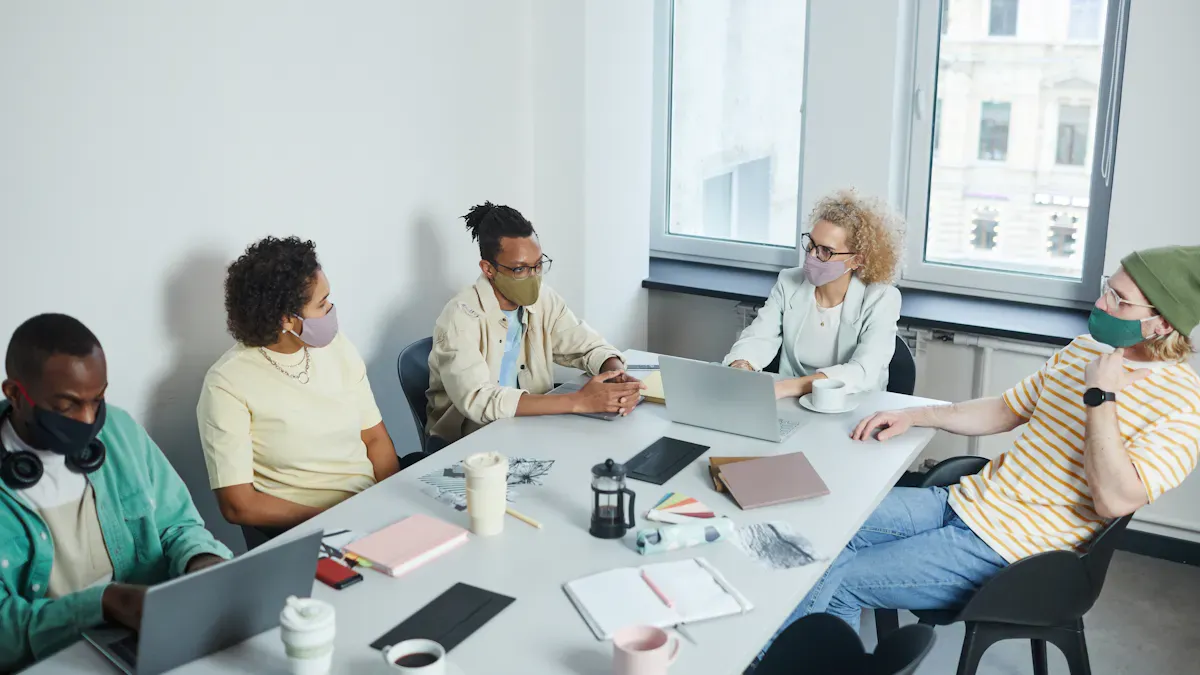
You want your hybrid workplace to run smoothly. The right technology makes this possible. With smart tools, you can connect, share, and get work done—no matter where you are. Let’s look at how you can use technology to boost collaboration and make every meeting count.
Collaboration Tools
Video Meetings
Video meetings help you see and hear your team, even if you work from different places. Microsoft Teams lets you join with one click. Smart camera technology makes sure everyone feels included. You can see faces clearly and avoid the “bowling alley” view. This design helps remote workers feel like they’re in the room.
Document Sharing
Sharing files should be easy. Microsoft 365 gives you cloud storage with OneDrive and SharePoint. You can edit documents together in real time. No more lost files or confusing email threads. Everyone stays on the same page.
Project Management
You need to keep track of tasks and deadlines. Microsoft Teams and tools like Planner help you organize projects. You can assign work, set due dates, and check progress. This design keeps your team focused and reduces stress.
Here’s how Microsoft Teams and Copilot help your team:
| Feature/Benefit | Description |
|---|---|
| Automating routine tasks | Reduces time spent on repetitive activities, letting you focus on important work. |
| Streamlining communication | Makes messages clear and avoids confusion. |
| Real-time insights | Gives you instant data during meetings to help you make decisions. |
| AI integration | Helps manage meetings, organize files, and track responses. |
| Culture of clarity | Shows your team that their time matters, which builds loyalty. |
| Competitive advantage | Teams using these tools often outperform others in hybrid work environments. |
Integrating Digital and Physical Work
Smart Meeting Rooms
Technology-integrated meeting spaces use smart cameras and microphones. These tools let everyone join in, whether they’re at home or in the office. You get clear sound and video. This design removes barriers and helps everyone share ideas.
Digital Whiteboards
Digital whiteboards let you draw, write, and brainstorm together. You can add notes in real time. Both in-person and remote team members can join. This design makes sure every voice gets heard.
- Smart meeting rooms and digital whiteboards help everyone feel connected.
- Teams that use these tools report higher job satisfaction and better results.
Accessibility and Training
Tool Training
You want everyone to use new tools with confidence. Start with simple training. Use peer learning, one-on-one sessions, and AI-powered demos. Make sure technical support is ready to help. This design reduces stress for new hires.
Device Compatibility
Your tools should work on any device. Microsoft 365 supports laptops, tablets, and phones. Easy-to-use software helps everyone join meetings and share files. When technology is accessible, more people join in and feel happy at work.
Tip: Make sure everyone gets equal access to learning and growth, no matter where they work.
Fostering Belonging and Connection
Building a sense of belonging in your hybrid workplace takes more than just good technology. You need to create an environment where everyone feels seen, heard, and valued—no matter where they work.
Inclusive Culture
A strong, inclusive culture helps everyone feel like part of the team. You can make this happen by focusing on regular communication and team-building activities. When you check in often and celebrate wins together, you help remote employees feel connected and valued.
Team Check-Ins
Frequent team check-ins keep everyone in the loop. These meetings give you a chance to share updates, ask questions, and support each other. Try using video conferencing tools to include everyone, whether they’re in the office or working from home. You can also set up hybrid collaboration spaces for in-person brainstorming and discussions. When you encourage knowledge sharing, you create a more collaborative environment.
Celebrating Success
Don’t let achievements go unnoticed. Celebrate both big and small wins as a team. Shout-outs during meetings, digital badges, or a quick message in your team chat can make a big difference. When you recognize effort, you boost morale and help everyone feel appreciated.
Employees who feel valued and supported are more likely to stay engaged and productive. A positive, inclusive culture also reduces turnover and supports better mental health outcomes.
| Evidence Type | Description |
|---|---|
| Enhanced employee engagement | Employees who feel valued and supported are more likely to be engaged in their work, leading to higher productivity and creativity. |
| Improved retention | A positive, inclusive culture reduces turnover by fostering loyalty and satisfaction among employees. |
| Better mental health outcomes | Inclusive environments help mitigate stress and burnout by promoting collaboration, support, and open communication. |
| Stronger team dynamics | Cultures that prioritize respect and inclusivity enhance teamwork and trust, leading to more effective collaboration. |
| Increased profitability | Organizations with strong workplace cultures experience higher levels of performance, as engaged and satisfied employees are more committed to achieving company goals. |
Employee Wellbeing
You can’t have a great hybrid team without focusing on health and wellness considerations. Many people find it hard to unplug from work at the end of the day. Others feel lonely or burned out, especially when working remotely.
- A 2021 survey found that 27% of remote workers struggle to disconnect after work.
- Nearly 75% of workers have experienced burnout, and 40% say it got worse during the pandemic.
- Over 60% of employees reported feeling lonely at work, a number that rises with hybrid and remote models.
- Almost half of workers would give up part of their salary for flexible working hours.
Mental Health Support
Make mental health a core part of your workplace, not just an afterthought. Encourage your team to take mental health breaks or days off. Trust your employees to manage their own schedules. Some people might start early and finish by mid-afternoon, while others need breaks for family. This flexibility helps everyone stay productive and healthy.
Flexible Benefits
Offer benefits that support work-life balance, like wellness programs and flexible hours. When you give people the freedom to choose what works best for them, you help reduce stress and improve satisfaction.
When you prioritize mental health and flexibility, you build resilience and loyalty in your team.
Onboarding in Hybrid Teams
A smooth onboarding process helps new hires feel welcome and ready to contribute. Prepare access credentials and equipment before their first day. Host icebreaker sessions so new team members can connect right away.
- Schedule regular one-on-one check-ins to answer questions and build relationships.
- Run virtual training sessions to introduce company culture.
- Assign a mentor or onboarding buddy to guide new hires.
- Encourage socialization to help everyone feel like they belong.
Hybrid Onboarding
Hybrid onboarding means blending digital and in-person experiences. Make sure new hires have everything they need, from equipment to clear instructions. Use video calls and chat tools to keep communication open.
Mentorship Programs
Mentorship programs help new hires grow and feel included. Design these programs with input from your team, especially underrepresented groups. Set up regular check-ins and clear expectations. Mentorship boosts engagement, supports professional development, and helps everyone feel part of the team.
When you focus on belonging, you create a hybrid workplace where everyone can thrive.
Encouraging Interaction in Hybrid Teams
You want your team to feel connected, even when you work in different places. Interaction helps you build trust, spark new ideas, and keep everyone engaged. Let’s explore how you can encourage both spontaneous and structured connections in your hybrid workplace.
Spontaneous Connections
Sometimes, the best ideas come from casual chats. You can create spaces for these moments, even if your team works remotely.
Virtual Watercoolers
Set up a virtual watercooler using Microsoft Teams or another chat tool. You can drop in for quick conversations, share funny stories, or ask about weekend plans. These spaces help you feel like you’re part of the team, no matter where you work.
- Start a daily “coffee chat” channel.
- Share photos or memes to break the ice.
- Ask random questions to spark conversation.
Tip: Virtual watercoolers make remote work feel less lonely and more fun.
Casual Gatherings
Host casual gatherings online or in person. You might plan a lunch-and-learn, a game session, or a Friday afternoon hangout. These events let you relax and connect with coworkers outside of work tasks.
| Gathering Type | Purpose | Example Activity |
|---|---|---|
| Online Hangouts | Build team spirit | Trivia games |
| In-person Meetups | Strengthen relationships | Pizza lunch |
| Hybrid Events | Include everyone | Virtual escape room |
Structured Collaboration
You need planned sessions to solve problems and share ideas. Structured collaboration keeps your team focused and productive.
Brainstorming Sessions
Schedule regular brainstorming sessions. Use digital whiteboards to collect ideas from everyone. You can vote on the best suggestions and turn them into action steps.
- Invite all team members to join.
- Set a clear goal for each session.
- Use polls to pick top ideas.
Cross-Team Projects
Work with other teams to tackle big projects. You can share skills, learn new things, and build stronger connections across your company. Cross-team projects bring fresh perspectives and help you grow.
Note: Structured collaboration helps you reach goals faster and keeps everyone involved.
Feedback and Improvement
You want your team to keep getting better. Feedback lets you see what works and what needs to change.
Surveys and Forums
Send out quick surveys or set up forums for open discussion. You can ask about meeting formats, work tools, or team culture. Honest feedback helps you make smart changes.
- Use Microsoft Forms for easy surveys.
- Create a feedback channel in Teams.
- Review responses together.
Iterative Practices
Try new ways of working and adjust as you go. You can set regular check-ins to review progress and tweak your approach. Iterative practices keep your hybrid team flexible and ready for anything.
🚀 Continuous improvement makes your team stronger and more adaptable.
You can build a vibrant hybrid workplace by mixing spontaneous chats, structured sessions, and regular feedback. These steps help your team stay connected, creative, and ready to succeed.
You can build a collaborative and flexible hybrid workplace by mixing smart technology, clear guidelines, and inclusive design. Try these steps in your hybrid office:
- Set up zones for focus and teamwork.
- Use tools that connect everyone.
- Personalize your workspace.
Start with one new idea today. Keep improving your hybrid setup. Your team will thank you!
FAQ
How do you make hybrid meetings more inclusive?
You can make every meeting inclusive by using video, clear agendas, and tools like Microsoft Teams. Always invite remote team members to speak. Use features like live captions and chat to help everyone join the conversation.
What’s the best way to schedule a hybrid meeting?
Pick a time that works for everyone, no matter where they work. Use shared calendars and send invites early. Try to rotate meeting times if your team is in different time zones.
How can you keep remote workers engaged during a meeting?
Ask questions often. Use polls or chat to get feedback. Share your screen and encourage everyone to turn on their cameras. A good meeting keeps everyone involved, not just those in the office.
What technology helps hybrid meetings run smoothly?
Smart cameras, microphones, and platforms like Microsoft Teams make a big difference. Digital whiteboards let everyone share ideas. Test your tech before the meeting to avoid surprises.
How do you handle meeting fatigue in a hybrid workplace?
Keep meetings short and focused. Set clear goals and only invite people who need to be there. Use tools like Microsoft Viva Insights to track your meeting time and take breaks when needed.
Should you record hybrid meetings?
Yes, recording meetings helps team members who can’t attend. Share the recording and notes afterward. This way, everyone stays updated, even if they miss the meeting.
How do you decide if a meeting should be in-person or virtual?
Think about the goal. If you need to brainstorm or build team spirit, an in-person meeting works best. For quick updates or when people work from different places, a virtual meeting saves time.
🎧 Listen to this episode
Want a practical explanation of Designing an Inclusive Hybrid Workplace? This episode breaks down the topic in clear language and shows why it matters for Microsoft 365, Azure, Power Platform, security, AI, and modern work.
Listen to this episode if you want to:
- Understand the key concepts behind Designing an Inclusive Hybrid Workplace
- See how it fits into the wider Microsoft technology ecosystem
- Learn where it can create practical value for your organization
You may also enjoy these related M365 FM episodes:
- High-Stakes Hybrid Events with Microsoft Teams and Mesh
- Why High Performers Burn Out from Workplace Isolation
- Public vs Hybrid vs Multi-Cloud Azure Architecture
- Run Hybrid Quantum Jobs in Azure with Python and QAOA
- Unify Hybrid Security with Microsoft Defender XDR
Discover more practical Microsoft conversations on M365 FM.
Last reviewed: July 2026.
Who Should Listen
This episode is for Microsoft administrators, architects, developers, security professionals, and business leaders who need a practical foundation before making implementation, operations, or governance decisions.
🎧 You Should Also Listen To
- AI Agents — A strongly related next step for extending this topic.
- Power Platform — A strongly related next step for extending this topic.
- Microsoft Teams — A strongly related next step for extending this topic.
Official Microsoft MVP profile: Onyinye Madubuko on Microsoft MVP
Apple Podcasts · Spotify · YouTube · YouTube Music
Host: Mirko Peters