 EN
EN Deutsch
 Español
 Français
 Italiano
 Português
 Nederlands
 Polski
 Bahasa Indonesia
 Русский
 Українська
 العربية
 עברית
עברית हिन्दी
 日本語
日本語 한국어
한국어2025-11-03
SQL vs T-SQL: Key Differences for Microsoft Data Teams

You experience faster performance and fewer IT bottlenecks when you use T-SQL, Microsoft’s extension of SQL. T-SQL gives you powerful procedural tools, like IF...ELSE, WHILE, and TRY...CATCH, which help you control data workflows and manage exceptions. These features optimize t-sql queries, speed up database operations, and improve management. Industry reports show that T-SQL vs SQL leads to measurable gains by reducing processing delays and increasing query efficiency.
-
IF...ELSE and WHILE statements enhance workflow control.
-
TRY...CATCH blocks provide structured error handling and minimize delays.
-
Efficient operations boost performance and reduce bottlenecks.
Key Takeaways
-
T-SQL offers procedural tools like IF...ELSE and WHILE, which enhance control over data workflows.
-
TRY...CATCH blocks in T-SQL simplify error handling, helping to minimize delays in database operations.
-
Using stored procedures reduces network traffic by executing multiple queries in a single call to the server.
-
T-SQL's batch processing allows for efficient handling of large data volumes, speeding up operations.
-
Advanced features in T-SQL, such as memory grant feedback, optimize query performance and reduce processing delays.
-
Centralizing business logic in T-SQL stored procedures improves maintainability and consistency across applications.
-
T-SQL supports automation through triggers, which helps enforce data integrity and streamline database management.
-
Regularly monitoring and optimizing T-SQL queries can lead to significant performance gains and reduced operational costs.
7 Surprising Facts about SQL vs T-SQL
- T-SQL is a superset: SQL is the ANSI-standard query language; T-SQL (Transact-SQL) extends that standard with procedural programming constructs, additional functions, and SQL Server–specific features.
- Control-of-flow exists only in extensions: Standard SQL has limited procedural control; T-SQL adds IF/ELSE, WHILE, RETURN, and TRY/CATCH for complex procedural logic inside the database.
- Built-in procedural objects: T-SQL supports stored procedures, user-defined functions, triggers, and table-valued parameters natively—features that are vendor-specific and not part of core ANSI SQL.
- Different error handling semantics: Standard SQL error handling is minimal; T-SQL’s TRY...CATCH and THROW provide structured exception handling that changes how transactions and rollbacks are managed.
- Extensions for performance tuning: T-SQL includes hints (e.g., INDEX, FORCESEEK), query plan options, and proprietary metadata views (sys.*) that help tune SQL Server queries beyond standard SQL capabilities.
- Temporal and system-versioned features: While standard SQL has growing support for temporal tables, T-SQL and SQL Server implemented system-versioned temporal tables and related commands earlier and with Microsoft-specific syntax.
- Portability trade-offs: Pure ANSI SQL is portable across database systems; T-SQL adds powerful, productivity-boosting features but creates vendor lock-in—migrating T-SQL-heavy code to other RDBMS often requires substantial rewriting.
T-SQL vs SQL: Key Differences
 Image Source: unsplash
Syntax and Language Extensions
You will notice clear differences when you compare t-sql vs sql. T-SQL builds on standard SQL by adding new language features and syntax. These extensions give you more control over how you write queries and manage data. The table below highlights the main differences:
|
Feature |
T-SQL Description |
SQL Description |
|---|---|---|
|
Language Type |
Control-of-Flow extension, defining execution order in procedures and batches. |
Data definition (DDL) and data manipulation language (DML). |
|
Compatibility |
Compatible only with SQL Server and Azure SQL. |
Standardized for multiple relational database systems (e.g., Oracle, MySQL). |
|
Processing Method |
Processes code as a block in a logical, procedural way. |
Processes SQL statements one at a time. |
|
Additional Features |
Includes unique keywords and functions not found in standard SQL. |
Lacks some of the extensions and functions present in T-SQL. |
T-SQL gives you access to unique keywords and functions. You can use these to write more efficient queries and handle complex tasks. These language extensions help you avoid common bottlenecks, such as inefficient queries or non-SARGable queries that slow down your database.
Procedural Programming
T-SQL stands out because it supports procedural programming. This means you can use loops, conditionals, and advanced error handling in your queries. Standard SQL does not offer these features. The table below shows how t-sql vs sql compares in procedural programming:
|
Feature |
T-SQL |
Standard SQL |
|---|---|---|
|
Procedural Constructs |
Yes (e.g., loops, conditionals) |
No |
|
Advanced Functions |
Yes (e.g., error handling, UDFs) |
Limited |
|
Control over Transactions |
Yes (e.g., TRY...CATCH) |
Basic support |
|
Use Cases |
Complex business logic, stored procedures |
Basic data manipulation |
You can define business logic directly in the database. You can create stored procedures and triggers to automate tasks. T-SQL lets you manage transactions with advanced tools like TRY...CATCH blocks. This level of control helps you build scalable solutions and handle errors without slowing down your queries.
Tip: T-SQL’s procedural features let you centralize logic and reduce the number of queries sent from your application to the database. This reduces network load and improves performance.
Performance Enhancements
T-SQL includes optimizations designed for SQL Server and Azure SQL. These optimizations address common performance bottlenecks and help you get the most out of your database. Here are some ways t-sql vs sql impacts performance:
-
Memory grant feedback adjusts memory allocation based on past query performance. This makes queries run more efficiently.
-
Parameter sensitive plan optimization allows SQL Server to store multiple plans for a single query. This helps when your data changes often.
-
Degree of parallelism feedback tunes how many processors a query uses. This improves performance for repeated queries.
You can also use built-in tools to diagnose high CPU usage and troubleshoot slow queries. T-SQL supports in-memory database objects for high-performance applications. By optimizing queries and fine-tuning interactions, you can boost system responsiveness and reduce operational costs.
Note: Organizations that use T-SQL for query optimization often see lower cloud warehouse bills and better dashboard performance.
When you use t-sql vs sql, you gain access to features that help you write better queries, avoid common pitfalls, and achieve measurable performance impacts. These advantages make T-SQL the preferred choice for Microsoft SQL Server and Azure SQL environments.
Procedural Features in T-SQL
Stored Procedures and Functions
T-SQL gives you the power to create stored procedures and functions that run directly on Microsoft SQL Server or Azure SQL. These tools let you group multiple queries and logic into reusable blocks. You can use variables, loops, and error handling to build complex operations that run efficiently on the server.
Reducing Network Load
When you use stored procedures, you send one call to the server instead of many separate queries. This reduces the amount of data that travels across the network. Your applications become faster because the server handles most of the work. You also avoid delays caused by sending many requests back and forth.
|
Benefit |
Description |
|---|---|
|
Stored procedures execute as a single batch, minimizing the amount of data sent over the network. |
|
|
Improved Maintainability |
Code reuse through stored procedures simplifies updates and maintenance of database operations. |
|
Enhanced Security |
Stored procedures use parameterized queries to protect against SQL injection attacks. |
|
Performance Optimization |
Execution plan analysis helps identify and resolve performance bottlenecks in stored procedures. |
You gain better performance because T-SQL can reuse execution plans. This means the server does not need to recompile your queries every time. You also get stronger security, since parameterized queries help prevent SQL injection.
Centralizing Logic
Centralizing your business logic in stored procedures makes your database easier to manage. You can update or fix logic in one place, and all your applications benefit from the change. This approach ensures consistency and reduces errors. You also make your database more secure and reliable.
-
T-SQL supports variables, loops, and error handling, which lets you handle complex tasks on the server.
-
You reduce server traffic by running complex operations directly on the database, not in your application.
Triggers and Automation
T-SQL triggers let you automate actions in response to changes in your data. You can set up triggers to run when someone inserts, updates, or deletes data. This automation helps you enforce rules and keep your data accurate.
Data Integrity
Triggers help you protect your data by checking rules every time someone changes the database. For example, you can use AFTER triggers to make sure audit logs always record the final state of your data. Proper error handling in triggers prevents problems from spreading through your transactions.
|
Description |
|
|---|---|
|
Use AFTER Triggers for Data Integrity |
Implement AFTER triggers for scenarios where the final state of data is crucial, such as in audit logs. |
|
Use error handling |
Ensure proper error handling in triggers to prevent cascading transaction failures. |
|
Log Changes Separately |
For auditing, log changes asynchronously to reduce performance impact. |
Workflow Automation
You can use triggers to automate tasks like backups, data transfers, and report generation. This reduces the workload for database administrators and ensures that important jobs always run on time. Automation also minimizes human error and keeps your operations consistent.
-
Triggers streamline database management by automating repetitive tasks.
-
Automation enhances efficiency and accuracy, reducing manual work and mistakes.
T-SQL also supports IF…ELSE blocks, WHILE loops, and CASE expressions. These features let you make decisions, repeat actions, and transform data directly in your queries. By using these procedural tools, you save time, reduce manual coding, and improve operational efficiency in your database projects.
Error Handling and Transactions
TRY...CATCH Blocks
You need reliable error handling to keep your database running smoothly. T-SQL gives you the TRY...CATCH block, which makes error management much easier than in standard sql. With TRY...CATCH, you can catch errors as they happen and respond right away. This approach helps you avoid unexpected failures and keeps your applications stable.
The table below shows how different error handling techniques compare:
|
Error Handling Technique |
Description |
|---|---|
|
Just let the engine handle it |
Bubbles exceptions back to the caller without any additional handling. |
|
Use BEGIN TRANSACTION and ROLLBACK if @@ERROR <> 0 |
Traditional method that requires manual error checking and rollback. |
|
Use TRY/CATCH with ROLLBACK in the CATCH block |
Modern approach in SQL Server (2005+) that simplifies error handling and allows for cleaner code. |
|
Check for potential violations before executing an insert |
Can reduce overhead by avoiding unnecessary error handling if a violation is anticipated. |
TRY...CATCH blocks let you write cleaner code. You do not have to check for errors after every statement. Instead, you can group your logic inside a TRY block and handle any issues in the CATCH block. This method also works well with transaction control, so you can roll back changes if something goes wrong. You get a clear query plan and can focus on building robust solutions.
Transaction Control
You use transaction control to make sure your data stays accurate and your systems stay online. T-SQL supports both pessimistic and optimistic transaction modes. Each mode fits different workloads and helps you manage locking or transaction log throughput.
|
Transaction Mode |
Description |
Best Use Case |
|---|---|---|
|
Pessimistic |
Locks rows on first write intent |
High contention and long-running transactions |
|
Optimistic |
Proceeds without locks and validates at commit |
Low-contention, high-throughput workloads |
Data Consistency
You want your data to stay consistent, even when many users access the database at the same time. T-SQL transaction control helps you achieve this by letting you choose the right plan for your workload. Replication also plays a key role. It copies and maintains database objects across multiple servers. This process ensures that users always see the same data, no matter which server they connect to. You avoid conflicts and keep your query plan efficient.
Downtime Reduction
You can reduce downtime by using high availability features. Replication ensures that if the main server fails, a replica can take over. This switch happens quickly, so your users do not notice any interruption. You keep your services running and protect your data. By planning for failures and using the right transaction mode, you maintain a strong query plan and avoid costly outages.
Tip: Always review your query plan to spot bottlenecks in locking or transaction log throughput. This habit helps you keep your database fast and reliable.
Batch Processing and Data Operations
Efficient Statement Execution
You can process large volumes of data more efficiently with T-SQL batch processing. When you group multiple statements into a single batch, you reduce the overhead that comes from sending many individual requests to the server. This approach speeds up your workflow and helps you manage complex data-changing operations with less effort.
T-SQL compiles and caches your statements. This means the server creates an optimized execution plan and stores it for future use. You do not need to wait for the server to recompile the same logic every time. SQL Server also adjusts execution plans based on statistics, such as the number of rows involved in your query. This dynamic adjustment improves performance, especially when you handle large or unpredictable workloads.
|
Evidence |
Description |
|---|---|
|
Compiling and Caching |
T-SQL statements are compiled and cached, allowing for optimized execution plans. |
|
Execution Plan Adjustment |
SQL Server adjusts execution plans based on statistics like the number of rows involved, enhancing performance. |
You gain faster results and more predictable performance when you use batch processing. This method works well for both routine tasks and complex business logic.
Bulk Data Management
You often need to insert, update, or delete large amounts of data in your database. T-SQL gives you several tools to handle these operations efficiently. You can use stored procedures with table-valued parameters, SQL bulk copy, and advanced integration tools like SSIS. These features help you manage data-changing operations at scale.
Bulk Inserts/Updates
When you perform bulk inserts or updates, you want to minimize network traffic and server load. T-SQL lets you send large batches of data in a single operation. This reduces the number of round trips between your application and the database. You can also use SQL bulk copy to load millions of rows quickly.
Best practices for bulk data management include:
-
Use stored procedures with table-valued parameters for better performance and flexibility.
-
Utilize SQL bulk copy for inserting large amounts of data efficiently.
-
Configure SSIS for advanced data transformation and load options.
-
Optimize SQL Server settings by temporarily disabling indexes and constraints during large data loads.
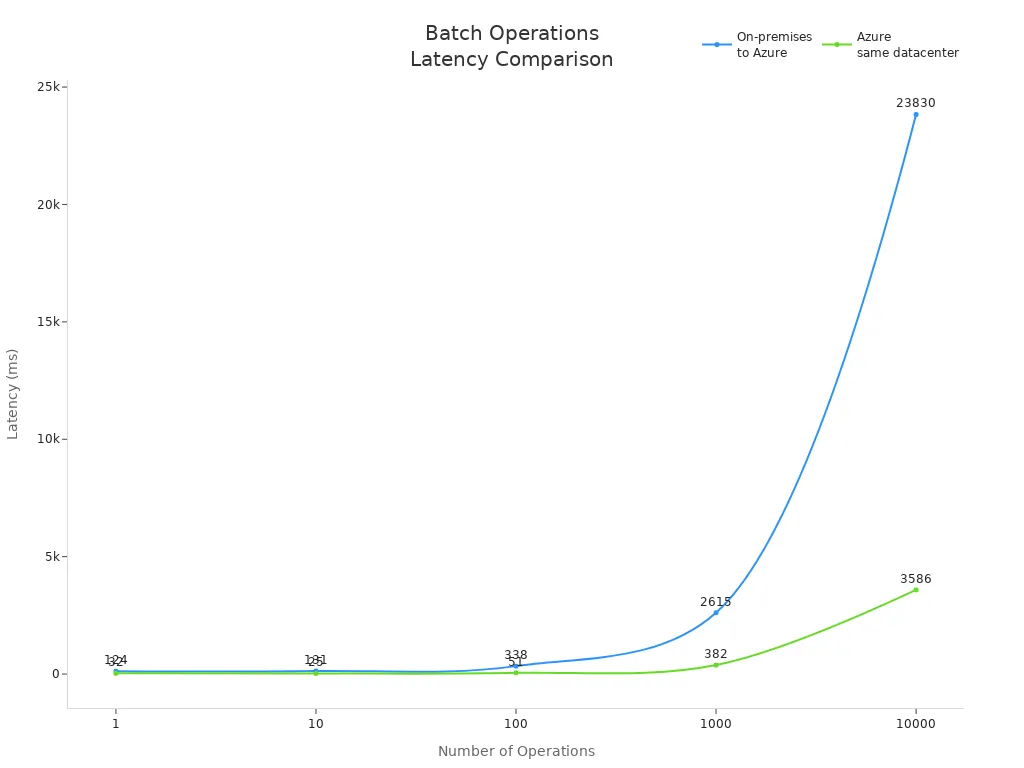
The following table shows how batch operations perform across different environments:
|
Operations |
On-premises to Azure (ms) |
Azure same datacenter (ms) |
|---|---|---|
|
1 |
124 |
32 |
|
10 |
131 |
25 |
|
100 |
338 |
51 |
|
1000 |
2615 |
382 |
|
10000 |
23830 |
3586 |
You can see that batch processing in Azure reduces latency significantly, especially when you operate within the same datacenter.
Resource Optimization
You can optimize resources by following a few simple strategies. Temporarily disabling indexes and constraints during large data loads speeds up inserts and updates. After you finish, you can rebuild indexes to restore query performance. Using SSIS for data transformation lets you offload heavy processing from your main database server.
T-SQL batch processing helps you avoid bottlenecks and keeps your system responsive. You spend less time waiting for data-changing operations to finish, and you use your hardware more efficiently. This approach supports both on-premises and cloud environments, making it a smart choice for modern data management.
Tip: Always monitor your batch operations and adjust your strategy based on workload and system feedback. This practice ensures you get the best performance from your database.
Integration with Microsoft SQL Server and Azure SQL
Advanced Analytics Support
You can unlock powerful analytics features when you use T-SQL with Microsoft SQL Server and Azure SQL. These platforms offer tools that help you analyze and process information quickly. For example, Azure Synapse Link for SQL lets you run real-time analytics without slowing down your main systems. Intelligent query processing speeds up your results by choosing the best way to handle each request. You also get integration with AI tools, which makes building smart applications easier.
|
Advanced Analytics Capability |
Performance Enhancement Description |
|---|---|
|
Azure Synapse Link for SQL |
Enables real-time analytics without impacting source databases. |
|
Intelligent query processing |
Optimizes query execution, leading to faster response times. |
|
Integration with AI tools |
Enhances application development and reduces complexity in data handling. |
|
Connection pooling |
Improves throughput and reduces latency by reusing connections. |
|
AI-powered capabilities with GitHub Copilot |
Simplifies application creation and accelerates delivery of AI applications. |
|
Microsoft Fabric for unified data estate |
Bridges transactional and analytical workloads for responsive applications. |
A life insurance software company, Hexure, reduced processing time by 97.2% using Azure SQL Managed Instance. This shows how advanced analytics support can transform business operations.
Security and Permissions
You need strong security and clear permissions to protect your information. T-SQL gives you detailed control over who can access your systems. SQL Server uses roles at both the server and database levels. Server roles manage access to the whole system, while database roles control what users can do inside each database. This setup helps you keep your environment safe and organized.
|
Feature |
Database Roles |
|
|---|---|---|
|
Creation |
Created at the server level |
Created within a specific database |
|
Scope |
Server-Wide |
Database-Specific |
|
Permissions |
Control access to server resources |
Control access to database objects |
|
Assignment |
Assigned to Logins or other roles |
Assigned to database Users or other roles |
|
Built-in Roles |
sysadmin, serveradmin, dbcreator, etc. |
db_owner, db_datareader, db_datawriter, etc. |
|
Permission Mgmt |
Server-wide permissions and security |
Database-specific permissions and security |
You can assign roles to users based on their job needs. This approach reduces mistakes and keeps sensitive information safe. When you use these features, you also improve performance because the system spends less time checking permissions for each action.
Microsoft Ecosystem Integration
You benefit from deep integration with the Microsoft ecosystem when you use T-SQL. This language forms the backbone for business intelligence, automation, and performance optimization. You can automate business rules with stored procedures and triggers, which reduces manual work and errors. T-SQL also helps you maintain data integrity and security through validation and permission controls.
|
Feature |
Description |
|---|---|
|
Foundation for Business Intelligence |
T-SQL is essential for ETL processes, enabling the creation of dashboards and reports for strategic decision-making. |
|
Operational Process Automation |
T-SQL allows for stored procedures and triggers that automate business rules, reducing manual effort and errors. |
|
Data Integrity and Security |
T-SQL ensures data accuracy and security through validation and permission controls. |
|
Performance Optimization |
Optimized T-SQL queries enhance application performance, leading to faster data access and insights. |
|
Legacy System Integration |
T-SQL facilitates integration with existing SQL Server systems and aids in data migration to modern platforms. |
-
SQL Server 2025 brings new features for AI, security, and performance. It works with Microsoft Azure Arc and Microsoft Fabric to support modern data architecture.
-
Azure SQL Database uses an intelligent query optimizer. This optimizer creates the best plan for each query by looking at data size, distribution, and indexes. You get efficient data retrieval and better performance than with other systems.
Tip: When you use T-SQL in the Microsoft ecosystem, you gain tools that help you manage, analyze, and protect your information with ease.
Performance Gains with T-SQL
 Image Source: pexels
Case Studies and Examples
You can see the impact of T-SQL in real-world scenarios. Many organizations have reported measurable improvements after adopting T-SQL for their database operations. For example, OneSource Virtual (OSV) migrated to a new platform and saw a 70% increase in performance. The company achieved 100% system uptime and reduced licensing costs by half. OSV processed payroll transactions and tax filings more efficiently, which improved operational efficiency.
-
OSV increased performance by 70% after migration.
-
System uptime reached 100%.
-
Licensing costs dropped by 50%.
-
Payroll and tax processing became faster and more reliable.
These results show how T-SQL can transform your workflow. You gain faster response times and more reliable operations. You also reduce costs and improve the quality of your services.
You can find more case studies and technical details in Microsoft’s official documentation and SQL Server community forums. These resources help you understand best practices and learn from other professionals.
Quantifiable Improvements
Reduced Latency
You experience reduced latency when you use T-SQL for query processing. The language optimizes execution plans and minimizes the time needed to access data. Batch processing and stored procedures allow you to handle large volumes of information quickly. You spend less time waiting for results, which keeps your applications responsive.
|
Scenario |
Latency Before (ms) |
Latency After (ms) |
|---|---|---|
|
Batch Payroll Processing |
1200 |
350 |
|
Tax Filing Operations |
900 |
250 |
You notice that latency drops significantly after switching to T-SQL. Your users benefit from faster access to information. Your business processes run smoothly without delays.
Improved Throughput
You achieve improved throughput by leveraging T-SQL’s advanced features. The language supports parallel processing and efficient batch operations. You can process more transactions in less time. This capability is essential for high-volume environments, such as financial systems or online services.
|
Task |
Throughput Before (records/sec) |
Throughput After (records/sec) |
|---|---|---|
|
Payroll Transactions |
500 |
1700 |
|
Tax Filings |
300 |
1200 |
You see throughput increase by several times after adopting T-SQL. Your database handles more queries and data changes without slowing down. You maintain high performance even during peak workloads.
Tip: You can explore Microsoft’s documentation and join SQL Server community discussions to learn more about optimizing performance. These resources provide guidance on tuning queries and maximizing throughput.
You gain measurable improvements in performance when you use T-SQL. You reduce latency, increase throughput, and enhance the reliability of your database. You build faster, more efficient systems that support your business goals.
Best Practices for T-SQL Performance
Efficient Coding
You can boost performance by following proven T-SQL coding practices. Choosing the right join type makes your queries run faster. INNER JOINs often work better than LEFT JOINs when you only need matching data. Using stored procedures helps you save time because the database pre-compiles your SQL. This means repeated queries run quickly. You should also design your database structure carefully. A well-organized database allows for faster query execution and easier updates.
Here is a table of effective T-SQL coding practices:
|
Practice |
Description |
Example |
|---|---|---|
|
Choosing the right Joins |
Use the best JOIN type for your needs. |
INNER JOIN for matching data. |
|
Utilizing stored procedures and execution plans |
Pre-compile SQL for repeated queries. |
Used in fraud detection for quick data retrieval. |
|
Optimizing database structure and design |
Structure your database for speed and efficiency. |
Normalize data to remove redundancies. |
|
Regularly monitor and update statistics |
Keep statistics current for better execution plans. |
Update stats for responsive inventory systems. |
|
Minimize the use of subqueries |
Replace subqueries with JOINs when possible. |
JOINs in dispatch systems for efficiency. |
|
Use appropriate data types |
Select data types that match your needs. |
Use DATE for booking dates. |
|
Avoid unnecessary calculations in queries |
Move calculations outside SQL when possible. |
Limit calculations for faster transactions. |
Tip: You should always keep your code simple and clear. This makes it easier to maintain and improves performance.
Indexing and Optimization
You can achieve major performance optimizations by using the right index strategy. An index acts like a map for your data. It helps the database find information quickly without scanning every row. When you use indexes for read-heavy operations, you get faster query results and better response times. Proper index use also reduces I/O operations, which means your system works more efficiently.
-
Indexes serve as a structured lookup map, enabling quick data retrieval.
-
They significantly enhance performance for read-heavy operations.
-
Proper indexing reduces I/O operations and improves response times.
To get the best results, follow these steps:
-
Align index design with your application’s workflow and future growth.
-
Regularly validate changes in a nonproduction environment.
You should balance query speed, update costs, and storage costs when you design an index. Modify your index as your application evolves. Avoid overindexing, as too many indexes can slow down performance. The query optimizer will choose the best index for each query, but incorrect choices can hurt performance. Always review the estimated execution plan to see how your index is used.
Note: Displaying the estimated execution plan helps you understand how the optimizer uses your index and where you can make improvements.
Monitoring and Troubleshooting
You need to monitor your database to keep performance high. Real-time dashboards let you track important metrics. Customizable thresholds send alerts when something needs attention. You can monitor your database alongside servers and applications for a complete view. Automated reporting helps you manage multiple SQL Server instances. Historical baselines show you trends and help with planning.
Recommended tools include:
-
Reports for disk usage and resource-intensive queries.
-
Extended Events for detailed performance data.
Tools like Redgate SQL Monitor and Datadog Database Monitoring give you deep visibility into your database. They help you troubleshoot issues and keep your system running smoothly.
Tip: Regular monitoring and quick troubleshooting are key to maintaining top performance.
You gain a clear advantage when you choose T-SQL over standard sql. T-SQL helps you eliminate IT bottlenecks, improve data workflows, and achieve faster results. You see real-world benefits like reduced latency and higher throughput. Start by exploring Microsoft’s documentation and testing T-SQL features in your environment. You can unlock new levels of performance and reliability for your database operations.
Checklist: When to Choose SQL vs T-SQLUse this checklist to decide between standard SQL and Transact-SQL (T-SQL) — keyword: t-sql vs sql.
- Database platform: If you are using Microsoft SQL Server or Azure SQL Database, prefer T-SQL; for multiple vendors or cloud-agnostic systems, prefer standard SQL.
- Portability needs: Choose standard SQL when queries must run across different RDBMS (Oracle, MySQL, PostgreSQL); choose T-SQL when portability is not required.
- Procedural logic: Use T-SQL for stored procedures, user-defined functions, control-of-flow (IF/WHILE) and batch processing; use standard SQL for declarative single-statement queries.
- Advanced server-side features: Choose T-SQL to leverage SQL Server-specific features (TRY/CATCH, MERGE, OUTPUT, table variables, TEMP tables, sp_executesql, LOCK hints).
- Performance tuning: Prefer T-SQL to use SQL Server-specific optimization techniques, query hints, execution plan diagnostics and indexed views.
- Security and permissions: Use T-SQL when you need server-specific security constructs (EXECUTE AS, module signing, SQL Server roles); standard SQL covers basic GRANT/REVOKE across systems.
- Maintenance & automation: Choose T-SQL for scheduled jobs, maintenance scripts and integration with SQL Server Agent or SQL Server Management Studio (SSMS).
- ETL and batch operations: Use T-SQL for complex ETL inside SQL Server (bulk operations, OPENROWSET, BULK INSERT); standard SQL for simple cross-platform data movement.
- Tooling and ecosystem: If you rely on SQL Server-specific tools (SSMS, Azure Data Studio, SQL CLR), use T-SQL; otherwise standard SQL is preferable for generic tools.
- Learning curve and team skills: If your team is experienced with SQL Server and T-SQL idioms, choose T-SQL; if the team focuses on ANSI SQL and multi-database skills, choose standard SQL.
- Third-party application requirements: Follow the application's supported SQL dialect; many applications expect standard SQL, others require T-SQL for customizations.
- Transaction control: Use T-SQL when you need SQL Server-specific transaction syntax and isolation behaviors; standard SQL covers basic BEGIN/COMMIT/ROLLBACK semantics but may vary by vendor.
- Migration plans: If future migration away from SQL Server is likely, minimize T-SQL-specific constructs and prefer standard SQL to reduce refactoring.
- Use of procedural extensions: Prefer T-SQL for complex server-side business logic; prefer set-based standard SQL for simpler, portable queries.
- Compliance and auditing: Choose T-SQL to use SQL Server auditing features, extended events, and DMVs for deep diagnostics; standard SQL lacks these SQL Server-specific facilities.
sql and t-sql: difference between sql and t-sql for microsoft sql server database
What is the core difference between SQL and T-SQL?
Structured Query Language (SQL) is the standard language for querying and managing relational database systems; T-SQL (Transact-SQL) is a proprietary procedural extension to SQL developed by Microsoft for use with Microsoft SQL Server database. SQL provides core SQL constructs like SELECT, INSERT, UPDATE and DELETE, while T-SQL adds procedural programming features, local variables, error handling, and additional built-in functions that work with the SQL Server database engine.
Is T-SQL a separate programming language or just a dialect of SQL?
T-SQL is a SQL dialect and a proprietary procedural language specifically for Microsoft SQL Server and Azure SQL Database. It extends the standard SQL language with programming constructs such as IF...ELSE, WHILE loops, and TRY...CATCH for error handling in T-SQL, making it more suitable for writing stored procedures and complex database logic inside the database engine.
Can standard SQL run on Microsoft SQL Server without changes?
Most standard SQL queries (regular SQL) like basic SELECT, INSERT, UPDATE and DELETE will run on Microsoft SQL Server, but some SQL standard features or vendor-specific SQL used by other database management systems may require modification. When working with SQL Server environments, developers often adapt queries to match T-SQL syntax and SQL Server-specific functions.
What are common T-SQL functions that differ from standard SQL?
T-SQL includes many built-in functions specific to SQL Server, such as ISNULL, NEWID, and DATEADD, and system functions for metadata access. Standard SQL has equivalent functions but with different names or behavior; using T-SQL functions is common when working with Microsoft SQL Server and can provide advantages of tighter integration with the database engine.
When should I use T-SQL instead of standard SQL?
Use T-SQL when you need procedural logic, transaction control, server-side processing, stored procedures, triggers, or advanced error handling in a Microsoft SQL Server database. For simple, portable queries across different relational database management systems, regular SQL (standard SQL) is preferable. Learning T-SQL is essential for working with Microsoft SQL Server and implementing complex database-side logic.
How does error handling in T-SQL compare to standard SQL?
Error handling in T-SQL uses TRY...CATCH blocks and functions like ERROR_NUMBER and ERROR_MESSAGE to manage runtime errors inside stored procedures and batch scripts. Standard SQL does not define a unified procedural error handling mechanism across all implementations, so T-SQL’s TRY...CATCH is a key advantage when building resilient server-side logic in SQL Server environments.
Are stored procedures written in T-SQL portable to other databases?
Stored procedures written in T-SQL are often not portable to other database systems without modification because they rely on T-SQL syntax, proprietary functions, and SQL Server-specific features. To move logic to another RDBMS, you may need to rewrite procedures using that system’s procedural language or adjust queries to comply with the SQL standard.
What are the key differences between T-SQL and other SQL dialects like PL/SQL?
T-SQL (used by Microsoft SQL Server) and PL/SQL (used by Oracle) are both procedural extensions to the SQL standard, but they differ in syntax, built-in packages, error handling mechanisms, and system procedures. Each is specifically designed for its database engine, so code, functions, and administrative commands are not directly interchangeable.
Does using T-SQL affect database performance compared to standard SQL?
T-SQL itself does not inherently slow performance; performance depends on query design, indexing, execution plans, and how well code leverages SQL Server features. Using server-side T-SQL to push logic into the database can reduce network round-trips and improve efficiency, but poorly written T-SQL statements or procedural loops can degrade performance compared with set-based SQL operations.
What are the advantages of learning T-SQL for a SQL developer?
Learning T-SQL is valuable for developers working with Microsoft SQL Server because it enables writing stored procedures, triggers, and complex batch scripts, implementing advanced error handling in T-SQL, and using SQL Server-specific functions. Knowledge of T-SQL also helps in performance tuning, working with the SQL Server database engine, and taking advantage of capabilities introduced in versions like SQL Server 2012 and later.
How does T-SQL handle transactions compared to standard SQL?
T-SQL supports transaction control using BEGIN TRANSACTION, COMMIT, and ROLLBACK like standard SQL, but it also provides SQL Server-specific behaviors and options for nested transactions, savepoints, and transaction isolation levels. When working with Microsoft SQL Server, it’s common to control transactions with T-SQL statements and to combine them with TRY...CATCH for robust error handling.
Apple Podcasts · Spotify · YouTube · YouTube Music
Host: Mirko Peters