 EN
EN Deutsch
 Español
 Français
 Italiano
 Português
 Nederlands
 Polski
 Bahasa Indonesia
 Русский
 Українська
 العربية
 עברית
עברית हिन्दी
 日本語
日本語 한국어
한국어2026-06-20 · Season 2
High-Stakes Hybrid Events with Microsoft Teams and Mesh
Quick answer: high-stakes hybrid events with Microsoft Teams and Mesh is covered in this M365 FM episode with a practical focus on how it works, where it fits, and the architecture, security, governance, or operational choices that matter in real Microsoft environments.
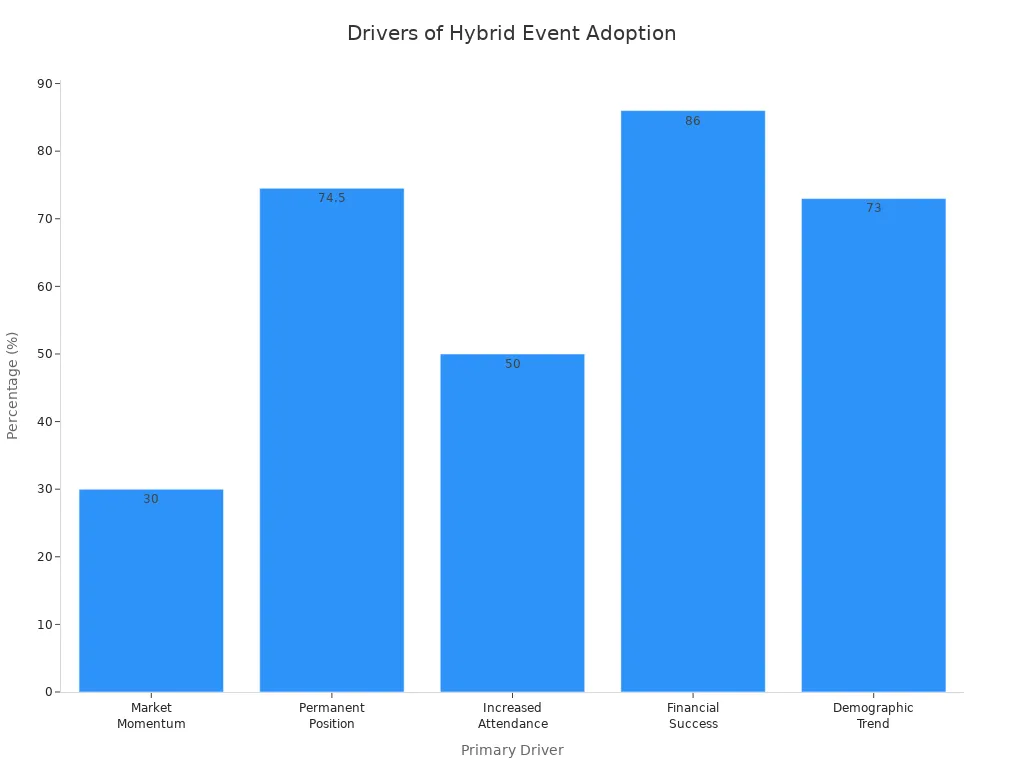
Hybrid events have become essential in today’s landscape, with 70% of corporate or organizational events conducted in this format as of 2022. This shift presents both challenges and opportunities for event organizers. You must leverage technology effectively to create a seamless experience that engages your audience, both in-person and online.
Using tools like Microsoft 365 can enhance your hybrid experience. However, you may face challenges such as increased complexity and the need for personalized experiences. Understanding these dynamics will help you craft high-stakes hybrid events that resonate with all attendees.
Key Takeaways
- Hybrid events are now essential, with 70% of corporate events using this format. Embrace this trend to reach wider audiences.
- Leverage Microsoft 365 tools like Teams and Dynamics 365 to enhance communication and engagement during hybrid events.
- Focus on creating immersive experiences using VR and AR technologies to captivate both in-person and remote attendees.
- Utilize data from past events to improve future planning and execution, ensuring a more tailored experience for participants.
- Establish clear communication channels before the event to keep attendees informed and engaged, using emails and event apps.
- Implement real-time engagement techniques, such as live Q&A and polls, to foster interaction among all attendees.
- Measure success through key performance indicators like attendance rates and participant satisfaction to identify areas for improvement.
- Continuously gather feedback after events to refine your strategy and enhance future hybrid experiences.
Evolution of Hybrid Events
Historical Context
Hybrid events have evolved significantly over the past decade. Initially, they emerged as a novel concept, combining in-person and virtual elements. As technology advanced, these events gained traction, becoming a mainstream feature in the event industry. Organizers began to recognize the potential of hybrid formats to reach wider audiences. The integration of live Q&A sessions and audience participation tools transformed the way attendees engaged with content. These features now serve as standard practices, enhancing the overall experience for participants.
Current Trends
Today, hybrid events focus on connection rather than just content delivery. Here are some key trends shaping the current landscape:
- Increased use of new event technology enhances engagement.
- Cross-platform accessibility ensures attendees can join from various devices.
- Leveraging VR and AR creates immersive experiences that captivate audiences.
- Utilizing past event data helps improve future planning and execution.
These trends highlight how technology adoption has redefined hybrid events. Organizers now prioritize creating memorable shared experiences that cater to diverse audience needs.
| Trend | Description | Importance |
|---|---|---|
| Increase in use of new event technology | New platforms and technologies are emerging to enhance engagement. | Helps keep the audience engaged and satisfied. |
| Cross-platform accessibility | Ensures attendees can access events on various devices. | Prevents potential attendees from missing out. |
| Leveraging VR/AR for immersive experiences | Uses AR/VR to create engaging digital environments. | Offers memorable experiences and saves physical space. |
| Utilizing past event data | Collects data to improve future events. | Enhances attendee experience and reduces costs. |
Future Predictions
Looking ahead, industry experts predict that hybrid events will continue to grow. The global market for hybrid events is expected to expand by nearly 18%. This growth reflects a shift in how organizations approach event planning. Here are some predictions for the future:
- Increased demand for systems that combine offline and online engagements.
- Enhanced personalization through AI integration.
- A need for intensified real-time interaction in virtual events.
As digital platforms like Microsoft 365 evolve, they will play a crucial role in shaping the future of hybrid events. The emphasis on flexibility, personalization, and enhanced engagement will define the next generation of hybrid experiences.
M365 Tools for Hybrid Events
Microsoft 365 offers a suite of tools designed to enhance your high-stakes hybrid events. These tools streamline event management, improve communication, and foster engagement among attendees. Here’s an overview of some key features that can elevate your hybrid event experience.
Overview of M365 Features
| Microsoft 365 Feature | Description |
|---|---|
| Microsoft Teams | Used for collaboration and communication during events, facilitating hybrid interactions. |
| Dynamics 365 | Automates attendee data management, enhancing outreach and ROI visibility. |
| Azure OpenAI Service | Integrates AI tools like ChatGPT for content generation and audience segmentation. |
These features work together to create a cohesive environment for managing hybrid events. You can leverage Microsoft Teams for real-time communication, while Dynamics 365 helps you track attendee engagement and gather valuable data.
Microsoft Teams Immersive Spaces
Microsoft Teams Immersive Spaces revolutionizes the way you conduct hybrid events. Unlike traditional video conferencing tools, immersive spaces create a more engaging environment for participants. Here are some key benefits:
- Immersive events utilize customizable 3D spaces, enhancing the overall experience by making interactions feel more natural.
- Participants can engage through avatars, adding a layer of personalization and expression that is often missing in standard video conferencing.
- The spatial audio environment allows for more realistic interactions, making conversations feel more engaging compared to traditional video grids.
By using immersive spaces, you ensure that everyone in the meeting feels included and represented. This creates a productive environment where connections feel natural and immersive.
Enhancing Engagement with Teams
Engagement is crucial for the success of hybrid events. Microsoft Teams provides various interactive features that help you keep your audience involved. You can track engagement metrics such as:
| Engagement Metric | Description |
|---|---|
| Engagement Tracking | Includes polls answered, chat participation, Q&A activity, resource downloads, and session duration. |
| Session and Content Consumption | Details on how long attendees viewed specific sessions, both live and on-demand, and materials accessed. |
| Audience Sentiment Signals | Themes and patterns in Q&A, indicating questions, concerns, or areas of interest. |
| Lead Interest Indicators | Actions suggesting higher intent, such as unique event recording views, survey responses, or downloads. |
These metrics provide valuable data that can inform your future event planning. By analyzing this data, you can continuously improve your hybrid event technology and create even more engaging experiences.
Effective Communication Strategies
Effective communication plays a vital role in the success of high-stakes hybrid events. You must ensure that both in-person and remote attendees feel connected and engaged throughout the event. Here are some strategies to enhance communication before, during, and after your hybrid events.
Pre-Event Communication
Before your event, establish clear communication channels to keep attendees informed. Consider using the following methods:
- Utilize email campaigns for initial communication and updates.
- Implement SMS notifications for important alerts.
- Create an event app to centralize information and facilitate two-way communication with attendees.
- Develop pre-event guides that include FAQs and agenda sneak peeks to engage attendees.
Maximize Microsoft 365 integration by using its tools to boost engagement and productivity. Design a dynamic SharePoint intranet to improve collaboration and organize content effectively. Empower collaboration by making Microsoft Teams the central hub for projects and communication. This approach ensures that everyone stays informed and prepared for the event.
It's crucial to check your technology ahead of time to avoid disruptions during a hybrid meeting. Testing audiovisual equipment and internet connections well in advance allows for troubleshooting any potential issues. Conducting a quick rehearsal can help identify problems and ensure a smooth experience for remote participants.
Real-Time Engagement Techniques
During the event, you can implement various techniques to foster real-time engagement. Here are some effective strategies:
- Utilize built-in discussions before, during, and after the event to foster engagement.
- Implement Q&A features to allow attendees to ask questions and receive answers in real-time.
- Monitor unanswered questions during the event to ensure all attendee inquiries are addressed.
- Encourage interaction by @mentioning specific individuals to answer questions, enhancing participation.
Incorporating audience participation tools like polls and live chats can significantly enhance the experience for both in-person and remote attendees. Sharing video recordings post-event also provides attendees with the opportunity to revisit the content, ensuring they do not miss any valuable information.
Over-Communicating with Remote Attendees
Keeping remote attendees informed and engaged throughout the event is essential. Here are some best practices to ensure they remain connected:
- Ensure a reliable internet connection and high-quality audio-visual setup.
- Use interactive tools to involve both virtual and in-person participants.
- Break longer sessions into shorter segments and incorporate various formats to maintain interest.
- Create recurring moments of interaction to keep audiences engaged throughout the event.
Appoint a dedicated moderator for virtual Q&A to ensure remote attendees' questions are addressed effectively. Consistently improve content, production, and technology to enhance long-term engagement. Conduct tests on technology beforehand to avoid issues during the event.
By implementing these communication strategies, you can create a more engaging and inclusive experience for all attendees, ultimately leading to the success of your high-stakes hybrid events.
Best Practices for Hybrid Event Technology
Setting up a successful hybrid event requires careful planning and execution. You must consider both the physical and virtual spaces to optimize the experience for all attendees. Here are some best practices to follow when setting up your hybrid event space:
Setting Up the Space
- Speaker Coordination: Ensure speakers are comfortable with the hybrid format. Provide necessary resources and rehearsal opportunities to help them adapt.
- Marketing and Promotion: Use targeted marketing tools to effectively reach your audience. This will help maximize attendance and engagement.
- Registration and Attendee Management: Streamline registration processes to manage both in-person and online participants efficiently.
- Technical Setup and Support: Leverage technical support for a flawless event experience. This includes covering both virtual and physical setups.
To enhance the experience further, ensure you have a robust internet connection. A reliable high-speed connection is essential for streaming. Invest in state-of-the-art audiovisual equipment to guarantee clear audio and visuals. Conduct technical rehearsals to test the AV setup and mitigate potential issues.
Technical Setup and Support
A well-structured technical setup is crucial for the success of your hybrid event. Here are some key components to consider:
| Technical Support Structure | Description |
|---|---|
| Microsoft Teams | Acts as a central workspace for conversations and coordination, enabling real-time collaboration. |
| Dynamics 365 | Provides a structured system for managing customer relationships and operational workflows, ensuring data is accessible and organized. |
| Automation (Power Automate) | Streamlines routine tasks and updates, reducing manual overhead and maintaining workflow momentum. |
| Governance | Ensures role-based access and data security, allowing oversight without micromanagement. |
By implementing these structures, you can create a seamless experience for both in-person and remote attendees. This approach helps you address common technical issues that may arise during hybrid events.
Cyber Recovery Considerations
Cyber recovery is a critical aspect of hybrid event technology. You must prepare for potential threats and ensure your data remains secure. Here are some common challenges and strategies to enhance your cyber resilience:
- Unified Management Layer: Simplifies the management of hybrid Microsoft 365 environments, making it easier to oversee security measures.
- Instant User Provisioning: Facilitates quick setup and management of user accounts across platforms, reducing delays in access.
- Error Reduction: Minimizes manual processes, which can lead to human error in user management.
You should also be aware of the potential threats that can impact your hybrid events. These include inadequate access control, data privacy gaps, and content confidentiality risks. To mitigate these threats, consider implementing the following strategies:
- Use unique, one-time join links tied to registration identity to prevent unauthorized access.
- Collect only necessary attendee data and store it in encrypted systems with role-based access.
- Apply sensitivity labels via Microsoft Purview to protect confidential materials.
By focusing on these cyber recovery strategies, you can enhance the security of your hybrid events and ensure a smooth experience for all participants.
Measuring Success in Hybrid Events
Measuring the success of your hybrid events is crucial for understanding their impact and effectiveness. You can use various metrics and feedback mechanisms to evaluate your event's performance. This process helps you identify strengths and areas for improvement.
Key Performance Indicators
To gauge the success of your hybrid events, focus on key performance indicators (KPIs). These metrics provide valuable insights into attendee engagement and overall event effectiveness. Here are some essential KPIs to consider:
| KPI | Description |
|---|---|
| Registration, attendance, and no-show rates | Measures the number of registrations versus actual attendees, indicating engagement levels. |
| Networking and output | Assesses the quality and quantity of interactions during the event, crucial for business-focused events. |
| Social media engagement | Evaluates event reach through social media metrics like likes and shares, indicating public interest. |
| Lead generation and conversions | Tracks the number of leads generated and conversion rates, essential for sales-oriented events. |
| Participant satisfaction and NPS | Gauges overall satisfaction and likelihood of recommendations, reflecting event quality. |
| Invitation response rate | Measures effectiveness of invitation campaigns by tracking responses and registrations. |
| Ticket sales, revenue, and ROI | Analyzes financial performance through ticket sales and ROI, crucial for assessing profitability. |
By monitoring these KPIs, you can gain a comprehensive understanding of your event's success and make data-driven decisions for future planning.
Gathering Feedback
Collecting feedback from both in-person and remote attendees is vital for continuous improvement. Here are some effective methods to gather insights after your hybrid event:
- Post-event surveys and questionnaires
- Interviews and focus groups
- Email follow-ups and feedback reminders
- Live polling
- Interactive Q&A sessions
- In-app feedback features
- Social media monitoring
These methods allow you to capture diverse perspectives and experiences. Analyzing this feedback helps you identify what worked well and what needs enhancement.
Continuous Improvement
Continuous improvement is essential for refining your hybrid event strategy. Use the data and feedback you gather to make informed adjustments. Here are some steps to consider:
- Review KPIs regularly to track progress and identify trends.
- Implement changes based on attendee feedback to enhance their experience.
- Stay updated on emerging event technology to incorporate new tools and features.
- Foster a culture of learning within your team to encourage innovative ideas for future events.
By focusing on continuous improvement, you can create more engaging and successful hybrid events that resonate with your audience.
In summary, integrating technology and strategic planning is vital for successful hybrid events. Microsoft 365 tools like Teams, SharePoint, and Copilot enhance collaboration and communication, making it easier for you to manage tasks efficiently. Upcoming features, such as advanced AI-driven noise suppression in Teams, will further improve audio quality during meetings.
As you plan your next hybrid event, remember that intentional design is crucial. Ensure both in-person and remote attendees feel engaged. A study shows that 66% of event organizers believe live sessions boost audience engagement significantly. By applying these insights, you can create memorable experiences that resonate with all participants.
FAQ
What are hybrid events?
Hybrid events combine in-person and virtual elements. They allow attendees to participate either physically or online, enhancing accessibility and engagement.
How can I measure engagement in hybrid events?
You can measure engagement through various metrics, such as attendance rates, audience participation in polls, and feedback surveys. Analyzing this data helps improve future events.
What tools does Microsoft 365 offer for hybrid events?
Microsoft 365 provides tools like Teams for communication, Dynamics 365 for data management, and Azure OpenAI for AI integration. These tools streamline event planning and execution.
How do I ensure a smooth technical setup?
Conduct thorough testing of all equipment before the event. Ensure a reliable internet connection and have technical support available during the event to address any issues.
What strategies enhance communication with remote attendees?
Utilize interactive tools like live chats and Q&A sessions. Regular updates and reminders through email or SMS keep remote attendees informed and engaged.
How can I gather feedback after the event?
You can collect feedback through post-event surveys, interviews, and social media monitoring. This data helps you understand attendee experiences and improve future events.
Why is data important for hybrid events?
Data helps you track engagement, measure success, and identify areas for improvement. Analyzing this information allows you to create more effective and engaging hybrid events.
🎧 Listen to this episode
Want a practical explanation of High-Stakes Hybrid Events with Microsoft Teams and Mesh? This episode breaks down the topic in clear language and shows why it matters for Microsoft 365, Azure, Power Platform, security, AI, and modern work.
Listen to this episode if you want to:
- Understand the key concepts behind High-Stakes Hybrid Events with Microsoft Teams and Mesh
- See how it fits into the wider Microsoft technology ecosystem
- Learn where it can create practical value for your organization
You may also enjoy these related M365 FM episodes:
- Microsoft Mesh - Simply Explained
- How to Become a High-Performing Microsoft Partner
- Teams Telephony - Simply Explained
- ARM Templates vs Bicep: Why Azure Teams Are Switching
- Microsoft Teams Hidden Features with Josh Blalock [MVP]
Discover more practical Microsoft conversations on M365 FM.
Last reviewed: July 2026.
Who Should Listen
This episode is for Microsoft administrators, architects, developers, security professionals, and business leaders who need a practical foundation before making implementation, operations, or governance decisions.
🎧 You Should Also Listen To
- AI Agents — A strongly related next step for extending this topic.
- Power Platform — A strongly related next step for extending this topic.
- Microsoft Graph Data Connect — A strongly related next step for extending this topic.
Apple Podcasts · Spotify · YouTube · YouTube Music
Host: Mirko Peters