 EN
EN Deutsch
 Español
 Français
 Italiano
 Português
 Nederlands
 Polski
 Bahasa Indonesia
 Русский
 Українська
 العربية
 עברית
עברית हिन्दी
 日本語
日本語 한국어
한국어2025-11-19
Build Multi-Channel Agents with the Microsoft 365 Agent SDK

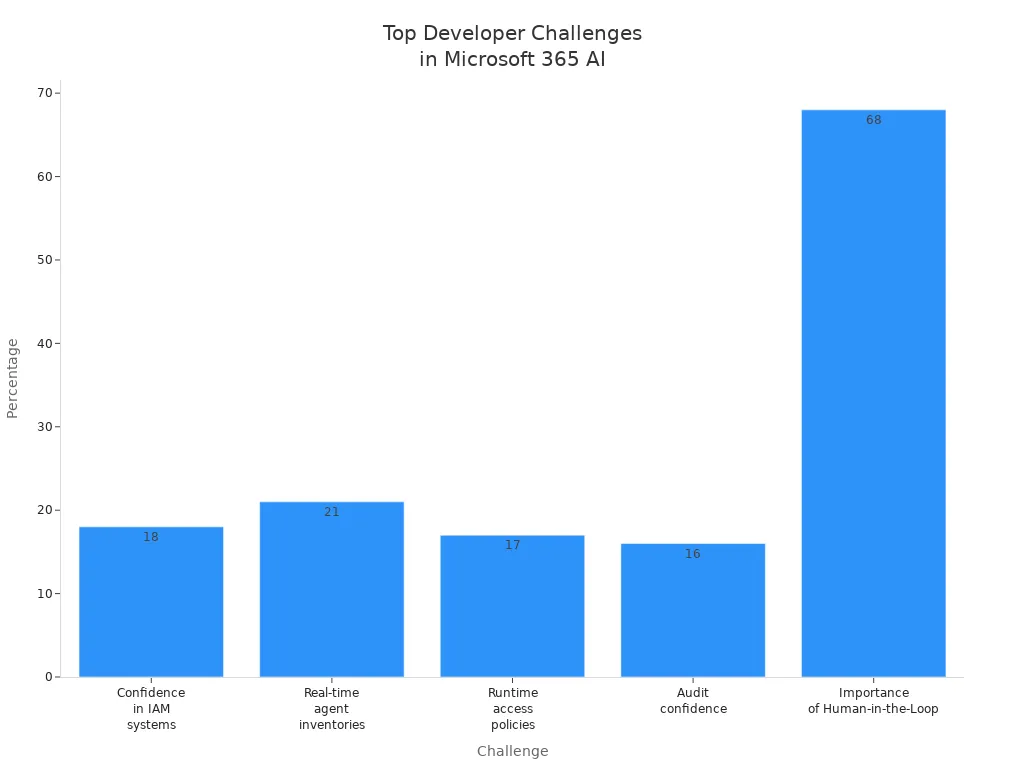
In the fast-evolving landscape of AI development, the Microsoft 365 Agent SDK stands out as a crucial tool for developers. This SDK helps you tackle significant challenges, such as managing identities, ensuring security, and maintaining conversation continuity. For example, a staggering 68% of developers believe that integrating a Human-in-the-Loop (HITL) approach is vital for sensitive actions like data access.
Ignoring the Microsoft 365 Agent SDK can lead to increased complexity in your projects. You may face risks related to compliance and security, while also compromising user experience. Without this SDK, your conversational AI agents could struggle with context retention and multi-channel support, ultimately affecting their effectiveness.
Key Takeaways
- Microsoft 365 Agent SDK simplifies building secure and scalable AI agents with strong identity and permission management.
- The SDK supports multi-channel deployment, letting your agents work smoothly across Teams, Slack, Outlook, and web apps.
- Conversation resumption helps agents remember past interactions, creating natural and continuous user experiences.
- Integration with Microsoft 365 services like Mail, Calendar, SharePoint, and Teams boosts agent capabilities and data access.
- Built-in security and compliance features protect sensitive data and ensure your agents follow organizational policies.
- The SDK enables automation of workflows, improving productivity for enterprises and small businesses alike.
- Not using the SDK can increase development complexity, security risks, and lead to poor user experiences.
- Customizing agents with the SDK is easy, allowing you to tailor solutions to specific business needs and scale confidently.
Core Features of Microsoft 365 Agent SDK
The Microsoft 365 Agent SDK serves as a standardized framework for building robust AI agents. It simplifies identity management, state persistence, and governance compliance. This framework allows you to create conversational AI agents that are not only effective but also secure and compliant with organizational policies.
Identity and Permission Management
Identity and permission management is crucial for any AI agent. The Microsoft 365 Agent SDK provides several components to ensure that your agents operate securely and efficiently. Here’s a breakdown of these components:
| Component | Description |
|---|---|
| Agent blueprint | Defines the agent's identity, permissions, and infrastructure requirements. |
| Agentic app instance | Represents a specific deployment of the agent blueprint with unique configurations. |
| Agentic user | The runtime identity that appears in the organization, designed specifically for agents. |
With features like act-as-user authentication, your agents can operate with the same permissions as the user. This capability ensures permission fidelity and maintains audit trails. The SDK includes built-in sign-in handlers, consent surfaces, and token exchange mechanisms. These features allow agents to act on behalf of users when necessary while adhering to the principle of least privilege. This means your agents will only have the minimal permissions required, which enhances security and compliance.
Multi-Channel Adapters
The Microsoft 365 Agent SDK excels in providing multi-channel support. It includes built-in adapters for popular platforms such as Microsoft Teams, Slack, and Outlook. This native support allows you to deploy your AI agents seamlessly across various environments.
| Supported Platforms |
|---|
| Microsoft 365 Copilot |
| Microsoft Teams |
| Web & Custom Apps |
By leveraging these multi-channel adapters, you can ensure that your conversational AI agents deliver a consistent user experience. The SDK facilitates seamless integration with different enterprise systems and APIs, allowing your agents to function effectively in diverse settings. This capability is essential for maintaining a cohesive environment for managing AI applications.
Scalability and State Persistence
Scalability and state persistence are vital for delivering effective AI solutions. The Microsoft 365 Agent SDK employs several mechanisms to achieve this:
| Mechanism | Description |
|---|---|
| Context Management | AI agents manage context windows to ensure effective processing of tasks, deciding on necessary context for each agent transition. |
| Memory Integration | Supports both volatile and long-term memory, allowing for context-aware reasoning and integration with vector databases. |
| External State Persistence | Shared state is stored externally to maintain task progress and conversation history, enabling agents to resume work after interruptions. |
These features allow your agents to maintain context across multiple interactions. This durability in conversation management prevents stateless bot issues, enhancing user experience. You can scale your agents across multiple nodes while ensuring they retain context, which is crucial for multi-turn interactions.
Conversation Resumption in Microsoft 365 Agents SDK
Durable conversation management is essential for creating effective AI agents. It allows your agents to handle multi-turn interactions smoothly. With durable conversation management, your agents can remember previous messages and context, making conversations feel more natural and engaging.
When you implement conversation resumption, you prevent the common issues associated with stateless bots. Stateless bots often treat each interaction as a standalone event. This approach can lead to frustrating user experiences, as the bot fails to recall previous interactions. In contrast, the Microsoft 365 Agent SDK enables your agents to maintain conversation history. This capability allows for seamless transitions between messages, enhancing the overall user experience.
Here’s a comparison of how conversation resumption in the Microsoft 365 Agent SDK stacks up against stateless bot architectures:
| Feature | Microsoft 365 Agent SDK | Stateless Bot Architectures |
|---|---|---|
| Conversation Context | Maintains context across multiple turns | Does not maintain persistent context internally |
| State Storage | Stores state externally (databases, Redis, etc.) | Relies on shared storage for each interaction |
| Conversation Resumption | Can reload context after restarts or interruptions | Treats each interaction independently |
| User Experience Improvement | Enables multi-turn, context-aware interactions | Limits seamless conversation flow |
The ability to resume conversations on the server side is a game changer. Your agents can reload context after interruptions, ensuring that users do not lose track of their discussions. This feature is particularly useful in scenarios where users may need to pause and return later.
Moreover, the Microsoft 365 Agent SDK allows you to scale your agents across multiple nodes while maintaining context. This means that even as your user base grows, your agents can still provide personalized and coherent interactions. By leveraging conversation management capabilities, you ensure that your agents remain effective, regardless of the load.
Integration with Microsoft 365 Ecosystem

The Microsoft 365 Agent SDK integrates seamlessly with the broader Microsoft 365 ecosystem. This integration enhances your ability to build powerful AI agents that leverage existing Microsoft services.
Microsoft 365 Services Compatibility
You can utilize various Microsoft 365 services with the Microsoft 365 Agent SDK. Here’s a quick overview of the compatible services:
| Compatible Services |
|---|
| Calendar |
| SharePoint |
| Teams |
These services allow you to create agents that can interact with users across multiple platforms, ensuring a cohesive experience. By integrating with these services, your agents can access essential data and provide timely responses.
Extending with Custom Orchestrators
The Microsoft 365 Agent SDK also supports the development of custom orchestrators and foundation models. This flexibility allows you to tailor your agents to meet specific business needs. To extend the SDK effectively, follow these steps:
- Choose a Development Approach: Decide between a low-code approach using Copilot Studio or a pro-code approach using Visual Studio with the Microsoft 365 Agents Toolkit.
- Select the Appropriate SDK: Depending on your needs, choose between the Microsoft 365 Agents SDK for full-stack agents or the Teams SDK for agents specifically designed for Microsoft Teams.
- Integrate Existing Agents: If applicable, integrate Microsoft Foundry agents into Microsoft 365 Copilot and Teams.
By following these steps, you can create agents that not only meet your requirements but also enhance user engagement.
The integration with Microsoft Graph API and Azure services further amplifies the capabilities of your agents. You can install the Azure integration package and the Microsoft.Identity.Web.AgentIdentities package to add support for agent identities. After that, configure your services to add Azure token credential support. This process ensures that your agents can securely access resources and perform actions on behalf of users.
Security and Compliance with Microsoft 365 Agent SDK
Security and compliance are critical when developing AI agents. The Microsoft 365 Agent SDK provides robust features to protect enterprise data and ensure adherence to organizational policies.
The SDK integrates seamlessly with Microsoft compliance tools like Purview and Data Loss Prevention (DLP). This integration allows you to build AI agents that are secure by design. Here are some key benefits of this integration:
- The Purview SDK evaluates prompts and responses in real-time against DLP policies.
- AI interactions are logged in Purview, supporting audit, communication compliance, and data lifecycle management.
- Sensitive data in prompts and responses is automatically protected, ensuring compliance with organizational policies.
The Microsoft 365 Agent SDK also includes several security features that enhance its enterprise-ready capabilities. The following table summarizes these features:
| Security Feature | Description |
|---|---|
| Entra-backed Agent Identity | Provides secure authentication and controlled access to user resources like mailboxes. |
| Open Telemetry | Enables full observability of agent interactions, ensuring actions are auditable and traceable. |
| Governed Model Context Protocol (MCP) | Allows access to Microsoft 365 workloads under admin control, ensuring compliance and security. |
| IT-approved Blueprint System | Ensures agents inherit compliance, governance, and security policies. |
| Integration with Microsoft Purview | Applies data protection policies and audits agent activity. |
| Integration with Microsoft Defender | Detects, investigates, and responds to threats in real time. |
Governance features via MCP servers further enhance security and compliance. These features ensure that your agents operate within defined policies. Here’s how they work:
| Feature | Description |
|---|---|
| Centralized Control | IT administrators manage which Work IQ MCP servers are available to agents, ensuring compliance. |
| Scoped Permissions | Permissions are granted based on what agents need, limiting access to only necessary resources. |
| Observability | Full tracing of tool calls is provided for audits and troubleshooting purposes. |
| Policy Enforcement | Enforces rate limits, payload checks, and security scans during runtime to maintain security. |
By leveraging these features, you can ensure that your AI agents not only meet security standards but also comply with governance requirements. The built-in security measures of the Microsoft 365 Agent SDK make it an ideal choice for developing enterprise-ready solutions. You can focus on creating innovative agents while the SDK handles the complexities of security and compliance.
Real-World Use Cases of Microsoft 365 Agents SDK
The Microsoft 365 Agent SDK empowers organizations to enhance productivity through intelligent automation. Here are some real-world examples of how businesses leverage this powerful tool.
Enterprise Workflow Automation
Organizations can streamline various processes using the Microsoft 365 Agent SDK. Here are three notable examples:
-
Automating Shared Mailbox Access Management: Teams can simplify the process of granting and revoking access to shared mailboxes. By initiating workflows in Microsoft Teams, you can ensure that the right people have access to the right information without manual intervention.
-
Adding Users to Active Directory and Azure AD Groups: Automating user provisioning reduces complexity and saves time. This process allows IT teams to efficiently manage user access across both on-premises and cloud directories.
-
Creating an Employee Onboarding Workflow: The SDK enables IT departments to automate the entire onboarding process. This includes account provisioning and access management, ensuring new employees have everything they need from day one.
Small Business Applications
Small businesses also benefit from the Microsoft 365 Agent SDK. Many use it to enhance their customer relationship management (CRM) and project management solutions. The following table illustrates some common functionalities:
| Functionality | CRM Use Case | Project Management Use Case |
|---|---|---|
| Update records | Update CRM records | N/A |
| Pull customer notes | Pull customer notes | N/A |
| Generate summaries | Generate meeting summaries | Daily standup reports |
| Prepare handover data | Prepare account handover data | Ticket summaries, Task allocation |
| N/A | N/A | Risk updates |
These applications allow small businesses to automate routine tasks, freeing up time for more strategic activities. By integrating the Microsoft 365 Agent SDK, you can create a productivity assistant that enhances your team's efficiency.
Multi-Channel Deployment Benefits
The Microsoft 365 Agent SDK supports multi-channel deployment, allowing your agents to operate seamlessly across various platforms. This capability is crucial for maintaining consistent user experiences. For instance, you can deploy a multi-agent webchat app that interacts with users on Microsoft Teams, Slack, and webchat interfaces. This flexibility ensures that your agents can engage users wherever they are, enhancing overall satisfaction.
Risks of Not Using Microsoft 365 Agent SDK
Choosing not to use the Microsoft 365 Agent SDK can lead to several significant risks that may impact your development projects. Here are some key concerns to consider:
-
Increased Development Complexity: Without the Microsoft 365 Agent SDK, you may face a more complicated development process. You will need to create custom solutions for identity management, state persistence, and security. This added complexity can lead to longer development times and increased maintenance overhead.
-
Security, Compliance, and Governance Risks: The absence of the Microsoft 365 Agent SDK can expose your projects to security vulnerabilities. The SDK provides essential security and governance features that help you manage AI agents effectively. Without these features, you may struggle to implement consistent security measures. This inconsistency can lead to compliance issues, putting your organization at risk.
-
Poor User Experience: If you do not utilize the SDK, your agents may lack conversation resumption and multi-channel support. This limitation can result in frustrating user experiences. Users expect seamless interactions, and without the ability to remember context, your agents may fail to deliver coherent conversations. This can lead to dissatisfaction and decreased engagement.
-
Competitive Disadvantages: Not using the Microsoft 365 Agent SDK can slow your time to market. Competitors who leverage the SDK can develop and deploy their AI agents more quickly. This advantage allows them to capture market share and innovate faster. You may find it challenging to keep up with industry trends and user expectations without the SDK's capabilities.
The Microsoft 365 Agent SDK offers essential features that empower you to build secure, scalable, and compliant AI agents. Key benefits include multi-channel support, enterprise readiness, and significant time savings in development. This SDK is not just an option; it is a foundational tool for your projects. It provides a trusted platform for managing AI workloads while ensuring compliance with existing security frameworks.
By adopting the Microsoft 365 Agent SDK, you can innovate confidently and deliver superior user experiences across various Microsoft 365 platforms. Embrace this powerful tool to enhance your AI development journey.
FAQ
What is the Microsoft 365 Agent SDK?
The Microsoft 365 Agent SDK is a framework that helps you build secure and scalable AI agents within the Microsoft 365 ecosystem. It simplifies identity management, conversation continuity, and compliance.
How does the SDK handle security?
The SDK integrates with Microsoft compliance tools like Purview and DLP. It ensures that your agents adhere to security policies and protects sensitive data during interactions.
Can I use the SDK for multi-channel deployment?
Yes! The Microsoft 365 Agent SDK supports multi-channel deployment. You can deploy your agents across platforms like Teams, Slack, and Outlook, ensuring a consistent user experience.
Is the SDK suitable for small businesses?
Absolutely! Small businesses can leverage the Microsoft 365 Agent SDK to automate tasks in CRM and project management. It enhances productivity and streamlines workflows.
How does conversation resumption work?
Conversation resumption allows your agents to maintain context across interactions. This feature prevents stateless bot issues, ensuring users have a seamless experience even after interruptions.
What are the benefits of using the SDK?
Using the Microsoft 365 Agent SDK provides benefits like simplified development, enhanced security, and improved user experience. It helps you build compliant and effective AI agents quickly.
Can I customize my agents with the SDK?
Yes, you can customize your agents using the SDK. It supports the development of custom orchestrators and foundation models, allowing you to tailor agents to specific business needs.
How do I get started with the SDK?
To get started, visit the Microsoft 365 Agent SDK documentation. You can choose between low-code or pro-code approaches based on your development preferences and requirements.
Apple Podcasts · Spotify · YouTube · YouTube Music
Host: Mirko Peters