 EN
EN Deutsch
 Español
 Français
 Italiano
 Português
 Nederlands
 Polski
 Bahasa Indonesia
 Русский
 Українська
 العربية
 עברית
עברית हिन्दी
 日本語
日本語 한국어
한국어2025-12-25
Fix Microsoft 365 Compliance Drift Beyond Green Dashboards
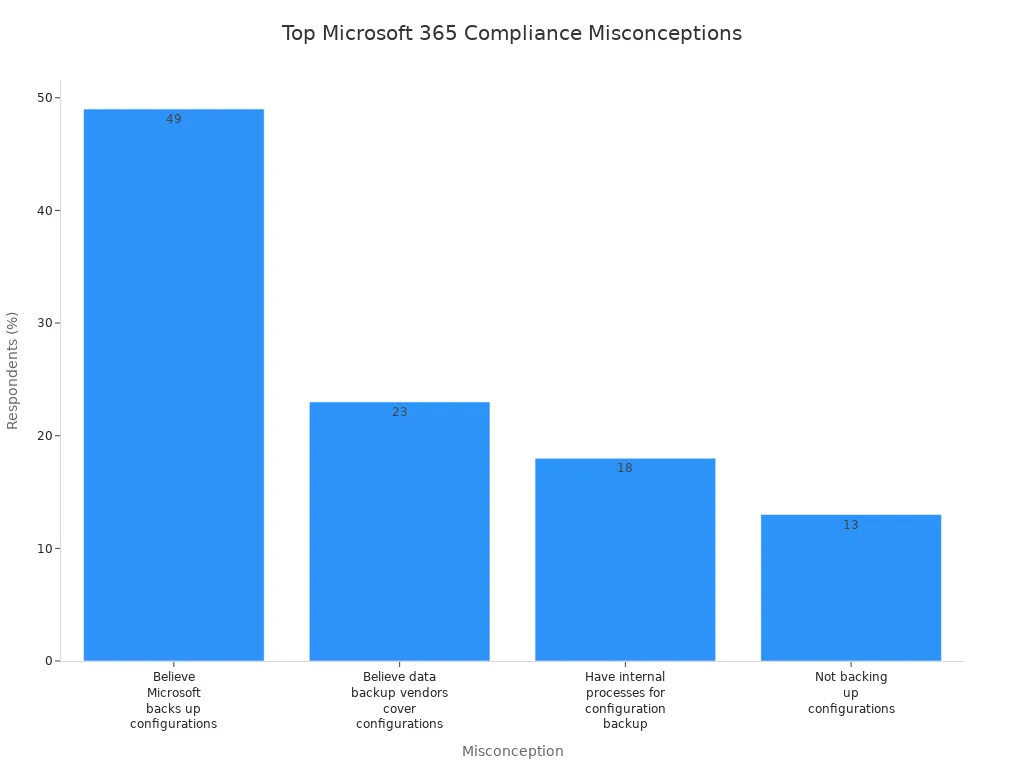
Microsoft 365 compliance policies can often mislead you. You may think everything is in order just because the dashboards show green indicators. However, this perception masks a deeper issue known as the compliance time-loop. Understanding this concept is crucial. It reveals that while your policies may appear effective, they might not represent true governance and security. Recent surveys highlight common misconceptions, such as 49% of respondents believing that Microsoft backs up configurations. Such misunderstandings can lead to significant compliance gaps.
Key Takeaways
-
Misleading compliance indicators can create a false sense of security. Don't rely solely on green lights in dashboards.
-
The compliance time-loop traps organizations in a cycle of misunderstanding. Break free by digging deeper into your compliance status.
-
Regular audits are essential. Assess your compliance posture to identify vulnerabilities before they lead to breaches.
-
Policy drift can expose your organization to risks. Regularly review settings to ensure they align with compliance standards.
-
Continuous monitoring is crucial. It helps detect unauthorized access and data leaks in real-time.
-
Utilize automation tools to enhance compliance. They reduce manual errors and provide real-time insights into your compliance status.
-
Educate your team about compliance. Regular training promotes a culture of vigilance and helps mitigate insider threats.
-
Proactive governance is key. Embed compliance into daily operations to protect your organization from potential threats.
Compliance Time-Loop Explained
Misleading Compliance Indicators
You might trust the compliance dashboards in Microsoft 365 because they show green lights and successful policy runs. However, these indicators can mislead you. The system often generates generic alerts that do not reveal the full picture. For example, some alerts only warn or block based on broad signatures, which means they might miss specific threats or produce false positives. You may also see exclusions or custom "allow" indicators designed to prevent false alarms. While these help reduce noise, they can hide real security issues. This creates a false sense of security, making you believe your data and policies are fully protected when gaps remain.
Microsoft’s compliance tools focus on what exists in the system, not always on what should be preserved or protected. This means the indicators reflect current states but do not measure behavior or risk patterns. You might think your governance is solid because the dashboards say so, but the reality could be different. The inability to block certain Microsoft apps due to their signatures further complicates alert accuracy. These factors combine to create misleading compliance signals that mask true security compliance.
Consequences of the Time-Loop
This cycle of misleading compliance indicators forms what we call the compliance time-loop. You see green lights, assume everything is fine, and stop digging deeper. Meanwhile, data drifts away from your intended governance policies. Breaches can occur silently because the system does not flag them properly. Your regulatory compliance may suffer without your knowledge, exposing your organization to fines and reputational damage.
The compliance time-loop traps you in a cycle where policies appear effective but fail to enforce real-time security. You might miss critical data changes or unauthorized access because the indicators do not capture these events accurately. Over time, this leads to governance gaps that grow unnoticed. The longer you stay in this loop, the harder it becomes to break free and restore true compliance.
To escape this loop, you must look beyond surface-level indicators. Focus on measuring behavior, such as data creation ratios, survival hit rates, and discovery coverage ratios. These metrics reveal how well your policies protect data over time. You need continuous monitoring and enforcement that align with your compliance requirements. Only then can you ensure your Microsoft 365 environment meets security and regulatory standards without falling prey to misleading compliance signals.
Note: Trusting compliance dashboards alone can put your data and governance at risk. Take proactive steps to verify and enforce your policies beyond what the indicators show.
Causes of Compliance Issues
Policy Drift
Definition and Examples
Policy drift occurs when your Microsoft 365 settings gradually deviate from established compliance standards. This drift can happen due to various factors, including:
-
Unauthorized or manual tweaks to settings, such as guest sharing in Teams.
-
Changes to identity and access policies that weaken security.
-
Direct edits in production environments without following a controlled change pipeline.
-
Lack of multi-party approvals and proper configuration backups.
These actions can lead to significant compliance failures. In fact, research shows that 45% of security incidents stem from misconfigurations, highlighting the importance of maintaining strict adherence to policies.
Impact on Compliance
When policy drift occurs, you risk exposing your organization to data breaches and regulatory penalties. The absence of oversight can create vulnerabilities that malicious actors exploit. You must remain vigilant and regularly review your policies to ensure they align with your compliance goals.
Real-Time Enforcement Gaps
Importance of Monitoring
Effective monitoring is crucial for maintaining security compliance in Microsoft 365. Without real-time oversight, you may miss critical changes or unauthorized access attempts. This lack of visibility can lead to governance gaps that jeopardize your organization's data protection efforts.
Tools for Effective Enforcement
Utilizing the right tools can help you bridge these enforcement gaps. Consider implementing solutions that provide continuous monitoring and alerting capabilities. These tools can help you detect anomalies and respond to potential threats before they escalate.
Governance Gaps
Identifying Gaps
Identifying governance gaps is essential for maintaining compliance. Many organizations struggle with visibility in Microsoft 365, making it difficult to answer operational questions during incidents. Common oversights include misconfigured retention settings and forgotten exceptions.
Risks of Non-Compliance
Failing to address these governance gaps can lead to severe consequences. Organizations in regulated industries face substantial penalties for data protection failures. Neglecting compliance requirements can result in breaches that damage your reputation and lead to financial losses. Proper governance policies are essential to avoid legal penalties and ensure your organization meets regulatory standards.
|
Evidence |
Explanation |
|---|---|
|
Neglecting compliance requirements |
Failing to align M365 usage with regulatory requirements can lead to compliance breaches. |
|
Ensure governance policies align with regulations |
Proper governance policies are essential to avoid legal penalties. |
You must take proactive steps to identify and address these compliance issues. By doing so, you can strengthen your security posture and protect your sensitive data from potential threats.
Real-World Compliance Breaches
Case Study: Okta
In 2020, Okta experienced a significant data breach when attackers stole credentials, exposing sensitive support case information. This incident highlighted the vulnerabilities that can arise from inadequate security measures. Organizations often overlook the importance of securing access points, leading to severe consequences. The breach not only affected Okta's reputation but also raised concerns about the security of its clients' data.
Case Study: Air Europa
In October 2023, Air Europa faced a data breach that compromised customers' financial information. Attackers gained unauthorized access to sensitive data, demonstrating how even established companies can fall victim to security threats. This breach serves as a reminder that organizations must prioritize data protection and implement robust compliance measures to safeguard sensitive information.
Lessons from Breaches
Recent compliance breaches reveal critical lessons for organizations using Microsoft 365. Here are key takeaways to help you avoid similar pitfalls:
-
Assess your compliance posture: Understanding your current compliance status is crucial for effective management. Regular audits can help identify vulnerabilities before they lead to breaches.
-
Broaden your idea of compliance: Recognize that compliance extends beyond just regulatory requirements. It encompasses the overall security of your data and systems.
-
Implement unified policies: Establish clear policies for sensitivity labeling, retention, and data loss prevention. Inconsistent policies can lead to data leakage and regulatory risks.
-
Enhance monitoring capabilities: Utilize tools that provide real-time monitoring and alerting. This proactive approach can help you detect threats early and respond effectively.
-
Educate your team: Ensure that all employees understand the importance of compliance and security. Regular training can help mitigate insider threats and promote a culture of vigilance.
By learning from these breaches, you can strengthen your organization's security posture and protect sensitive data from potential threats. The stakes are high, and the cost of non-compliance can be devastating. Take action now to safeguard your Microsoft 365 environment.
Strategies to Break the Compliance Time-Loop
 Image Source: pexels
Automating Compliance Processes
Automation transforms how you manage compliance in Microsoft 365. It reduces manual errors and keeps your environment aligned with regulatory standards. By automating compliance processes, you gain continuous monitoring and real-time insights into your compliance status. This approach helps you detect configuration drift early and respond before issues escalate.
Consider tools like Microsoft Purview Compliance Manager, which centralizes control definitions and tracks implementation progress. It also stores evidence and notes, giving you a clear visualization of your overall compliance posture. Dedicated automation solutions, such as ConfigCobra, perform scheduled scans across all CIS Microsoft 365 Foundations Benchmark controls. These scans differentiate between Level 1 and Level 2 profiles and run continuous assessments to catch deviations quickly.
Automation also supports role-based access control, allowing your security, compliance, and IT teams to collaborate efficiently. Automated scans feed into audit preparation, providing audit-ready reports with evidence and remediation guidance. This layered automation approach strengthens your compliance posture by ensuring consistent application of policies and timely detection of risks.
Automation in Microsoft 365 compliance means fewer surprises and more control over your data protection efforts.
Recommended Tools
-
Microsoft Purview Compliance Manager: Centralizes compliance controls, tracks testing status, and visualizes compliance posture.
-
ConfigCobra: Runs continuous assessments against CIS benchmarks, detects configuration drift, and generates audit-ready reports.
-
ShareGate Protect: Automates data discovery, classification, and compliance monitoring, enhancing governance.
-
Rubrik: Continuously classifies data across Microsoft 365 services, scanning for sensitive content and compliance risks.
Continuous Monitoring for Compliance
Importance of Ongoing Oversight
Continuous monitoring is your best defense against compliance gaps. It integrates risk management and security into your daily operations, allowing you to track critical metrics in real time. This ongoing oversight helps you spot unauthorized access, data leaks, or malware threats before they cause damage.
Regular reviews of your security policies ensure they stay current with evolving threats. Automated alerts notify you immediately of security incidents, so you can act fast. This proactive approach reduces the risk of data breaches and keeps your Microsoft 365 security aligned with regulatory requirements.
Without continuous monitoring, you risk missing subtle changes that can lead to major compliance failures.
Effective Monitoring Solutions
|
Description |
|
|---|---|
|
Intelligent Activity Tracking |
Understands user actions in context, differentiating normal from risky behavior with real-time alerts. |
|
Behavioral Data Loss Prevention |
Adapts to user behavior to reduce false positives while protecting sensitive data. |
|
Communication Security |
Monitors communication patterns without invasive content inspection, balancing security and privacy. |
|
Productivity Intelligence |
Analyzes work patterns to provide insights without compromising employee privacy. |
To build an effective monitoring program, you should:
-
Define clear objectives aligned with your compliance goals.
-
Identify key stakeholders and their requirements.
-
Establish privacy guidelines to protect employee rights.
-
Develop a communication strategy to maintain transparency.
-
Regularly update monitoring policies to reflect regulatory changes.
-
Train your team on security awareness and compliance best practices.
Enhancing Microsoft 365 Security
Role of APIs in Compliance
APIs play a crucial role in boosting Microsoft 365 security and compliance. They allow you to integrate various operations, collect detailed activity logs, and improve your protection measures. Using APIs, you can ensure your environment meets regulatory standards while gaining deeper visibility into user and system actions.
|
API Name |
Role in Compliance and Security |
|---|---|
|
Office 365 Management APIs |
Provide a platform for management tasks, including security and compliance monitoring. |
|
Office 365 Management Activity API |
Offers detailed information about user, admin, system, and policy actions to enhance security. |
APIs enable you to automate data collection and analysis, making your compliance efforts more efficient and accurate. They help you detect malware activity, unauthorized data access, and policy violations in near real time.
Examples of API Integration
Several tools leverage Microsoft 365 APIs to improve compliance and security:
-
ShareGate Protect uses APIs to automate data discovery, classification, and compliance monitoring. It gives you visibility into permissions, guest access, and workspace sprawl, simplifying governance.
-
Rubrik integrates with Microsoft 365 APIs to scan data repositories continuously. It identifies sensitive content and compliance risks, keeping your data protection up to date.
-
These integrations close gaps that traditional backup or manual methods might miss, enhancing your overall Microsoft 365 security.
By combining automation, continuous monitoring, and API-driven tools, you can break free from the compliance time-loop. You gain real-time control over your data, improve malware prevention, and strengthen your protection strategies. This proactive approach ensures your Microsoft Purview environment delivers true compliance and security—not just green lights on a dashboard.
Proactive Governance in M365
Building a Compliance Culture
Creating a compliance culture within your organization is essential for effective governance in Microsoft 365. You need to foster an environment where compliance is everyone's responsibility. Here are some key tools and their purposes to help you build this culture:
|
Tool |
Purpose |
|---|---|
|
Microsoft 365 Compliance Center |
Centralized portal for managing compliance across Microsoft 365 services. |
|
Azure Policy |
Enforces organizational standards and assesses compliance at scale. |
|
Microsoft Intune |
Supports policy management for mobile devices and applications, ensuring compliance. |
To establish a strong compliance culture, follow these steps:
-
Assess Your Current Compliance Posture
-
Map Microsoft Tools to Your Compliance Requirements
-
Implement and Configure Microsoft Tools
-
Develop and Document Policies and Procedures
-
Conduct Training and Awareness Programs
-
Continuously Monitor and Improve
Immediate Steps for Improvement
You can take immediate actions to enhance your compliance posture in Microsoft 365. Consider implementing the following strategies:
-
Set Up Data Loss Prevention (DLP) Policies: Choose from pre-defined templates or create custom policies to monitor or block sensitive content sharing.
-
Utilize Insider Risk Management Tools: Implement machine learning to detect unusual activities and generate alerts for investigation.
-
Employ the Compliance Manager: Use pre-built templates to align with regulations and assign improvement actions to teams.
-
Integrate with Microsoft Defender for Cloud Apps: Enhance compliance controls and threat detection by combining these tools.
-
Train Compliance Managers and IT Teams: Regular training ensures effective use of compliance tools and updates on regulatory changes.
-
Automate Alerts and Reports: Set up automation for timely alerts on policy violations and support for audits.
These steps will help you reduce risks and strengthen your governance framework.
Future Trends in Compliance
As you look ahead, several trends will shape compliance and governance in Microsoft 365:
-
Integration of AI and automation to enhance compliance as a strategic enabler.
-
Evolution of regulatory standards, including responsible AI.
-
Shift from IT-only security to organization-wide collaboration.
-
Adoption of Zero Trust and least privilege principles.
-
Continuous audit readiness through compliance-driven security automation.
-
Sovereign cloud adoption for data residency.
-
Advanced data governance with Microsoft Purview.
You should prepare for these changes to ensure your organization remains compliant and secure. The future of compliance will demand a proactive approach, where you take responsibility for your governance strategies.
Remember, proactive governance reduces the likelihood of compliance failures. By embedding compliance into your daily operations, you can protect your organization from potential threats and ensure regulatory adherence.
You must recognize the compliance time-loop in your Microsoft 365 environment. Ignoring it risks data exposure and regulatory penalties. Use tools like Microsoft Purview, sensitivity labels, and conditional access to enforce strong policies.
|
Feature |
Description & Business Benefit |
|---|---|
|
Compliance Certifications |
Meets SOC 2, ISO 27001, HIPAA, and GDPR standards, ensuring trusted security and privacy. |
|
Microsoft Purview Integration |
Enables eDiscovery, audit, retention, and DLP to manage compliance effectively. |
|
Customer Lockbox |
Controls Microsoft engineer access, vital for compliance-heavy industries. |
Measure your progress by tracking DLP matches, labeling rates, and encryption use. Store reports centrally to ease audits. Treat compliance as an ongoing discipline with continuous monitoring and training.
You face challenges like complex regulations, shadow IT, and user adoption hurdles. Overcome these by embedding compliance into daily workflows and leveraging automation and AI tools. Act now to break the loop and secure your Microsoft 365 environment for the future.
Your proactive steps today build a stronger, compliant tomorrow.
FAQ
What is the compliance time-loop in Microsoft 365?
The compliance time-loop refers to the cycle where misleading indicators make you believe your policies are effective, while underlying issues may exist. This can lead to significant governance gaps.
How can I identify policy drift in my organization?
You can identify policy drift by regularly reviewing your Microsoft 365 settings and comparing them against established compliance standards. Look for unauthorized changes or deviations from approved configurations.
Why is continuous monitoring important for compliance?
Continuous monitoring helps you detect unauthorized access and data leaks in real-time. It ensures that your compliance efforts align with regulatory requirements and protects your sensitive data.
What tools can help enhance compliance in Microsoft 365?
Tools like Microsoft Purview Compliance Manager, ConfigCobra, and ShareGate Protect can automate compliance processes, monitor data, and ensure adherence to policies effectively.
How often should I review my compliance policies?
You should review your compliance policies at least quarterly. Regular assessments help you stay aligned with evolving regulations and address any potential gaps in your governance framework.
What are the risks of non-compliance in Microsoft 365?
Non-compliance can lead to data breaches, regulatory penalties, and reputational damage. Organizations must prioritize compliance to protect sensitive data and avoid severe consequences.
How can automation improve my compliance posture?
Automation reduces manual errors and ensures consistent application of compliance policies. It provides real-time insights and helps you respond quickly to potential risks in your Microsoft 365 environment.
What role do APIs play in Microsoft 365 compliance?
APIs enhance compliance by allowing integration of various operations, collecting detailed activity logs, and improving security measures. They help you maintain regulatory standards effectively.
Apple Podcasts · Spotify · YouTube · YouTube Music
Host: Mirko Peters
Related articles
- How to Perform a Microsoft Policy Compliance Check: Step-by-Step Guide for M365 and Power Platform Admins
- How to Achieve Microsoft Policy Compliance: Intune Policy Guide for M365 and Power Platform Admins
- Not for Profit Governance Best Practices: How to Strengthen Your Board’s Impact
- SharePoint vs Google Drive: A Complete Business Comparison
- Why Copilot Breaks Compliance Policies in Microsoft 365
- Microsoft Purview eDiscovery