 EN
EN Deutsch
 Español
 Français
 Italiano
 Português
 Nederlands
 Polski
 Bahasa Indonesia
 Русский
 Українська
 العربية
 עברית
עברית हिन्दी
 日本語
日本語 한국어
한국어2025-11-03
Microsoft Fabric Digital Twin Builder Explained

You face tough challenges in managing data from machines, sensors, and different systems. Microsoft Fabric Digital Twin gives you a smarter way to bridge physical and digital worlds. You gain real-time intelligence and actionable insights with low code or no code tools.
Here is a look at common data management challenges:
| Challenge Type | Description |
|---|---|
| Unified Data Representation | The need for a cohesive way to represent data across different systems and sources. |
| Real-Time Insights | The requirement for immediate access to data insights for timely decision-making. |
| Integration of Diverse Data Sources | The challenge of harmonizing various data inputs into a single, coherent framework. |
Key Takeaways
- Microsoft Fabric Digital Twin bridges physical and digital worlds, providing real-time intelligence for better decision-making.
- Digital twins allow you to run simulations and optimize processes, helping you make informed choices based on accurate data.
- The low code/no code features of Digital Twin Builder make it accessible for everyone, enabling easy modeling of assets and processes.
- Real-time data sync keeps your operations updated, allowing you to respond quickly to changes and reduce downtime.
- Integrating Power BI with Digital Twin Builder transforms complex data into clear visuals, enhancing collaboration and insight sharing.
- Using digital twins helps break down data silos, creating a single source of truth that improves communication across teams.
- Predictive analytics in digital twins allows you to anticipate issues before they arise, minimizing risks and optimizing outcomes.
- Establishing strong data management practices and promoting user adoption are key to maximizing the benefits of Digital Twin Builder.
9 Surprising Facts about Digital Twin Builder in Microsoft Fabric
- Low‑code visual modeling: The Builder provides a drag‑and‑drop canvas to create complex twin models and relationships without writing DTDL by hand, accelerating model design for non‑developers.
- Auto‑generate models from data: It can infer entity types and relationships from existing telemetry or tabular data sources to bootstrap a twin graph automatically.
- Direct Lakehouse integration: Twins built in Fabric connect natively to the Fabric Lakehouse, enabling seamless access to raw telemetry, enriched features, and single‑store analytics.
- Kusto (KQL) queryability: Digital Twin graphs are queryable using Kusto Query Language inside Fabric, letting analysts run familiar, powerful queries against live twins and historical time series.
- Built‑in templates and industry accelerators: The Builder ships with predefined templates (assets, sensors, facilities) and accelerators that speed up common industry scenarios such as manufacturing and smart buildings.
- Exportable standard definitions: Models created visually can be exported as standard definitions (JSON/DTDL), supporting interoperability and reuse across tools and environments.
- Relationship‑first topology design: The interface emphasizes relationships and topology (not just properties), making it easier to model complex networks like supply chains or multi‑floor facilities.
- Security and governance via Fabric identities: Access, roles, and governance for twins leverage Fabric’s identity and workspace controls so enterprise policies apply consistently to twin artifacts and data.
- Built for operational analytics and automation: Beyond visualization, the Builder is designed to feed operational analytics, automation, and real‑time alerts—making it practical to go from model to action inside the Fabric ecosystem.
What is Microsoft Fabric Digital Twin?
Digital Twin Definition
You can think of a digital twin as a dynamic software model that mirrors real-world environments and processes. In enterprise data management, a digital twin represents your organization and its operations. This model uses real-time data to reflect the current state of your systems. You gain the ability to run simulations and test different scenarios. Digital twins help you optimize processes and make better decisions. They connect various system-level twins, giving you a complete view of your business activities. You can monitor, analyze, and improve operations with this technology.
- Digital twins let you:
- Run simulations to test processes.
- Use real-time data for accurate representations.
- Generate insights to optimize your organization.
A digital twin provides a holistic view by integrating data from different departments. You can track performance and support leadership in making strategic decisions.
Microsoft Fabric Integration
Microsoft fabric digital twin builder fits seamlessly into the Microsoft Fabric ecosystem. You use this tool to create digital twins of assets, processes, and relationships. The builder organizes information using namespaces, entity types, and properties. You map real-world objects to digital models, making your data easy to manage and understand.
| Component | Description |
|---|---|
| Namespace | Groups entity types, properties, and relationships for clear organization. |
| Entity type | Defines concepts like equipment or processes. |
| Entity instance | Represents specific objects, such as a particular machine. |
| Property | Adds details, like temperature or status, to each entity. |
| Relationship type | Shows how entities connect, such as dependencies or interactions. |
| Relationship instance | Tracks specific links, like one machine being part of another. |
You use microsoft fabric digital twin builder to create a digital representation that updates in real time. This integration makes your data more accessible and actionable.
Real-World Applications
Microsoft fabric digital twin technology has transformed many industries. You see its impact in aerospace, automotive, retail, and architecture. In aerospace, you predict issues in airframes and engines before they happen. Automotive companies use digital twins to develop connected vehicles and improve safety. Retailers model customer behavior to enhance experiences. Architects visualize designs and support building lifecycles.
- Predictive maintenance and diagnostics help you anticipate equipment needs.
- Simulations decrease time to market by identifying problems early.
- Streamlining product development reduces costs and environmental impact.
Microsoft fabric digital twin lets you harness real-time data for smarter decisions. You can optimize operations, reduce downtime, and improve efficiency across different sectors.
Key Features of Digital Twin Builder
Real-Time Data Sync
You need immediate access to accurate information to make smart decisions. Digital twin builder in microsoft fabric gives you real-time data sync, so you always see the latest state of your operations. This feature helps you respond quickly to changes and keeps your team on the same page.
Continuous Updates
Digital twin builder connects to your data sources and updates your digital twin as soon as new information arrives. You see live changes from machines, sensors, and systems. This continuous flow of data means you can monitor site conditions and project progress without delay. You get immediate insights that help you solve problems before they grow.
- You track machinery states in real-time.
- You spot issues early and act fast.
- You reduce downtime and improve safety.
Data Silos Reduction
Many organizations struggle with data trapped in separate systems. Digital twin builder breaks down these silos by bringing all your data together in one place. You get a single, reliable source of truth for your operations. This unified view improves cooperation and communication across teams. You avoid errors and delays that come from outdated or missing information.
Tip: Use digital twin builder to streamline workflows and maintain continuity throughout your project lifecycle.
Low Code/No Code Modeling
You do not need to be a developer to use digital twin builder. Microsoft fabric designed this tool with low code and no code features, so you can build and manage digital twins with simple drag-and-drop actions. This approach makes digital twin technology accessible to everyone in your organization.
Business Concept Mapping
You can map your business concepts directly into the digital twin builder. Define assets, processes, and relationships using familiar terms. This mapping helps you organize your data in a way that matches your real-world operations. You create models that reflect how your business works, making it easier to analyze and improve.
- Map equipment, rooms, or workflows as entities.
- Link them with relationships that show how things connect.
- Add properties like temperature, status, or location.
Ease of Use
Digital twin builder focuses on simplicity. You use visual tools to create and update your digital twin without writing code. This ease of use speeds up adoption and lets more people contribute to data management. You can quickly adjust models as your needs change, keeping your digital twin accurate and useful.
Note: Low code and no code modeling in microsoft fabric helps you save time and resources while building powerful digital twins.
Semantic Relationships
Understanding how assets and processes connect is key to smart data management. Digital twin builder in microsoft fabric lets you define semantic relationships that mirror your real-world environment. You gain deeper insights by modeling these connections.
Asset Mapping
You use digital twin builder to map assets like machines, buildings, or vehicles. Each asset becomes a digital entity with its own properties and status. You can track performance, monitor health, and plan maintenance using real-time data. This mapping supports predictive analytics and helps you optimize asset usage.
Process Modeling
You can model complex processes by linking assets and actions in digital twin builder. Define workflows, dependencies, and interactions to see how everything fits together. This process modeling gives you a clear picture of your operations. You spot bottlenecks, improve efficiency, and make better decisions with the help of ai-powered insights.
- Visualize process flows and dependencies.
- Identify areas for improvement.
- Use ai to predict outcomes and recommend actions.
Callout: Semantic relationships in microsoft fabric digital twin builder unlock new levels of understanding and control for your organization.
Power BI Integration
You can unlock the full potential of your digital twin builder by connecting it with Power BI. This integration gives you the power to visualize complex operations and gain real-time insights. You see your digital twin come alive through interactive dashboards that update as your data changes. Microsoft fabric makes it easy to turn raw information into clear, actionable visuals.
Interactive Dashboards
You use Power BI to create dashboards that display the current state of your digital twin. These dashboards help you track assets, monitor performance, and spot trends. You can run simulations and test different scenarios before making decisions. This approach helps you avoid costly mistakes and improve your management strategies.
| Benefit | Description |
|---|---|
| Advanced Simulation | Run 'what-if' scenarios to assess impacts of decisions before implementation. |
| Improved Efficiency and ROI | Enhance capital and operational efficiency by 20% to 30%, minimizing disruptions and costs. |
| Operational Optimization | Identify bottlenecks and streamline operations, leading to significant cost reductions. |
| Visualize BIM Dimensions | Connect models to analyze 4D (time) and 5D (cost) data for better tracking of schedules and budgets. |
| Integrate with ERP Data | Link design and construction data with financials for a holistic view. |
| Centralize Information | Create a single source of truth for all stakeholders, breaking down data silos. |
| Build a Historical Record | Capture data for future forecasting and optimization, improving project tracking. |
You can use these dashboards to share information with your team. Everyone stays informed and can make decisions based on the same real-time data. This transparency supports better collaboration and faster problem-solving.
Actionable Insights
You gain more than just visuals with Power BI integration. You receive insights that help you act quickly and confidently. Microsoft fabric uses AI and predictive analytics to highlight trends and suggest next steps. You can spot issues before they become problems and take action to keep your operations running smoothly.
Tip: Use Power BI with digital twin builder to turn complex data into clear, actionable insights. This combination helps you make smarter decisions every day.
Scalability and Security
You need a solution that grows with your business and keeps your information safe. Microsoft fabric digital twin builder delivers enterprise-grade management and strong security features. You can trust that your digital twin will perform well, even as your operations expand.
Enterprise-Grade Management
You manage digital twins at scale with Microsoft fabric. The platform supports large numbers of assets and data sources without slowing down. You can add new models, connect more systems, and handle increased workloads as your needs change. Microsoft fabric ensures that your digital twin builder remains reliable and responsive.
You also benefit from centralized management tools. These tools help you monitor performance, track changes, and maintain consistency across your digital twin environment. You save time and reduce errors by using a single platform for all your digital twin needs.
Compliance Support
You protect sensitive information with advanced security features built into Microsoft fabric digital twin builder. The platform uses role-based access control, so only authorized users can view or change data. Fine-grained data partitioning lets you share insights with the right people while keeping other information private.
| Security Feature | Description |
|---|---|
| Role-Based Access Control | Stakeholders only see data they are authorized to access, protecting proprietary information. |
| Fine-Grained Data Partitioning | Selective exposure of insights relevant to each participant's operational role. |
| Immutable Data Lineage | Maintains a traceable record of data origins, crucial for audits and compliance. |
| Containerized Deployments | Ensures consistent behavior across different environments, enhancing security and integrity. |
| Compliance with DOE Standards | Supports confidentiality and availability controls to protect sensitive data across cloud infrastructures. |
You can also track the origin and flow of your data with immutable data lineage. This feature is important for audits and regulatory compliance. Microsoft fabric supports containerized deployments, so your digital twin builder works securely in any environment. You meet industry standards and keep your operations protected.
Note: Microsoft fabric digital twin builder gives you the confidence to scale your digital twin projects while maintaining strong security and compliance.
Microsoft Fabric Real-Time Intelligence
Microsoft fabric real-time intelligence gives you the power to make faster and smarter decisions. You see what is happening in your operations as it unfolds. This technology brings together data from many sources and uses AI to turn it into actionable real-time insights. You can spot problems early, respond quickly, and keep your business running smoothly.
Real-Time Analytics
You use real-time analytics in digital twin builder to create virtual models of your physical assets and processes. These models track state changes and simulate behavior as new data arrives. You can monitor machines, buildings, or supply chains and see updates instantly. This helps you test scenarios, optimize processes, and improve operational efficiency.
- Microsoft fabric real-time intelligence centralizes your data in OneLake, removing silos.
- You get a single source of truth for your team.
- CXOs and managers access AI-driven insights in real time, which means quicker actions and better results.
- You transform raw data into clear visuals and reports, supporting every step from intake to visualization.
Tip: Use real-time insights to stay ahead of challenges and make decisions with confidence.
Predictive Insights
With predictive analytics, you do more than react to problems—you anticipate them. Digital twin builder lets you monitor assets and spot unusual patterns before they become failures. For example, telecom providers use digital twins to predict fiber degradation. This reduces unplanned outages and keeps services reliable.
- You detect anomalies that might go unnoticed with manual checks.
- You simulate capacity needs and adjust resources before launching new projects.
- Microsoft fabric real-time intelligence helps you minimize risks and optimize outcomes.
Callout: Predictive insights give you the edge to solve issues before they impact your business.
Operational Optimization
You can see the impact of microsoft fabric real-time intelligence across many industries. Digital twin builder supports manufacturing, energy, transportation, and retail. Each sector uses digital twins to boost performance and cut costs.
| Industry | Example of Optimization |
|---|---|
| Manufacturing & IoT | Digital representations of machines and lines reduce downtimes and improve quality. |
| Energy & Utilities | Digital twins of power grids enhance efficiency and compliance. |
| Transportation & Logistics | Rail operators use digital twin builder for precise fuel consumption predictions. |
| Consumer Goods & Retail | Digital twins help monitor inventory and reduce costs in supply chains. |
You use machine learning models to predict failures and improve product quality. Microsoft fabric real-time intelligence empowers you to act on actionable real-time insights, making your operations smarter and more competitive.
Impact on Data Management
Efficiency Gains
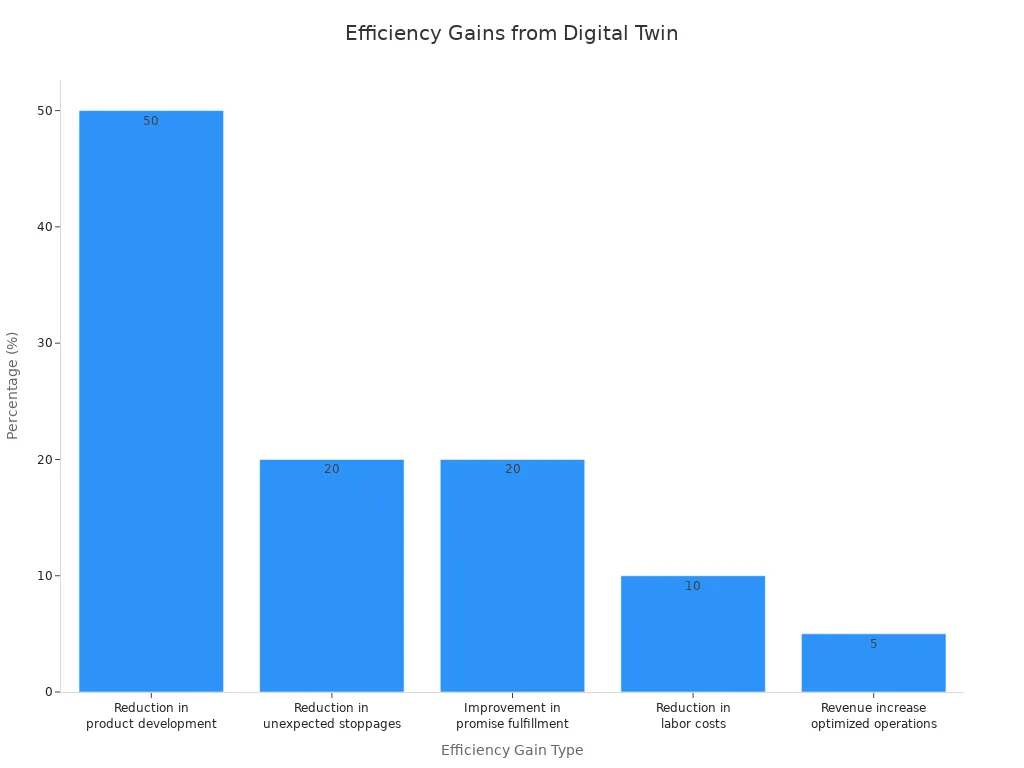
You see measurable improvements in efficiency when you use Digital Twin Builder for data management. Many organizations report faster project timelines and lower costs. You can track these gains in several ways. For example, you reduce project timelines by up to 20%. You save millions of dollars on single projects through better resource allocation. You also decrease design errors and safety incidents, which leads to smoother operations.
| Efficiency Gain Type | Percentage/Value |
|---|---|
| Reduction in project timelines | 10-20% |
| Cost reduction on a single project | $3 million |
| Cost savings through better resource allocation | 5-30% |
| Reduction in design errors | 32% |
| Enhancement in design cooperation | 27% |
| Decrease in safety incidents | 15-25% |
You also see improvements in product development times and labor costs. Digital Twin Builder helps you avoid unexpected work stoppages and boosts your ability to fulfill consumer promises. Optimized operations can increase revenue by 5%. The chart below shows how these efficiency gains add up across different areas.
Data Accuracy
You improve data accuracy by using Digital Twin Builder. Real-time data collection ensures your models stay current and reliable. You update your digital twin regularly, which reduces discrepancies between the digital and physical environments. Machine learning techniques, such as rolling learning, refine your models with each new data point. You focus on detecting sensor defects and maintaining high data quality. This approach gives you confidence in your data management and supports better decision-making.
| Aspect | Description |
|---|---|
| Real-time Data Collection | Digital twins utilize real-time data from physical entities to ensure models are up-to-date and accurate. |
| Model Updating | Regular updates to the twin model reduce discrepancies between the digital and physical entities. |
| Machine Learning Integration | Techniques like rolling learning help in continuously refining model parameters with real-time data. |
| Data Reliability | Focus on detecting sensor defects and ensuring data quality enhances the overall accuracy of models. |
Tip: You gain a competitive advantage when you trust your data and act on accurate information.
Unified Data Views
You benefit from unified data views when you use Digital Twin Builder. You aggregate structured, semi-structured, and unstructured data from multiple data sources. This aggregation creates a single source of truth for your organization. You ensure consistency and reliability in your asset and product master data. Disciplined data management leads to strong business outcomes. You connect diverse data sources flexibly, which gives you a holistic view of your business.
| Advantage | Description |
|---|---|
| Data Aggregation | Digital twins combine structured, semi-structured, and unstructured data from various sources. |
| Single Source of Truth | Unified asset and product master data ensures consistency and reliability in data management. |
| Reliable and Governed Data | Successful implementations rely on disciplined data management for strong business outcomes. |
| Holistic Business View | Flexibility in connecting diverse data sources provides a comprehensive view of the business. |
Note: Unified data views help you make informed decisions and support collaboration across teams.
Enhanced Decision-Making
You make better decisions when you have clear, up-to-date information. Digital Twin Builder gives you a transparent path from planning to action. You see how your choices affect your business in real time. This tool connects your strategy with daily operations, so you can move quickly from ideas to results.
You can use Digital Twin Builder to test different plans before you act. You change business rules and see the impact right away. This helps you avoid mistakes and find the best way forward. You do not need to wait for reports or guess what might happen. Instead, you use live data and smart models to guide your next steps.
Here are some ways Digital Twin Builder improves your decision-making process:
- You create a clear link between your goals and your actions. This makes it easier to track progress and adjust your plans.
- You adjust key business levers, such as production rates or resource allocation, and see instant feedback on outcomes.
- You use real-time communication across your organization. This means everyone stays informed and can respond to changes quickly.
- You automate routine decisions, freeing up time for you to focus on bigger challenges.
- You spot trends and risks early, so you can act before small issues become big problems.
Tip: Use Digital Twin Builder to bring together data from across your business. This unified view helps you make choices based on facts, not guesses.
You also benefit from the integration of digital twins into a Distributed Intelligence System. This setup lets your systems talk to each other and share insights. You get intelligent responses to new business conditions. For example, if a machine shows signs of wear, the system can alert you and suggest maintenance before a breakdown happens.
You gain confidence in your decisions because you rely on accurate, real-time information. You see the whole picture, not just a snapshot. This approach leads to better outcomes for your business and helps you stay ahead of the competition.
Digital Twin vs. Traditional Data Management
Manual vs. Automated
Traditional data management often relies on manual processes. You might enter data into spreadsheets, update records by hand, or move files between systems. These steps take time and can lead to mistakes. When you use Digital Twin Builder, you automate many of these tasks. The system collects data from machines, sensors, and other sources in real time. You see updates instantly, so you do not have to wait for someone to input new information. Automation helps you catch problems early and respond faster. You spend less time on routine work and more time making decisions that matter.
Tip: Automation reduces errors and frees up your team to focus on higher-value tasks.
Fragmented vs. Unified Systems
Many organizations struggle with fragmented data. You might have different teams using separate systems or spreadsheets. This makes it hard to get a clear picture of your operations. Digital Twin Builder brings all your data together in one place. You create a unified model that connects information from across your business.
- SPI, a major real estate company, used Digital Twin Builder to combine property data from many offices. Before, each office kept its own records, which caused confusion and wasted time.
- With Digital Twin Builder, SPI integrated all their data into a single model. Now, they get near real-time insights for every property.
- You can use the same approach to break down silos and improve teamwork.
Digital Twin Builder uses a direct-on-lake, ontology-first model. This means you can add new data sources easily, without writing custom code. You use a visual canvas to define how your data connects. Even if you have unstructured data, you can map it into a clear digital twin. This lets you build dashboards and run predictive analytics, so you always know what is happening in your business.
Note: Unified systems help you make better decisions and avoid the confusion of scattered data.
ROI and Business Value
When you invest in Digital Twin Builder, you see real business value. The technology helps you save time, reduce costs, and improve productivity. Many companies report strong returns after their first major project.
| Evidence Type | Details |
|---|---|
| Market Growth | The digital twin technology market in construction is projected to grow from $2.0 billion to over $93 billion by 2029. |
| Initial Investment | The typical initial investment ranges from $275,000 to $750,000, with companies reporting justifiable returns within the first major project. |
| Schedule Compression | Digital twins can reduce project duration by 8–15%, translating to significant time and cost savings on large projects. |
| Rework Reduction | Digital twins can reduce rework costs by 60–80%, leading to substantial savings on project budgets. |
| Material Waste Elimination | Accurate takeoffs can reduce material waste by 10–20%, resulting in savings of $200,000 to $500,000 on major projects. |
| Labor Productivity Gains | Labor productivity can improve by 15–25%, enhancing overall project profitability. |
You gain more than just cost savings. Digital Twin Builder helps you finish projects faster, reduce waste, and boost your team’s productivity. You also get a tool that grows with your business and supports smarter, data-driven decisions.
Callout: Digital Twin Builder turns your data into a valuable asset, helping you achieve better results with less effort.
Getting Started with Microsoft Fabric
Readiness Assessment
You should start your journey with Microsoft Fabric by checking your organization's readiness. Begin by reviewing your current data landscape. List all the systems, sensors, and machines that produce data. Identify gaps in your data collection. Make sure your team understands the goals of a data-driven approach. You need to know if your staff has the skills to use Digital Twin Builder. If not, plan for training. Assess your IT infrastructure to confirm it can support real-time data flows. Strong network connections and secure cloud access are important for success.
Tip: Involve key stakeholders early. Their support helps you overcome challenges and speeds up adoption.
Implementation Steps
You can follow a clear path to set up Digital Twin Builder. Start by defining your business objectives. Decide what you want to achieve with digital twins. Next, select the assets or processes you want to model. Gather data from these sources and check its quality. Clean and organize your data before you begin data integration. Set up your Microsoft Fabric environment and connect your data sources. Use the low code tools to build your first digital twin model. Test the model with real data. Adjust your setup based on feedback from users. Roll out the solution to more teams or departments as you gain experience.
- Define goals and select assets.
- Prepare and clean your data.
- Set up your environment and connect sources.
- Build and test your digital twin.
- Expand usage across your organization.
Note: Start small and scale up. Early wins build confidence and show the value of a data-driven strategy.
Integration Tips
You want your Digital Twin Builder to work smoothly with your existing systems. Good integration ensures you get the most from your data-driven efforts. Focus on these key areas:
| Tip | Description |
|---|---|
| Data Quality | Set clear standards for accuracy, completeness, and timeliness. Monitor your data often to catch and fix problems quickly. |
| Integration Architecture | Use publish/subscribe patterns and protocols like DDS, MQTT, or AMQP. RESTful or GraphQL APIs help keep your systems in sync. |
| Governance Framework | Create rules for decision-making and data ownership. Involve stakeholders to manage your digital twin project well. |
| Adherence to Standards | Follow industry standards for security and data management. This helps your systems work together and keeps your data safe. |
You should always check that your data integration methods support your business needs. High-quality data and strong governance lead to better results. When you follow best practices, you build a solid foundation for your data-driven future.
Callout: Good integration practices help you unlock the full power of Microsoft Fabric and support smarter, data-driven decisions.
Best Practices
You can maximize the value of Digital Twin Builder by following a set of proven best practices. These steps help you get the most from your data and ensure your digital twin projects succeed.
-
Establish Strong Data Management and Quality Protocols
Start by setting up clear rules for how you collect, store, and use data. Use advanced analytics tools to check your data for errors or gaps. Clean and organize your data before you build your digital twins. High-quality data leads to accurate models and better decisions. -
Promote User Adoption and Change Management
Involve key stakeholders early in your project. Explain the benefits of Digital Twin Builder to your team. Offer training sessions and hands-on workshops. Encourage feedback and address concerns quickly. When everyone understands the value, you see faster adoption and less resistance to new technology. -
Practice Continuous Optimization and Iteration
Review the insights you gain from your digital twins regularly. Use this information to improve your real-world processes. Update your models as your business changes. Test new ideas and measure their impact. This cycle of learning and improvement keeps your operations efficient and competitive.
Tip: Make best practices part of your daily routine. Regular reviews and open communication help you spot issues early and keep your digital twin projects on track.
Community and Support
You have access to a wide range of community resources and support channels when you use Microsoft Fabric Digital Twin Builder. These resources help you learn, solve problems, and connect with other users.
| Resource Type | Description |
|---|---|
| Forums | Join discussions on Power BI, Data Engineering, Data Warehouse, Data Science, and more. |
| Inspiration | Explore contests and galleries to share and discover new ideas and projects. |
| Ideas | Submit your suggestions and view the Microsoft Fabric roadmap for upcoming features. |
| Communities | Connect with user groups and find events focused on Microsoft Fabric. |
| Blogs | Read updates and insights on Power BI and Microsoft Fabric from experts and the community. |
| Learning | Access certifications, tutorials, and documentation to build your skills and knowledge. |
| Support | Get help from community forums and official product support channels when you need assistance. |
You can join forums to ask questions or share your experiences. Inspiration galleries let you see what others have built and spark your creativity. If you have ideas for new features, you can submit them and help shape the future of Microsoft Fabric. User groups and events give you a chance to network and learn from peers. Blogs and tutorials keep you updated on the latest trends and best practices. When you need help, support channels are ready to assist you.
Note: Take advantage of these resources to stay informed, solve challenges, and grow your expertise with Digital Twin Builder.
You can transform your data management with Microsoft Fabric Digital Twin Builder. Real-world users like CSX Corporation and SPIE Nederland B.V. have improved decision-making and streamlined operations by unifying their data. You benefit from real-time intelligence, easy modeling, and operational excellence.
Looking ahead, you will see these trends shape the future:
- Enhanced real-time intelligence for actionable insights
- Seamless integration of diverse data sources
- Broader accessibility through democratized digital twin technology
Explore Digital Twin Builder to unlock smarter, easier data for your organization.
Microsoft Fabric Digital Twin Builder ChecklistThis checklist helps teams plan, build, and operate digital twins using Microsoft Fabric Digital Twin Builder.
- Define objectives and success criteria for the digital twin (business outcomes, KPIs).
- Identify stakeholders and assign roles (owners, data engineers, IoT/OT, analysts).
- Confirm Microsoft Fabric subscription and required service access (workspace, permissions).
- Verify prerequisites: Fabric tenant setup, resource quotas, and licensing for Digital Twin Builder.
- Inventory data sources: IoT device streams, telemetry, time series, asset registers, external APIs.
- Map data types and schemas needed by Microsoft Fabric Digital Twin (properties, telemetry, relationships).
- Prepare data ingestion pipelines into Fabric (Event Hubs, IoT Hub, Synapse, Data Factory, connectors).
- Design the digital twin model: entities, components, relationships, behaviors, and lifecycle states.
- Use right modeling standards and naming conventions consistent with Microsoft Fabric Digital Twin Builder.
- Create and validate digital twin templates in the builder, including sample instances for testing.
- Configure real-time bindings: connect telemetry streams and update mechanisms for live state.
- Implement time-series and historical data storage and retention policies in Fabric.
- Set up simulation and test scenarios to validate behavior and edge cases.
- Define monitoring dashboards and alerts for key digital twin KPIs and anomalies.
- Integrate analytics and ML pipelines in Fabric to derive insights from the digital twin.
- Establish access control: RBAC, least privilege, and identity integration (Azure AD).
- Secure data in transit and at rest: encryption, network controls, and private endpoints.
- Document operational runbooks: deployment, scaling, incident response, and rollback steps.
- Plan for model governance: versioning, change management, and audit trails in Digital Twin Builder.
- Test performance and scale: load test telemetry ingestion and query performance in Fabric.
- Optimize cost: review resource usage, retention, and compute sizing for Microsoft Fabric Digital Twin workloads.
- Validate compliance requirements: data residency, regulatory controls, and logging.
- Deploy to production with staged rollout and validation gates.
- Train users and operations team on using Microsoft Fabric Digital Twin Builder and monitoring tools.
- Schedule regular reviews: model accuracy, data quality, and system health.
- Maintain a backlog for enhancements: integration improvements, new telemetry, and analytics features.
How does the ontology in digital twin builder enable better digital twin creation?
The ontology in the digital twin builder provides a semantic model that defines entities, relationships and properties, allowing you to structure data into an ontology and create comprehensive digital replicas. By using an ontology you can map disparate data and OT data into a consistent schema, which simplifies digital twin creation, digital twin development and the creation of digital representations of real-world environments within Microsoft Fabric.
What data sources can Microsoft Fabric integrate for digital twin data?
Microsoft Fabric supports a wide range of data sources including IoT/OT data streams, telemetry, relational databases, CSV and Parquet files, Azure services, and external APIs. Fabric enables ingest data workflows and data integration so you can bring disparate data into the digital twin builder's environment to create and manage digital replicas and structure to create comprehensive digital models.
Can I use Azure services alongside microsoft fabric digital twin features?
Yes—fabric stands with Azure by enabling integration with Azure Digital Twins, Azure IoT Hub and other Azure services. You can combine microsoft fabric's all-in-one platform with Azure resources for storage, compute and device connectivity, enabling real-time intelligence workload in Microsoft and hybrid scenarios that use both Fabric and Azure Digital Twins for large-scale digital twin creation.
What is the new digital twin builder and how does it simplify digital twin development?
The new digital twin builder in Fabric provides a visual interface and tools for semantic model authoring, data mapping, and digital twin creation. The digital twin builder item helps you define entities, relationships and business logic, accelerating digital twin development and enabling non-experts to create comprehensive digital replicas and digital representations of real-world environments with less code.
How does Microsoft Fabric enable real-time insights and real-time dashboards for digital twins?
Fabric enables real-time analytics by ingesting streaming telemetry and combining it with historical data, supporting real-time dashboards and real-time intelligence in Microsoft Fabric. By connecting digital twin data to Fabric’s analytics and visualization tools you can produce dashboards that surface live status, alerts and predictive insights for physical operations using data.
What role does data mapping and data engineering play in creating complex digital twins?
Data mapping and data engineering are critical for transforming raw inputs into the semantic model used by the digital twin. Data engineering pipelines clean, enrich and map data into the ontology, ensuring that complex digital twins accurately reflect assets and relationships. This process supports creation of digital twins that combine telemetry, contextual metadata and business KPIs.
How do I get access to digital twin instances and manage permissions in Fabric?
Access to digital twin resources in Fabric is controlled through workspace-level and item-level permissions, integrating with Azure AD for identity and role-based access control. You can invite collaborators, assign roles for digital twin creation or viewing, and audit activity to ensure secure access to digital twin data and semantic model artifacts.
Is there a tutorial data summary or Microsoft Learn path for getting started?
There are tutorial introduction guides, Microsoft Learn modules and a microsoft fabric blog with examples that summarize key steps: ingest data, define an ontology, map data into the semantic model, and create visualizations. These tutorial data summary resources help you follow a repeatable path to create digital representations and begin digital twin development within Microsoft Fabric.
How do semantic model and ontology in digital twin builder handle disparate data types?
The semantic model and ontology allow you to normalize disparate data types by defining canonical entity types and relationships. Whether data comes from OT devices, enterprise systems or CSV files, you can harmonize it into the same model so the digital twin can represent assets, events and states consistently across systems.
Can microsoft fabric digital twin consume OT data and integrate it with business systems?
Yes—fabric enables OT data ingestion and can combine that telemetry with ERP, maintenance systems and other business data. By unifying operational and business context in the digital twin, organizations can create comprehensive digital replicas of assets and use them for predictive maintenance, process optimization and digital transformation initiatives.
What are best practices for data integration and data mapping into the digital twin builder?
Best practices include: establish a clear ontology before mapping, use schema validation and transformation pipelines, enrich telemetry with metadata, maintain a single source of truth for identity resolution, and document mapping rules. Following these steps makes digital twin creation repeatable and reduces errors when mapping data into an ontology or digital twin data store.
How do I use Microsoft Fabric to create real-time intelligence workloads for operational scenarios?
To build real-time intelligence workloads in Microsoft Fabric, ingest streaming data, apply real-time processing and join it with historical and contextual data in the semantic model. Connect the results to real-time dashboards and alerting; this approach lets you create and manage digital replicas that drive operational decisions and bring real-time intelligence to physical operations using data.
Apple Podcasts · Spotify · YouTube · YouTube Music
Host: Mirko Peters