 EN
EN Deutsch
 Español
 Français
 Italiano
 Português
 Nederlands
 Polski
 Bahasa Indonesia
 Русский
 Українська
 العربية
 עברית
עברית हिन्दी
 日本語
日本語 한국어
한국어2025-08-05
End Content Silos with Microsoft Syntex
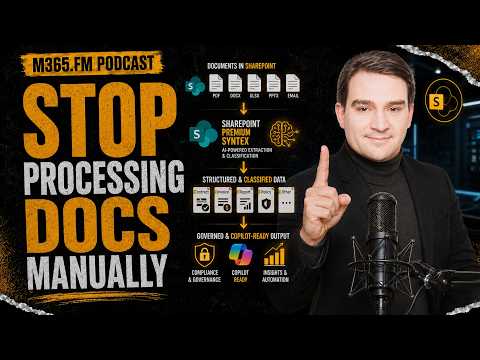
Still combing through endless folders for the “right” version? We break down how Microsoft Syntex uses classifiers and extractors to auto-tag documents, unlock search and discovery, power automation with Power Platform, and simplify compliance/eDiscovery in Microsoft 365.
Who This Is For
-
IT leaders, records managers, and compliance teams
-
SharePoint/Teams admins fighting version sprawl
-
Operations, finance, and legal teams buried in contracts/invoices
-
Power Platform builders seeking reliable, structured inputs
The Problem (Why Silos Persist)
-
Files live in too many places (SharePoint, OneDrive, Teams, inboxes).
-
Inconsistent naming and versions bury critical context.
-
Audits/eDiscovery become fire drills; automation can’t run on unstructured content.
How Syntex Fixes It
-
Classify: Identify document types (e.g., invoice, NDA, MSA) from content—not filenames.
-
Extract: Pull key fields (vendor, totals, dates, terms) into metadata automatically.
-
Enrich: Store metadata with the file, sync insights across Microsoft Graph to light up M365.
-
Activate: Use metadata to filter, secure, retain, and trigger Power Automate workflows.
What “Good” Looks Like
-
Filter a library by Vendor = Contoso and Renewal = This Quarter—no manual hunting.
-
Auto-route invoices by Amount; alert owners as Contract End Date approaches.
-
Apply retention/legal hold via Purview using tags Syntex created—no extra data entry.
Real-World Patterns
-
Contracts Hub: Classify agreements, extract Effective Date, Renewal, Risk Level → approval + renewal workflows.
-
AP Invoices: Identify supplier, total, due date → route by thresholds, flag exceptions.
-
NDA Discovery: Pull parties, jurisdiction, term → instant audit sets, no inbox spelunking.
Rollout Playbook
-
Target high-value content (contracts, invoices, policies).
-
Gather real samples (good + messy) for training.
-
Define fields that drive action (dates, amounts, owners, region).
-
Train & test classifiers/extractors; tune on edge cases.
-
Wire automation (approvals, escalations, reminders).
-
Bake in compliance (retention, sensitivity, DLP via Purview).
-
Measure and iterate (search time, audit prep time, workflow SLA).
Common Pitfalls (and Fixes)
-
Template drift: Standardize current templates; retrain models on real variations.
-
Library sprawl: Consolidate, align content types/columns, and set owners.
-
User pushback: Show faster search + fewer clicks; keep fields business-relevant.
-
Silent failures: Monitor extraction accuracy; add QA views and exception queues.
Measurable Wins
-
Search time drops from minutes to seconds with metadata filters.
-
Fewer copy-paste errors; workflows trigger on reliable fields.
-
Faster, defensible audit responses (targeted sets instead of manual hunts).
Architecture at a Glance
-
Ingress: Files land in SharePoint libraries.
-
Understanding: Syntex classifies & extracts → writes metadata to columns.
-
Activation: Power Automate, Teams notifications, dashboards consume metadata.
-
Governance: Purview uses tags for retention, holds, and DLP.
Quick FAQ
-
Do I need ML skills? No—models are trained by example with real files.
-
Does it only help SharePoint? Benefits surface across Microsoft 365 via Graph.
-
What about legacy PDFs/scans? Start with highest-value sets; add more as accuracy proves out.
-
Will users still need to tag? Syntex automates most tagging; keep any manual fields minimal.
Action Items
-
Pick one document type with high audit or cycle-time pain.
-
Define 5–8 fields that drive decisions.
-
Train Syntex on 30–50 real samples (include edge cases).
-
Launch a pilot + dashboard: measure search time, approval time, audit prep.
-
Scale to adjacent libraries once accuracy >90%.
Host: Mirko Peters