 EN
EN Deutsch
 Español
 Français
 Italiano
 Português
 Nederlands
 Polski
 Bahasa Indonesia
 Русский
 Українська
 العربية
 עברית
עברית हिन्दी
 日本語
日本語 한국어
한국어2025-12-05
When to Use RAG vs Microsoft 365 Copilot
In today's fast-paced world, selecting the right AI tool is crucial. About 78% of business leaders utilize AI in some capacity, indicating a growing demand for effective solutions. You may find yourself deciding between two powerful options: RAG vs Copilot.
RAG is designed to provide you with accurate information based on your company’s content, ensuring that you have reliable data at your fingertips. Conversely, Microsoft 365 Copilot enhances your productivity within the Microsoft 365 ecosystem by simplifying tasks. Understanding these distinctions can empower you to make informed choices that align with your business needs.
Key Takeaways
- RAG gives correct and trustworthy information. It combines what you know with outside data. This makes it great for following rules and making decisions.
- Microsoft 365 Copilot helps you work better. It makes tasks easier in Microsoft 365 apps. This lets users focus on important work, not just routine tasks.
- Choosing RAG or Copilot depends on what your business needs. RAG is great for accuracy and rules, while Copilot is best for daily work and managing projects.
- You can use both tools together. This way, you get RAG's accurate data and Copilot's speed. This improves how you work and make decisions.
- Knowing what each tool is good at and where they fall short helps you make smart choices that fit your business goals.
Understanding RAG
Definition of RAG
Retrieval-Augmented Generation (RAG) is a strong method in artificial intelligence. It makes generative AI models more accurate and reliable. RAG does this by using information from important outside data sources. This method links large language models with different external resources. This helps them give trustworthy answers. Instead of just using internal knowledge, RAG makes sure the information you get is solid and dependable.
Strengths of RAG
RAG has many benefits that make it useful for businesses. Here are some main strengths:
-
Dynamic and Up-to-date Information: RAG systems mix old knowledge with current data. This makes sure answers show recent changes. This is important for smart decision-making in fast-moving fields like finance and healthcare.
-
Scalability: RAG architecture can handle big datasets well. It keeps working well even with a lot of information. This is important for businesses that need quick and accurate information retrieval.
-
Efficient Management of Data: RAG is great at pulling and combining important information from large data stores. This ability ensures quick outputs without slowing down, making it perfect for real-time data processing tasks.
-
Improved AI Reliability: By basing answers on trusted sources, RAG builds trust with users. This reliability is key for important decision-making, where accuracy is a must.
Microsoft 365 Copilot Overview
Features of Copilot
Microsoft 365 Copilot is a strong helper that boosts your work in many apps. Here are some key features that make it different from other AI tools:
| Application | Core Features |
|---|---|
| Word | Write, change, and summarize documents using company files. |
| Excel | Find trends, create formulas, and show insights from data. |
| PowerPoint | Make presentations from a Word document or prompt, suggest slide designs. |
| Outlook | Write and summarize emails, suggest replies, organize your inbox. |
| Teams | Summarize missed meetings, create action items, recap chats. |
| SharePoint | Show relevant documents, create page summaries, help with content. |
| Power Automate | Build automation flows from simple descriptions, fix workflows. |
These features help you finish tasks faster and work better, making your day easier.
Limitations of Copilot
Even though Microsoft 365 Copilot has many benefits, it also has some downsides. Knowing these can help you set realistic expectations. Here are some limitations based on what users say:
| Use Case | Limitations |
|---|---|
| Summarizing Lengthy Documents | Might miss important details, so you need to check and add missing info. |
| Generating Meeting Notes | Gives general summaries but may skip important points, needing manual additions. |
| Summarizing, Drafting, and Refining Emails | Automated drafts might lack a personal touch and details, often needing edits. |
| Drafting Documents and Content | First drafts usually need a lot of changes for clarity and requirements. |
| Analyzing Data and Reporting | Limited for complex data tasks, often better to do manually. |
| Drafting Initial Presentations | You must adjust AI-made content to fit your style and brand. |
| Translating into Multiple Languages | Accuracy and context can be issues, needing checks by native speakers. |
| Comparing Documents | Has trouble with legal language details, needing human review for accuracy. |
| Searching for Documents, Emails, etc. | May struggle with context or specific keywords, leading to irrelevant results. |
By knowing these limits, you can use Microsoft 365 Copilot better for your needs.
RAG vs Copilot: A Comparative Analysis
Key Differences
When you look at RAG and Microsoft 365 Copilot, you will see some important differences. These differences can help you choose the right tool for your needs. The way each tool is built affects how they work for your business. Here’s a simple comparison of their main features:
| Feature | RAG Architecture | Microsoft 365 Copilot Architecture |
|---|---|---|
| Core Positioning | Focused on company knowledge and clear Q&A. | Built into Microsoft 365 tools for productivity. |
| Knowledge Base Integration | Changes company documents into a smart knowledge base. | Uses data from Microsoft Graph, like SharePoint and OneDrive. |
| Deployment Options | Can be set up on-site for better data control and rules. | Works within Microsoft’s cloud services. |
| Customization Capabilities | Highly customizable for managing knowledge and user experience. | Limited customization mainly at the app level. |
These differences show that RAG focuses on data accuracy and control. Meanwhile, Copilot aims to boost productivity in the Microsoft environment.
Use Cases for Each Tool
Knowing when to use RAG or Copilot can help you pick the best tool for your business. Here are some common ways to use each one:
RAG Use Cases:
- Compliance and Governance: RAG is great where data accuracy and rules matter. It gives reliable answers based on trusted sources, making it perfect for finance and healthcare.
- Research and Development: Use RAG to find exact information from large databases. This helps your team make decisions based on the best data.
- Legal and Regulatory: RAG helps legal teams by providing accurate references and citations, which are key for following rules and preparing cases.
Microsoft 365 Copilot Use Cases:
- Daily Operations: Copilot makes everyday tasks easier, like writing emails, summarizing meetings, and creating reports. This saves time and boosts productivity.
- Project Management: Use Copilot for planning and scheduling. It helps manage resources, timelines, and team efforts well.
- Data Analysis: Copilot makes data insights easier by creating charts and summaries without complex formulas. This lets you focus on important decisions instead of manual data work.
By knowing these use cases, you can better match your choice of RAG or Copilot with your business goals.
Real-World Applications of RAG and Copilot
Industries Using RAG
Retrieval-Augmented Generation (RAG) is used in many different industries. Here are some important areas that use RAG solutions:
- Finance: RAG helps banks and financial companies stay accurate and follow rules in their reports.
- Law: Legal teams use RAG to find exact case laws and rules, making their research better.
- Healthcare: RAG helps healthcare workers by giving them correct patient details and treatment advice.
- Retail: Stores use RAG to look at customer data and manage their stock better.
- Technology: Tech companies use RAG for developing products and improving customer support.
Companies using RAG see great results. For example, 86% of businesses add RAG methods to their generative AI. In healthcare, around 75% of people have RAG pilot projects going on. The global RAG market is expected to grow a lot, from USD 1.2 billion in 2023 to USD 11.0 billion by 2030, with a yearly growth rate of 49.1%. RAG systems also cut down AI mistakes by 70–90% compared to regular models, which helps users trust AI outputs more.
Industries Using Microsoft 365 Copilot
Microsoft 365 Copilot boosts productivity in many sectors. Here are some industries that gain from its features:
- Education: Teachers use Copilot to make lesson plans and simplify admin tasks.
- Marketing: Marketing teams use Copilot to write content and check how campaigns are doing.
- Finance: Financial analysts use Copilot to automate reports and analyze data.
- Healthcare: Healthcare workers benefit from Copilot's ability to summarize patient records and organize schedules.
- Human Resources: HR teams use Copilot to write job descriptions and make onboarding easier.
The effects of Microsoft 365 Copilot are impressive. It automates boring tasks, letting teams focus on important work. For instance, Copilot cuts down manual work by quickly drafting documents and summarizing meeting notes. This efficiency leads to overall productivity gains across functions, adding up to $18.8 million in total benefits.
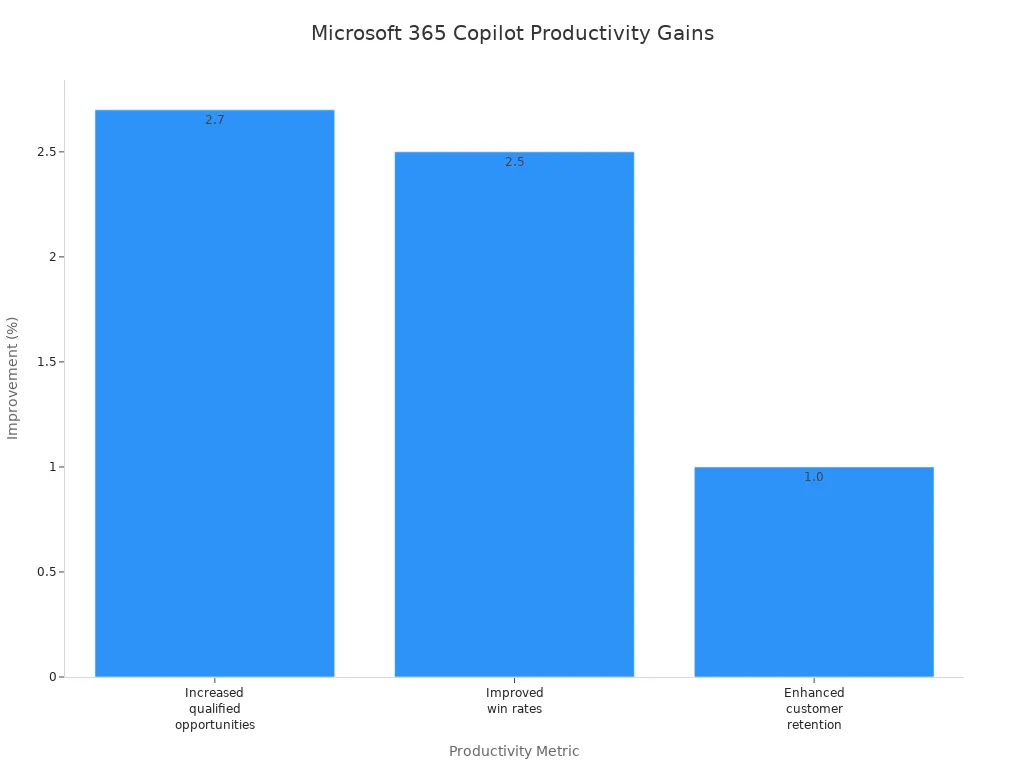
By knowing how RAG and Microsoft 365 Copilot work in real life, you can better decide which tool fits your business needs.
Choosing Between RAG and Copilot
Factors to Consider
When you pick between RAG and Microsoft 365 Copilot, think about some important factors. These will help you find the right tool for your business:
- Cost: Look at the monthly costs for each option. RAG might need a lot of money upfront for setup and ongoing care. On the other hand, Microsoft 365 Copilot has different subscription plans that fit various budgets. Here’s a quick cost comparison:
| Plan Type | Monthly Cost | Features |
|---|---|---|
| Free Tier | Free | Moderate response times, capped message volumes, limited image generation capabilities. |
| Plus Plan | $20/user/month | Good for small teams, includes access to GPT-4 and shared infrastructure. |
| Pro Plan | $200/user/month | Unlimited access to reasoning models, targets groups of 10-50 users. |
| Enterprise Plan | Custom pricing | Made for organizations over 50 users, offers dedicated infrastructure and priority access. |
-
Technical Requirements: RAG systems usually need advanced setups. You must set up distributed vector databases and GPU-accelerated models. This can take a lot of resources. In contrast, Copilot works well with existing Microsoft 365 apps, making it easier to use.
-
Data Security and Governance: Both tools need careful thought about data security. RAG focuses on safety and governance checks, keeping sensitive information safe. Copilot also stresses governance, helping you manage who can access information.
-
Use Cases: Think about what your business needs. RAG is great where accuracy and compliance are very important. Copilot is best for daily productivity tasks, making it perfect for teams wanting to improve operations.
Scenarios for RAG
RAG works best in situations where accuracy and compliance are very important. Here are some cases where RAG can help a lot:
-
Compliance and Governance: If your business is in a regulated field, RAG helps you get accurate information. This is key for meeting rules and avoiding legal problems.
-
Research and Development: Use RAG when your team needs exact data from large databases. This helps in making smart decisions based on trustworthy information.
-
Legal and Regulatory: RAG helps legal teams by giving accurate references and citations. This is vital for preparing cases and following rules.
-
Data-Driven Decision Making: When your organization depends on data for decisions, RAG can boost trust in the information you get. This leads to better results and informed choices.
Scenarios for Copilot
Microsoft 365 Copilot is perfect for boosting productivity in everyday tasks. Here are some situations where Copilot can be very helpful:
-
Daily Operations: Use Copilot to make routine tasks easier, like writing emails, summarizing meetings, and creating reports. This saves time and lets your team focus on more important work.
-
Project Management: Copilot can help with planning and scheduling projects. It manages resources and timelines well, keeping your projects on track.
-
Data Analysis: When you need quick insights from data, Copilot can create charts and summaries. This helps you make decisions without getting stuck in complicated data work.
-
Collaboration: Copilot improves teamwork by giving real-time suggestions while editing documents. This feature helps raise the quality of work and encourages teamwork among members.
By knowing these scenarios, you can better match your choice of RAG or Copilot with your business goals.
To sum up, knowing about RAG and Microsoft 365 Copilot is very important for your business. Each tool has special strengths that fit different needs. RAG is great at giving accurate and trustworthy information. This makes it perfect for industries with strict rules. Copilot helps you work faster inside Microsoft 365 by making daily tasks easier.
When you think about your choices, remember future updates. RAG will probably connect better with company content. Copilot will get smarter AI search features. By looking at what your business needs, you can pick the best tool to help your company succeed. 🚀
FAQ
What is RAG used for in business?
RAG helps businesses find accurate information from big data sets. You can use it for following rules, research, and making decisions. This way, you always have reliable data when you need it.
How does Microsoft 365 Copilot enhance productivity?
Microsoft 365 Copilot makes tasks easier within Microsoft 365. It helps you write emails, summarize documents, and organize schedules. This saves time and makes you more efficient.
Can I use RAG and Copilot together?
Yes, you can use RAG and Copilot together. RAG gives you accurate data, while Copilot helps you work faster. Using both tools can improve your workflows and help with decision-making.
Which tool is better for compliance needs?
RAG is better for compliance needs. It focuses on being accurate and gives reliable information from trusted sources. This makes it great for industries with strict rules, like finance and healthcare.
Is Microsoft 365 Copilot easy to use?
Yes, Microsoft 365 Copilot is easy to use. It works well with Microsoft 365 apps, so you can boost your productivity without needing a lot of training or technical skills.
Apple Podcasts · Spotify · YouTube · YouTube Music
Host: Mirko Peters