 EN
EN Deutsch
 Español
 Français
 Italiano
 Português
 Nederlands
 Polski
 Bahasa Indonesia
 Русский
 Українська
 العربية
 עברית
עברית हिन्दी
 日本語
日本語 한국어
한국어2025-08-10
Secure Microsoft Fabric Data Pipelines

You need strong security measures to protect sensitive data in modern data pipelines. Microsoft Fabric security gives you a secure by default foundation, but common mistakes like misconfigured permissions or hardcoded secrets can still expose sensitive information. In fact:
- 15% of all data breaches in cloud environments come from cloud misconfigurations, including permissions.
To prevent leaks of sensitive data, Microsoft Fabric security uses managed identities, Azure Key Vault, and role-based access control. These security practices help you control access, keep sensitive information safe, and support secure pipelines for sensitive data.
Key Takeaways
- Use managed identities to avoid hardcoded secrets in your data pipelines. This keeps sensitive information safe.
- Implement role-based access control (RBAC) to limit who can access sensitive data. Assign permissions based on user roles.
- Regularly review access permissions to ensure only trusted users can reach sensitive data. This helps prevent unauthorized access.
- Encrypt all sensitive data at rest and in transit. Use Microsoft-managed keys or customer-managed keys for added security.
- Utilize Azure Key Vault to securely store secrets and connection strings. This prevents sensitive information from being exposed.
- Set up monitoring and auditing to track data access and changes. This helps you spot unusual activity and maintain compliance.
- Apply data masking techniques to protect sensitive information. Use dynamic masking for live data and static masking for shared data.
- Plan for disaster recovery by regularly testing backup procedures. This ensures you can restore sensitive data quickly if needed.
8 Surprising Facts About Data Pipelines in Microsoft Fabric
- Built-in end-to-end encryption: Microsoft Fabric data pipelines automatically support encryption at rest and in transit, meaning secure data pipelines microsoft fabric can be configured without adding third-party encryption tools.
- Automatic lineage capture: Fabric records detailed lineage for every transformation, so secure data pipelines microsoft fabric provide auditable, queryable lineage with minimal developer effort.
- Zero-copy sharing between workloads: Data movement can be minimized using Fabric's storage abstractions, enabling secure data pipelines microsoft fabric to share data among analytics, BI, and machine learning without duplicating sensitive datasets.
- Row- and column-level security integrated: Fabric allows fine-grained access controls inside the pipeline, so secure data pipelines microsoft fabric can enforce least-privilege access down to specific columns or rows during processing.
- Built-in data masking and classification: Fabric includes automated sensitivity labeling and dynamic data masking capabilities, helping secure data pipelines microsoft fabric reduce exposure of sensitive fields during development and testing.
- Policy enforcement via Microsoft Purview integration: Compliance policies and retention rules from Purview can be applied directly to Fabric pipelines, enabling secure data pipelines microsoft fabric to meet corporate governance automatically.
- Streaming and batch unified: Fabric supports real-time streaming and batch processing within the same pipeline constructs, so secure data pipelines microsoft fabric can apply consistent security controls across both low-latency and scheduled workloads.
- Cost-aware isolation for sensitive workloads: Fabric lets you isolate compute and storage for high-sensitivity pipelines, enabling secure data pipelines microsoft fabric to balance security isolation and cost by assigning dedicated resources only where needed.
Security Model Overview
Core Principles
You need to understand the core principles that protect modern data pipelines in Microsoft Fabric. These principles help you keep sensitive data safe and prevent exposure of sensitive information. Microsoft Fabric uses Microsoft Entra ID for user authentication. When you sign in, you receive access tokens that allow you to work with data securely. Conditional access policies in Microsoft Entra ID require multifactor authentication and limit access based on device enrollment and user location. This means only trusted users and devices can reach sensitive data.
A Fabric workspace identity acts as a managed service principal. You do not need to store credentials in your pipelines, which reduces the risk of leaking sensitive information. Microsoft Fabric encrypts all data at rest and in transit. Microsoft manages the keys by default, so your sensitive data stays protected even if someone tries to intercept it.
- Microsoft Entra ID authentication with access tokens
- Conditional access policies for multifactor authentication
- Managed workspace identity for password-free pipelines
- Encryption of data at rest and in transit
Shared Responsibility
You share responsibility for data security with Microsoft Fabric. Microsoft provides a strong foundation, but you must manage access and protect sensitive information in your data pipelines. The table below shows how responsibility divides between you and Microsoft:
| Responsibility | Description |
|---|---|
| Microsoft | Provides a robust security foundation, including Azure AD integration, encryption, and compliance certifications. |
| Users | Manage access, set up data access requirements, and ensure compliance with security policies. |
You must review access permissions often and make sure only trusted users can reach sensitive data.
Data Flow Boundaries
You need to set clear boundaries for data flow in Microsoft Fabric. These boundaries help you control who can access sensitive information and how data moves through your pipelines. You define workspace security boundaries to manage access and protect sensitive data assets. You apply default sensitivity labels to classify data based on its impact. You enforce protection policies by label to control user actions on labeled data.
- Define workspace security boundaries to control access and management of data assets.
- Apply default sensitivity labels to classify data based on its impact.
- Enforce protection policies by label to control user actions on labeled data.
- Only authorized users can access different layers of data in the lakehouse.
- You restrict access based on user roles and departments.
Microsoft Fabric uses a unified role-based access control model. This model gives you consistent permissions across all workloads. You protect sensitive information from data ingestion to consumption. You keep sensitive data secure and maintain control over your data pipelines.
Data Pipeline Security Architecture
You need a strong architecture to protect sensitive data in modern data pipelines. Microsoft Fabric security gives you a layered approach that covers network, storage, and compute. Each layer works together to keep sensitive information safe and ensure only trusted users can access it.
Tip: A well-designed architecture reduces risk and makes your pipelines easier to manage.
Network Protection
Network protection forms the first line of defense for your data. You must set up secure network configurations to prevent unauthorized access and keep sensitive information private.
Private Endpoints
Private endpoints let you connect your Microsoft Fabric resources to your virtual network. This means your data never travels over the public internet. You create a private link between your data sources and your pipelines. This setup blocks outside threats and keeps sensitive data inside your trusted network.
- You use private endpoints to load data securely into the Lakehouse.
- You limit exposure by keeping sensitive information off the public internet.
Firewall Rules
Firewall rules help you control who can reach your data. You set rules to allow only trusted IP addresses or networks. This stops unwanted traffic and protects sensitive data from attacks.
- You block all public access by default.
- You allow only approved sources to connect to your storage and compute resources.
Microsoft Fabric security also uses Microsoft Entra ID for authentication. You get access tokens for every operation. Permissions are stored centrally and checked every time you make a request. This ensures only authorized users can access sensitive information.
Storage Protection
Storage protection is critical for keeping sensitive data safe. Microsoft Fabric uses OneLake as the central storage layer. You must follow best practices to secure your data and prevent leaks.
| Component | Description | Functionality |
|---|---|---|
| OneLake | Central data lake storage. | Supports Delta Lake format for both structured and unstructured data. |
| Data Factory | Data integration and orchestration service. | Moves and transforms data across sources, enabling streamlined data pipelines. |
| Data Engineering | Scalable data processing with Apache Spark. | Supports complex transformations and large-scale data processing. |
| Data Science | Machine learning model development. | Integrates seamlessly for AI-driven data analysis and automation. |
| Real-Time Analytics | Real-time data processing and analytics. | Provides immediate insights from streaming data for timely decisions. |
| Data Warehouse | High-performance data warehousing solution. | Optimized for complex queries and large-scale data analysis. |
| Power BI | Business intelligence and visualization tool. | Creates interactive reports and dashboards to visualize business insights. |
ADLS Gen2 Access
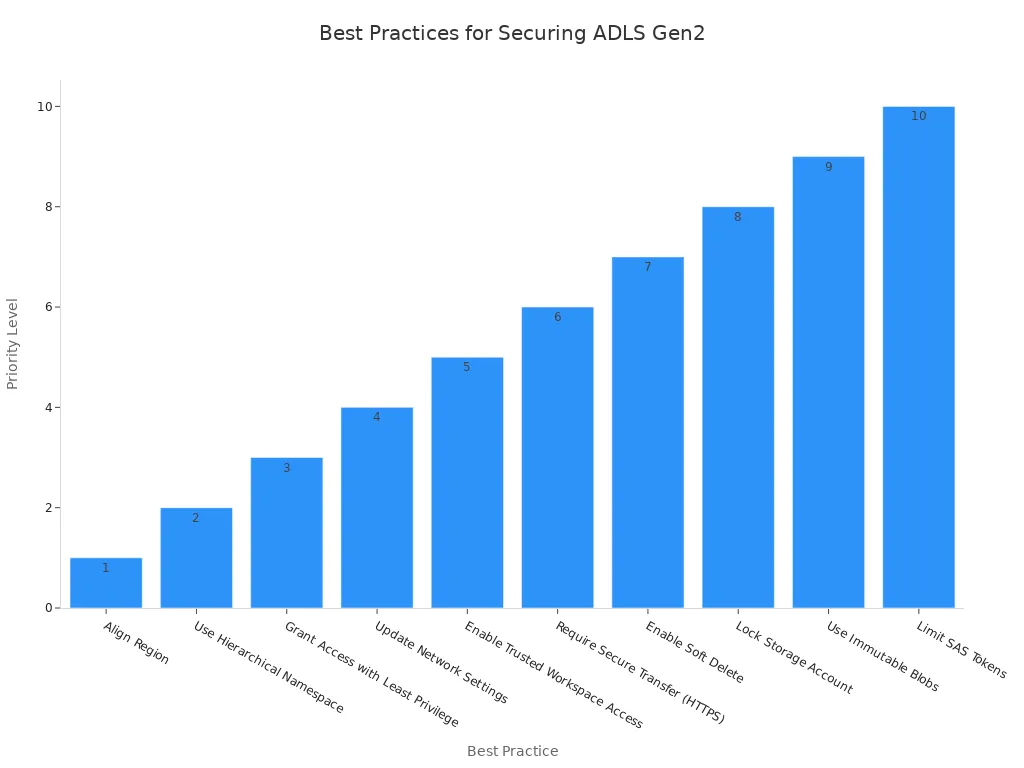
You must secure your Azure Data Lake Storage Gen2 accounts. Start by aligning the storage region with your Fabric capacity region. Enable the hierarchical namespace for better organization. Grant the Storage Blob Data Reader role only at the container level. This limits access and follows the least privilege principle.
- Grant access to the Fabric Workspace Identity with the right Azure RBAC roles.
- Use a private endpoint to restrict access to your storage account.
- Turn off public access and require secure transfer (HTTPS) for all connections.
- Enable trusted workspace access for secure connections.
- Turn on soft delete and use immutable blobs to protect against accidental or malicious changes.
Encryption at Rest/In Transit
Encryption is a key part of Microsoft Fabric security. All data is encrypted at rest using Microsoft-managed keys. Data is never stored in an unencrypted state. For data in transit, Microsoft Fabric enforces TLS 1.2 or higher. This protects sensitive data as it moves between services.
- You can use customer-managed keys in Azure Key Vault for extra control.
- Encryption ensures compliance with strict data security requirements.
Compute Security
Compute security keeps your processing environments safe. You must isolate workloads and control execution to protect sensitive information.
Isolated Environments
You can create dedicated Spark pools for different workloads. This isolates performance and cost. For moderate isolation, use one workspace per data product. For high isolation, use multiple workspaces and enforce strict separation of duties. Only consolidate data products when necessary.
- Turn off job-level bursting to prevent pipelines from using all capacity.
- Isolate sensitive workloads to reduce risk.
Secure Execution
Microsoft Fabric security ensures that only trusted users can run jobs. You use managed identities for authentication. This removes the need for hard-coded credentials. You control access to compute resources through role-based access control. This keeps sensitive information safe during processing.
Note: Always review your compute environment settings to make sure only authorized users can access and run sensitive data jobs.
Microsoft Fabric uses a multi-layered approach to data security. You get network security with private endpoints and firewall rules. You get identity and access management with Microsoft Entra ID. You get encryption, data masking, and row-level security for sensitive data. This architecture gives you strong protection for your modern data pipelines.
Data Movement Security
You must protect data as it moves through your pipelines. Microsoft Fabric gives you tools to secure every step of data movement. You can keep sensitive information safe from the moment you ingest it until you deliver it to users. This approach helps you build trust in your modern data pipelines and ensures data security at every stage.
Secure Ingestion
You need to secure the way you bring data into Microsoft Fabric. Secure ingestion means you control who can send data, where it comes from, and how it enters your system. You use managed identities to avoid hardcoded secrets. This method keeps sensitive information out of your code and reduces risk.
Microsoft Fabric supports secure connections to data sources. You can use private endpoints and firewall rules to limit who can send data to your pipelines. You also use Azure Key Vault to manage secrets and connection strings. This setup ensures only trusted users and services can access sensitive data during ingestion.
You should always validate incoming data. Check the source and format before you load it. This step helps you block unwanted or harmful data. You can set up data validation rules in your pipelines to catch errors early. When you use secure ingestion, you protect sensitive data from leaks and attacks.
Data Integrity
You must make sure that data stays accurate and complete as it moves through your pipelines. Data integrity means no one can change, delete, or add data without permission. Microsoft Fabric uses several layers of protection to keep sensitive information safe.
You can use authentication and authorization to control who can move or change data. Microsoft Fabric integrates with Azure Active Directory for identity management. This setup supports single sign-on and multi-factor authentication. You can assign roles to users so only the right people can access sensitive data.
Microsoft Fabric also supports row-level and column-level security. You can hide or mask sensitive information based on user roles. This feature keeps sensitive data visible only to those who need it. Data governance tools help you track data movement and enforce policies. You can see who accessed or changed data at any time.
Here is a summary of how Microsoft Fabric secures data movement between services and storage layers:
| Security Measure | Description |
|---|---|
| Authentication and Authorization | Manages user identities and access permissions across Microsoft Fabric, ensuring secure data access. |
| Identity Management | Integrates with Azure Active Directory for centralized identity management, supporting SSO and MFA. |
| Role-based Access Control | Provides granular permission management at various levels, ensuring only authorized users access data. |
| Row-level Security | Implements dynamic data filtering based on user context, enhancing data access security. |
| Column-level Security | Offers fine-grained control over data visibility, masking sensitive columns based on user roles. |
| Data Governance | Ensures data quality and compliance, tracking data movement and enforcing policies. |
You should monitor your pipelines for changes or errors. Set up alerts for unusual activity. Regular reviews help you catch problems before they affect sensitive information. By following these steps, you keep sensitive data safe and maintain trust in your data pipelines.
Tip: Always review your data movement policies. Update them as your organization grows or as new threats appear. Strong data movement security protects your sensitive information and supports compliance with regulations.
Securing Data Factory in Microsoft Fabric
Managed Identity Authentication
You can secure your data factory in microsoft fabric by using managed identity authentication. This method lets you connect to resources without storing passwords or secrets in your pipelines. You avoid the risks that come with hardcoded credentials. Managed identity works automatically and supports seamless authentication for your modern data pipelines. You can also use service principals, which rely on client secrets, or workspace identities, which Microsoft Fabric manages for you. Workspace identity simplifies authentication and removes the need for manual key management.
- Managed identity automates authentication for your pipelines.
- Service principal uses a client secret for authentication.
- Workspace identity gives you a managed service principal for easy setup.
You protect sensitive data and sensitive information by choosing the right authentication method. You also reduce the chance of exposing sensitive credentials.
Trusted Workspace Access
Trusted workspace access strengthens security in data factory in microsoft fabric. This feature lets you connect securely to Azure storage accounts that have firewalls enabled. Workspace identities control which workspaces can access your data. You can restrict connections to specific virtual networks and IP addresses. This setup ensures that only trusted users and services reach your sensitive data.
Microsoft fabric security uses trusted workspace access to limit exposure. You keep sensitive information safe by allowing only approved workspaces to connect. You also gain better control over who can access and move data in your pipelines.
Tip: Always review your trusted workspace access settings. Make sure only the right workspaces have permission to reach sensitive data.
Secure Pipeline Configuration
You need to configure your data factory in microsoft fabric pipelines with security in mind. Start by assigning workspace roles based on the least privilege principle. Use Microsoft Entra conditional access and enforce multi-factor authentication for all users. Set up workspace identities for trusted access to data sources. Manage data-source access carefully to prevent leaks of sensitive information.
- Implement row-level security for detailed data access control.
- Apply sensitivity labels to protect sensitive data.
- Configure data loss prevention policies to stop leaks of sensitive information.
- Store credentials in Azure Key Vault for centralized management.
- Enable audit logging to track user actions and changes.
- Monitor pipeline executions to ensure data flows work as expected.
- Set up notifications for important events in your pipelines.
- Use information protection and content endorsement to identify trusted items.
- Enable data lineage tracking for compliance.
- Integrate Git for version control in pipeline development.
- Test disaster recovery procedures to keep data safe during disruptions.
When you copy data securely from Azure Data Lake Storage (ADLS) to the Lakehouse, always use workspace identities and private endpoints. This approach keeps sensitive data inside your trusted network and blocks public access. You can monitor and audit every step to ensure compliance with microsoft fabric security standards.
Note: Secure pipeline configuration protects your sensitive data and supports a strong security posture for your data factory in microsoft fabric.
Common Mistakes When Securing Data Factory in Microsoft Fabric
- Not using least-privilege identities: Granting broad permissions to service principals, managed identities, or users instead of applying least-privilege role assignments.
- Hardcoding secrets in pipelines: Storing connection strings, passwords, or API keys directly in pipeline definitions or notebooks rather than using Azure Key Vault or Fabric-secret stores.
- Missing network restrictions: Leaving endpoints publicly accessible instead of using private endpoints, service endpoints, or firewall rules to restrict traffic.
- Insufficient identity isolation: Reusing the same managed identity across multiple workloads or environments, which increases blast radius if compromised.
- Not enabling encryption for data at rest and in transit: Assuming default settings are sufficient and failing to enforce CMK (customer-managed keys) or TLS enforcement where needed.
- Poor role-based access control (RBAC) configuration: Assigning high-level roles (owner/contributor) to many users instead of using narrow roles and custom roles for specific operations.
- Skipping audit logging and monitoring: Not enabling diagnostic logs, activity logs, or Alerts for suspicious activities and pipeline failures.
- Ignoring workspace and resource separation: Mixing dev/test/prod resources in the same workspace or subscription, making it harder to apply environment-specific controls.
- Improperly configured linked services: Creating linked services with over-permissive authentication methods or inadequate restrictions on upstream/downstream systems.
- Not rotating credentials and keys: Failing to implement automated key/secret rotation policies and relying on long-lived secrets.
- Underestimating supply-chain risks: Using unvetted third-party connectors, custom activities, or scripts without code review and security validation.
- Neglecting data classification and access policies: Not classifying sensitive data or enforcing data protection policies (masking, row-level security, or encryption scopes) across Fabric artifacts.
Role-Based Access Control Implementation

RBAC Fundamentals
You need a strong role-based access control system to protect sensitive data in your data pipelines. Microsoft Fabric uses role-based access control to manage access and keep sensitive information secure. You assign permissions based on roles, which helps you reduce risks and support collaboration. This approach lets you scale your operations while maintaining compliance.
- Role-based access control gives you a secure way to manage access.
- Permissions are tied to roles, not individuals, which streamlines collaboration.
- You can set permissions at both workspace and item levels for flexibility.
When you use role-based access control, you protect sensitive information and sensitive data from unauthorized users. You also make sure that only trusted users can access your pipelines.
Role Definitions
Role definitions in Microsoft Fabric are collections of permissions that grant access to specific resources. You can use built-in roles or create custom roles for more granular control. Each role gives users different levels of access to sensitive data and sensitive information.
Workspace Roles
Workspace roles help you manage access to your data pipelines and sensitive data. You can assign roles to individuals, security groups, Microsoft 365 groups, or distribution lists. The main workspace roles include:
- Admin: Oversees workspace membership, allocates resources, and configures access policies.
- Contributor: Publishes, modifies, and manages content within the workspace.
- Viewer: Accesses dashboards, reports, and insights with view-only permissions.
- Member: Collaborates on workspace items and shares content.
Admins have the highest level of access. Contributors and Members can work with data and pipelines, but cannot change workspace settings. Viewers can see sensitive information and sensitive data, but cannot make changes.
Item Roles
Item roles give you control over individual data assets within a workspace. You can assign roles to specific items, such as datasets, reports, or pipelines. Built-in roles like Owner, Contributor, and Reader provide different access levels. Custom roles let you fine-tune permissions for sensitive data.
- Owner manages item settings and access.
- Contributor edits and updates the item.
- Reader views the item without making changes.
You can link role assignments to a defined scope, such as a subscription, resource group, or resource. The scope determines which resources the role affects. This setup supports least-privilege access control, which helps you protect sensitive information.
Role Assignment
You must assign roles carefully to keep sensitive data safe. Microsoft Fabric lets you assign roles to users and services at different levels. You can use practical scenarios to guide your role assignments and follow the least privilege principle.
Practical Scenarios
You can follow these steps to assign roles in Microsoft Fabric:
- Enable the Microsoft.Fabric Azure service provider.
- Assign the Contributor role.
- Assign the Fabric administrator role.
- Provision the Fabric Capacity.
- Assign Fabric Capacity to Fabric Workspace.
You can assign roles to individuals or groups. For example, you might give Admin access to IT staff, Contributor access to data engineers, and Viewer access to business analysts. This setup keeps sensitive information and sensitive data secure.
In Microsoft Fabric, you can set up a semantic model to use a fixed identity and implement row-level security to control user access to data. By sharing only the semantic model with data analysts and business users, you limit their access to other workspace items, ensuring they only have the permissions necessary to create Power BI reports.
Least Privilege
You should always follow the least privilege principle. This means you grant users the minimum access needed to do their jobs. You regularly review and adjust permissions to make sure they match current needs.
- Grant only the necessary access to sensitive data and sensitive information.
- Review role assignments often to prevent unnecessary access.
- Use row-level security to restrict data visibility based on user roles.
When you follow least privilege, you protect sensitive data and sensitive information from leaks. You also support compliance and keep your data pipelines secure.
Tip: Set up regular access reviews and audits to maintain least privilege and keep your Microsoft Fabric environment safe.
RBAC Enforcement
You need to enforce role-based access control in your Microsoft Fabric environment to keep your data pipelines secure. Enforcement means you do not just set up roles and permissions. You also check and confirm that only the right people have access to sensitive data and sensitive information. This process helps you prevent mistakes and stop unauthorized users from reaching critical resources.
Access Reviews
Access reviews help you make sure that only trusted users can reach sensitive data. You should schedule regular reviews of all role assignments in your workspaces and items. During each review, you check who has access and decide if they still need it. If someone changes jobs or leaves your team, you remove their permissions right away.
You can follow these steps for effective access reviews:
- List all users and groups with access to each workspace and item.
- Check each user’s role and see if it matches their current job.
- Remove or adjust permissions for users who no longer need access.
- Document every change for future reference.
Tip: Set reminders to review access every quarter. This habit helps you catch issues before they become security risks.
Microsoft Fabric makes access reviews easier by showing you all role assignments in one place. You can see workspace roles and item-level permissions together. This view helps you spot problems quickly and keep sensitive information safe.
Auditing
Auditing gives you a record of every action in your Microsoft Fabric environment. You can track who accessed sensitive data, what changes they made, and when they did it. Auditing supports compliance and helps you investigate any suspicious activity.
Microsoft Fabric logs every access to data, including reads, writes, and changes to permissions. You can use these logs to answer important questions:
- Who viewed or changed sensitive data?
- When did someone access a specific pipeline or dataset?
- Did anyone try to reach sensitive information without permission?
You can organize audit logs in a table for easy review:
| Action Type | User | Resource | Timestamp | Outcome |
|---|---|---|---|---|
| Read | Analyst A | Sales Dataset | 2024-06-01 10:15 AM | Success |
| Write | Engineer B | Pipeline X | 2024-06-01 11:00 AM | Success |
| Permission Change | Admin C | Workspace Alpha | 2024-06-01 12:30 PM | Success |
| Access Attempt | User D | Sensitive Table | 2024-06-01 01:00 PM | Denied |
You should review audit logs often. Look for unusual patterns, such as repeated denied access attempts or changes to sensitive data outside normal hours. If you find something suspicious, investigate right away.
Microsoft Fabric enforces role-based access control at both the workspace and item level. You get fine-grained control over who can see or change sensitive data. Service principals help you secure automated workloads. You can manage access to compute resources by schema and table, so analysts can work without risking sensitive information. This approach aligns with compliance needs and strengthens your security.
Note: Regular access reviews and audits are not just best practices. They are essential steps to protect sensitive data and sensitive information in your data pipelines.
Role-Based Access Control (RBAC) Implementation to Secure Data Pipelines in Microsoft Fabric
Overview: RBAC is a principal mechanism to manage permissions for users and services interacting with data pipelines in Microsoft Fabric, assigning roles that limit access based on responsibility.
Pros
- Least-privilege enforcement: Roles enable fine-grained permission assignment so users and services only get the access needed to perform their pipeline tasks, reducing attack surface.
- Centralized management: Microsoft Fabric integrates with Azure AD and Fabric role models, allowing centralized role assignment, policy application, and auditing across pipelines and workspace resources.
- Scalability: Role assignments scale well for large teams and multiple pipelines—roles can be reused and applied to groups, service principals, or managed identities.
- Separation of duties: RBAC supports separation between development, deployment, and operational responsibilities (e.g., data engineers vs. operators), reducing risk of accidental or malicious changes.
- Auditability and compliance: Role-based actions are logged, enabling traceability of who accessed or changed pipeline artifacts—useful for compliance and incident response.
- Integration with Fabric features: RBAC complements Fabric controls (lakehouse/table permissions, synapse integration, workspace access) to provide layered security for data pipelines.
- Least-privilege automation: Roles can be assigned to service principals and managed identities used by pipeline runtimes, enabling automated, secure pipeline execution without exposing user credentials.
Cons
- Complexity of role design: Designing appropriate roles for diverse pipeline tasks can be complex; overly broad roles undermine security while overly restrictive roles hinder productivity.
- Management overhead: Maintaining role assignments, especially across many pipelines, environments, and transient identities, increases administrative overhead.
- Role proliferation: Creating many narrowly scoped roles to meet least-privilege goals can lead to role sprawl, making it harder to understand and audit access.
- Potential misconfiguration: Incorrect role mappings or inheritance mistakes (workspace vs. artifact permissions) can unintentionally grant elevated access or block legitimate operations.
- Delayed adoption and friction: Developers and operators may face friction or slower onboarding if RBAC processes (approval, role requests) are not streamlined.
- Dependency on identity infrastructure: RBAC effectiveness depends on Azure AD and Fabric identity features; outages or misconfigurations in identity services impact access control for pipelines.
- Limited runtime context awareness: Traditional RBAC is role- and identity-centric and may not enforce dynamic, data-contextual policies (e.g., data sensitivity, row-level conditions) without additional controls.
Data Protection Best Practices
Data Masking
You need to protect sensitive data in your data pipelines. Data masking stands out as one of the best practices for securing privacy and supporting compliance and governance. You can use two main techniques in Microsoft Fabric pipelines:
| Data Masking Technique | Description | Use Case |
|---|---|---|
| Dynamic Data Masking | Hides sensitive data in real-time without altering the actual data. | Protects live production data from unauthorized users. |
| Static Data Masking | Permanently replaces sensitive information with fake values in a copy. | Safely shares data for testing or with external partners. |
Dynamic data masking helps you keep privacy intact when users query live data. Static data masking lets you share data for development or analytics without exposing sensitive information. You should always choose the right method based on your security best practices and compliance needs.
Encryption Strategies
You must use strong encryption to protect sensitive data and sensitive information. Encryption is one of the best practices for securing data pipelines and meeting privacy requirements.
End-to-End Encryption
End-to-end encryption means you protect data at every stage. You encrypt data at rest using Microsoft-managed keys or your own customer-managed keys through Azure Key Vault. You also encrypt data in transit with Transport Layer Security (TLS) 1.2 or higher. This approach blocks attackers from reading or changing sensitive data as it moves between services.
All Microsoft Fabric data stores are encrypted at rest using Microsoft-managed keys, ensuring that customer data is protected. Additionally, data is encrypted in transit, safeguarding it during transmission.
You should always follow these best practices for securing data:
- Encrypt all data at rest with Microsoft or customer-managed keys.
- Use TLS 1.2 or higher for data in transit.
- Regularly review your encryption settings to match compliance and governance standards.
Key Management
Key management is a critical part of your security best practices. You need to control who can access and manage encryption keys. Azure Key Vault helps you store, rotate, and audit keys safely. You should rotate keys often and monitor their use to prevent misuse. This step supports privacy and keeps sensitive information safe.
- Regularly rotate and audit encryption keys.
- Limit access to key management functions.
- Store keys in Azure Key Vault for centralized control.
Secrets Management
You must never store secrets or passwords in your pipelines. Secrets management is one of the best practices for securing sensitive data and supporting compliance.
Azure Key Vault
Azure Key Vault gives you a secure place to store secrets, passwords, and certificates. You can control access to secrets using role-based access. Only trusted users and services can retrieve sensitive information. This tool supports privacy and helps you meet compliance and governance requirements.
- Store all secrets in Azure Key Vault.
- Use managed identities to access secrets without hardcoded credentials.
- Review access permissions to secrets regularly.
Audit Trails
Audit trails help you track who accessed or changed secrets. You can see every action in Azure Key Vault logs. This practice supports compliance and helps you investigate security incidents. You should review audit logs often as part of your best practices for securing data pipelines.
Tip: Set up alerts for unusual access to secrets or keys. This step helps you respond quickly to potential threats.
By following these best practices, you protect sensitive data, support privacy, and strengthen your overall security posture in Microsoft Fabric.
Monitoring and Auditing
You need strong monitoring and auditing to protect sensitive data in your pipelines. Microsoft Fabric gives you tools to watch both the inside and outside of your data environment. You can spot problems early and keep sensitive information safe.
- Use external monitoring to check for outside threats that could harm your pipelines.
- Use internal monitoring to track performance and spot issues inside your data flows.
- Run regular inspections and audits. These help you find hidden problems and make sure you follow security standards.
- Check data quality at every stage. Look for missing values, wrong formats, or anything that does not match your rules.
- Keep end-to-end visibility. You want to see the whole pipeline, so you know where sensitive data goes and who can access it.
- Set up automated recovery. If something goes wrong, your system can fix it fast and reduce downtime.
Auditing in Microsoft Fabric helps you track every record that enters your lakehouse. You can see how data changes and who made those changes. This makes it easier to find errors, fix them, and keep a history for compliance. You also get logs that show when someone tries to access sensitive information. These logs help you spot unusual activity and protect your environment.
Tip: Review your audit logs often. Look for patterns that might show someone is trying to reach sensitive data without permission.
Compliance and Regulations
You must follow strict rules to handle sensitive data, especially if you work with personal or health information. Microsoft Fabric supports many compliance standards, including GDPR and HIPAA. You get tools that help you manage sensitive information and meet legal requirements.
GDPR/HIPAA
You can use Microsoft Fabric to manage data subject rights. For example, you can handle requests to access, correct, or delete sensitive data. The platform gives you templates for privacy risk checks and real-time audit logs for tracking sensitive information. You control access with role-based access control and use encryption and masking to protect personal data. Microsoft Fabric also labels data based on sensitivity and enforces rules for keeping or deleting it.
- Automate workflows for data subject requests.
- Use safeguards for high-risk data processing.
- Meet the 72-hour breach notification rule with real-time logs.
- Reduce risks by limiting who can access sensitive data.
- Protect personal data during analytics with encryption and masking.
- Follow data minimization rules with retention policies.
Data Residency
You need to know where your sensitive data lives. Microsoft Fabric helps you keep data in the right region to meet local laws. You can set up your environment to store and process sensitive information only in approved locations. This supports compliance and builds trust with your users.
Disaster Recovery
You must plan for problems before they happen. Disaster recovery keeps your sensitive data safe if something goes wrong.
Backup
Set up strong backup procedures. Microsoft Fabric lets you back up your pipelines and data so you can restore them if needed. Use version control, like Git, to track changes and keep copies of your work. Test your backups often to make sure they work.
Failover
Prepare for service disruptions by planning failover steps. Microsoft Fabric supports automated recovery to keep your pipelines running. Test your disaster recovery plan so you know you can recover sensitive information quickly. This keeps your business running and protects sensitive data from loss.
Note: Regularly test your backup and failover plans. This ensures you can recover sensitive data and sensitive information when you need it most.
Real-World Scenarios
Financial Pipeline Security
You handle large amounts of sensitive data in financial pipelines. You must protect this data from unauthorized access and leaks. Microsoft Fabric helps you build a strong security foundation for your financial workflows. You can use managed identities to control who can access your pipelines. You also use Azure Key Vault to store secrets and connection strings. This setup keeps sensitive information out of your code and away from prying eyes.
You should always encrypt sensitive data at rest and in transit. Microsoft Fabric enforces encryption, so you do not need to worry about unprotected data. You can set up row-level security to make sure only the right people see the most sensitive information. You also monitor your pipelines for unusual activity. If you see something strange, you can act fast to protect your data.
Common Pitfalls
Many organizations make mistakes when they set up their data pipelines. You might give too many users access to sensitive data. You could forget to review permissions or leave secrets in your code. These errors can lead to leaks of sensitive information.
You should avoid these pitfalls by following best practices. Assign the least amount of access needed for each user. Store all secrets in Azure Key Vault. Review your role assignments often. You should also turn on audit logging in Microsoft Fabric. This way, you can track who accessed sensitive data and when. If you find a problem, you can fix it before it becomes a bigger issue.
Tip: Always test your pipeline security before you move to production. This step helps you catch mistakes early and keeps your sensitive data safe.
Success Stories
You can learn from organizations that improved their data security with Microsoft Fabric. Here are some real-world examples:
- Dentsu achieved a 55% faster data replication using Microsoft Fabric. The company restructured its data architecture to support real-time analytics and AI integration. Teams established centralized datasets and standardized KPIs, which improved collaboration and insights.
- Wilson Group reduced reporting latency from days to near real-time. Daily processing times were cut in half, so teams could focus on delivering insights instead of manual reporting. The organization consolidated data across many systems into a single governed platform.
These stories show how you can use Microsoft Fabric to protect sensitive data, speed up your workflows, and gain better insights. You can build trust in your data pipelines by following strong security practices and learning from others.
You can secure your data pipelines in Microsoft Fabric by following clear steps. First, use managed identities to protect sensitive information and sensitive data. Next, apply role-based access control to limit access to sensitive data. Store secrets in Azure Key Vault and encrypt all sensitive data. Review permissions often and monitor data flows. Microsoft Fabric gives you strong security tools. Take action now to protect sensitive data and build trust in your data environment.
Stay proactive. Regular reviews help you keep sensitive data safe and maintain security.
Secure Data Pipelines Microsoft Fabric — Checklist
- Define security requirements — Document compliance, data classification, retention, and access control objectives for pipelines.
- Inventory data sources and sinks — List all systems, files, streams, and external endpoints involved in the pipeline.
- Apply least privilege access — Use role-based access control (RBAC) and grant minimal permissions in Fabric workspaces, dataflows, and compute.
- Enable strong authentication — Enforce Azure AD authentication, multi-factor authentication (MFA), and conditional access policies.
- Use managed identities — Prefer managed identities for service-to-service access instead of embedded credentials.
- Encrypt data at rest — Ensure storage and catalogs use platform encryption (Azure Storage, Purview, Synapse/OneLake) and customer-managed keys as required.
- Encrypt data in transit — Require TLS/HTTPS for all endpoints and secure internal links between Fabric components.
- Secure credentials and secrets — Store secrets in Azure Key Vault or Fabric-integrated secret stores; avoid hard-coded secrets.
- Network security controls — Use private endpoints, virtual networks, firewall rules, and service endpoints to limit exposure.
- Isolate environments — Separate development, test, and production workspaces, datasets, and storage accounts.
- Data masking and tokenization — Apply dynamic data masking, column-level security, or tokenization for sensitive fields.
- Implement row- and column-level security — Use Fabric-supported object-level, row-level, and column-level access controls for datasets and reports.
- Audit and monitoring — Enable diagnostic logs, activity logs, and monitoring for Fabric services; integrate with Azure Monitor and SIEM.
- Data lineage and governance — Track provenance with Microsoft Purview or Fabric lineage features to support audits and investigations.
- Secure ETL/ELT processes — Validate and sanitize inputs, run data validation tests, and ensure upstream sources are trusted.
- Dependency and change control — Use CI/CD pipelines, code reviews, and deployment gates for Fabric pipelines and notebooks.
- Backup and recovery — Define backup schedules, snapshot policies, and recovery procedures for critical datasets and configs.
- Regular security assessments — Conduct vulnerability scans, penetration tests, and configuration reviews on Fabric components.
- Incident response plan — Maintain a documented incident response process that includes Fabric-specific roles, runbooks, and communication paths.
- Train users and operators — Provide security awareness and role-specific training for data engineers, analysts, and administrators.
- Review third-party integrations — Assess security posture of connectors, APIs, and external services used by Fabric pipelines.
- Periodic access reviews — Conduct regular reviews of user, group, and service principal access to Fabric resources.
- Automate policy enforcement — Use Azure Policy, Microsoft Defender, and Fabric governance controls to enforce security baselines.
- Document runbooks and SOPs — Keep operational playbooks for deployment, onboarding, decommissioning, and emergency procedures.
FAQ: microsoft fabric data and network security for data engineer
What are secure data pipelines in Microsoft Fabric and why do they matter?
Secure data pipelines in Microsoft Fabric are end-to-end data workflows—ingestion, pipeline copy, data movement and transformation, and storage—designed to protect sensitive data as it moves from source data (cloud data or on-premises data) into Fabric Lakehouse or Fabric Data Warehouse. They matter because they reduce leakage risk, ensure secure access, maintain compliance and make sure ETL pipelines and dataflow processes are auditable and resilient within a modern data platform.
How does Fabric Data Factory relate to Azure Data Factory and data factory pipelines?
Fabric Data Factory builds on familiar concepts from Azure Data Factory by providing pipelines in Fabric and a unified experience for data integration. Data factory pipelines, including pipeline copy and ETL pipelines, operate similarly but are optimized for Fabric's data platform, enabling seamless data movement and transformation into Fabric Lakehouse, Fabric Data Warehouse, or other Fabric services while leveraging security features and governance.
How can I securely ingest on-premises data into Microsoft Fabric?
Secure ingestion of on-premises data into Microsoft Fabric typically uses an on-premises data gateway or virtual network data gateway to bridge on-premises data sources and cloud services. Combine gateways with firewall-enabled Azure Data Lake Storage, VNet integration and role-based secure access to ensure data is encrypted in transit and at rest and to prevent leakage during ETL and data ingestion workflows.
What security features does Microsoft Fabric offer for protecting source data and complex data?
Microsoft Fabric provides a range of security features: encryption at rest and in transit, firewall-enabled Azure Data Lake Storage, role-based access control, data masking, row-level security, audit logs, network isolation via virtual networks and gateways, and integration with enterprise identity providers for secure access. These controls help protect complex data and sensitive data when building data workflows and dataflows.
How do I prevent data leakage when moving data between on-premises data sources and the Fabric Lakehouse?
Prevent leakage by enforcing least-privilege access, using an on-premises data gateway or virtual network data gateway with private endpoints, securing storage with firewall-enabled Azure Data Lake Storage, encrypting pipeline copy operations, applying data classification and masking in Fabric dataflows, and monitoring pipelines for anomalous data movement and transformation activities.
Can I run ETL pipelines entirely within Microsoft Fabric without exposing on-premises databases?
Yes. By using an on-premises data gateway or a private virtual network data gateway, you can orchestrate ETL pipelines that pull transformed datasets into Fabric without directly exposing on-premises databases to the public internet. Properly configured secure access, firewall rules, and encrypted channels ensure the on-premises data remains protected.
How do dataflows in Fabric help with secure transformation of data?
Dataflow provides GUI-based and code-based transformations within Fabric that execute under Fabric's security model. Dataflows respect role-based access, inherit storage security policies (e.g., firewall-enabled Azure Data Lake Storage), and can apply data governance features like masking and lineage so transformations do not leak sensitive data and remain auditable.
What is the difference between an on-premises data gateway and a virtual network data gateway for secure transfers?
An on-premises data gateway is a host-installed service that securely routes requests from cloud services to on-premises data sources. A virtual network data gateway extends secure connectivity using VNet integration and private endpoints, providing stronger network isolation and often tighter controls for enterprises requiring virtual network–level security when performing pipeline copy or data movement and transformation.
How should I architect pipelines in Fabric to meet security and compliance requirements?
Architect pipelines in Fabric by segmenting environments (dev/test/prod), using least-privilege identities, enabling encryption and firewall-enabled storage, deploying gateways for on-premises data sources, centralizing sensitive data access via controlled Fabric Data Factory pipelines, enabling audit logs and lineage, and applying compliance policies that map to regulatory frameworks to ensure security and compliance.
How does Fabric integrate with existing data platforms and the Fabric Data Warehouse?
Fabric integrates with existing data platforms by supporting ingestion from common connectors, using data factory pipelines and pipeline copy to move data to Fabric Lakehouse or Fabric Data Warehouse, and offering transformation capabilities via dataflows or ETL jobs. Integration respects source-level security and uses secure access patterns to ensure data management remains consistent across platforms.
What best practices should a data engineer follow to secure data workflows in Microsoft Fabric?
Best practices include: use managed identities instead of shared keys, restrict storage with firewall rules and private endpoints, employ on-premises data gateway for on-prem sources, encrypt data in transit and at rest, implement row-level security and masking for sensitive data, centralize ETL pipelines in Fabric Data Factory, monitor logs for leakage indicators, and document data lineage for audits.
How do I store data safely in Fabric Lakehouse and avoid unauthorized access?
Store data in Fabric Lakehouse with storage accounts that enforce firewall-enabled Azure Data Lake Storage, use private endpoints, assign RBAC roles for least-privilege access, enable encryption scopes and keys, apply data classification and masking, and use Fabric's governance features to manage access and detect unusual activity to prevent unauthorized access and leakage.
How can I explain the costs and performance trade-offs of secure configurations like virtual network data gateway?
Secure configurations such as virtual network data gateway introduce additional egress/ingress routing, potential latency, and maintenance overhead compared with open internet connections, and may incur networking and gateway costs. However, they provide stronger isolation and compliance support. Evaluate requirements for sensitivity, compliance, and performance to balance cost versus secure access and pick the right pattern for each data workflow.
How do I monitor and audit pipelines in Fabric to detect possible data leakage or compliance breaches?
Monitor and audit pipelines by enabling diagnostic logs, activity and access logs, data lineage, and alerts on anomalous data movement. Use Fabric's audit capabilities along with SIEM tools to centralize logs, track pipeline copy events, ETL executions and connector usage, and set alerts for unusual access patterns or large data exports that might indicate leakage.
Where can I find more resources like the Microsoft Fabric blog or documentation to stay updated on security features?
Refer to the Microsoft Fabric blog, official documentation for Fabric Data Factory and Azure Data Factory, security and compliance guides, and community resources for hands-on examples. Search for articles on secure your data in Fabric, on-premises data gateway best practices, and posts by data engineers that explain pipeline copy and data movement and transformation patterns to keep current.
Host: Mirko Peters