 EN
EN Deutsch
 Español
 Français
 Italiano
 Português
 Nederlands
 Polski
 Bahasa Indonesia
 Русский
 Українська
 العربية
 עברית
עברית हिन्दी
 日本語
日本語 한국어
한국어2026-06-15 · Season 2
Azure Logic Apps for Multi-Agent AI Orchestration
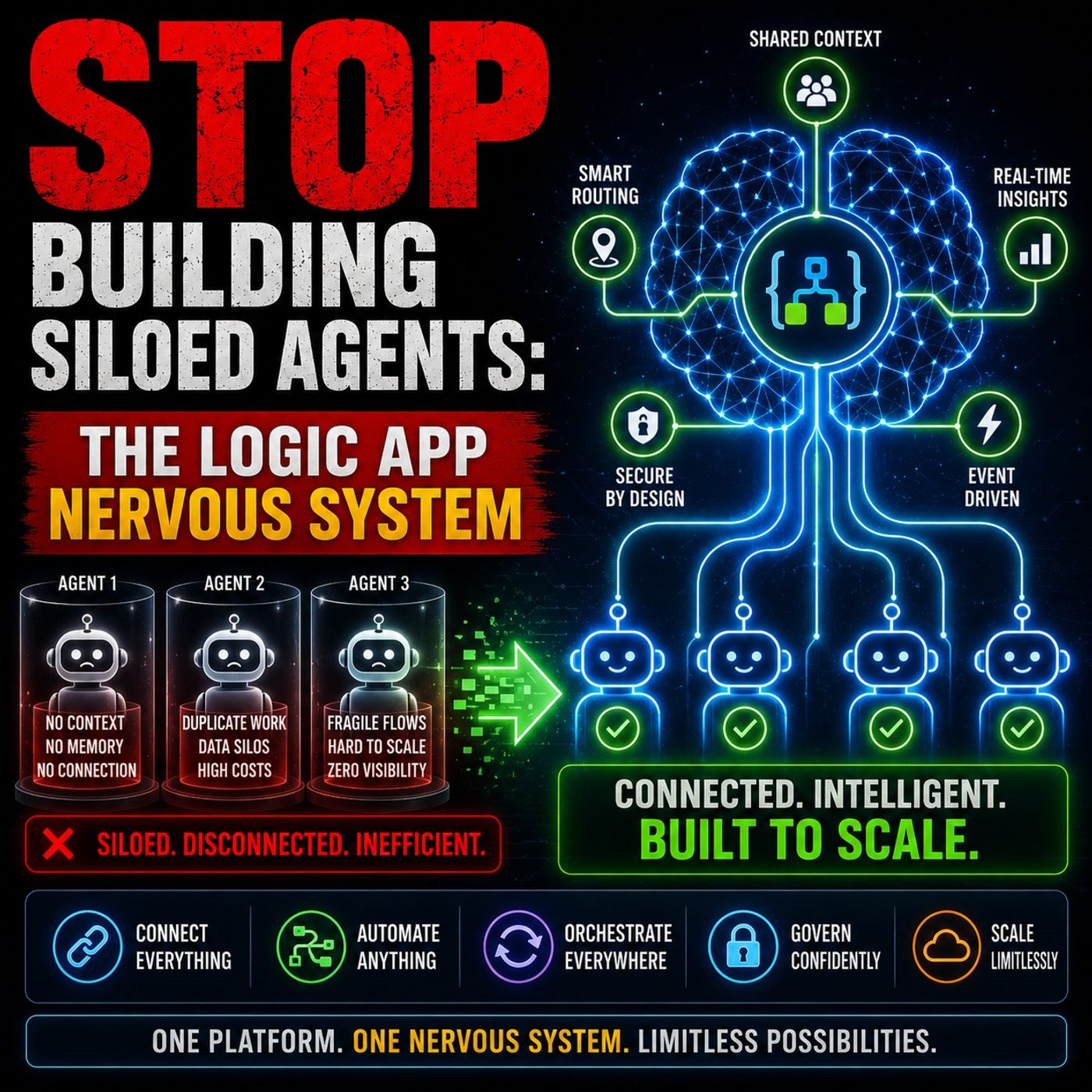
Quick answer: Azure Logic Apps multi-agent AI orchestration is covered in this M365 FM episode with a practical focus on how it works, where it fits, and the architecture, security, governance, or operational choices that matter in real Microsoft environments.
You often see teams deploy AI agents for customer service or IT support. These isolated agents create chaos in enterprise environments. Fragmented systems and data silos limit access to important information. High integration and maintenance costs drain resources. Manual interventions become necessary when disconnected agents cannot automate end-to-end workflows. Logic apps solve these challenges. You use logic apps to STOP BUILDING SILOED AGENTS and create a unified architecture. Logic apps orchestrate workflows, connect agents, and enable event-driven processes. Logic apps provide visibility, explainability, and built-in governance, making your operations efficient and scalable.
Key Takeaways
- Stop building siloed agents. Focus on creating a unified architecture that enhances collaboration across your organization.
- Recognize the limitations of local optimization. Ensure that every agent aligns with your broader business goals to avoid fragmented systems.
- Avoid operational debt. Each new agent adds maintenance costs. Streamline your processes to reduce manual interventions and improve efficiency.
- Implement orchestration with Logic Apps. This centralizes control, allowing agents to work together seamlessly and manage complex workflows.
- Adopt event-driven architecture. This approach enables your agents to respond instantly to changes, improving responsiveness and scalability.
- Utilize connectors as neural pathways. They link Logic Apps to various systems, ensuring smooth data flow and reducing manual tasks.
- Embrace stateful workflows. They allow agents to remember past actions, enhancing continuity and reliability in long-running processes.
- Prioritize security and compliance. Use strong authentication methods and monitor your systems to protect sensitive data and maintain trust.
Stop Building Siloed Agents
The Chatbot Mirage
You might feel excited when your team builds a new chatbot or AI agent. The demo works. The agent answers questions and solves problems. This success can make you believe that more agents will bring more value. However, you soon realize that these agents only solve local problems. They do not help your entire organization work better together.
Local vs Enterprise Optimization
When you focus on local wins, you miss the bigger picture. Each department creates its own agent to handle specific tasks. These agents do not share information or coordinate with each other. You end up with many small solutions that do not add up to a strong enterprise system. If you want to stop building siloed agents, you must think about how every agent fits into your larger business goals.
Operational Debt
Every new agent adds to your workload. You must maintain, update, and support each one. Over time, this creates operational debt. You spend more time fixing problems and less time improving your business. If you do not stop building siloed agents, you will face growing costs and more manual work.
Architectural Weaknesses
Demo Success vs Scale Failure
A chatbot may work well in a demo, but things change when you try to scale. You might see one agent succeed, but dozens of agents can create chaos. Without a plan to stop building siloed agents, you face broken workflows, lost data, and frustrated users. You need a strong architecture to support growth.
The Point-to-Point Trap
Many teams connect agents directly to APIs, databases, or SaaS platforms. This approach seems simple at first, but it quickly becomes a problem as you add more agents.
Integration Sprawl
- The average enterprise now uses 110 SaaS applications, compared to just 8 in 2015.
- Employees spend about 36% of their workday switching between apps and searching for information in disconnected systems.
When you do not stop building siloed agents, you create a web of point-to-point connections. This leads to integration sprawl. Your systems become harder to manage and your users waste time.
Credential Proliferation
Each direct connection needs its own credentials. As you add more agents, you must manage more passwords and secrets. This increases your security risks and makes it harder to keep your systems safe. If you want to stop building siloed agents, you need a better way to handle identity and access.
Tip: Focus on building a unified architecture. This will help you stop building siloed agents and reduce complexity across your organization.
Why Agents Fail at Scale
Reasoning vs Orchestration
You may think that smart agents can solve every problem. In reality, reasoning alone does not guarantee success. Agents need orchestration to work together and manage complex tasks. When you deploy agents without orchestration, you face several challenges:
- Governance and observability become difficult.
- Integration with legacy systems slows progress.
- Teams must supervise autonomous systems and manage risks.
- Without standardized platforms, your projects stay stuck in pilot mode.
Transitioning from legacy mainframes to cloud-native microservices, or merging massive databases, often amplifies data problems. Deploying AI does not clean up these issues; it usually makes them worse.
You must treat agents as production systems from the start. This approach ensures reliability, security, and lifecycle management.
Stateless vs Stateful Workflows
Stateless workflows treat each interaction as independent. You use them for simple tasks like generating a response or running a quick API call. Stateful workflows allow agents to remember context and handle multi-step reasoning. This difference shapes how agents perform in real-world environments.
| Aspect | Stateless Workflows | Stateful Workflows |
|---|---|---|
| Scalability | Achieves 99.9% linear scaling efficiency. | Limited scalability due to session information. |
| Cost | Cost-efficient; best for budget scenarios. | 2-3x more expensive due to memory and session management. |
| Performance | Faster per request (50-150ms). | Slower per request (150-500ms) due to context management. |
| User Experience | Worse for multi-turn conversations and complex workflows. | Superior for multi-turn conversations and advanced tasks. |
| Use Cases | Translation, API queries, simple classifications. | Customer service, sales, healthcare, multi-step processes. |
Process Persistence
You need process persistence for tasks that last longer than a single interaction. Stateless agents cannot remember previous steps. Stateful workflows maintain context and allow agents to resume tasks after interruptions. This capability is essential for onboarding, approvals, and other long-running processes.
Workflow Recovery
Workflow recovery helps you avoid losing progress when something goes wrong. Stateful workflows can checkpoint and restore tasks. You gain reliability and continuity, even when agents face errors or interruptions.
Governance and Observability
You cannot govern what you cannot observe. Without ecosystem-wide observability and decision traces, you cannot answer questions like "Why did the agent do that?" Audit, forensics, and trust become impossible. You must pair observability with strong governance to ensure reliability and traceability.
Untraceable Actions
When agents operate without observability, risks remain invisible until incidents occur. You need to capture decision history, contextual inputs, workflow interactions, and system logs over time. This practice supports accountability and compliance.
Fragmented Error Handling
Fragmented error handling makes oversight difficult. You must review, document, and act on signals proactively. Observability surfaces signals such as decision traces and tool usage. Governance ensures these signals lead to improvements and prevent risks from becoming incidents.
Observability is a governance requirement for agent-driven systems. The EU AI Act mandates traceability, technical documentation, human oversight, and logging of system activity. You must build these capabilities into your agent ecosystem to scale successfully.
Logic Apps as the Nervous System

Imagine your organization as a living body. Each AI agent acts like a muscle or an organ, performing a specific function. However, without a central nervous system, these parts cannot work together. Logic Apps serve as the central nervous system for your enterprise AI. They coordinate actions, transmit signals, and ensure every agent and system responds at the right time.
Orchestration Layer
You need more than smart agents to achieve real business results. Logic Apps provide an orchestration layer that connects agents, people, and systems. This layer acts as the command center, guiding each agent through complex workflows. You can design workflows that:
- Trigger agents based on business events.
- Route tasks to the right person or system.
- Combine human decisions with automated actions.
- Monitor every step for reliability and compliance.
When you use Logic Apps, you can connect agents to enterprise systems like SAP or Salesforce. You can also use conditional logic and parallel execution to handle multiple tasks at once. This orchestration layer helps you avoid common mistakes, such as unnecessary complexity or ignoring latency. You can optimize costs by choosing the right models for each task and ensure observability by monitoring every agent.
Tip: Identify where human input is needed in your workflows. Design your orchestration to include these checkpoints for better results.
Effective orchestration strategies include:
- Agent Loop: Let workflows think and act in cycles until they reach a goal.
- Integration with Enterprise Systems: Use connectors to link agents with business platforms.
- Support for Human and Autonomous Execution: Blend automation with human oversight.
Event-Driven Architecture
You want your agent ecosystem to be responsive and scalable. Event-driven architecture makes this possible. In this model, agents and workflows react to events instead of waiting for scheduled tasks. For example, a new customer record or a file upload can trigger an entire process.
Event-driven architecture separates agent management from execution. Message queues handle traffic spikes, so your system stays stable even during busy times. Listeners activate agents only when new data arrives, which reduces idle costs and improves speed. Event Grid lets agents respond to events from many sources, making your system more flexible.
- Agents can react instantly to business changes.
- You can process information as soon as it appears.
- Loose coupling between workflows increases scalability.
You gain a system that grows with your needs and adapts to new challenges. Event-driven architecture turns your Logic Apps into the central nervous system that keeps every part of your organization in sync.
Connectors as Neural Pathways
Connectors act like the nerves in your central nervous system. They link Logic Apps to hundreds of external systems, making sure information flows smoothly between agents and business platforms. You can use connectors to pull in data, automate tasks, and reduce manual work.
Microsoft 365 Integration
You can connect Logic Apps to Microsoft 365 tools like Teams, Outlook, SharePoint, and OneDrive. This integration allows agents to:
- Access emails, calendars, and files.
- Automate meeting scheduling and notifications.
- Update documents and share information across teams.
With these connectors, you reduce context switching. Agents can pull in customer details, project updates, or shipment statuses directly into their workspace. You streamline repetitive tasks, such as routing conversations or sending alerts, without leaving the Microsoft 365 environment.
Custom APIs
Sometimes, you need to connect to systems that do not have prebuilt connectors. Logic Apps let you build custom APIs as neural pathways. You can:
- Integrate with third-party tools like CRM, TMS, or project management platforms.
- Automate actions such as creating tickets, updating statuses, or logging emails.
- Apply smart rules to route tasks or respond to specific business events.
“Connectors have had a significant impact on our operations because we can now access all the information we need without ever leaving our inbox. Plus, smart rules allow us to identify potentially harmful emails and quarantine them based on alerts in our fraud detection software. This helps us verify and prevent spoofing or fraud attempts before our carrier sales team even sees them.” — Brandon Bay, EVP, Logistics Group International
Prebuilt and low-code connectors make it easy for you to enhance productivity. You can automate workflows, reduce errors, and improve efficiency across your organization.
Key benefits of using connectors:
- Integrate external data from multiple systems in one place.
- Automate repetitive tasks and reduce manual effort.
- Simplify integration with prebuilt and low-code solutions.
Logic Apps, as the central nervous system, use connectors to ensure every agent and system communicates effectively. You gain a unified, event-driven architecture that supports growth, agility, and innovation.
Building Agent Ecosystems

Agent Loop Action
You can build smarter agents by using the Agent Loop. This approach helps agents learn and adapt over time. The Agent Loop works in three main steps:
- Reasoning (Think): The agent looks at its goal and the current situation. It decides what to do next.
- Action (Act): The agent uses Logic Apps' connectors to carry out the chosen action.
- Reflection (Learn): The agent checks the results and updates its understanding for the future.
The Agent Loop repeats these steps in cycles. This lets your agents improve with each round. They learn from their actions and adjust their strategies based on what happens. You get agents that do not just follow rules—they get better at their jobs over time.
Multi-Agent Collaboration
You need agents that can work together, not just alone. Multi-agent collaboration lets you solve bigger problems by dividing tasks among specialized agents. For example, in a smart healthcare system, one agent can monitor patient data while another manages appointments. This teamwork ensures accuracy and continuity.
To make collaboration work, you should focus on these key areas:
- Agent Orchestration: Manage how agents start, stop, and hand off tasks.
- Common Communication Protocol: Use a standard way for agents to talk to each other.
- Reasoning and Planning Engine: Break down big goals into smaller tasks and assign them to the right agents.
- Knowledge and Memory Management: Let agents share data so they do not repeat work.
- Security and Trust Framework: Make sure only trusted agents can access sensitive data.
- Human-Agent Teaming Interface: Allow people to monitor and guide agent activities.
You can set up your platform so each agent has its own tools and permissions. This makes it easy to add new agents or change their roles. You do not need to be an engineer to configure these systems, which helps your whole team get involved.
Cross-Tenant Coordination
You may need agents to work across different Microsoft 365 tenants, especially in large organizations or after mergers. Cross-tenant coordination helps you keep security and scalability strong.
| Aspect | Description |
|---|---|
| Cross-Tenant Operational Standardization | You use API-driven normalization to keep investigations consistent across all tenants. This builds a unified model that adapts to each client’s needs. |
| Acceleration of Detection and Response | You collect evidence and validate threats quickly. This lets you act fast and limit the time attackers spend in your system. |
| Closed-Loop Learning and Continuous Improvement | You use feedback loops to improve detection and risk models for each tenant. This keeps your system accurate without sharing sensitive data between tenants. |
Identity and Security
You must protect your data when agents work across tenants. Use strong authentication and authorization methods. This ensures only approved agents can access the right resources.
Managed Identities
Managed identities help you avoid password sprawl. You do not need to store or rotate secrets. Logic Apps can use managed identities to connect securely to resources in any tenant.
Workload Federation
Workload federation lets agents authenticate without secrets. You use federated credentials and token exchange to build trust between tenants. This supports zero trust security and makes your agent ecosystem safer and easier to manage.
Tip: Build your agent ecosystem with these practices to ensure security, scalability, and continuous improvement.
Stateful Workflows and Memory
Stateful workflows give your agents the ability to remember past actions and keep track of ongoing tasks. You gain a system that adapts, learns, and maintains continuity across sessions. This approach helps you manage complex, long-running processes that require persistent memory and coordination.
Checkpointing and Persistence
Checkpointing lets your workflow pause and resume without losing progress. You set safe boundaries where the system saves its state. If an error or crash happens, your workflow can restart from the last checkpoint instead of starting over.
- Checkpoints store results in memory for quick access or in a database for long-term durability.
- You preserve successful steps even if other parts fail, which improves recovery efficiency.
- You ensure that agents can resume tasks after interruptions, maintaining reliability.
When you use checkpointing, you reduce the risk of losing important data. Your agents can handle tasks that last hours, days, or even weeks. This makes your workflows resilient and dependable.
Approval Handling
Automated workflows often need human approval. You must design approval steps that are clear, secure, and easy to manage. Best practices include:
- Ask only for the data you need, then collect missing information in chat.
- Keep approvals in-thread with fallback paths and clear owners.
- Separate knowledge automation from change actions.
- Tag automated finishes for honest reporting.
- Review one dashboard weekly and improve the slowest step.
- Use least-privilege roles and keep sensitive flows private.
- Publish short rules so requesters know what to expect.
You build trust and transparency by following these practices. Your approval process stays organized, and you avoid confusion or delays. You also protect sensitive information by limiting access and keeping flows private.
Recovery and Coordination
Recovery and coordination ensure that your workflows continue smoothly, even when agents fail or tasks get interrupted. You use monitoring to detect errors and orchestrators to manage recovery.
- Detection: Monitoring notices when an agent stops or an error occurs.
- Isolation: The orchestrator marks the task as failed and checks the last checkpoint.
- State Preservation: Results from previous steps are safely stored.
- Recovery Action: The orchestrator restarts the agent or assigns a new one, using saved context.
- Resume Workflow: The new agent continues from the last checkpoint, and other agents wait for results.
You maintain continuity and avoid losing progress. Your system adapts to failures by recovering quickly and coordinating tasks among agents. This approach keeps your workflows efficient and reliable.
Stateful workflows and memory transform your agent ecosystem. You gain personalized responses, manage complex tasks, and coordinate multiple agents. Your system learns from experience, maintains persistent identity, and delivers consistent results across long-running processes.
Best Practices for Agent Integration
Custom Connectors
You often need to connect your agents to systems that do not have ready-made connectors. Custom connectors give you the flexibility to build these links yourself. They help you solve unique integration challenges and make sure your agents work with any system your business uses.
Here are some reasons why custom connectors matter:
- Tailored Integration Solutions: You can design connectors that fit your exact needs. This ensures your agents work smoothly with your existing tools and data.
- Enhanced Functionality and Flexibility: Custom connectors let you create advanced workflows and map data in ways that standard connectors cannot. You get more control over how information moves between systems.
- Competitive Advantage: By using custom connectors, you reduce manual work and speed up your processes. This leads to better productivity and a stronger customer experience.
Tip: Start by identifying which systems need custom connectors. Build and test these connectors to make sure they meet your business goals.
Logic-in-API Contracts
You need clear rules for how your agents share data and complete tasks. Logic-in-API contracts set these rules. They define what information goes into each step (StepInput) and what comes out (StepOutput). This makes your workflows predictable and easy to manage.
Logic-in-API contracts act as formal agreements between different parts of your workflow. Each agent knows exactly what to expect. This reduces confusion and mistakes. When you use these contracts, you make your agent ecosystem more reliable. You also make it easier to update or add new agents in the future.
Note: Standardizing your data flow with logic-in-API contracts helps you avoid errors and keeps your workflows consistent, even as your system grows.
Security and Compliance
Protecting sensitive data is a top priority when you integrate agents. You must follow strong security and compliance practices to keep your information safe.
- Encryption Standards: Use TLS 1.3 for secure communication and AES-256 for storing data. This keeps your information safe from unauthorized access.
- Identity and Access Management: Apply OAuth2 or OpenID Connect for authentication. Use Role-Based Access Control (RBAC) to limit who can see or change sensitive data.
- Monitoring and Response: Connect your agent workflows to a Security Information and Event Management (SIEM) system. This helps you spot and respond to threats quickly.
- Regulatory Compliance: Make sure your integrations follow laws like GDPR and HIPAA. Start with compliance in mind to avoid problems later.
Always review your security settings and update them as threats change. Keeping your agent integrations secure protects your business and builds trust with your users.
Error Handling Intelligence
You need strong error handling to keep your agent integrations reliable and safe. Intelligent error handling does more than just catch mistakes. It helps you find problems early, fix them quickly, and learn from every failure. You build trust in your system when you can explain what went wrong and how you solved it.
Start by using a unified observability platform. Tools like Datadog, Dynatrace, or New Relic let you monitor all your agents and workflows in one place. You can see logs, traces, and alerts from every part of your system. This makes it easier to spot issues before they become big problems.
Specialized monitoring tools help you track how your AI agents behave. Platforms like LangSmith let you trace, debug, and evaluate agent interactions. You can see each step an agent takes and understand why it made certain choices. This level of detail helps you improve agent performance and fix errors faster.
Structured logging is another key practice. You should log every important action in a consistent format. Use unique trace IDs for each request. This lets you follow a problem from start to finish, even if it moves across different systems. Clear logs make it easier to find the root cause of an error.
Set up health checks and alerts for your most important workflows. Automated health checks test if your agents and connectors are working as expected. If something fails, alerts notify you right away. You can respond quickly and keep your business running smoothly.
Tip: Review your error logs and alerts regularly. Look for patterns and recurring issues. Use these insights to improve your workflows and prevent future problems.
You also need to plan for changes in your agents and connected systems. AI models and APIs change over time. A new version might break an old integration or change how data is handled. To manage this, use version pinning to lock your agents and APIs to known-good versions. Monitor for updates and test changes in a safe environment before rolling them out. Staged rollouts and adapter patterns help you adjust to new versions without breaking your workflows.
By following these practices, you create an agent ecosystem that can handle errors intelligently. You gain resilience, faster recovery, and a system that learns from every failure. This approach keeps your integrations strong, even as your business grows and changes.
Getting Started with Logic Apps
Quick Wins
You can start using Logic Apps quickly, even if you have never built a workflow before. Logic Apps gives you a simple way to automate tasks and connect your systems. You do not need to write code to get results. Here is a step-by-step guide to help you begin:
- Open the Azure Portal and sign in with your Azure credentials.
- Search for "Logic App" in the portal and select it.
- Choose the plan that fits your needs. If you are new, the Consumption Plan works best for simple projects.
- Set up your Logic App by picking a Resource Group, giving it a name, choosing a Region, and deploying it.
- Build your first workflow by picking a trigger. For example, you can set it to send a daily email or start when a file is uploaded.
Tip: Start with a small workflow, such as sending yourself a daily summary email. This helps you learn how triggers and actions work together.
You can see results right away. Logic Apps lets you connect to many services, like Microsoft 365, Outlook, or SharePoint. You can also add more actions to your workflow as you get comfortable. Each step you take builds your skills and shows you the power of automation.
Resources and Roadmap
As you grow your Logic Apps skills, you will want to scale your solutions and manage more complex workflows. Microsoft provides many resources to help you along the way. The table below highlights some key tools and features you can use:
| Resource | Description |
|---|---|
| Azure Logic Apps | Orchestrate workflows and multi-agent business processes at Azure scale, enabling intelligent, goal-driven processes. |
| Power Automate migration to Azure Logic Apps (Standard) | Offers scalability for large workflows with high throughput and low latency, along with performance optimization features. |
| Azure Logic Apps | Provides out-of-the-box connectors and the ability to create custom connectors, facilitating seamless automation across teams. |
| Azure Logic Apps | Features a visual workflow designer and organizational templates for faster workflow creation and governance. |
You can use the visual designer to build workflows without writing code. Templates help you start faster and follow best practices. Out-of-the-box connectors let you automate tasks across your favorite apps. If you need more, you can create custom connectors for your unique business needs.
Note: As you move from simple workflows to enterprise-scale solutions, review the available resources and plan your roadmap. This helps you build a strong, scalable automation platform for your organization.
You move from siloed agents to orchestrated ecosystems and gain stronger enterprise AI outcomes. Fragmented systems increase costs and cause agents to forget prior interactions. Centralized operations enhance collaboration and improve decision-making. A unified framework for governance boosts efficiency and reduces duplicated efforts. Logic Apps act as your nervous system, connecting agents and workflows. Start integrating your agents and explore event-driven architecture. For next steps, review Microsoft’s documentation and try building a simple workflow to see the benefits firsthand.
FAQ
What are agents in Logic Apps, and why do they matter?
Agents act as digital workers in your workflows. You use agents to automate tasks, connect systems, and manage data. Agents help you build scalable architecture and improve efficiency. You can coordinate agents for real-time communication and adaptive workflows.
How do Logic Apps support real-time event-driven design?
Logic Apps use event-driven design to trigger workflows instantly. You can set up event-driven agents that respond to changes in data or systems. This approach gives you real-time updates and lets you automate processes without delays.
Can I build multi-agent systems for complex workflows?
Yes, you can create multi-agent systems with Logic Apps. You assign each agent a role in your architecture. Agents share context and work together to complete tasks. This setup boosts scalability and supports autonomous operations.
How do I ensure data interoperability and seamless integration?
You connect agents to different platforms using Logic Apps connectors. This ensures data interoperability and seamless integration. You can move data between systems, maintain context, and keep workflows running smoothly.
What is the best way to test your AI solution in Logic Apps?
You should test your AI solution by running sample workflows. Check how agents handle context and real-time events. Review logs for errors. Refine agent instructions to improve results. Testing helps you build reliable and scalable architecture.
How do I create a standard edition logic app for AI agents?
You start in the Azure portal. Choose to create a standard edition logic app. Add your agents and set up workflows. Use connectors for event-driven agents and real-time triggers. This method supports multi-agent systems and improves scalability.
What makes no-code AI agent development possible in Logic Apps?
Logic Apps offer a visual designer. You drag and drop actions to build workflows for your AI agent. You do not need to write code. This no-code AI agent approach lets you focus on architecture, context, and event-driven design.
How do I manage context and memory in adaptive workflows?
You use stateful workflows to store context. Agents remember past actions and share information. This helps you coordinate multi-agent systems and maintain real-time operations. Adaptive workflows adjust to changes and keep your architecture flexible.
Tip: Always review your workflows for context sharing and real-time triggers. This practice ensures your agents work together and your architecture stays strong.
🎧 Listen to this episode
Want a practical explanation of Azure Logic Apps for Multi-Agent AI Orchestration? This episode breaks down the topic in clear language and shows why it matters for Microsoft 365, Azure, Power Platform, security, AI, and modern work.
Listen to this episode if you want to:
- Understand the key concepts behind Azure Logic Apps for Multi-Agent AI Orchestration
- See how it fits into the wider Microsoft technology ecosystem
- Learn where it can create practical value for your organization
You may also enjoy these related M365 FM episodes:
- Azure Logic Apps - Simply Explained
- Multi-Agent AI with Microsoft Copilot and SharePoint – Reshmee Auckloo [MVP]
- Multi-Agent AI with Copilot Studio and David Lorenzo Lopez [MVP]
- Stop Microsoft Copilot Prompt Injection with Azure Logic Apps
- Scale Azure Logic Apps Beyond Custom Connectors
Discover more practical Microsoft conversations on M365 FM.
Last reviewed: July 2026.
Who Should Listen
This episode is for Microsoft administrators, architects, developers, security professionals, and business leaders who need a practical foundation before making implementation, operations, or governance decisions.
🎧 You Should Also Listen To
- AI Agents — A strongly related next step for extending this topic.
- Power Platform — A strongly related next step for extending this topic.
- Microsoft Graph Data Connect — A strongly related next step for extending this topic.
Apple Podcasts · Spotify · YouTube · YouTube Music
Host: Mirko Peters