 EN
EN Deutsch
 Español
 Français
 Italiano
 Português
 Nederlands
 Polski
 Bahasa Indonesia
 Русский
 Українська
 العربية
 עברית
עברית हिन्दी
 日本語
日本語 한국어
한국어2026-05-30 · Season 2
The Copilot Tax: Hidden Costs of Enterprise AI Strategy

Quick answer: hidden costs of Microsoft Copilot enterprise strategy is covered in this M365 FM episode with a practical focus on how it works, where it fits, and the architecture, security, governance, or operational choices that matter in real Microsoft environments.
You may think the $30 per user fee for Copilot covers everything, but the copilot tax runs much deeper. Every time you use Copilot for AI-powered tasks, hidden costs like token consumption and compute usage quietly add up. If you ignore these operational inefficiencies, your money can slip away fast. Leaders who track these costs gain real control over AI spending and see better returns.
Key Takeaways
- The Copilot Tax includes hidden costs beyond the $30 per user fee, such as token consumption and compute usage.
- Regularly review your Copilot usage to identify idle licenses and avoid unnecessary expenses.
- Invest in training and onboarding to maximize your team's efficiency with Copilot and reduce operational waste.
- Establish clear cost centers to track AI spending by department, helping to identify areas for optimization.
- Use metrics like cost per hour saved and productivity lift to measure the value of your AI investment.
- Negotiate contracts strategically to leverage your organization's size and secure better terms.
- Implement strong governance practices to monitor compliance and manage risks associated with AI usage.
- Conduct regular audits to ensure your AI tools align with business goals and deliver expected returns.
What Is the Copilot Tax?
Defining Copilot Tax
You may hear the term copilot tax when people talk about the real price of using Copilot in your organization. This tax is not just the $30 per user each month. It describes the full economic impact of Copilot AI on your business. When you pay for Copilot, you do more than buy a tool. You set a new standard for how your team works. This tax pushes you to improve your data governance and rethink your workflows. Microsoft uses this fee to create a new baseline for productivity across companies worldwide. As a result, you need to pay close attention to how Copilot AI changes your daily operations and your budget.
Why Copilot Costs Add Up
You might think the main cost comes from the license fee, but many hidden factors drive up your spending. These extra costs can surprise you if you do not track them closely. Here are the main reasons why Copilot costs add up:
- Billing rates change based on the features and capabilities you use.
- Copilot credits get used up as you design and run different agents.
- The licensing structure pools capacity across your organization, which can make it hard to see where your money goes.
- Token consumption increases as more users interact with Copilot AI.
- Compute usage grows when you process large documents or run complex tasks.
- Zombie licenses, or unused seats, still cost you money.
- The verification tax appears when you need to check or validate AI outputs.
- Operational inefficiencies, like poor onboarding or lack of training, waste both time and resources.
Tip: Tax professionals recommend regular reviews of your Copilot usage to avoid paying for idle licenses or wasted tokens.
Impact on AI Budgets
The copilot tax can have a big effect on your overall AI budget. You may start with a simple license fee, but as your team uses Copilot AI more, your costs can rise quickly. Many organizations find it hard to predict these expenses because AI usage changes all the time. When your team relies on Copilot for daily tasks, you see more interactions and higher operating costs, especially with large projects.
The table below shows the main cost factors that can impact your AI budget:
| Cost Factor | Description |
|---|---|
| Licensing Costs | The starting price for Copilot licenses. |
| Usage-Based Fees | Extra charges based on how much you use Copilot AI. |
| Training Costs | Money spent to teach your team how to use Copilot. |
| Auto-Enabled Seats | Costs from user seats that are turned on but not always used. |
| Storage Growth | More storage needed as Copilot AI handles more data. |
| Shadow AI | Unmanaged AI tools that can create surprise expenses. |
| Unmanaged Renewals | Renewed licenses without careful review. |
| Optimization Strategies | Steps you take to control spending, like better governance and analytics. |
Only about 20% of organizations use Microsoft's AI tools at a large scale. Many buy Copilot but do not fully deploy it. Sometimes, the promised plug-and-play experience does not match what you need in real life. This gap can lead to wasted money and missed opportunities. Tax professionals often see companies struggle with these hidden costs. You need to watch your spending and make sure every dollar helps your business grow.
Main Cost Drivers of Copilot AI

Subscription and Usage Fees
Per-User and Usage-Based Pricing
You pay a base licensing fee for Copilot, but the real cost often goes beyond that. Copilot charges $30 per user each month, and you may see extra fees for compute, AI APIs, or premium models. These usage-based charges can make your total cost rise by 40% to 100% depending on your plan. Many organizations find the pricing structure complex, with mandatory add-ons and hidden costs that can surprise you.
| Feature/Cost Aspect | Microsoft Copilot | Other Enterprise AI Tools |
|---|---|---|
| Base Licensing Fee | $30 per user/month | Varies by tool |
| Additional Usage Charges | Yes (Compute, AI APIs, premium models) | Varies by tool |
| Total Cost Increase | 40% to 100% depending on base plan | Varies by tool |
| Complexity of Pricing | High (mandatory add-ons, hidden costs) | Varies by tool |
You may also face unpredictable pay-as-you-go billing, which makes it hard to plan your AI budget. Licenses often come bundled with add-ons, increasing your overall tax burden.
Idle Licenses and Token Waste
Idle licenses, sometimes called zombie licenses, create a hidden copilot tax. When users do not use their assigned seats, you still pay for them. Token waste happens when Copilot AI processes unnecessary or repeated queries, using up valuable compute resources. This waste can push your costs higher without adding value. Tax professionals recommend regular audits to find and remove these idle licenses.
Engineering Overhead
Training, Onboarding, and Support
You need to invest in training and onboarding to help your team use Copilot AI effectively. This process takes time and resources. Support costs can rise as users ask for help or need troubleshooting. If you skip proper onboarding, you risk pilot purgatory, where your AI project stalls and never reaches full deployment. This purgatory drains efficiency and increases your implementation risk.
| Cost Category | Primary Cost Driver |
|---|---|
| Platform licensing | Number of users and feature tier |
| Model usage | Query volume and context size |
| Operations and support | Number of workflows and business units |
Integration and Workflow Challenges
Compatibility Issues
Integrating Copilot AI with your existing systems can be complex. You may need to hire consultants or buy extra software to make everything work together. This adds to your tax and can slow down your project.
Workflow Disruptions
Workflow disruptions can lower accuracy and reliability. If Copilot AI does not fit smoothly into your daily tasks, you may see productivity drop. Low adoption rates lead to underutilization, which means you pay for features you do not use. The absence of native tools to track usage makes it hard to measure return on investment. You may also face unpredictable usage-based billing, which complicates your financial planning.
Note: Strong governance and regular reviews help you avoid these hidden costs and improve your AI efficiency.
Hidden and Operational Expenses
Productivity Losses
You may notice that productivity drops when you deploy copilot ai without proper planning. Copilot can automate tasks and boost efficiency, but operational inefficiencies often lead to wasted time. If users do not receive enough training, they may struggle to use copilot ai effectively. This confusion can cause repeated queries, which increases token consumption and compute usage. You pay for these extra resources, but you do not see a real improvement in productivity. Tax professionals often point out that idle licenses and underutilized features create hidden tax burdens. When you track usage and focus on high-value applications, you protect your budget and improve accuracy.
Tip: Regular audits help you identify idle licenses and wasted tokens, so you can optimize your copilot deployment and maximize productivity.
Security and Compliance Risks
Security and compliance risks can create unexpected financial impact for your organization. Misconfigured permissions may allow unauthorized access, which leads to compliance violations and costly penalties. Oversharing sensitive data increases the risk of data breaches, causing financial losses and damaging your reputation. Content sprawl results in inefficient resource allocation and higher storage costs. You must monitor these risks to avoid hidden operational expenses.
| Risk Factor | Impact on Operational Expenses |
|---|---|
| Misconfigured permissions | Unauthorized access and compliance violations, increasing costs due to penalties and remediation |
| Oversharing of sensitive data | Data breaches, financial losses, reputational damage |
| Content sprawl | Inefficient resource allocation, increased storage costs |
- Increased licensing costs often occur when users misunderstand copilot capabilities.
- Non-compliance penalties arise from improper data management.
- Cybersecurity risks can lead to significant financial losses.
You can reduce these risks by defining clear governance policies and conducting ongoing access reviews. Monitoring usage metrics helps you maintain compliance and protect sensitive data.
Data and API Costs
Data and API costs can escalate quickly when you integrate copilot with your enterprise systems. You pay $30 per user per month for copilot, but you also need supporting infrastructure. Professional services for deployment and configuration add to your expenses. Training programs for end users increase your spending. Ongoing management overhead pushes your costs higher over time. Many organizations see a 15-20% increase in overall Microsoft spending after integrating copilot ai.
| Cost Component | Description |
|---|---|
| Licensing | $30 per user per month, plus additional infrastructure licensing |
| Professional Services | Deployment and configuration costs |
| Training Programs | Expenses for end user training |
| Ongoing Management Overhead | Costs for managing integration over time |
| Overall Spending Increase | 15-20% rise in Microsoft spending with AI integration |
- Copilot requires existing Microsoft 365 E3/E5 or Business Standard/Premium subscriptions.
- Users on lower-tier licenses may need upgrades, which adds to your tax burden.
- Usage-based charges for AI APIs and premium models increase your overall cost.
You can control these expenses by aligning subscription plans with your business needs and monitoring usage. Governance and prompt discipline help you avoid unnecessary spending and maintain a sustainable AI budget.
Copilot vs. Alternatives

Open Source and In-House AI
You may wonder if open source or internal ai solutions can help you avoid the copilot tax. Many organizations choose open-source tools because they eliminate token fees and reduce strategic dependency on a single vendor. You do not face vendor lock-in, which means you have more control over your ai costs. Open-source ai requires you to invest in infrastructure and maintenance, but you often see long-term savings. For example, a global law firm switched from cloud-based tools to a secure, on-prem internal ai model. This move eliminated token fees and cut annual ai spending by $500,000. You also improve compliance and audit readiness with this approach.
Here are some key points to consider:
- Open-source solutions remove token fees and lower total cost of ownership.
- Internal ai gives you more control and flexibility.
- Proprietary solutions like copilot involve ongoing subscription and token-based fees.
- Open-source ai needs technical resources for setup and support.
If your team has the right skills, you can use internal ai to drive innovation and keep costs predictable.
Competing AI Tools
You have many choices when you compare copilot ai to other leading tools. Some popular options include ChatGPT, Tabnine, and Codeium. Each tool has its own pricing and features. The table below shows how copilot compares to ChatGPT across different tiers:
| Tier | ChatGPT | Microsoft Copilot |
|---|---|---|
| Free | $0 (GPT-4o-mini, limited) | $0 (basic, session context) |
| Individual Pro | $20/mo (Plus) / $200/mo (Pro) | $30/mo (Copilot Pro) |
| Team / Small Business | $25/seat/mo (Team) | $30/seat/mo (M365 add-on) |
| Enterprise | ~$30/seat/mo (custom) | $30/seat/mo (M365 add-on) |
| API Access | Pay-per-token (OpenAI API) | Azure OpenAI (consumption-based) |
| Annual Discount | ~17% on Team plan | Bundled with M365 agreements |
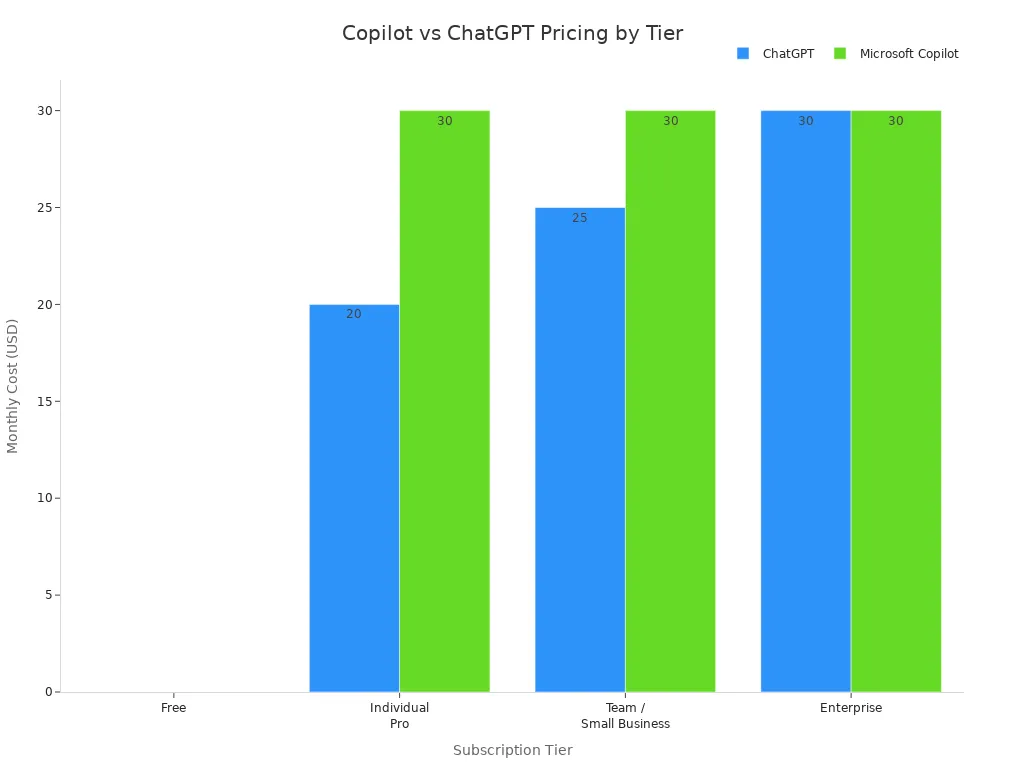
You see that copilot offers a free tier and a Pro version at $30 per month. ChatGPT Plus costs $20 per month and gives you more raw ai capability per dollar. If your organization already uses Microsoft 365 E5, adding copilot is a cost-effective choice. ChatGPT may work better for independent users or small teams.
Cost Divergence Explained
You need to understand why costs diverge between copilot and other ai tools. The main factors include features, support, and compliance. Some tools, like Codeium, offer unlimited completions for free. Others, such as Tabnine Enterprise, charge $59 per user for advanced features and compliance support. Copilot sits in the middle, balancing price and integration with Microsoft 365.
| Solution | Cost (Monthly) | Features |
|---|---|---|
| GitHub Copilot | $10 | Code suggestions, chat features, CLI assistance |
| Cursor Pro | $20 | Unlimited completions, 500 fast premium requests per month |
| Tabnine Enterprise | $59/user | Advanced features, team management, compliance features, custom model training |
| Codeium | Free | Unlimited completions, meaningful functionality for individual developers |
| Mid-tier options | $10-20 | Balance features with affordability, suitable for freelancers and small teams |
| Enterprise plans | $19-59/user | Organization-wide policy management, IP indemnity, enhanced security |
You see higher costs when you need advanced compliance, team management, or custom model training. Lower-cost options may lack these features but support rapid innovation for smaller teams. You must weigh the value of integration, support, and compliance against the copilot tax. Careful selection helps you avoid unnecessary spending and maximize revenue from your ai investments.
Auditing Your Copilot Spending
Identifying Cost Centers
You need to know where your money goes when you invest in ai tools. Start by setting up cost centers for each department or business unit. This helps you see which teams use the most resources. Many organizations use cost center features to track spending and hold teams accountable. You can create cost centers for different programs or projects. This makes it easier to manage your budget and spot areas where you spend too much.
Here are some practical steps to identify major cost centers:
- Use usage-based cost projections to predict future expenses.
- Track budgets at the department level to see if you stay within limits.
- Watch for unusual spending patterns that may signal waste.
- Look for ways to optimize costs, such as adjusting licenses or features.
When you break down your spending, you can find hidden costs like zombie licenses or idle usage. Regular reviews help you keep your ai budget under control.
Tracking Usage and Value
You must measure how much value you get from your ai investment. Tracking usage and value helps you see if copilot delivers the results you expect. Use clear metrics to compare costs and benefits.
| Metric | Description |
|---|---|
| Cost per hour saved | How much money you save for each hour of work automated by ai. |
| Payback period | How long it takes for benefits to match your initial investment. |
| Productivity lift | The percentage increase in efficiency from using ai. |
| License utilization rates | The share of licenses that users actually use. |
| Training completion rates | The number of users who finish ai training. |
| User satisfaction levels | Feedback from users about their experience with ai. |
Tip: Review these metrics every quarter. This helps you spot trends and make better decisions about your ai tools.
Tools for Expense Auditing
You can use several tools to audit your ai spending and find waste. Many mid-sized firms lose thousands each month on inactive accounts. Automating license reclamation can save money and improve your budget health. For example, LicenseIQ offers workflows that reclaim licenses after 30 days of inactivity. This keeps your license pool fresh and reduces waste.
A professional services firm with 350 seats reviewed their Microsoft stack, including copilot licenses. They found surprising usage patterns and saved over a million rupees in one year without changing tools. Before you add more seats, always pull usage reports to see who actually uses ai. This prevents you from paying for unused or redundant licenses.
Note: Effective auditing tools help you measure program effectiveness and avoid wasted budgets. Regular reviews and accountability measures keep your ai spending in check.
Reducing the Copilot Tax
License and Contract Negotiation
You can lower your copilot costs by taking a strategic approach to license and contract negotiation. Start by using your organization's size as leverage. Larger companies often have more bargaining power. Microsoft Account Executives want to include copilot in contracts, so you can use this motivation to your advantage.
Consider these proven strategies:
- Negotiate phased implementations. This lets you evaluate copilot's impact before committing to a full rollout.
- Have open conversations with licensing resellers. Transparency helps you find the best deal.
- Offer to share your success story or participate in case studies. In return, you may receive discounts or added value.
- Review contract terms carefully. Make sure you understand all fees and renewal clauses.
When you negotiate with confidence, you gain more control over your ai budget. You also set the stage for better long-term partnerships.
Optimizing Adoption and Training
Maximizing the value of ai tools depends on strong adoption and effective training. You want your team to use copilot in ways that boost productivity and accuracy. Companies have found creative ways to encourage adoption and reduce unnecessary spending.
- A retail company launched a "31 Days of Copilot" campaign. Daily tips helped users try 12 new functions in one month.
- A financial services firm used a digital adoption platform for in-app guidance. This increased usage by 36% compared to teams without support.
- A construction company built a tiered support model. Copilot Champions, Power Users, and a Center of Excellence provided local help and kept training consistent.
You can also save money by rightsizing licenses and using analytics. Many organizations cut copilot spending by 20-35% with this approach. Track how much time your team saves and how often they automate tasks. Some users report saving over 10 hours per month when they use ai actively.
Tip: Focus on high-value users and monitor adoption rates. This ensures you invest in the right places and avoid wasted licenses.
Governance and Deployment Discipline
Strong governance and disciplined deployment help you control ai costs and maintain efficiency. Assign clear responsibilities to different teams. Each group plays a key role in managing copilot and related ai tools.
| Function | Responsibility |
|---|---|
| IT | Permissions architecture, tenant configuration, admin controls, audit logging |
| Security | Threat monitoring, DLP policies, incident response for copilot-related events |
| Legal | AUP development, compliance framework mapping, contract, and IP risk |
| HR | Employee training, AUP acknowledgment, acceptable use enforcement |
| Business leaders | Use case approval, team-level rollout decisions, shadow AI reporting |
You must also follow important frameworks to stay compliant and protect your data.
| Framework | Key Considerations |
|---|---|
| GDPR | Lawful basis, data rights, retention, cross-border transfers |
| HIPAA | BAA required, PHI access must follow the minimum necessary rule |
| SOC 2 | Include copilot in scope, logs, access reviews, and DLP evidence |
| ISO 27001 | Risk assessment, supplier security, and access controls |
To keep your ai environment secure and cost-effective, take these steps:
- Complete permission audits and fix oversharing.
- Apply sensitivity labels for data classification.
- Configure and test DLP policies.
- Enforce multi-factor authentication and conditional access.
- Review and acknowledge acceptable use policies.
- Enable audit logs and send them to your SIEM.
- Regularly review agents and connectors.
Note: Ongoing monitoring and prompt discipline prevent costs from spiraling. You protect your investment and support sustainable ai growth.
Reviewing AI Tool Usage
You need to review your AI tool usage regularly to keep your Copilot costs under control. Many organizations buy licenses and expect instant results. Real value comes from understanding how your team uses these tools over time. You can spot waste, improve productivity, and make smarter decisions when you track usage closely.
Start by setting a schedule for reviews. Early in your Copilot journey, focus on how many people use the tool and how often they log in. As your team grows, look for ways Copilot helps save time and boost productivity. When your organization reaches maturity, measure how Copilot supports innovation and gives you an edge over competitors. In the optimization stage, check if you get the most value for your money and if Copilot aligns with your business goals.
Here is a simple table to guide your review process at each stage:
| Stage | Focus Area |
|---|---|
| Early Stage | Usage rates and basic adoption metrics |
| Growth Stage | Productivity improvements and time savings |
| Maturity Stage | Innovation metrics and competitive advantage |
| Optimization Stage | Cost efficiency and strategic impact |
You should use both quantitative and qualitative data. Pull reports that show license activity, token consumption, and feature usage. Ask users for feedback about their experience. This helps you find out which features matter most and which ones go unused.
Consider these steps to make your reviews effective:
- Set clear goals for each review period.
- Compare actual usage to your original expectations.
- Identify licenses that remain idle for more than 30 days.
- Look for patterns in token consumption and workflow changes.
- Adjust your deployment based on what you learn.
Tip: Involve team leaders in the review process. They can provide insights about workflow changes and help you spot areas for improvement.
You can also benchmark your results against similar organizations. This shows if you lead or lag in AI adoption and helps you set realistic targets. Regular reviews keep your AI strategy on track and ensure you get the best return on your investment.
Building a Sustainable AI Budget
Forecasting Ongoing Costs
You need to predict your ongoing costs to keep your AI budget healthy. Start with a pilot deployment for two or three months. Measure how much your team actually uses Copilot during this time. Use these numbers to estimate future expenses, adding a safety margin for unexpected growth. You can also run a prototyping exercise. Simulate real workflows and transactions to see how Copilot fits your business. Watch how your team interacts with the tool. This helps you model expected volumes before you roll out Copilot to everyone.
- Begin with a small pilot to measure real usage.
- Track token consumption and compute usage.
- Use the data to forecast costs for a larger rollout.
- Add a buffer to your estimates for safety.
This approach gives you a clear view of your AI spending. You avoid surprises and make better decisions for your organization.
Aligning AI Spend with Goals
You should connect your AI investments to your business goals. This ensures your spending supports growth and revenue. Focus on high-impact roles first. Assign Copilot licenses to the teams that will benefit most. Train these teams on real workflows so they can use Copilot to its full potential. Embed Copilot into daily work processes. This makes AI a natural part of your operations and drives innovation.
| Step | Description |
|---|---|
| 1 | Align licenses to high-impact roles to ensure effective use of Copilot. |
| 2 | Train teams on real workflows to maximize the tool's potential. |
| 3 | Embed Copilot into daily work processes for seamless integration. |
| 4 | Measure outcomes that matter to the business to assess true ROI. |
Measure the results that matter most to your business. Track how Copilot helps you save time, improve accuracy, and increase revenue. When you align your AI strategy with your goals, you get the best return on your investment.
Accountability for AI Expenses
You must hold your teams accountable for AI spending. Keep a complete inventory of all Copilot-related assets. Track key metrics like usage and policy violations. Gather feedback from users to make sure your policies work in practice. Use scheduled and dynamic reports to keep leaders informed. Monitor new AI capabilities and regulations to stay ahead of risks.
Centralized governance helps you manage AI spending as a portfolio. Build dashboards that show cost and usage data. Assign an owner for AI cost management. Set approval levels for new services and standard contract terms. Run phased rollouts with clear cost-per-outcome metrics. Optimize your models and prompts to reduce waste. Negotiate contracts that are clear and fair.
Make cost awareness part of your culture. Set up approval workflows and share budget ownership. Schedule quarterly reviews with different teams. Show cost metrics to everyone so they use AI responsibly. This discipline helps you control expenses and protect your revenue.
Tip: When you make accountability part of your process, you build a sustainable AI budget that supports growth and innovation.
You face the copilot tax through hidden costs like monitoring, data cleansing, and governance staffing, which can reach up to 80% of your project spend. These expenses impact your AI budget and can slow productivity gains. To control copilot ai costs, you need real-time visibility, regular audits, and strong governance.
Delivering real business value requires a clear-eyed view of the hidden expenses: data readiness, security, and continuous governance.
Tax professionals recommend phased rollouts and disciplined deployment. Reassess your AI strategy often to maximize productivity and ensure every tax dollar drives results.
FAQ
What is the Copilot Tax?
You pay more than just the license fee for Copilot. The Copilot Tax includes hidden costs like token consumption, compute usage, and operational overhead. These expenses can add up quickly if you do not monitor them.
How can I spot zombie licenses?
Check your user activity reports. Look for licenses that show no usage for 30 days or more. Remove or reassign these seats to avoid paying for unused accounts.
Does Copilot require extra Microsoft subscriptions?
Yes. You need Microsoft 365 E3/E5 or Business Standard/Premium. If you use lower-tier plans, you may need to upgrade. This adds to your overall AI spending.
How do I reduce token waste?
Train your team to use Copilot efficiently. Encourage clear prompts and avoid repeated queries. Regular audits help you find and fix unnecessary token usage.
What is the verification tax?
The verification tax is the time and resources you spend checking AI outputs for accuracy. You pay for this through extra work hours and possible delays.
Can I negotiate Copilot pricing?
You can negotiate with Microsoft, especially if you buy many licenses. Ask for phased rollouts, bundled discounts, or custom terms. Always review your contract before signing.
What tools help track Copilot costs?
| Tool Type | Example Use |
|---|---|
| License Auditing | Find idle licenses |
| Usage Analytics | Monitor token consumption |
| Cost Dashboards | Visualize spending trends |
Use these tools to keep your AI budget under control.
🎧 Listen to this episode
Want a practical explanation of The Copilot Tax? This episode breaks down the topic in clear language and shows why it matters for Microsoft 365, Azure, Power Platform, security, AI, and modern work.
Listen to this episode if you want to:
- Understand the key concepts behind The Copilot Tax
- See how it fits into the wider Microsoft technology ecosystem
- Learn where it can create practical value for your organization
You may also enjoy these related M365 FM episodes:
- Microsoft 365 Copilot Enterprise Transformation Strategy
- Agentic Operating Model for Enterprise AI and Copilot
- Mixture of Experts for Enterprise Copilot and AI Agents
- Grounding Microsoft Copilot for Trusted Enterprise AI
- How to Govern Microsoft Copilot in the Enterprise
Discover more practical Microsoft conversations on M365 FM.
Last reviewed: July 2026.
Who Should Listen
This episode is for Microsoft administrators, architects, developers, security professionals, and business leaders who need a practical foundation before making implementation, operations, or governance decisions.
🎧 You Should Also Listen To
- AI Agents — A strongly related next step for extending this topic.
- Power Platform — A strongly related next step for extending this topic.
- Microsoft Teams — A strongly related next step for extending this topic.
Apple Podcasts · Spotify · YouTube · YouTube Music
Host: Mirko Peters