 EN
EN Deutsch
 Español
 Français
 Italiano
 Português
 Nederlands
 Polski
 Bahasa Indonesia
 Русский
 Українська
 العربية
 עברית
עברית हिन्दी
 日本語
日本語 한국어
한국어2026-02-13
Why Microsoft Copilot Agents Fail—and How to Fix Them

Organizations across various industries increasingly rely on Copilot agents to enhance productivity and streamline operations. You expect these agents to drive efficiency and improve decision-making. However, when Copilot agents are failing to deliver, disappointment sets in. Why do these failures occur? Understanding the underlying issues can help you avoid common pitfalls and maximize the potential of your Copilot agents.
Key Takeaways
- Establish clear governance policies to ensure copilot agents operate effectively and meet expectations.
- Define roles and responsibilities within your team to foster accountability and prevent confusion.
- Implement performance monitoring to track key metrics and identify areas for improvement in copilot agents.
- Ensure high-quality data inputs to enhance the accuracy and reliability of outputs from your copilot agents.
- Address data silos by standardizing data and creating policies for seamless integration across systems.
- Prepare your organization for change by fostering a culture that embraces innovation and provides adequate training.
- Gather user feedback regularly to refine copilot agents and adapt them to better meet user needs.
- Monitor agents in real-time to detect issues early and take corrective actions to improve performance.
Governance and Copilot Agents Failing

Effective governance plays a crucial role in the success of copilot agents. Without a solid governance framework, you risk facing significant challenges that can lead to copilot agents failing. Establishing clear policies is the first step in ensuring that your agents operate effectively and deliver the expected results.
Clear Policies
Roles and Responsibilities
Defining roles and responsibilities is essential for the smooth operation of copilot agents. When you clarify who is responsible for what, you create a structured environment that fosters accountability. Each team member should understand their role in managing and overseeing copilot agents. This clarity helps prevent confusion and ensures that everyone works towards common goals.
Accountability Measures
Implementing accountability measures is vital for maintaining the integrity of your copilot agents. You need to establish frameworks that hold individuals and teams responsible for their actions. This can include regular performance reviews and audits to assess how well agents are meeting their objectives. According to research, organizations lacking robust governance face risks, making it essential to have clear policies to mitigate potential penalties and ensure compliance.
| Evidence Type | Description |
|---|---|
| Governance Models | AI governance models that enforce delivery truth improve accountability and decision-making processes. |
| Common Failure Reasons | High pilot failure rates (75%) are often due to vague goals, poor data quality, and lack of governance. |
| Steps for Measurable ROI | Structured planning with clear metrics is essential for successful AI implementation and governance. |
Oversight Mechanisms
Performance Monitoring
You must implement effective performance monitoring to ensure your copilot agents are functioning as intended. This involves tracking key performance indicators (KPIs) that reflect the agents' effectiveness. By regularly reviewing these metrics, you can identify areas for improvement and make necessary adjustments. A strong Agent PMO coordinates workflows that make governance repeatable, including monitoring and AI success metrics.
Adaptation to Changes
The business landscape is constantly evolving, and your governance framework must adapt accordingly. You should regularly review and update your policies to reflect new challenges and opportunities. This proactive approach helps you maintain the relevance and effectiveness of your copilot agents. Continuous monitoring is necessary to detect bias and ensure safety, which builds trust among users.
| Feature | Description |
|---|---|
| Central Control Hub | Microsoft Agent 365 acts as a central control hub for AI agents, providing visibility and governance across the enterprise. |
| Unified Observability | Offers a single dashboard for tracking all AI agent activities, eliminating blind spots and reducing risks. |
| Actionable Oversight | Provides AI-driven insights and visualizations that help stakeholders understand agent interactions and performance metrics. |
| Proactive Monitoring | Flags risky agents and anomalies in real-time, allowing for immediate action to be taken by IT leaders. |
By prioritizing governance, you can significantly reduce the chances of copilot agents failing. Clear policies and effective oversight mechanisms create a foundation for success, ensuring that your agents operate efficiently and deliver the desired outcomes.
Data Quality and Copilot Agents
Data quality significantly impacts the performance of copilot agents. When you provide accurate and reliable data, your agents can deliver better outputs. However, poor data quality leads to errors and misinterpretations, which can undermine the effectiveness of your copilot agents.
Accurate Data Inputs
Sources of Errors
Inaccurate or incomplete data inputs can cause copilot agents to produce superficial or incorrect outputs. These agents often lack the enterprise-specific context needed to understand critical business elements. They operate within a single semantic model and cannot integrate diverse data sources. As a result, they may fail to deliver reliable root-cause analyses. This leads to user distrust and stalled adoption in real-world scenarios.
Impact on Decisions
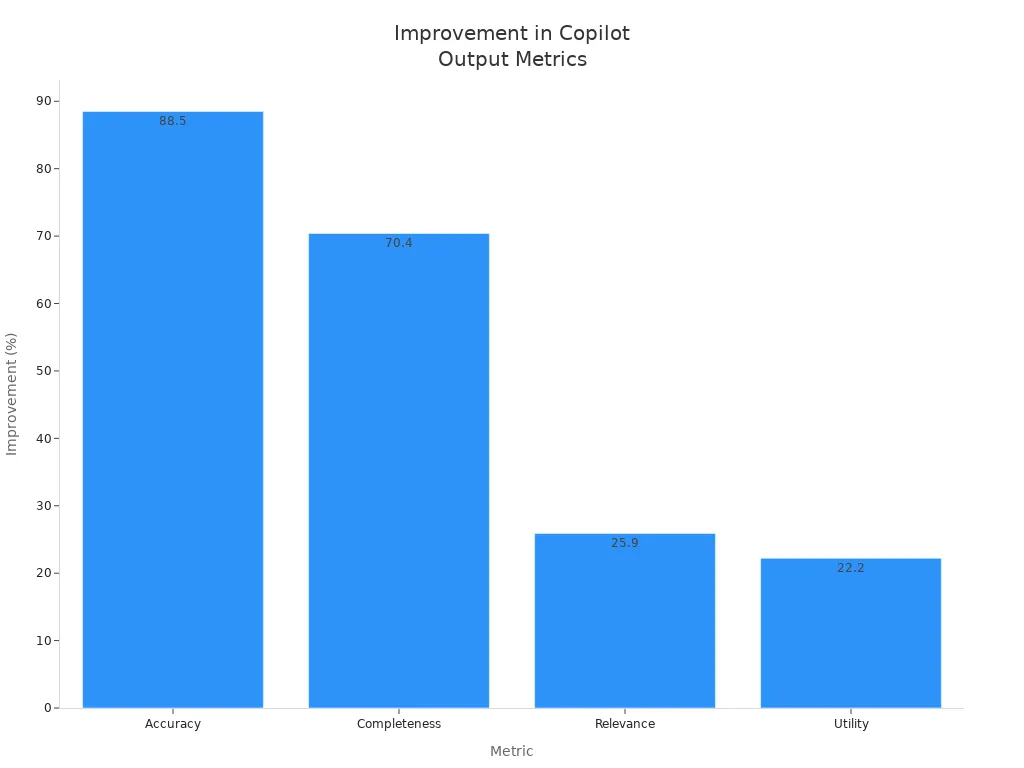
The quality of data directly influences decision-making. When you use high-quality data, you enhance the accuracy, completeness, relevance, and utility of your copilot agents. Studies show that improving data quality can lead to significant enhancements in agent outputs:
| Metric | Improvement (%) |
|---|---|
| Accuracy | 88.5 |
| Completeness | 70.4 |
| Relevance | 25.9 |
| Utility | 22.2 |
Data Integration
Effective data integration is essential for maximizing the potential of your copilot agents. You must manage data silos and ensure compatibility across various systems.
Managing Data Silos
Data silos can hinder the performance of copilot agents. When data resides in isolated systems, agents struggle to access the information they need. You should standardize your data and create policies that allow for seamless integration. This approach ensures that your agents have access to comprehensive and relevant data.
Compatibility Issues
Compatibility issues can also pose challenges when integrating data for copilot agents. Organizations often face several common challenges, including:
| Challenge | Description |
|---|---|
| Data Policies | Organizations need to configure data policies to control which knowledge sources can be used by agents. |
| Authentication | Agents require user authentication, complicating the integration process. |
| Knowledge Sources | Restrictions on knowledge sources can limit agent functionality, impacting effectiveness. |
| HTTP Requests | Blocking HTTP requests can prevent agents from accessing necessary external data. |
| Skills | Configuring which skills agents can use is essential for security but can limit functionality. |
| Publishing Channels | Organizations must manage which channels agents can be published to, affecting accessibility. |
| Event Triggers | Restrictions on event triggers are necessary to prevent unwanted data consumption or exfiltration. |
By addressing these challenges, you can enhance the data quality that feeds into your copilot agents. This improvement will lead to better decision-making and increased trust in the outputs generated by your agents.
Organizational Readiness for Copilot Agents
Organizational readiness is crucial for the successful implementation of copilot agents. You must prepare your organization to embrace these agents fully. This preparation involves addressing change resistance and ensuring alignment with business goals.
Change Resistance
Cultural Barriers
Cultural barriers can significantly hinder the adoption of copilot agents. Employees may resist changes due to fear of job displacement or discomfort with new technologies. To overcome this resistance, you should foster a culture that embraces innovation. Encourage open communication about the benefits of copilot agents. Highlight how these tools can enhance productivity rather than replace jobs.
Training and Support
Training and support are essential for easing the transition to using copilot agents. You should provide comprehensive training programs that equip employees with the skills they need. Regular workshops and resources can help users feel confident in utilizing these agents. According to research, 96% of management expects AI to increase productivity, while 77% of teams using AI report that their workload has increased. This statistic underscores the importance of providing adequate support to prevent burnout and digital fatigue among employees.
Alignment with Business Goals
Aligning copilot agent implementation with your organization's business goals is vital for long-term success. You must ensure that these agents contribute to your strategic objectives.
Understanding User Needs
Understanding user needs is the first step in aligning copilot agents with business goals. Engage with employees to gather insights about their challenges and expectations. This feedback can guide the development of copilot agents that address specific pain points. Setting clear goals aligned with business objectives will help you measure the success of these agents effectively.
Strategic Alignment
Strategic alignment involves integrating copilot agents into your overall business strategy. You should assess your organizational readiness for deployment by evaluating the current technology landscape and reviewing policies related to copilot licenses. This assessment helps identify areas for cost optimization through process automation.
To effectively implement copilot agents, consider the following strategies:
- Start with an end goal in mind to align with business objectives.
- Assess the current organizational landscape for readiness.
- Implement a strong governance framework to support copilot deployment.
- Provide user training and resources for effective adoption.
- Establish data security measures to protect sensitive information.
- Pilot projects before full-scale deployment to mitigate risks.
By embedding AI transformation within broader sustainability goals, you can ensure that copilot initiatives support mission objectives and scale responsibly over time.
| Readiness Factor | Impact on Deployment Success |
|---|---|
| Clear understanding of current position | Ensures alignment with business objectives and measurable value. |
| Strong governance framework | Reduces risk and empowers teams for effective deployment. |
| Assessment of tech landscape maturity | Facilitates appropriate scaling of copilot agents. |
Technical Limitations of Copilot Agents
When you deploy copilot agents, you may face several technical limitations that cause failures. These issues often stem from the environment where the agents run or how they handle sessions. Understanding these challenges helps you plan better and avoid common pitfalls.
Customization Needs
One-Size-Fits-All Issues
Many copilot agents come with default settings that do not fit every organization or user. This one-size-fits-all approach limits their usefulness. For example, ai agents designed for general tasks may not handle specific workflows or industry jargon well. When you rely on generic agents, users may find the responses irrelevant or incomplete. This gap reduces trust and slows adoption.
User-Specific Requirements
Customization lets you tailor ai agents to meet unique needs. Different industries require different capabilities. The table below shows examples of how organizations customize their copilot agents to improve user experience:
| Industry | Use Case | Customization Needs |
|---|---|---|
| Education | Student support at Victoria University | Tailored responses to common student questions |
| Finance | Virgin Money's credit card assistant | 24/7 personalized financial support |
| Government | City of Burlington's digital assistant | Localized information and citizen engagement |
| Healthcare | Centro de la Familia's case worker automation | Streamlined admin tasks for critical support roles |
| Retail | Online store product queries and order tracking | Responses based on live inventory and customer history |
| Human Resources | Microsoft's HR copilot on intranet | Automating repetitive HR queries |
| Transportation | Heathrow Airport's 'Here to Help' initiative | Real-time info for frontline staff assisting travelers |
By customizing your copilot agents, you improve relevance and user satisfaction. You also reduce errors caused by generic responses.
Performance Reliability
System Downtime
Downtime disrupts workflows and frustrates users. Some technical limitations cause session failures or prevent sessions from starting. The table below lists common issues that affect copilot agent reliability:
| Technical Limitation Category | Description | Impact on Copilot Agent |
|---|---|---|
| Hosted machine groups | Not supported, causing inability to run sessions on these machines | Session failure or inability to start session |
| Multi-screen desktops | Not supported, limiting environment compatibility | Session failure or degraded functionality |
| Session status inaccuracies | Agent session may incorrectly show "In progress" when completed | Misleading session status, complicating troubleshooting |
| Hosted browser throttling | Usage is throttled based on demand and user limits, leading to session failures | Session failure due to throttling |
To improve uptime, platforms like Azure Copilot use resiliency agents. These agents help maintain consistent performance and recover quickly from disruptions. This reliability is critical for your business continuity.
Response Time Challenges
Slow responses reduce user satisfaction and productivity. In enterprise environments, copilot agents have cut average email response times by 17%. Users rate their experience highly, with a satisfaction score of 4.6 out of 5 in Microsoft 365 applications. Fast response times help users trust ai agents and rely on them for daily tasks.
Tip: Monitor your copilot agents’ performance regularly. Identify bottlenecks and optimize infrastructure to reduce downtime and improve response times.
By addressing technical limitations and customizing your copilot agents, you can unlock their full potential. Focus on reliable systems and tailored solutions to meet your users’ needs and improve overall outcomes.
User Engagement and Copilot Agents
User engagement plays a vital role in the success of copilot agents. When you actively involve users in the process, you enhance their experience and increase the likelihood of adoption. Effective training and onboarding are essential components of this engagement.
Training and Onboarding
Importance of Effective Training
You must implement structured training programs that allow users to progress at their own pace. This approach helps users feel comfortable and confident in using copilot agents. Consider incorporating microlearning techniques, such as daily tips and quick guides. These methods have shown to significantly increase user engagement. In-app guidance can also provide contextual support, leading to a 36% increase in usage.
Here are some effective training practices:
- Coaching and Peer Learning: Establish a champions network to enhance local support and consistency.
- Pilot Training Programs: Gather feedback to refine training materials, resulting in faster adoption rates.
Continuous Learning
Continuous learning ensures that users remain informed about new features and best practices. Tailored training programs enhance relevance and effectiveness for users. Facilitator-led interactive training sessions encourage engagement and immediate feedback. Peer-to-peer learning fosters the sharing of best practices among users, enhancing collective understanding of ai-driven agents.
Feedback Loops
Gathering Insights
Feedback loops are crucial for continuously improving copilot agent performance. You can capture real-time user interactions and product usage data. This information helps refine the AI model's behavior and evolve product features. The process, often referred to as the "signals loop," enables AI systems to learn from actual user feedback. This adaptability transforms agents from reactive tools into proactive collaborators that improve over time.
Here are some effective methods for gathering user feedback:
| Method | Description |
|---|---|
| Built-in thumbs up/down reactions | Enable users to provide quick feedback on each response with a simple click. |
| Custom feedback via Adaptive Cards | Solicit specific feedback through interactive cards. |
| Analytics dashboard | Analyze feedback data to identify trends and areas for improvement in agent performance. |
Iterative Improvements
You should regularly analyze the feedback collected to make iterative improvements. This process allows you to adapt your copilot agents to better meet user needs. By focusing on user engagement and feedback, you can enhance the overall effectiveness of your copilot agents.
Copilot agents often fail due to several key issues. Common reasons include specification issues, loss of conversation history, and task derailment. These failures can lead to significant inefficiencies in your operations.
To enhance the effectiveness of your copilot agents, you must address these challenges. Consider implementing the following actionable steps:
- Monitor Agents in Real-Time to detect problematic behaviors.
- Quarantine Misbehaving Agents to prevent further issues.
- Investigate Root Causes to understand and resolve specific problems.
By evaluating your current practices and making necessary changes, you can unlock the full potential of your copilot agents and drive better outcomes for your organization.
Remember, proactive governance and continuous improvement are essential for success!
FAQ
What are copilot agents?
Copilot agents are AI-driven tools designed to assist users in various tasks. They enhance productivity by automating processes and providing insights based on data.
How can I improve the performance of my copilot agents?
You can improve performance by ensuring high-quality data inputs, implementing effective governance, and providing user training. Regular monitoring and feedback loops also help.
What role does data quality play in copilot agents?
Data quality is crucial. Accurate and reliable data inputs lead to better outputs from copilot agents. Poor data can result in errors and misinterpretations.
How do I address user resistance to copilot agents?
To address resistance, foster a culture of innovation. Communicate the benefits of copilot agents and provide comprehensive training to ease the transition.
What are common technical limitations of copilot agents?
Common limitations include system downtime, slow response times, and compatibility issues. These can hinder the effectiveness of copilot agents in your organization.
How can I gather user feedback on copilot agents?
You can gather feedback through built-in reactions, surveys, and analytics dashboards. This information helps you refine agent performance and adapt to user needs.
Why is governance important for copilot agents?
Governance ensures accountability and clarity in roles. It helps maintain control over copilot agents, reducing risks and enhancing their effectiveness in operations.
What should I do if my copilot agents are failing?
If your agents are failing, assess governance, data quality, and user engagement. Identify root causes and implement necessary changes to improve their performance.
🎧 Listen to this episode
Want a practical explanation of Why Microsoft Copilot Agents Fail—and How to Fix Them? This episode breaks down the topic in clear language and shows why it matters for Microsoft 365, Azure, Power Platform, security, AI, and modern work.
Listen to this episode if you want to:
- Understand the key concepts behind Why Microsoft Copilot Agents Fail—and How to Fix Them
- See how it fits into the wider Microsoft technology ecosystem
- Learn where it can create practical value for your organization
You may also enjoy these related M365 FM episodes:
- Fix Copilot Policy Hallucinations with Custom Engine Agents
- Microsoft 365 Copilot Agents: Real Business Value with Steve Corey [MVP]
- Copilot Studio AI Agents and RAG with Nilüfer Doğan [MVP]
- Azure Copilot Agents: Building a Synthetic Platform Team
- Mixture of Experts for Enterprise Copilot and AI Agents
Discover more practical Microsoft conversations on M365 FM.
Apple Podcasts · Spotify · YouTube · YouTube Music
Host: Mirko Peters