 EN
EN Deutsch
 Español
 Français
 Italiano
 Português
 Nederlands
 Polski
 Bahasa Indonesia
 Русский
 Українська
 العربية
 עברית
עברית हिन्दी
 日本語
日本語 한국어
한국어2025-11-03
Prove Microsoft 365 Copilot ROI for Sales Teams

Microsoft 365 Copilot saves you both time and money by automating routine tasks and streamlining your workflows. This ai assistant helps you cut down on busywork like email writing, meeting summaries, and data analysis, freeing up hours each month for higher-value work. On average, users save around 9 hours monthly, with advanced users reclaiming up to 20 hours. These productivity gains lead to cost reductions, including up to a 0.24% decrease in operating expenses.
Investing in microsoft 365 Copilot pays for itself by boosting efficiency and enabling data-driven decision-making that accelerates your business outcomes. You can rely on microsoft copilot’s seamless integration with microsoft 365 tools to enhance your daily work without disruption.
| Metric | Value/Description |
|---|---|
| Average time saved by general users | 8 hours per month |
| Average time saved by advanced users | Up to 20 hours per month |
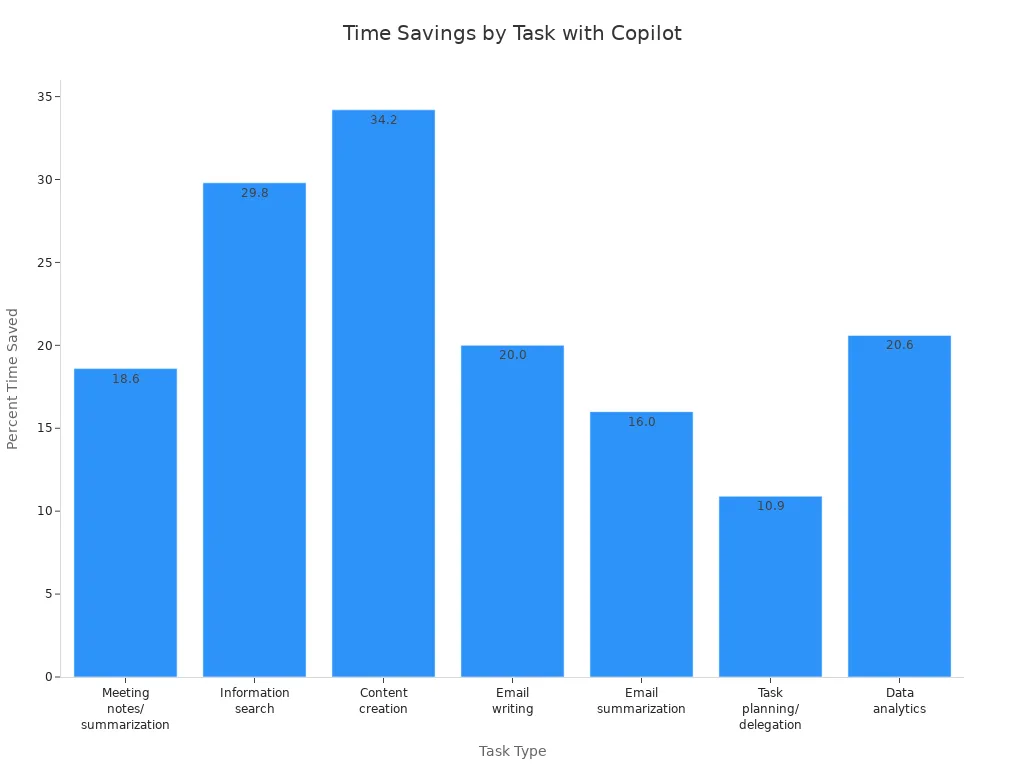
| Percent time savings by task type | Meeting notes/summarization: 18.6% |
| Information search: 29.8% | |
| Content creation: 34.2% | |
| Email writing: 20.0% | |
| Email summarization: 16.0% | |
| Task planning and delegation: 10.9% | |
| Data analytics: 20.6% | |
| Average fully burdened hourly rate | $38 per hour |
| Reduction in total operating expenses | Up to 0.24% decrease |
Key Takeaways
- Microsoft 365 Copilot automates routine tasks, saving users an average of 9 hours per month.
- Advanced users can reclaim up to 20 hours monthly, allowing more time for high-value work.
- The tool reduces operating expenses by up to 0.24%, making it a cost-effective investment.
- Copilot enhances document creation, speeding up the process by nearly 12% and saving users significant time.
- Effective communication improves with Copilot, which summarizes emails and suggests quick replies.
- Data analysis time can be reduced by 70-90%, enabling quicker insights and better decision-making.
- Organizations can lower labor costs by redirecting workforce efforts to higher-value activities.
- Microsoft 365 Copilot integrates seamlessly with existing tools, enhancing productivity without disruption.
Time Savings with Microsoft 365 Copilot
Automating Routine Tasks
Microsoft 365 Copilot revolutionizes how you handle routine tasks. By automating repetitive activities, you can reclaim valuable time. For instance, studies show that users save an average of 1.2 hours per week just by using Copilot for routine tasks. In some cases, employees report saving up to 30 minutes a day, which adds up to 13 workdays a year.
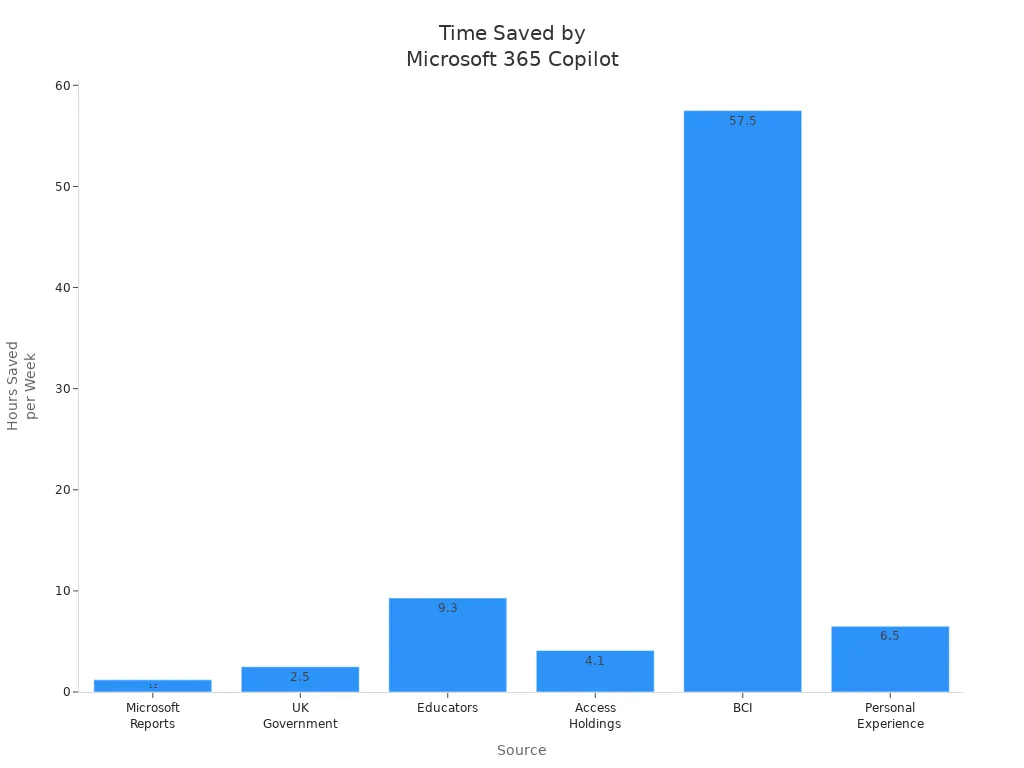
Here’s a quick overview of time saved across various sources:
| Source | Time Saved |
|---|---|
| Microsoft Reports | 1.2 hours/week |
| UK Government Trial | 30 minutes/day |
| Educators | 9.3 hours/week |
| Access Holdings | 30-60 minutes/day |
| BCI | 2,300 person-hours saved |
| Personal Experience | 6.5 hours/week |
Accelerating Document Creation
Creating documents can often feel like a time-consuming chore. With Microsoft 365 Copilot, you can speed up this process significantly. Users report saving nearly half a day on average when creating documents. Regular users can save almost a full day, which translates to 12% faster document creation.
- Copilot drafts, rewrites, and formats documents quickly.
- You spend less time editing and more time shaping your ideas.
- This tool enhances your overall workflow, making tasks feel smoother.
As one user noted, "Copilot doesn’t replace the work. It removes the drag that slows it down. Once you start using it, the speed feels natural."
Streamlining Communication
Effective communication is crucial in any organization. Microsoft 365 Copilot enhances your communication efficiency by summarizing long email threads and suggesting quick replies. Here’s how it improves your daily interactions:
- Flags urgent items to help you prioritize important emails.
- Groups related threads for better context.
- Summarizes lengthy email chains, saving you from scrolling through them.
- Drafts professional emails with the appropriate tone and style.
By streamlining communication, Copilot allows you to focus on strategic initiatives rather than getting bogged down in mundane tasks. As a result, productivity increases, work accuracy improves, and employee satisfaction rises.
Reducing Data Analysis Time
Data analysis can often feel like a daunting task, consuming hours of your valuable time. Fortunately, Microsoft 365 Copilot transforms this process, allowing you to focus on insights rather than getting lost in data. By leveraging advanced AI capabilities, Copilot reduces data analysis time by an impressive 70-90%.
Imagine this: a typical analysis cycle that once took 148 minutes can now be completed in just 15 minutes. This means you save 133 minutes per cycle, translating to an annual time saving of 114 hours when applied to weekly analyses. With Copilot, you can quickly generate reports, visualize data, and extract actionable insights without the usual hassle.
Here’s how Copilot streamlines your data analysis:
- Automated Data Processing: Copilot handles data gathering and processing, allowing you to skip tedious manual tasks.
- Instant Insights: The tool analyzes trends and patterns in real-time, providing you with immediate feedback.
- User-Friendly Visualizations: Copilot creates charts and graphs that make complex data easy to understand at a glance.
By reducing the time spent on data analysis, you can allocate more resources to strategic decision-making. This shift not only enhances your productivity but also empowers your team to respond swiftly to market changes.
Tip: Embrace the power of Microsoft 365 Copilot to transform your data analysis workflow. The time you save can be reinvested into high-impact projects that drive your business forward.
In a world where data drives decisions, having a tool that accelerates your analysis is invaluable. With Microsoft 365 Copilot, you gain a competitive edge, enabling you to make informed choices faster than ever before.
Cost Benefits of Microsoft Copilot

Lowering Labor Costs
Microsoft 365 Copilot significantly lowers labor costs by automating repetitive tasks. This automation allows you to redirect your workforce toward higher-value activities. As a result, organizations report substantial reductions in labor hours. For instance, users of Microsoft 365 Copilot save an average of 9 hours per month, while advanced users can reclaim up to 20 hours.
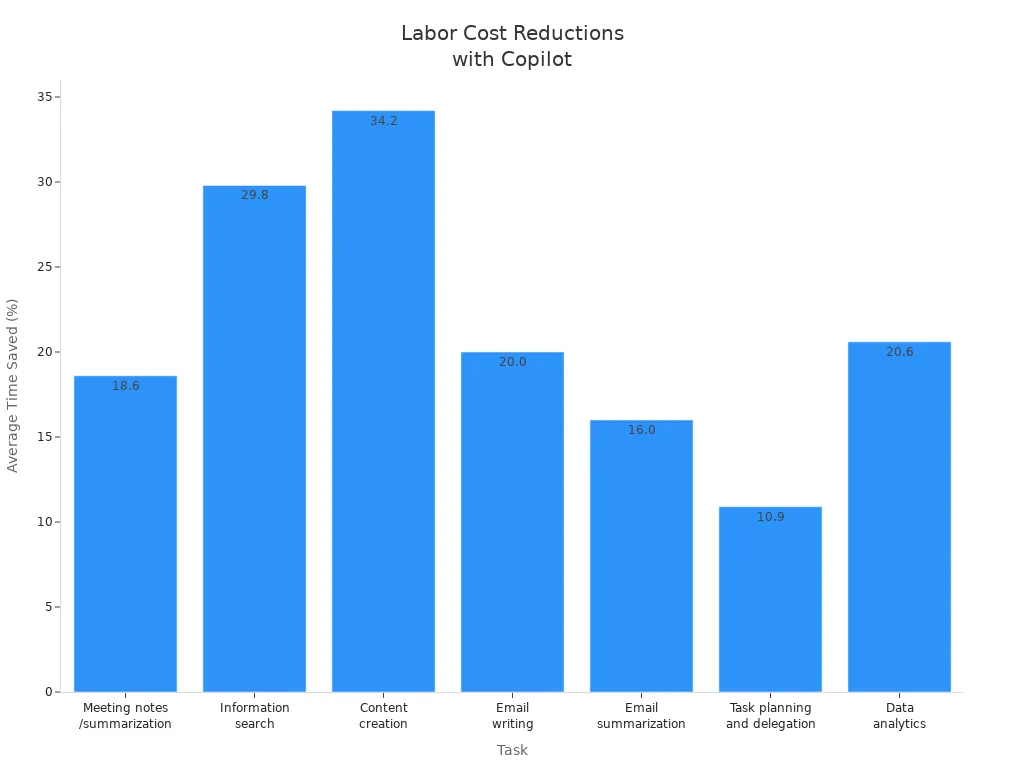
Here’s a breakdown of average time saved across various tasks:
| Task | Average Time Saved (%) |
|---|---|
| Meeting notes/summarization | 18.6% |
| Information search | 29.8% |
| Content creation | 34.2% |
| Email writing | 20.0% |
| Email summarization | 16.0% |
| Task planning and delegation | 10.9% |
| Data analytics | 20.6% |
By reducing the time spent on these tasks, you can lower your overall operational costs. In fact, organizations have reported up to a 0.24% decrease in total operating expenses after implementing Microsoft 365 Copilot. This reduction translates into real savings that can be reinvested into strategic initiatives, enhancing your business value.
Minimizing Errors
Another significant cost benefit of Microsoft 365 Copilot is its ability to minimize errors in business processes. By automating time-consuming tasks, Copilot improves accuracy and reduces the likelihood of mistakes. Here are some ways it achieves this:
- Automation of repetitive tasks helps minimize human error.
- Teams can focus on higher-value activities, which reduces the chances of oversight.
- The overall productivity boost from automation accelerates business operations.
When you use Microsoft 365 Copilot, you streamline workflows and enhance the quality of your outputs. This leads to fewer revisions and corrections, saving both time and money. By managing tasks like drafting reports and summarizing information, Copilot allows you to concentrate on more complex and creative problem-solving.
Optimizing Resource Use
Microsoft 365 Copilot also optimizes resource use within your organization. It integrates seamlessly with existing systems, enhancing data consolidation and accelerating decision-making. Here’s how it helps:
- Copilot empowers employees by providing tools that enhance their productivity.
- It facilitates the generation of synergies across departments, streamlining business processes.
- Optimization agents assist with resource allocation and task assignment based on organizational data.
By leveraging Microsoft 365 Copilot, you can ensure that your resources are used efficiently. This optimization not only improves your operational visibility but also helps you tackle financial challenges more effectively. The result is a more agile organization that can respond swiftly to market demands.
Tip: Embrace Microsoft 365 Copilot as a strategic asset. Its ability to lower costs, minimize errors, and optimize resource use makes it a valuable investment for any organization.
Productivity Gains and Value
Enhancing Employee Output
Microsoft 365 Copilot significantly enhances your employee output by automating mundane tasks. With this ai assistant, you can focus on high-impact activities that drive your business forward. By streamlining processes, Copilot allows you to draft documents, summarize information, and analyze data more efficiently. As a result, you can expect a productivity boost of 10% to 20% in your organization. This increase translates into more completed projects and improved team morale.
Supporting Faster Decision-Making
Faster decision-making is crucial in today’s competitive landscape. Microsoft 365 Copilot empowers you to make informed choices quickly. It integrates generative AI into tools like Word, Excel, and Teams, enabling you to access timely insights. Here’s how it supports faster decision-making:
| Business Case | Evidence of Faster Decision-Making |
|---|---|
| British Columbia Investment Management Corporation | Employees report a productivity boost of 10% to 20% due to faster financial analysis and improved decision-making processes. |
| Floww | Copilot helps summarize and cross-reference complex documents, speeding up project timelines and enhancing decision-making. |
| The Rider Firm | Automates data consolidation, improving efficiency in inventory management and decision-making. |
| Sensei | Provides tailored recommendations for patient care, allowing healthcare professionals to focus on outcomes. |
| Joos | Uses Copilot to personalize sales pitches, saving time and enhancing customer relationships. |
| PKSHA Technology | Reduces data analysis time from hours to less than an hour, enabling quicker insights and recommendations. |
By automating routine tasks and providing quick access to relevant data, you can focus on strategic initiatives that matter most.
Improving Workflow Quality
Microsoft 365 Copilot also improves workflow quality across departments. It enhances operational efficiency, reduces errors, and saves time. Here are some examples of how it boosts workflow quality:
- Automated IT documentation reduces manual workload by generating troubleshooting guides and scripts.
- Inventory and supply tracking is streamlined, improving order management and resource tracking.
- Real-time project and maintenance summaries keep teams aligned and operations running smoothly.
These improvements lead to significant gains in productivity. For instance, marketing teams have increased qualified opportunities by using Copilot to generate high-quality campaigns and content. Additionally, product launch preparation has been accelerated, reducing time from five days to just two hours.
With Microsoft 365 Copilot, you can expect a 40% reduction in time spent on recurring tasks, tripling workflow velocity and achieving 85% quality gains in decision-making. This tool not only enhances your output but also positions your organization for success in a fast-paced environment.
ROI Analysis of Microsoft 365 Copilot
Calculating Time and Cost Savings
To understand the return on investment (ROI) for Microsoft 365 Copilot, you need to calculate both time and cost savings. Here’s a straightforward method to determine your ROI:
- Determine Total Annual Cost: Calculate the total annual cost of an employee, including salary, overhead, and taxes. This typically ranges from 1.25 to 1.4 times the base salary.
- Calculate Hourly Costs: Divide the annual cost by the number of working hours in a year to find the hourly cost.
- Fixed Copilot Cost: Use a fixed cost of $30 per month for Microsoft 365 Copilot.
- Calculate ROI: Multiply the hourly cost by the time saved per month, subtract the monthly Copilot cost, and then divide by the Copilot cost.
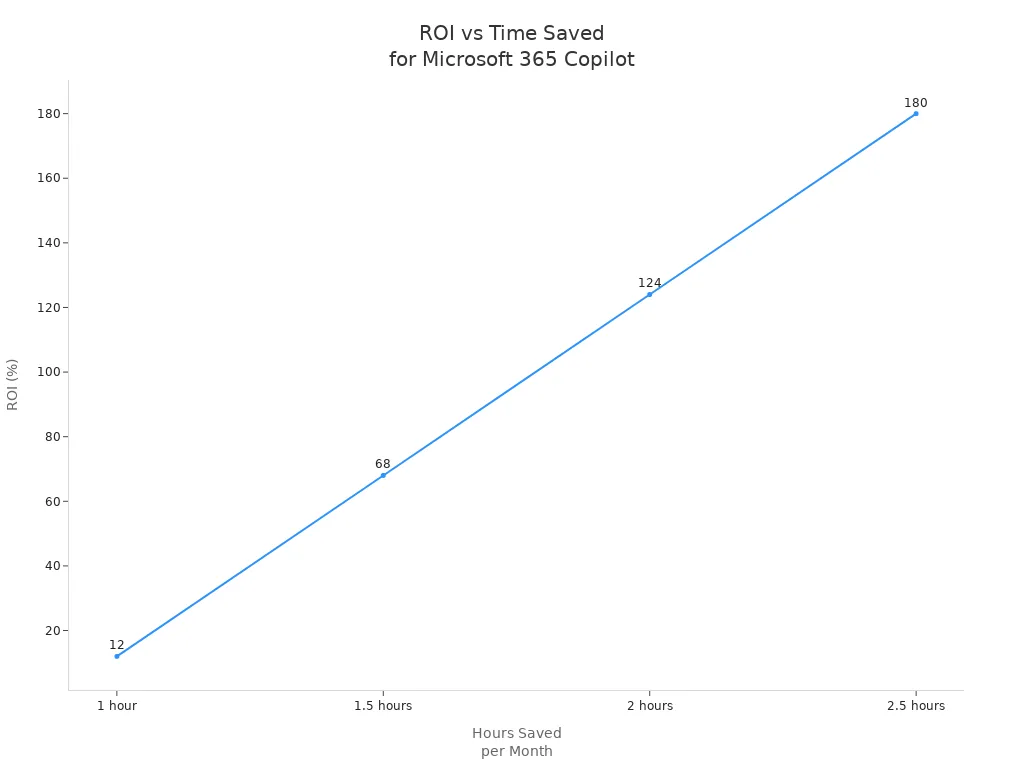
For example, if an employee costs $70,000 annually, the ROI calculations would look like this:
| Hours Saved/Month | ROI Percentage |
|---|---|
| 1 hour | 12% |
| 1.5 hours | 68% |
| 2 hours | 124% |
| 2.5 hours | 180% |
This method shows that saving just 54 minutes per month allows you to break even on your investment in Microsoft 365 Copilot.
Real-World ROI Examples
Organizations that have implemented Microsoft 365 Copilot report impressive ROI results. Here are some notable examples:
| Result | Description |
|---|---|
| 40% AI Knowledge Increase | Teams improved their AI literacy and practical application skills significantly. |
| 100% Workflow Creation | Non-technical teams built production-ready workflows without any coding. |
| 20,000 Hours Saved Annually | One cohort alone achieved over 20,000 hours of annual time savings through optimized workflows. |
These results highlight the transformative impact of Microsoft 365 Copilot on productivity and efficiency. Research from McKinsey indicates that even modest time savings of 30–60 minutes per employee per week can lead to significant cumulative time recovery across large teams. This translates into a competitive advantage for organizations.
By investing in Microsoft 365 Copilot, you not only enhance your team's capabilities but also position your organization for long-term success. The ROI you achieve can be substantial, making it a strategic investment worth considering.
ROI Tips: To maximize your ROI with Microsoft 365 Copilot, regularly assess the time savings across your team and adjust workflows accordingly. This proactive approach ensures you continue to reap the benefits of your investment.
Integration and Ease of Use
Seamless Integration
Microsoft 365 Copilot integrates effortlessly with your existing Microsoft 365 tools, enhancing your productivity without disrupting your workflow. This seamless integration allows you to leverage familiar applications like Word, Excel, and Outlook while benefiting from Copilot's advanced capabilities. Here are some key use cases that demonstrate how Copilot enhances your experience:
| Use Case | Description | Limitations |
|---|---|---|
| Summarizing Lengthy Documents | Assists in summarizing lengthy documents, making it easier for users to grasp key points quickly. | Can miss detailed information, requiring users to review and fill in gaps. |
| Generating Meeting Notes | Generates meeting notes and highlights key agreements and action items. | Sometimes misses detailed points, necessitating further manual additions. |
| Drafting Emails | Helps summarize long emails, draft emails, and provides coaching for improving emails. | Automated drafts may lack personal touch, requiring manual edits. |
| Analyzing Data | Assists with basic data analysis tasks and generating simple reports. | Limited for complex data operations, often requiring manual handling. |
| Drafting Presentations | Drafts PowerPoint presentations based on existing documents or new topics. | Users need to refine AI-generated content to align with their vision. |
With these capabilities, you can streamline your tasks and focus on what truly matters—achieving your business goals.
User Adoption Strategies
To maximize the benefits of Microsoft 365 Copilot, you need effective user adoption strategies. Here are some proven approaches to ensure a smooth transition and high adoption rates:
-
Prepare Your Organization: Appoint an adoption lead and form a cross-functional team. Define user personas and key scenarios to tailor the experience to your team's needs.
-
Engage User Cohorts: Activate readiness through targeted onboarding communications. Create champion communities and provide live or self-paced learning materials that demonstrate how Copilot enhances daily work.
-
Drive Measurable Impact: Promote usage internally and track key performance indicators (KPIs). Gather employee feedback through surveys and listening sessions to refine your adoption activities.
-
Extend and Optimize Deployment: Explore new high-value use cases and identify opportunities for business process transformation. Encourage employees to share tips and scenarios, fostering a culture of innovation.
Many organizations underinvest in training for generative AI. Making training a priority can significantly enhance user adoption. Microsoft 365 provides usage reports in the admin center, helping you understand user engagement and feature utilization. This insight allows you to tailor your training and support strategies effectively.
Tip: Address any hesitancy around AI by starting with easy tasks. This approach builds confidence and encourages employees to embrace Copilot's capabilities.
By implementing these strategies, you can ensure that your team fully leverages Microsoft 365 Copilot, leading to improved productivity and efficiency.
Addressing Common Concerns
Security and Privacy
You want to protect your data and maintain privacy while using AI tools. Microsoft 365 Copilot takes security seriously and meets top industry standards to keep your information safe. It holds key certifications that prove its commitment to data protection:
| Certification/Standard | Description |
|---|---|
| GDPR | Complies with the General Data Protection Regulation, ensuring strong privacy controls. |
| ISO 27001 | Meets the international standard for information security management. |
| HIPAA | Protects health information according to strict healthcare regulations. |
| ISO 42001 | Follows standards for managing AI systems responsibly and securely. |
Beyond certifications, Microsoft 365 Copilot uses advanced security features to guard your data every step of the way:
| Security Feature | Description |
|---|---|
| Data Encryption | Encrypts your data both at rest and in transit using technologies like BitLocker and TLS. |
| Strong Tenant Isolation | Uses Microsoft Entra authorization to keep your data logically separated from others. |
| Compliance Commitments | Adheres to privacy and security laws such as GDPR and HIPAA to protect your information. |
| Existing Permissions | Only shows content you have permission to access, preventing unauthorized data exposure. |
| User Identity as Access Boundary | Ensures data does not leak between users or groups by enforcing strict access controls. |
| Sensitivity Labels and Usage Rights | Honors Microsoft Purview protections, including encryption and access restrictions. |
🔒 Security Tip: With Microsoft 365 Copilot, you control who sees your data. The system respects your permissions and privacy settings, so your information stays safe and confidential.
Customization for Business Needs
Your business has unique needs, and Microsoft 365 Copilot adapts to fit them. You can customize Copilot to improve workflows, automate tasks, and support your specific goals. Here are some ways you can tailor Copilot to your organization:
- Financial Management: Get help with budgeting, forecasting, and financial analysis in Dynamics 365 Business Central. Copilot offers insights and recommendations to improve your financial decisions.
- Sales and Customer Service: Enhance lead tracking, customer interactions, and issue resolution with smart suggestions in Dynamics 365 Sales and Customer Service.
- Inventory and Supply Chain: Optimize procurement, inventory, and supply chain processes through data-driven insights.
- Development and Deployment: Use Copilot in Azure DevOps to generate code, test, and deploy applications with best practice recommendations.
- Data Analytics and Machine Learning: Analyze data, build models, and visualize results using Azure Machine Learning and Synapse Analytics.
- Infrastructure Management: Automate resource provisioning and monitoring in Azure IaaS and PaaS to reduce costs and boost efficiency.
You can customize Copilot using powerful tools like Copilot Studio, Power Automate, and Microsoft Teams. These tools let you design workflows, automate processes, and deploy solutions that fit your business perfectly.
| Industry | How Copilot Can Help |
|---|---|
| Higher Education | Customize learning plans, automate admin tasks, and create interactive materials. |
| Healthcare | Manage patient data, schedule appointments, and analyze research efficiently. |
| Retail | Analyze customer behavior, manage inventory, and forecast sales accurately. |
| Finance | Automate compliance reporting, evaluate risks, and detect fraud faster. |
| Human Resources | Source and screen talent, personalize onboarding, and analyze employee performance. |
🚀 Customization Tip: Start small by automating routine tasks in your department. Gradually expand Copilot’s use to other areas to unlock greater efficiency and cost savings.
Microsoft 365 Copilot’s flexibility lets you shape AI to work the way you do. This adaptability ensures you get the most value while meeting your organization’s unique challenges and goals.
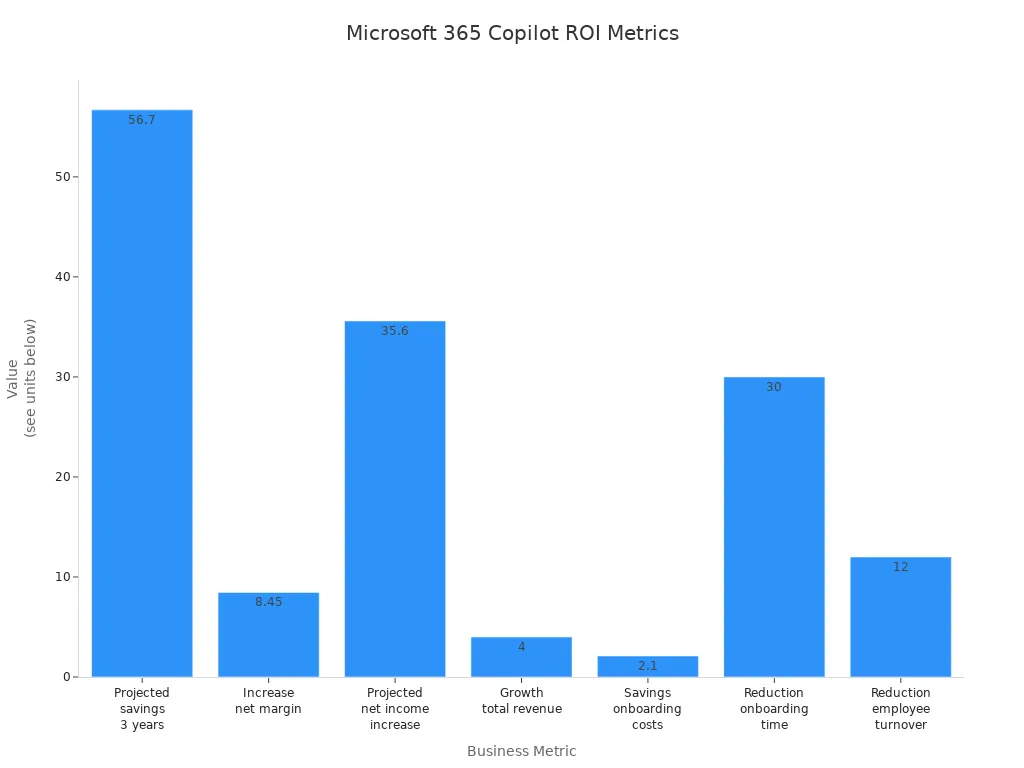
Microsoft 365 Copilot delivers clear time and cost savings that make your investment worthwhile. You gain faster workflows, fewer errors, and more productive employees. The table below shows how businesses see strong returns from this investment:
| Metric | Value |
|---|---|
| Projected savings over three years | 56.7 million US dollars |
| Increase in net margin | 8.45 percent |
| Projected increase in net income | 35.6 million US dollars |
| Projected growth in total revenue | 4 percent |
| Savings on onboarding costs for new hires | 2.1 million US dollars |
| Reduction in onboarding time | 30 percent |
| Reduction in employee turnover | 12 percent |
To get started, follow these steps many organizations use to succeed with microsoft copilot:
- Get ready by assessing your needs and securing leadership support.
- Onboard and engage your teams with clear plans and pilot data.
- Drive adoption by showing how Copilot adds value daily.
- Share success stories to spread benefits across your company.
You can explore microsoft 365 copilot as a strategic, cost-effective tool that fits into your existing microsoft 365 environment. It helps your teams save time and focus on what matters most. Consider this investment to boost your business operations and unlock new growth opportunities.
🚀 Ready to transform your workflows? Start exploring microsoft 365 copilot today and see how it can pay for itself by saving you time and cost.
FAQ
What is Microsoft 365 Copilot?
Microsoft 365 Copilot is an AI-powered productivity tool that automates routine tasks across Microsoft 365 applications. It helps you save time and improve efficiency by streamlining workflows and enhancing document creation, communication, and data analysis.
How does Copilot save time?
Copilot saves time by automating repetitive tasks, such as drafting emails and summarizing documents. Users report reclaiming an average of 9 hours per month, allowing you to focus on higher-value work and strategic initiatives.
Is Microsoft 365 Copilot easy to use?
Yes! Microsoft 365 Copilot integrates seamlessly with existing Microsoft 365 tools. Its user-friendly interface allows you to quickly adapt and start benefiting from its features without extensive training.
What are the cost benefits of using Copilot?
Using Microsoft 365 Copilot can lower labor costs, minimize errors, and optimize resource use. Organizations have reported up to a 0.24% decrease in operating expenses, translating into real savings.
Can Copilot help with data analysis?
Absolutely! Copilot significantly reduces data analysis time by automating data processing and generating insights quickly. Users can complete analyses in minutes instead of hours, enhancing decision-making capabilities.
How secure is Microsoft 365 Copilot?
Microsoft 365 Copilot prioritizes security and privacy. It complies with industry standards like GDPR and HIPAA, ensuring your data remains protected through encryption and strict access controls.
Can I customize Copilot for my business needs?
Yes! You can customize Microsoft 365 Copilot to fit your specific business requirements. Tailor its features to enhance workflows, automate tasks, and support your organization's unique goals.
How can I get started with Microsoft 365 Copilot?
To get started, assess your organization's needs and secure leadership support. Then, onboard your teams with clear plans and demonstrate how Copilot adds value to their daily tasks.
Apple Podcasts · Spotify · YouTube · YouTube Music
Host: Mirko Peters
Related articles
- Maximizing Sales Team ROI with Microsoft 365 Copilot
- ROI of Copilot in Teams: Real Business Impact and What to Expect
- Microsoft Copilot for Project Management: Use Cases and Best Practices
- Copilot and Power Platform: Transforming Microsoft 365 and Teams with AI
- Microsoft Copilot Licensing Explained
- Microsoft Copilot Deployment Guide