 EN
EN Deutsch
 Español
 Français
 Italiano
 Português
 Nederlands
 Polski
 Bahasa Indonesia
 Русский
 Українська
 العربية
 עברית
עברית हिन्दी
 日本語
日本語 한국어
한국어2026-07-15 · Season 3
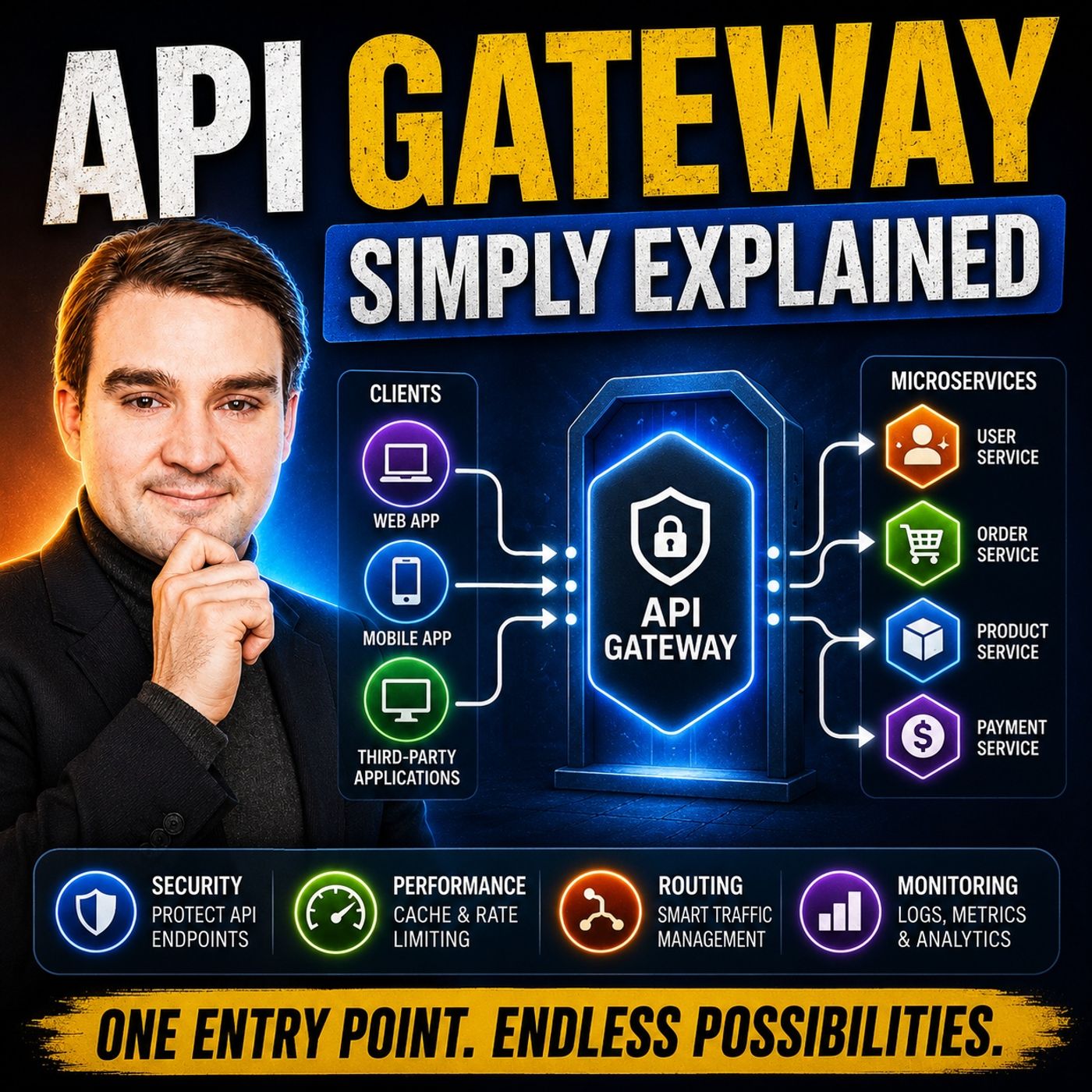
API Gateway - Simply Explained
Show notes
Learn API gateways in plain English: routing, authentication, throttling, observability, governance, and where they fit in secure Azure architecture. Modern applications rarely consist of a single backend anymore. Instead, they're built from dozens of independent services handling authentication, payments, products, users, notifications, and much more. As this architecture grows, managing communication between clients and services quickly becomes complex. In this episode of m365.fm, we explain what an API Gateway is, why it has become a fundamental building block of modern cloud applications, and how it simplifies routing, security, traffic management, and monitoring. Whether you're building applications in Azure, AWS, Google Cloud, or any microservices environment, understanding the API Gateway pattern is essential for designing scalable, secure, and maintainable systems. WHY MODERN APPLICATIONS NEED AN API GATEWAY Without an API Gateway, every client application must communicate directly with multiple backend services, each with its own endpoint, authentication process, error handling, and security rules. This creates unnecessary complexity for developers while increasing operational risk. We explain how an API Gateway acts as a single front door for your entire application, hiding backend complexity from clients and providing one centralized entry point for every request. Through practical examples, you'll see how API Gateways dramatically simplify application architecture while improving scalability and reducing maintenance overhead. ROUTING, SECURITY, AND TRAFFIC MANAGEMENT An API Gateway does far more than simply forward requests. This episode explores its four core responsibilities: intelligent request routing, centralized authentication and authorization, traffic management through rate limiting and load balancing, and request/response transformation. Learn how API Gateways validate JWT tokens, OAuth credentials, API keys, and certificates before traffic reaches your services. We also cover request throttling, quotas, version management, health checks, regional routing, and automatic failover, showing how a gateway protects backend systems while ensuring consistent performance under heavy load. DATA TRANSFORMATION AND OBSERVABILITY One of the most powerful capabilities of an API Gateway is its ability to transform requests and responses without modifying either clients or backend systems. Discover how gateways translate between JSON and XML, modify headers, rewrite URLs, mask sensitive information, and support legacy applications alongside modern cloud-native services. We also explain how centralized logging, metrics, analytics, monitoring, and observability provide complete visibility into every API request, making troubleshooting and performance optimization significantly easier across distributed systems. BUILDING A MODERN API PLATFORM The episode concludes with practical guidance for implementing an API Gateway in real-world environments. Learn when a gateway becomes necessary, how to gradually introduce one into an existing architecture, and why centralizing authentication is often the best first step. We also compare popular gateway platforms including Azure API Management, Kong, AWS API Gateway, and other modern solutions while emphasizing that the architectural pattern matters more than the specific product. Whether you're designing your first microservices application or modernizing an enterprise platform, this episode provides a practical foundation for understanding one of the most important components in modern cloud architecture. Explore more on M365.FM
- Full episode page with transcript, key takeaways and FAQ
- Azure API Management - Simply Explained
- Secure Azure Networking with Rex de Koning [MVP-MCT]
- More Azure & Cloud episodes on M365.FM
- Best of Azure & Cloud: the most-listened episodes
Become a supporter of this podcast: https://www.spreaker.com/podcast/m365-fm-microsoft-365-azure-cloud-power-platform-ai--6704921/support.
Apple Podcasts · Spotify · YouTube · YouTube Music · Deezer
Host: Mirko Peters
Guests
Related articles
Transcript
Read the full transcript
You've built an app that works, then you add another service and another, and suddenly directing traffic between them becomes a nightmare. So what exactly is an API gateway? And do you actually need one? By the end of this episode, you'll understand what an API gateway does, why it solves the chaos of managing multiple services, and how to know if you need one. We'll start with the problem, then the parts, then how they fit together. The problem. Too many doors. Imagine you're running a company that's growing fast. You've got a sales team on the third floor, accounting in the basement and IT in the backwing. Now, imagine every single one of those departments has its own front door, its own phone number, and its own security guard who doesn't talk to the others. If you're a visitor trying to drop off a package, good luck. You have to know exactly which door to use, which guard to talk to, and what to do when that guard is on break. That's exactly what happens when your app has multiple back-end services and every client calls each one directly. The client, whether it's a mobile app or website or another service, has to know where every service lives, how to authenticate with each one, and what to do when something breaks. Every single service has to handle its own security, its own rate limiting, and its own error handling. That's duplicated work, and it's easy for things to get inconsistent. Take a bank, for example. They have separate services for accounts, payments, loans, and fraud detection, and in the old way, each one is exposed directly. A mobile app has to know four different URLs, four different authentication methods, and four different ways to handle errors. That's four times the complexity and four times the surface area for something to go wrong. And that's the chaos in API Gateway is designed to fix. So what's the solution? What is an API Gateway? Picture an API Gateway like the front desk of a hotel. When you walk in, you don't need to know which floorhouse keeping is on, where the kitchen is, or how to reach the maintenance team. You just walk up to the front desk, tell them what you need, and they handle the rest. They route your request to the right person, check if you're allowed to be there, and even handle basic requests on their own. An API Gateway does the same thing for your software. It's a single entry point that sits between your clients and your backend services. Every request goes through the Gateway first. It decides where to send it, whether to allow it, and what to send back. Now, this isn't a new idea. Reverse proxies have been around for decades, but the API Gateway has become essential with microservices. When you break your app into many small services, you suddenly have many doors. The Gateway gives you one front door. In the Azure world, as your API management is the full platform, and the Gateway is the core component that handles traffic. But the pattern is the same everywhere. One entry point, centralize control. Every request comes in. The Gateway checks it, routes it, and sends the response back. The client never talks to your backend services directly. It only talks to the Gateway. Let's break down what that actually means. Starting with the most basic job, routing. Part one, routing traffic. The simplest job of an API Gateway is routing, directing each request to the right service. Think about how a website works. When you click a link, your browser sends a request. That request has a path. If the path is used, the Gateway knows to send it to the user service. If it's how orders it goes to the order service. The Gateway reads the path, figures out where it needs to go, and forwards it. Without a Gateway, your clients have to know every single service URL. The mobile app needs the address of the user service, the order service, the payment service, the catalog service. That's a lot of URLs to manage. And if any of those addresses change, you have to update every client. With a Gateway, clients only know one URL, the Gateway's address. They don't care where the service is actually live. They just send their request to the Gateway, and the Gateway handles the rest. This is one of the most common API Gateway use cases, resource-based routing. The Apache API 6 research calls it out explicitly. You root based on the path, the HTTP method, the headers, even the geolocation of the client. If someone in Europe sends a request, you can root them to a European data center. If someone in the US sends a request, they go to a US data center. The client doesn't know any of this is happening. They just get a fast response. Routing also handles versioning. Say you have a new version of your user service. The old clients still use their V1 users, and the new clients use V2 users. The Gateway roots them to different backends. Old clients keep working while you roll out the new version. You can change your back end without breaking your clients. That's a huge deal when you're managing a live application with real users. Think about an e-commerce platform. You've got separate services for the catalog, the shopping cart, checkout, and user accounts. Without a Gateway, a mobile app has to know four different URLs. With the Gateway, it knows one. The Gateway reads the path. Catalog, cart, checkout, account, and sends each request to the right service. Simple rooting is the easy part. The next job is where it gets really useful. Part two, security at the front door. Every API call needs to be checked. Who's making this request? Do they have the right permissions? Without a Gateway, each service has to handle its own authentication. That means duplicated work and it's easy to get wrong. One service might check tokens properly. Another might skip a step, and another might use a completely different method. You end up with inconsistent security across your entire application. The Gateway changes that. It handles authentication and authorization in one central place. One spot to check. One spot to enforce. One spot to update when policies change. That's a top security best practice. It validates API keys, JWTs, OAuth tokens, or certificates on every single request. Every request goes through the same check. No exceptions. The Gateway can also enforce rules. You can say, this API key can only call the read endpoints, or this client can only access the catalog service, not the payment service. You define fine grained permissions at the Gateway level and they apply automatically. The backend services never have to worry about authorization. They just process the request and send back the data. Here's the thing. The Gateway is a single place to revoke access when something goes wrong. If a client's API key is compromised, you revoke it at the Gateway. One change? Done. You don't have to update every service or restart anything. The next request from that key gets rejected immediately. Take a real example. A bank has a payment service and a billing service. Only the payment service needs right access to the billing system. The Gateway enforces that. If a client tries to write to the billing system through the wrong endpoint, the Gateway blocks it. The billing service never even sees the request. The Gateway can also support mutual TLS and WAF integration for deeper protection, but at its core, it's your first line of defense. Security is one thing. But what about when too many requests come in at once? Part three. Traffic management. What happens when 10,000 users hit your app at the same time? Maybe you're running a flash sale, maybe a product launch goes viral, or maybe it's just a normal Tuesday and everyone decided to log in at once. Without a Gateway, your backend services get hammered directly. And they might crash, not slowly. All at once. That's where traffic management comes in. The Gateway can limit how many requests each client can make. Rate limiting and throttling are standard features. You set the rules at the Gateway and it enforces them. Your backend services never feel the spike. You can set quotas per user, per API key or per IP address. There you have a free tier of your API. Free users get 100 requests per hour. Premium users get 10,000. The Gateway tracks every request and enforces those limits at the door. A free user hits their limit and the Gateway sends back a polite, try again later message. The backend services never even know there was a request. They keep humming along, serving the paying customers. The Gateway also handles load balancing. If you have multiple instances of the same service running, the Gateway spreads the requests across them. Once one gets a request, instance two gets the next, instance three gets the next. It's automatic and if one instance goes down, the Gateway routes to another. Clients never know, they just get their response. Load balancing with health checks keeps things running smoothly. The Gateway pings each instance to make sure it's alive. If it's not, it stops sending traffic there. This is especially important for high traffic APIs. Without the Gateway, a traffic spike hits your services directly. With the Gateway, the spike hits the Gateway first. The Gateway absorbs it, spreads it out and protects your services from being overwhelmed. Okay, but what if the data doesn't look right when it arrives? Part four, data transformation. Sometimes the data your client sends doesn't match what your backend expects. Maybe the client sends Jason but your backend only understands XML. Maybe the field names don't line up. The client uses first name and your backend expects first name. These mismatches break things. In the old way, you'd have to fix every single client or rewrite the backend, not great. The Gateway can transform the data before it reaches the backend. Think of it as a translator. It sits in the middle and it can change the data on the way in, on the way out or both. That's request and response transformation in a nutshell. Let me give you a real example. Say you have a legacy system that expects XML. It's been running for 15 years. It works fine. But now you're building a new mobile app and mobile app speak Jason. Without a Gateway, you'd have to rewrite the legacy system or force the mobile app to send XML. With a Gateway, you don't do either. The mobile app sends Jason. The Gateway converts it to XML. The legacy system gets what it expects. The mobile app gets a response back already in Jason. Nobody had to rewrite anything. That's the beauty of it. The Gateway can also add or remove headers, change URLs or mask sensitive data. Imagine a response includes a credit card number. You don't want that going back to the client. The Gateway can strip it out before the response leaves. Or replace it with a mask version. The backend never has to change. The Gateway handles it. This is especially useful when you're modernizing old systems. You don't have to rewrite the backend. You don't have to force clients to change. You just change the Gateway. It's like a translator at an international conference. Everyone speaks their own language, but the translator makes sure everyone understands. The Gateway is that translator for your software. So routing, security, throttling, transformation, that's a lot. But they're not four separate things. Let me show you how they connect. How it all connects. Here's the thing. These four jobs aren't separate. They work together on every single request every time a request comes in. The Gateway checks the authentication. It validates the rate limit. It routes to the right service. It transforms the data if needed. It gets the response back. It transforms that too if necessary. Then it sends it all back to the client. One pipeline. Every step happens automatically in order without any service having to think about it. The real power isn't any single feature. It's the integration. You can add a new security policy without touching the routing. You can change the backend service without changing the client. You can update the rate limits without redeploying anything. Each piece is independent, but they all work in the same pipeline. And because everything goes through one place, you get complete visibility into what's happening. You get the same metrics, analytics, all from one point. You can see how many requests came in, which ones failed, which ones were slow, which clients are using the most resources without a gateway you'd have to collect that data from every service individually. With a gateway, it's all right there. That's the big insight. The gateway isn't just a router. It's a control center for your entire API platform. Every request, every response, every error. It all flows through one place. You have a single pane of glass for everything that's happening. So how do you actually use this? Let's talk about what you can do right now, unless actionable takeaways. Let's be real. If you've got one or two services, you probably don't need an API gateway yet. You can handle the routing yourself, manage auth in each service. It's not elegant, but it works. But the moment you hit three services, or you're exposing APIs to external clients, the complexity adds up fast, the gateway pays for itself quickly. So what's your best first move? Centralize authentication at the gateway. Do that before anything else. Pick one service. Move its auth check to the gateway. You'll notice right away that your service code gets cleaner. No more token validation logic scattered everywhere. No more wondering if you implemented it the same way in every service. The gateway handles it once, and every service benefits. Next step, rate limiting. Even a simple limit protects your backend from overload. Start with something basic like a hundred requests per minute per client. That stops a runaway client from knocking out your services. You can tweak the numbers later. The important thing is to have that protection in place. Finally, routing. One URL for all your services simplifies everything downstream. Your clients only need to know one address. Your backend services can move, scale or change, and nobody notices. The gateway handles all that complexity. If you're in Azure, as your API management is a solid choice, it gives you a gateway plus management, a developer portal, and analytics. But the pattern is the same no matter the tool. Single entry point, centralized policies, observability. You could use Kong, AWS, API gateway, or even build your own with a reverse proxy. The pattern matters more than the tool. So here's your challenge. Pick one small thing this week and move it behind the gateway. You'll see the difference right away. So there you have it, the API gateway, a single front door that handles routing, security, traffic management, and transformation. It's not a new idea, but it's become important as apps get more complex. Start small, centralized authentication first. That's your smartest move. Subscribe for more breakdowns that cut through the jargon. And drop a comment, what's the one thing you'd move behind a gateway today?