 EN
EN Deutsch
 Español
 Français
 Italiano
 Português
 Nederlands
 Polski
 Bahasa Indonesia
 Русский
 Українська
 العربية
 עברית
עברית हिन्दी
 日本語
日本語 한국어
한국어2026-08-19 · Season 3
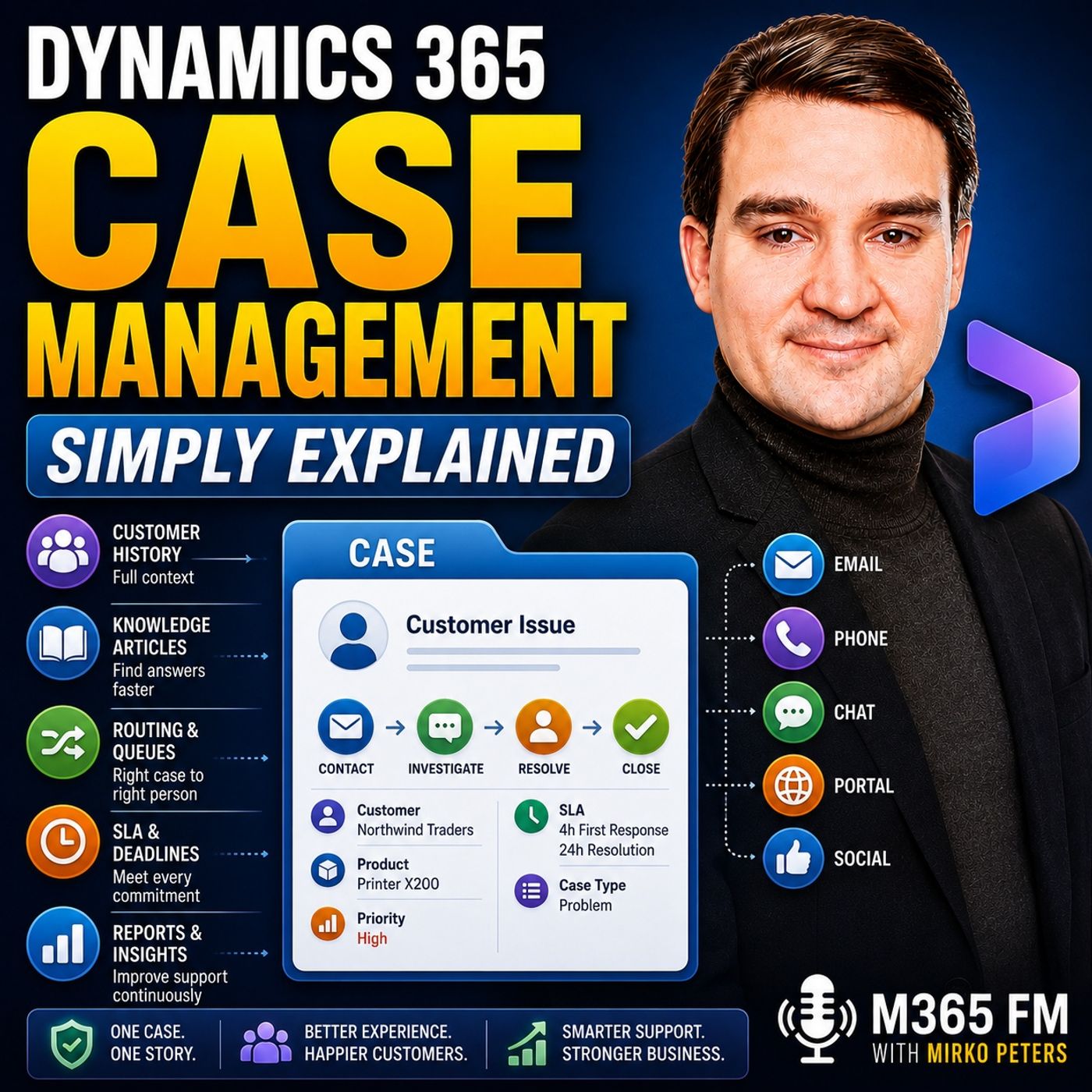
Dynamics 365 Case Management - Simply Explained
Show notes
Dynamics 365 Case Management gives customer service teams one central place to manage customer issues from the first contact through resolution. Instead of information being scattered across emails, calls, chats, notes, and separate systems, each customer problem becomes a structured case containing the issue, customer context, activities, ownership, priority, service commitments, and final resolution. In this episode of M365 FM, Mirko Peters explains how Dynamics 365 Customer Service uses cases, queues, routing, SLAs, knowledge articles, Copilot, entitlements, and automation to create a more consistent support experience. ㅤ WHAT IS A CASE IN DYNAMICS 365? A case represents one customer issue that requires an answer or resolution. It could be a damaged product, billing question, login problem, technical issue, or request for help. Customers can have multiple cases simultaneously because each problem is managed separately. Cases can be connected to contacts and accounts while recording information such as the subject, product, priority, case type, description, and responsible owner. This creates a single working record for the entire support issue rather than forcing agents to reconstruct the customer story from multiple systems. ㅤ KEEPING THE COMPLETE CUSTOMER HISTORY TOGETHER Emails, calls, notes, appointments, tasks, chats, and other activities can remain connected to the same case. When ownership changes, the next agent can understand what happened without asking the customer to explain everything again. This customer context becomes particularly important for complex cases involving several agents or previous troubleshooting attempts. The case shows the immediate problem while the broader customer record provides information about previous interactions, products, and support history. ㅤ ENTITLEMENTS AND CUSTOMER SUPPORT AGREEMENTS Not every customer receives the same level of support. Dynamics 365 can use entitlements to represent the support terms associated with a customer. An entitlement might define warranty coverage, available support hours, permitted numbers of cases, or premium service conditions. Agents can therefore understand what support applies before committing resources or making promises to customers. ㅤ KNOWLEDGE MANAGEMENT FOR FASTER RESOLUTION Customer service teams frequently solve the same problems repeatedly. Dynamics 365 Knowledge Management allows organizations to maintain approved articles containing troubleshooting instructions, explanations, screenshots, standard answers, and other reusable support information. Agents can search these articles while working on cases instead of recreating solutions from memory. This can improve consistency and make organizational knowledge more accessible to less experienced support agents. ㅤ COPILOT CASE SUMMARIES Long-running cases can contain substantial amounts of information. Copilot can help agents understand that history by generating concise case summaries from information such as the customer, subject, product, priority, description, case type, and recent activities. The summary provides a faster starting point, particularly when a case changes ownership. Agents still review the underlying information and apply their own judgment before deciding what to do next. ㅤ AUTOMATIC CASE CREATION Customers can contact support through channels such as email, phone, chat, social media, and self-service portals. Dynamics 365 can use record creation rules to turn supported incoming communications into structured cases. For example, an email sent to a shared support address can automatically create a case rather than remaining unnoticed in a mailbox. Existing conversations can remain associated with their original cases while genuinely new problems receive separate records. ㅤ QUEUES AND ROUTING Once a case exists, it needs to reach the appropriate team. Dynamics 365 queues provide shared work areas where teams can manage incoming cases. Organizations might create separate queues for billing, technical support, returns, products, languages, regions, or different levels of urgency. Routing rules can evaluate information contained within a case and automatically direct it toward the appropriate queue or agent. Cases can also be manually reassigned when human judgment determines that a particular specialist is better suited to handle the problem. ㅤ PARENT CASES, CHILD CASES AND DUPLICATES Sometimes many customers report problems caused by the same underlying issue. Dynamics 365 can use parent and child cases to connect those individual customer reports to a larger problem. This allows teams to investigate the underlying issue centrally while maintaining individual customer records and communications. Duplicate cases can also be merged so multiple agents don't unknowingly work on the same problem. ㅤ SERVICE LEVEL AGREEMENTS AND RESPONSE TIMES Getting a case to the correct person isn't enough. Customers also expect organizations to meet agreed response and resolution times. Dynamics 365 Service Level Agreements, or SLAs, can attach time-based targets to cases. First-response targets measure how quickly the organization acknowledges the customer, while resolution targets measure how long the organization has to completely address the issue. Different support agreements, priorities, and case types can have different targets. Agents can see which cases are approaching deadlines, while alerts and escalation processes can help teams respond before service commitments are missed. ㅤ BUSINESS PROCESS FLOWS FOR CONSISTENT SUPPORT Business Process Flows provide agents with structured stages for handling cases. A process might move through intake, investigation, diagnosis, and resolution while requiring important information at each stage. This helps newer agents understand what information they need while providing experienced teams with a consistent process. Managers can also identify stages where cases frequently become delayed. ㅤ RESOLVING AND REOPENING CASES Sending an email doesn't automatically mean the customer's problem has been solved. Teams should record how the issue was resolved and then formally close the case. Resolution information creates useful history for future interactions. If the original solution doesn't work, the case can be reopened so the team continues with the existing history instead of creating another disconnected record. ㅤ USING CASE DATA TO IMPROVE CUSTOMER SERVICE Individual cases also become valuable operational data. Managers can analyze time to resolution, time spent in different stages, first-contact resolution, queue workloads, reopened cases, and recurring issue categories. Patterns can reveal broader problems. Increasing case volumes around one product could indicate a product issue, while repeated questions may indicate that documentation or knowledge articles need improvement. Case management therefore supports both individual customer service and continuous improvement across the support organization. ㅤ CUSTOMER SELF-SERVICE Some customers don't need direct assistance from an agent. Self-service experiences can allow customers to create requests, check case status, provide additional information, and access approved knowledge content themselves. This can reduce routine support demand while allowing customer service agents to concentrate on problems requiring investigation, explanation, or human judgment. ㅤ MICROSOFT 365 AND POWER PLATFORM INTEGRATION Dynamics 365 Case Management can work alongside familiar Microsoft technologies. Outlook can support email communication, Teams can help employees collaborate on difficult cases, SharePoint can manage related documents, Power BI can provide reporting and dashboards, and Power Platform can extend processes with additional forms and automation. The tools surrounding the process may change, but the Dynamics 365 case remains the central record connecting the customer problem, activities, ownership, service commitments, and resolution. ㅤ THE KEY TAKEAWAY Dynamics 365 Case Management isn't simply a ticketing system. It provides a structured lifecycle for customer issues from initial contact through routing, investigation, service commitments, knowledge, collaboration, resolution, and reporting. By keeping the customer, problem, communication history, support agreement, ownership, deadlines, and final answer connected to one record, customer service teams can reduce lost context, avoid duplicated work, and provide customers with a more consistent support experience. Subscribe to M365 FM for more Microsoft Knowledge Nuggets and Simply Explained episodes covering Dynamics 365, Microsoft 365, Power Platform, Copilot, AI, Azure, security, governance, and the Microsoft ecosystem. Become a supporter of this podcast: https://www.spreaker.com/podcast/m365-fm-microsoft-365-azure-cloud-power-platform-ai--6704921/support.
Apple Podcasts · Spotify · YouTube · Deezer
Host: Mirko Peters
Guests
Related articles
Transcript
Read the full transcript
A customer emails about a broken order, then calls the next day, then opens a chat because nobody seems to know what happened, and they repeat the same story every time, while your support team hunts through inboxes, notes, and separate tools. That Uhtmer is exactly what Dynamics 365 Case Management fixes. Think of a case like one labeled folder inside a busy office building, where every part of a customer problem goes into that folder or from the first question to the final answer. Uhtmer Mirko Peters from M365FM. And in this knowledge nugget, you outmell see how cases, routing, response deadlines, and articles and closure all fit together. What a case actually is 520 words. So what exactly is a case? A case is one record for one customer issue that needs an answer or a fix, and the issue could be a damaged product, a billing question, a login problem, or a request for help using a service. HeroTemps the thing, one customer can have several cases at once. A single customer might ask about an invoice on Monday, report a failed device on Tuesday, and need help changing an address on Friday. Those are separate problems, so Dynamics 365 keeps them in separate case records instead of piling every conversation into one confusing thread. When an agent creates a case, they link it straight to the customer. That customer may be a contact you meaning an individual person or an account meaning the company they work for. So if Jamie from Northwind traders reports a problem, the case can point to both Jamie and the company, and anyone opening the record can see who needs help and which organization the issue belongs to. The case also needs a plain description of the problem, usually starting with a title like "Oprinter stops after software update AU" or "O will customer charge twice for annual plan" AU and that title helps people scan a list of open cases without opening every record. Below that title the agent adds the detail. What happened when did it begin? What has the customer already tried, which product it involves and whether it automates a question, a request, or a fault? These details turn a vague message into work that somebody can own and solve. Letotemps break it down further. A case can carry a subject, product, priority, and case type. The subject groups the issue into an area like billing or technical support, the product identifies what the customer uses, the priority tells the team how quickly to look at it, and the case type gives the team another way to sort work based on their support process. None of these fields solve the customer or temers problem by themselves, but they help the support team see the work clearly, especially when hundreds of cases arrive from different customers. A team dealing with a serious service failure should know, temate, have to search through general questions to find it. Now a case is no attempt to just form someone fills in and forgets. It becomes the working record for the whole conversation. Emails can connect to the case, phone calls can appear there, and an agent can add notes after a chat, set a follow-up task, or record an appointment. Each activity stays with the same customer problem, so the next person does now attempt, need to rebuild the story from scratch. Imagine an agent starts working the morning and then hands the case to a product specialist after lunch. Without a case record, the specialist might receive one short message like, "Oh, can you look at this?" A/O, which is now admit enough. With the case record, they can see the original issue, customer details, what happened during the call, and what the first agent already checked. That autumn is a much better hand off. Dynamics 365 keeps the case in a clear state as it moves through the support process. It can stay active while the team investigates, and once the team fixes the issue or gives the final answer, they resolve it. If the request no longer needs work, "Oh, maybe it came in by mistake or the customer withdrew, it how the team can cancel it." Active, resolved, and canceled. Now, those three states give the team a shared view of where each issue sits, so nobody needs to guess whether a case still needs attention and managers don't know, Tim, Artet, need to treat old finished work like a fresh customer problem. One record gives you control, and the full customer history gives the agent context. The customer's story behind the case. A case tells you what needs fixing. The customer record tells you what led to this moment. When an agent opens a case in Dynamics 365 customer service, they can look beyond the latest message. They see the bigger picture are you, earlier cases, past emails, the products connected to the customer and their support history, context changes the conversation, why does context matter? Imagine a customer reports a device failure. If the agent only sees today's message, they may start with basic questions. What model is it? When did it start? Did you restart it? But the customer has already contacted support twice this week, the first agent sent troubleshooting steps, the second arranged a replacement part, a third agent who sees that history won't ask the customer to start over. Instead, they say, "I can see you already tried those steps and the replacement part didn't fix it. Let's try the next thing." That feels very different from, "Can you explain the problem again?" This is often called a 360 degree customer view. The name sounds fancy, but it's simple. It means the agent sees the customer from more than one angle, not just one isolated message. The agent sees the person, they see the company, they see earlier support requests, previous conversations and the products connected to them. For a support team, that replaces guessing with a clear starting point. Now not every customer receives the same kind of support. A customer might have bought a warranty, their company might pay for a set number of support hours, or they might have a contract that allows a certain number of cases or premium support with faster help. Dynamics 365 tracks all of this through entitlements. An entitlement is the customer outtempt support agreement inside the system. Think of it as the service terms attached to their account. Before an agent promises an engineer over a TMS time or starts chargeable work, they check what support applies. That avoids awkward surprises. For example, a customer might still have warranty cover for a failed product. The case can follow that path. Another customer may have used all their support hours. The agent sees that before committing to work outside the agreement. It also helps the support team treat customers fairly. The agent doesn't need to search through old contracts or ask another department. The support terms sit with the customer information right where the agent can find them, then there's the knowledge base. The TMS solve the same problems over and over. Password resets, set up instructions, a known error after an update, a billing question with a standard answer, a knowledge article stores that answer in one place. Inside the service workspace, an agent can search for articles while working on a case. An article might include a plain explanation, steps, a screenshot, or the exact checks the team should complete. Instead of each agent writing their own version from memory, they use a shared answer the team has reviewed. That keeps support consistent. It also helps newer agents. They don't need years of experience to handle common problems well because the team's known fixes are available when they need them. Co-pilot case summaries help with another common problem, long case histories. A case can collect many emails, notes, and updates over time. Reading everyone takes time, especially after a hand off. Co-pilot creates a short case summary that pulls together the case title, customer, subject, product, priority, case type, description, and recent activity. It's a quick brief before the agent starts work. The agent still checks the record and uses their judgment. But they understand the situation faster that helps when the customer is waiting and the case has passed through several hands. Once the agent understands the customer and the problem, the case needs to reach the right person. From intake to the right queue, a customer can ask for help in many ways. Email, phone call, chat, social media, a self-service portal, the channel changes but the support team still needs one clear place to manage the request. Dynamics 365 can create cases from those conversations when the setup includes record creation rules. Think about an email arriving at a shared support address. Instead of leaving it in a mailbox until someone spots it, a rule turns that email into a case. The message becomes the start of work inside customer service. That cuts down on manual copying. The same idea applies to other connected channels. The team chooses which messages create a new case and which belong on an existing one. A reply to an open issue stays with that issue. A new question gets its own case. Then the case needs a home while someone takes ownership. That home is often a queue. A queue is a shared work tray for a team. It isn't one agent's inbox and it doesn't belong to the person who first saw the request. Instead it gives the whole team a place to see work waiting for attention. Imagine a company with a billing team, a technical support team and a returns team. Each team has its own queue. Billing questions go to billing, product faults go to technical support. Return requests go to the people who know the return process. That sounds simple because it is. Clear sorting saves people from passing work around blindly. Routing rules help with that sorting. A routing rule checks the details on a case and sends it to the right queue or person. A case about a specific product goes to the product team. A case from a certain region goes to local support. A serious issue goes to an urgent queue. A general question waits with the standard team. Some organizations root work based on skill. For example, a customer writing in French needs an agent who speaks French. A technical issue needs someone trained on a certain product. Routing puts the case closer to the person who can solve it instead of treating every request the same. Automation helps but people still make decisions. A team lead might look at a difficult case and assign it directly to a senior agent. Maybe someone already knows the customer. Maybe the problem crosses several products and needs experience a rule can't judge. Manual assignment gives the team room for that human choice. Ownership can change during a case. An agent might need more information and return the case to a queue. A team might discover the issue belongs to another department. Or an urgent request might need escalation when the normal team can't resolve it. Dynamics 365 keeps the work moving instead of leaving it with someone stuck. Now, sometimes one issue creates many cases. Picture a software outage affecting dozens of customers. Each customer contacts support separately, so each report needs its own case. But all reports connect to one larger problem. A parent case tracks that wider issue while child cases track individual customer reports beneath it. That gives the support team two views at once. They work on the underlying outage through the parent case. While each child case keeps the right customer informed. When they find the fix, they don't investigate the same outage from scratch for every caller. Duplicate cases create a similar problem on a smaller scale. A customer might email and call about the same issue. Or two agents might open cases before noticing the other one. Instead of splitting effort, the team can merge similar cases. One case becomes the main record and the work stays together. Nobody should solve the same problem twice, getting a case to the right queue and person starts the work. And the customer expects a response within the time they were promised. Keeping promises with SLA's and guided work. Getting a case to the right person is only half the job because the customer also expects help within the time you promised. And that's where a service level agreement, I'll call it an SLR, comes in. An SLA attaches a clock to the case, so the team knows exactly how long they have to meet a customer promise. Whether it's replying for the first time or fully resolving the issue. But here, O, to miss the thing. Those are not always the same deadline. Take a customer who expects an acknowledgement within one hour, even if the technical team needs two business days to find and test the fix. Dynamics 365 tracks the first response target and a resolution target separately, so the team can act quickly without pretending every issue can be fixed instantly. Now, imagine a customer who's service has stopped working. They don't expect a complete repair in 10 minutes, but they do expect someone to confirm the problem is known, explain what happens next and keep them informed. The first response target tracks that first contact, while the resolution target tracks the full path to an answer or fix. And different customers can have different promises. A company with premium support gets faster response targets than a customer on a standard plan. A high priority outage gets a shorter deadline than a routine. How do I question? Support agreements, priority and case type all shape the time rules that apply that keeps the process fair and clear. Without SLA's, an agent might work from the oldest item in a list while a time sensitive case quietly passes its deadline. With SLA's, the case screen shows time indicators that tell the agent which promise needs attention first. So you'll see the pressure building. A case with plenty of time left needs work, but a case nearing its response deadline needs attention now. Teams can also set alerts or escalation steps when a target is close or has already passed so a supervisor can step in before the customer has to chase the team. Time targets guide urgency and business process flows guide the work itself. A business process flow is a set of stages shown inside the case. It gives an agent a clear pass to follow based on how the organization once case is handled. The stages may move from intake to investigation to resolution with the right questions and checks at each point, think of it as a checklist with a place in the process. A new agent doesn't have to guess which details matter before sending a case to a specialist. The flow can ask for the product, issue type, impact, and other information the next team needs. A more experienced agent can move faster, but the shared path still keeps the team working in the same direction. Here's a scenario, a high priority service outage arrives. The case enters the urgent queue and its SLA starts counting down. The agent confirms the customer's details, records the impact and sends the first response before that response target expires. Next, the process flow moves the case into diagnosis, where the team gathers error details and checks for related reports. The case then moves into resolution when the team identifies the cause and prepares the customer update. That sequence gives managers a clearer picture too. They can see whether cases slow down during intake, diagnosis, or the final customer response. The flow doesn't solve the problem for the team, but it stops basic steps from disappearing during a busy day. Dynamics 365 can also control which status changes agents can choose at different points. These are called status reason transitions, which sounds technical, but the idea is simple. A case should move through sensible steps. You don't want someone to mark a case resolved while it still waits for a required internal check or jump from a new case straight to cancelled without recording why. The allowed choices can change as the case changes. For example, a case under investigation may allow an agent to place it on hold while waiting for customer details. After the customer replies, the agent can return it to active work. When the issue is fixed, the case can move to resolve. That creates a cleaner case history. A reply alone doesn't finish the work. The team needs to record how the issue ended, then close the case properly. Resolution, learning, and better service. Sending a reply doesn't automatically close a case. The team needs to record the resolution, which means writing down what fixed the issue or what final answer the customer received. That might be replacement device sent, duplicate payment refunded, or customer updated the setting that blocked access. That note becomes part of the customer record and it gives the next agent a useful starting point. If the same customer contact support again months later with a related problem, sometimes the first fix doesn't work. Maybe the customer follows the instructions and the error returns. Maybe a replacement part arrives but doesn't solve the fault. In that situation, the team can reopen the case or place it back in a queue for more work rather than starting a brand new record with no history. The case continues from where the team left off. That matters when ownership changes. A new agent can see what the previous agent tried, what the customer confirmed, and what still needs checking. The customer doesn't need to explain the whole story from the beginning just because a different person picked up the work. Over time, all those cases also tell the support team what's happening beyond one customer problem. Managers can look at time to resolution which tracks how long cases take from opening to closure. They can look at stage time which shows where cases spend their time. They can also watch first contact resolution, meaning how often the first person who speaks to the customer can solve the issue without a handoff. Workload matters too. If one queue fills up every Monday morning, the team can see it. If technical cases spend days waiting for an internal check, that delay appears in the case data. If one team closes cases quickly, but customers keep reopening them, the team has a reason to look closer at the quality of those first fixes. The numbers don't explain everything by themselves. They point the team to what questions worth asking. Why are cases about one product rising? Why does a certain case type take longer than expected? Why are agents repeatedly searching for the same answer, but not finding a useful knowledge article? Patterns turn daily support work into practical learning. A rise in similar cases may point to a product fault. It may show that a recent update confused customers. It may reveal that an instruction guide needs clearer steps. Instead of treating every request as unrelated, the team can spot the shared cause and work on it. That can reduce future case volume. Customer feedback belongs in that picture too. A closed case may show that the team met its response target, but the customer may still feel frustrated if they had to contact support three times. Looking at both the case history and feedback gives managers a fuller view of the experience. Some customers would rather avoid creating a case at all. That's where a self-service portal can help. Through a portal, customers can create a request, check its status, add new information, or read approved support articles without calling the support team. For simple questions, that can save time for everyone. A customer can check a delivery status or follow a setup guide when it suits them. Meanwhile, agents can spend more time on issues that need a person to investigate, explain, or make a decision. Dynamics 365 customer service can also connect with familiar Microsoft tools around the case process. An agent may work with email throughout look, a team may discuss a difficult issue in teams. Documents and shared information can live in SharePoint. Power BI can turn case data into reports and dashboards while power platform tools can support extra forms, alerts, or automated steps around the team's own process. Each tool has its own job. The case remains the place where the support issue and its history stay connected, even when people use other tools to communicate, share files, or review the work. Case management isn't really about filling out a ticket screen. It's about giving every customer issue a clear path or recorded answer and a team that can learn from what happened. Conclusion. Keep the whole customer story together. So here's the real takeaway. Dynamics 365 case management keeps the issue, the work, the promise, and the result in one record. No more lost context or repeated fixes. Look at your own support process. Oh, where does customer information disappear? That's where bringing it all together changes everything. Subscribe on your favorite podcast platform for more Microsoft knowledge nuggets from me, Mirko Peters at M365, FM, where we explain the Microsoft tools behind everyday work in plain English.