 EN
EN Deutsch
 Español
 Français
 Italiano
 Português
 Nederlands
 Polski
 Bahasa Indonesia
 Русский
 Українська
 العربية
 עברית
עברית हिन्दी
 日本語
日本語 한국어
한국어2026-06-30 · Season 2
Microsoft 365 Copilot Adoption with Chris Hinch [Microsoft]
![Microsoft 365 Copilot Adoption with Chris Hinch [Microsoft]](https://d3wo5wojvuv7l.cloudfront.net/t_rss_itunes_square_1400/images.spreaker.com/original/914780fa7b3bc99df95a0551a3994e82.jpg)
Quick answer: Microsoft 365 Copilot adoption strategies is covered in this M365 FM episode with a practical focus on how it works, where it fits, and the architecture, security, governance, or operational choices that matter in real Microsoft environments.
When you start your microsoft copilot adoption journey, you step into a new era of workplace transformation. Many teams already use AI tools—70% in technology, 58% in life sciences, and 30% in legal departments—showing how quickly this shift is happening. You need a strategy that puts people first, with strong governance, clear objectives, and ongoing training. Champions programs help your team embrace change and build trust in AI. Security and data quality matter at every step.
| Benefit | Description |
|---|---|
| Faster document creation | Streamlines the process of creating documents. |
| Quicker decision-making through data insights | Enhances the ability to make informed decisions rapidly. |
| Better customer engagement | Improves interactions with customers. |
| Reduced manual effort in sales, service, and operations | Minimizes the workload on employees. |
| More consistent and accurate communication | Ensures messages are clear and precise across the board. |
Set realistic expectations to capture opportunities and address challenges as you integrate Copilot into your teams.
Key Takeaways
- Microsoft Copilot enhances productivity by streamlining document creation and data analysis.
- Adopt a people-first strategy with clear communication and ongoing training to ease the transition.
- Set clear objectives and measure success regularly to align Copilot with business goals.
- Address employee concerns about AI by emphasizing productivity benefits and ensuring data security.
- Implement champions programs to foster trust and encourage peer support during the adoption process.
- Choose a phased or big bang rollout strategy based on your organization's readiness and goals.
- Regularly review analytics to track Copilot's impact and identify areas for improvement.
- Continuous training and feedback loops are essential for sustaining Copilot adoption and maximizing its value.
Microsoft Copilot Adoption Essentials
Understanding Copilot’s Role
You need to understand how Microsoft Copilot fits into your daily work. Copilot works inside familiar Microsoft 365 apps, such as Word, Excel, PowerPoint, Teams, and Outlook. It helps you draft documents, analyze data, create presentations, summarize meetings, and manage emails. Copilot modernizes spreadsheets and workflows, improves collaboration, and enables data-driven decision-making. You gain a productivity partner that adapts to your needs and keeps your data secure within the Microsoft environment.
| Function | Description |
|---|---|
| Document Drafting | Assists in drafting documents in Word. |
| Data Analysis | Helps analyze data in Excel. |
| Presentation Creation | Aids in creating presentations in PowerPoint. |
| Meeting Summarization | Summarizes meetings in Teams. |
| Email Management | Manages emails in Outlook. |
Copilot stands out because it understands your emails, meetings, and files. It operates directly within your apps, so you do not need to switch between tools. You can rely on enterprise-grade security and access controls.
People-Centric Change
Microsoft copilot adoption succeeds when you focus on people. You should develop communication plans that explain the benefits and goals of Copilot. Training and resources, such as user guides and FAQs, help your team learn and adapt. You need to gather feedback from employees and use it to improve your rollout. When you foster a culture of continuous learning, your team feels empowered.
Tip: Open communication increases excitement about AI. When you share your plans, 75% of employees feel more positive about new technology.
You should measure employee awareness and motivation. Tools like Viva Insights and Viva Glint help you track sentiment and usage. Building psychological safety encourages your team to share concerns and trust the process. When you align organizational goals with measurement strategies, you create value for both employees and your business.
Setting Clear Objectives
You must set clear objectives before making adoption decisions. Structured onboarding, continuous learning, and executive sponsorship form the foundation of a strong strategy. Organizational leadership guides the process, while department-specific use cases ensure Copilot meets unique needs. You should define business objectives and measure success regularly.
- Essential components of a successful Microsoft Copilot adoption strategy include:
- Clear objectives
- Structured onboarding
- Continuous learning
- Organizational leadership
- Department-specific use cases
- Executive sponsorship
- Ongoing success measurement
Microsoft 365 Copilot integrates practical AI into daily workflows. Teams work more efficiently, communicate better, and use data to make informed choices. For example, the British Heart Foundation found that users saved up to 30 minutes per day by using Copilot. This shows how Copilot aligns with business goals and boosts productivity.
You need to empower employees and connect Copilot to your business objectives. When you do this, you unlock measurable value and drive successful microsoft copilot adoption.
Overcoming Microsoft Copilot Adoption Barriers
Resistance to Change
Adopting new technology often brings hesitation. You may notice employees worry about how Microsoft Copilot will affect their daily work. Some fear that AI will replace their jobs or change their routines. Others feel unsure about trusting AI with sensitive information.
Addressing Employee Concerns
You can address these concerns by focusing on clear communication and support. When you explain how Copilot helps employees focus on higher-value tasks, you reduce anxiety. Employees see that Copilot is a tool for productivity, not a replacement. You should also highlight Copilot’s compliance with security standards. This builds confidence in the system.
| Strategy | Description |
|---|---|
| Emphasizing productivity enhancement | Show employees how Copilot lets them spend more time on important work. |
| Addressing data privacy concerns | Explain Copilot’s data encryption and access controls. |
| Ensuring ongoing support and training | Offer help desks and automated FAQs to answer questions as adoption grows. |
Tip: When you provide ongoing support and training, employees feel more comfortable using Copilot.
Building Trust in AI
Trust grows when you involve employees in the process. You can create champions programs where team members share their positive experiences. These champions help others learn practical workflows and build confidence. Open discussions about AI help employees voice concerns and ask questions. You should encourage feedback and use it to improve your rollout. When employees see real benefits, trust increases.
Technical and Integration Issues
Technical challenges can slow down adoption patterns. You may face problems with data quality, workflow alignment, or integration with existing systems. These issues often appear when Copilot does not match business goals or when employees lack proper training.
Data Quality Challenges
Poor data quality can lead to inaccurate AI recommendations. You need to check your data for errors and inconsistencies. Data sprawl and fragmented processes make it harder for Copilot to deliver useful insights. You should clean and organize your data before rollout. This ensures Copilot works as intended.
- Common technical barriers include:
- Misalignment with business goals
- Inadequate employee training
- Poor data quality
- Fragmented processes
- Data sprawl
Note: Clean data helps Copilot provide accurate suggestions and improves user satisfaction.
Security and Governance
Security and access risks are a top concern for many organizations. You must protect sensitive information and follow compliance rules. Copilot respects Microsoft 365 permissions, so users only see data they are allowed to access. You should review your governance policies and fix any weaknesses. Inconsistent governance can expose your organization to risks. Strong security practices keep your data safe and build trust among employees.
- Security and governance barriers include:
- Data security and privacy concerns
- Compliance and legal risks
- Inconsistent governance
Callout: Regular audits and clear policies help you manage security and access risks.
Skill Gaps and Training
Skill gaps can limit the success of Microsoft Copilot adoption. Employees may not understand how Copilot fits into their workflows or how to interact with AI. You need to provide structured training and clear use cases. Training should cover prompt maturity, showing employees how to ask Copilot the right questions.
| Skill Gap | Solution |
|---|---|
| Lack of understanding of the tool's purpose | Structured training and clear use cases to define where Copilot fits in workflows. |
| Undeveloped prompting skills | Training to build prompt maturity, teaching employees how to interact effectively with AI. |
| Absence of modeled success | Training to create a cohort of confident users, demonstrating successful use of Copilot. |
| Trust issues regarding data security | Training that addresses data security and privacy concerns directly with specifics. |
| Insufficient training | Expert-led training covering real use cases to ensure effective adoption of Copilot. |
You should create a group of confident users who can model success for others. When employees see real examples, they learn faster and feel more comfortable. Expert-led training helps everyone understand how to use Copilot effectively.
Tip: Continuous training and feedback keep your team up to date and ready for new features.
Microsoft 365 Copilot Rollout Strategies

When you plan your microsoft 365 copilot rollout, you need a strategy that matches your organization’s size, goals, and readiness. The Microsoft 365 Copilot Adoption Playbook recommends aligning leadership, building cross-functional teams, and choosing the right deployment approach. You can select a phased rollout or a big bang deployment, each with unique benefits and challenges.
Phased vs. Big Bang Deployment
You must decide how to introduce microsoft 365 copilot to your teams. A phased rollout lets you start small and expand gradually. A big bang deployment launches the solution across your organization all at once. The table below compares these two strategies:
| Deployment Strategy | Advantages | Disadvantages |
|---|---|---|
| Phased Rollout | - Risk containment: Failures affect only active modules. - Smooth change management: Step-by-step adoption reduces resistance. - Budget flexibility: Costs are spread over time. - Iterative improvement: Processes can be refined as rollout progresses. - Continuity of operations: Legacy systems remain active until ready. |
- Delayed ROI: Full benefits realized only after all phases. - Dual-system complexity: Challenges with integration and data synchronization. - Change fatigue: Employees face repeated disruptions. - Higher long-term costs: Each phase incurs its own costs. |
| Big-Bang Rollout | - Accelerated transformation: Modernization happens in one step. - Immediate ROI visibility: Complete value seen earlier. - Avoidance of parallel systems: No confusion from managing dual systems. - Cultural reset: Drives consistency and alignment. |
- High risk of disruption: Errors can lead to downtime. - Steep learning curve: Sudden transition increases resistance. |
A phased approach works well if you want to test microsoft 365 copilot in high-value areas first. You can measure results and adjust your plan before an enterprise-wide deployment. A big bang rollout suits organizations ready for rapid change and strong executive support.
Executive Sponsorship and AI Council
Strong leadership drives successful microsoft 365 copilot adoption. Executive sponsors set the vision, secure resources, and guide your teams through change. When leaders host forums and lead by example, you see higher adoption rates. The table below shows the impact of executive sponsorship:
| Success Rate | With Strong Sponsors | Without Strong Sponsors |
|---|---|---|
| Percentage | 72% | 29% |
You should form an AI council with leaders from IT, HR, and business units. This group ensures strategic alignment, manages resources, and supports change management. An AI council helps you coordinate your enterprise-wide deployment and address challenges quickly.
Tip: Executive sponsors and AI councils create a collaborative environment. They help reduce resistance and keep your microsoft 365 copilot project on track.
Champions Program
Champions programs play a key role in driving engagement and business transformation. Champions are employees who support their peers, share best practices, and encourage adoption. They receive role-specific training and help others use microsoft 365 copilot effectively.
| Role | Description |
|---|---|
| Champions | Drive engagement and business transformation by evangelizing and helping peers with technology. |
| Training | Provide role-specific training to ensure effective use of Microsoft Copilot. |
| Feedback | Gather feedback for continuous improvement and maximizing ROI from Copilot usage. |
You can start with focused pilots in high-value departments. Champions measure outcomes, model best practices, and coach their peers. For example, EPAM’s Champions of Change program enrolled 50 regional champions to unify adoption efforts and raise awareness. This approach builds momentum and supports long-term success with microsoft 365 copilot.
Note: Champions programs and cross-functional councils help you maximize the value of your microsoft 365 copilot investment.
Driving Value and ROI
Productivity and Collaboration Gains
You will see real improvements in how your teams work together when you use Microsoft Copilot. Many organizations report faster processes and better teamwork. For example, a global bank reduced its quarterly reporting times by 40%. Retailers now automate inventory reporting, which gives store managers more time to focus on customers. Healthcare providers have improved the accuracy of patient records by streamlining clinical documentation.
| Sector | Reported Gain |
|---|---|
| Financial Sector | 40% reduction in quarterly reporting times and greater standardization. |
| Retail and E-Commerce | Automation of inventory reporting, improving real-time oversight. |
| Healthcare | Streamlined clinical documentation leading to time savings and accuracy. |
You can expect Copilot to help your teams create documents faster, share information more easily, and make decisions with better data. These gains lead to higher productivity and stronger collaboration across departments.
Measuring Success with Analytics
You need to measure the impact of Copilot to understand its value. Start by tracking key metrics like Customer Satisfaction (CSAT) and Net Promoter Score (NPS). These scores show how much your users like Copilot and how likely they are to recommend it. Use performance dashboards to watch trends over time. Look for improvements in sales win rates, faster proposal turnaround, and higher customer satisfaction.
You can also use tools like Worklytics to track adoption and measure the impact of Copilot. Worklytics helps you see how Copilot changes productivity while keeping employee data private. During pilot programs, targeted training can boost adoption rates by over 20%. When you connect Copilot usage to business results, you get a clear picture of its success.
Tip: Regularly review your analytics to spot new opportunities and keep improving your Copilot rollout.
Cost and Efficiency Benefits
Microsoft Copilot delivers strong cost savings and efficiency improvements. Over three years, organizations have saved more than $18 million. General users save about 8 hours each month, while advanced users save up to 20 hours. You will notice big time savings in tasks like meeting notes, content creation, and data analytics.
| Metric | Value |
|---|---|
| Three-year total savings | $18,612,068 |
| Three-year present value | $14,801,002 |
| Average time savings (general users) | 8 hours/month |
| Average time savings (sophisticated users) | 20 hours/month |
| Percent time savings on meeting notes | 18.6% |
| Percent time savings on information search | 29.8% |
| Percent time savings on content creation | 34.2% |
| Percent time savings on email writing | 20.0% |
| Percent time savings on email summarization | 16.0% |
| Percent time savings on task planning | 10.9% |
| Percent time savings on data analytics | 20.6% |
| Reduction in average contract error rate | from 11.1% to 6.9% |
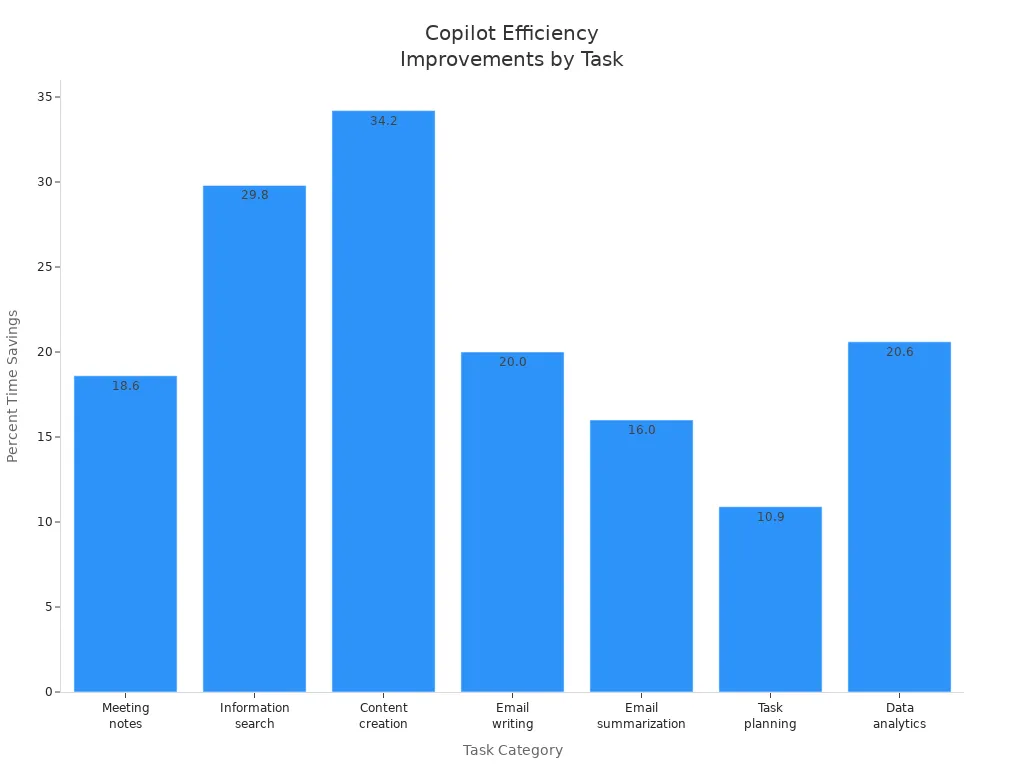
You will also see fewer errors in contracts and other documents. These improvements help your organization save money, reduce manual work, and focus on higher-value tasks.
Governance and Security in Copilot Adoption

Leveraging Microsoft 365 Permissions
You can rely on Microsoft 365 permissions to keep your data secure when using Copilot. Copilot uses the same role-based access control (RBAC) framework as the rest of Microsoft 365. This means only authorized users can access sensitive information. You can fine-tune permissions to control which data sources Copilot can use. Monitoring and auditing tools help you track Copilot’s actions and ensure accountability.
| Aspect | Description |
|---|---|
| Role-Based Access Control | Copilot uses the existing RBAC framework to ensure only authorized users can access sensitive data. |
| Permissions Management | Permissions can be finely tuned to control data sources accessible to Copilot. |
| Monitoring and Auditing | Comprehensive logs of activities enable auditability and traceability of Copilot's actions. |
Tip: Copilot only accesses data that a user can see based on their Microsoft 365 permissions. You should review and update permissions regularly to prevent accidental exposure of sensitive data.
Addressing Governance Weaknesses
Strong governance helps you avoid common pitfalls during Copilot adoption. Many organizations discover weaknesses in their governance processes when they start using AI tools. You can address these issues by taking a proactive approach:
- Automate certification with tools that review access rights on a regular schedule.
- Delegate responsibility for access reviews to business users, making them more accountable.
- Monitor offboarding and role changes closely to update permissions right away.
- Fix broken or misconfigured permissions to prevent accidental data leaks.
- Train your team and build a culture that values responsible AI use.
- Communicate the reasons behind governance policies so everyone understands their importance.
- Establish AI champions in each department to promote best practices.
- Encourage users to learn prompt engineering and critical thinking for safe AI use.
Note: Building a governance-minded culture turns data governance concerns into opportunities for safe innovation.
Ensuring Data Privacy
You play a key role in protecting data privacy when using Copilot. Start by setting up a clear governance framework for how Copilot uses data. Educate both users and administrators about safe AI practices. Automated policy enforcement helps you stay compliant with regulations. Assign specific roles for oversight and clarify responsibilities for everyone involved.
- Centralize logs to make compliance checks and incident responses easier.
- Create a Copilot Learning Center to provide ongoing training and support.
- Conduct regular data privacy workshops for users.
- Organize admin workshops to keep IT professionals up to date.
- Set up feedback loops so users can share their experiences and concerns.
Callout: Ongoing education and clear policies help you maintain trust and protect sensitive information as you expand Copilot’s use.
Sustaining Microsoft Copilot Adoption
Continuous Training and Support
You need to keep your team’s skills sharp to get the most from Microsoft Copilot. Training should not stop after the initial rollout. You should offer ongoing learning opportunities that fit your team’s needs. Tailored training for each department helps employees see how Copilot works in their daily tasks. Flexible e-learning and self-paced resources let everyone learn at their own speed.
- Provide department-specific training for practical use.
- Empower champions to support their peers and answer questions.
- Use change management strategies to address concerns and build trust.
- Offer e-learning modules and self-paced guides for easy access.
Champions play a big role in sustaining adoption. You can give them advanced training so they become peer coaches. Champions should hold regular sessions to share tips and real-life examples. This approach creates a self-sustaining ecosystem where employees help each other succeed.
Tip: Regular check-ins and refresher sessions keep everyone up to date with new Copilot features.
Fostering a Culture of AI Integration
You build a strong AI culture by involving leaders and encouraging teamwork. Executive sponsors set the tone for change and show that AI is a priority. Education initiatives, like workshops and online courses, help your team understand how to use Copilot. Peer-to-peer knowledge sharing speeds up adoption and creates a supportive community.
- Leadership involvement signals the importance of AI.
- Workshops and online courses boost understanding.
- Peer learning encourages sharing of best practices.
- Regular measurement of progress helps you see what works.
You should use AI-powered insights to show how Copilot improves productivity. When you measure outcomes and share success stories, you motivate your team to keep learning and growing.
Callout: A culture that values learning and sharing helps everyone feel confident using AI tools.
Gathering Feedback and Iterating
You improve Copilot adoption by listening to your team and making changes based on their feedback. Encourage employees to give specific, constructive feedback in a safe environment. Structured peer reviews help you gather useful insights. Leaders should model positive responses to feedback, which builds trust and openness.
- Practice giving feedback on low-stakes topics.
- Use structured peer reviews for honest exchanges.
- Discuss feedback openly to improve its effectiveness.
- Leaders should respond positively to suggestions.
- Normalize learning from mistakes and making improvements.
Treat Copilot as a tool that gets better with each use. Start with your best prompt, evaluate the results, and refine your approach. This cycle of feedback and iteration leads to better outcomes and higher satisfaction.
Note: High-quality results come from trying, learning, and improving together.
Next Steps for Leaders
Assessing Readiness
You need to check if your organization is ready for Microsoft Copilot. Start by identifying the best use cases. List where Copilot can help most and score each idea based on impact and how easy it will be to start. Pick a few use cases that offer high value and are easy to launch. Next, build training materials and prepare your IT support team. Internal champions can help answer questions and support their peers. Set clear metrics to measure Copilot’s impact. Collect data on how things work now so you can compare results after rollout. Finally, create a readiness report. This report should highlight your strengths, gaps, risks, and a plan for moving forward.
Checklist for Readiness:
- Identify and rank Copilot use cases.
- Prepare training and support resources.
- Set metrics and gather baseline data.
- Summarize findings and create a roadmap.
Tip: A clear readiness assessment helps you avoid surprises and sets your team up for success.
Creating an Action Plan
You need a step-by-step plan to guide your Copilot adoption. Begin with a technical and security review to make sure your systems are ready. Define clear use cases and decide if you want a phased rollout or a full launch. Empower champions in each department and build a user community. Champions will share best practices and help others learn. Offer role-based training that continues after launch. Track your progress and measure return on investment. Use what you learn to improve your approach.
Key Steps for Your Action Plan:
- Review technical and security readiness.
- Choose use cases and rollout strategy.
- Empower champions and build community.
- Deliver ongoing, role-based training.
- Measure ROI and keep improving.
Note: A strong action plan keeps your Copilot project on track and helps you reach your goals.
Sustaining Momentum
You must keep the energy high after your initial rollout. Start with a small group of users to test Copilot and gather feedback. Share early wins with your teams to build excitement. Address any technical issues right away. Expand to larger groups only when you see stability and value. Track usage and measure the effects to show the benefits of Copilot. Make sure leaders support Copilot as part of daily work.
| Strategy | Description |
|---|---|
| Structured Rollout | Roll out Copilot in phases and collect feedback before expanding. |
| Monitor Usage | Track who uses Copilot and measure its impact to support ongoing investment. |
| Executive Buy-in | Keep leaders involved to ensure Copilot becomes part of standard processes. |
Callout: Celebrate small wins and keep sharing success stories to inspire your teams and maintain momentum.
You can expect Microsoft Copilot to transform how your teams work by boosting productivity, collaboration, and employee satisfaction. Success depends on strong leadership, clear governance, and ongoing support. Build a champions network, use pilot programs, and provide continuous training to help your teams adapt. Leaders should assess readiness, set clear goals, and use resources like the Microsoft Customer Hub and Copilot scenario library. Over time, Copilot will help you drive innovation, improve retention, and unlock new opportunities for digital transformation.
FAQ
What is Microsoft Copilot?
Microsoft Copilot is an AI-powered assistant that works inside Microsoft 365 apps. You can use it to draft documents, analyze data, summarize meetings, and manage emails. It helps you work faster and smarter.
How does Copilot keep my data secure?
Copilot uses Microsoft 365’s built-in permissions. You only access data you are allowed to see. Copilot follows your organization’s security and privacy policies.
Who should lead a Copilot rollout?
You need executive sponsors and an AI council. These leaders set goals, guide teams, and ensure everyone follows best practices. Champions in each department help drive adoption.
What training do employees need for Copilot?
You should provide role-based training, e-learning modules, and hands-on workshops. Champions support their peers. Ongoing training helps everyone use Copilot effectively.
How do I measure Copilot’s success?
Track key metrics like time saved, user satisfaction, and productivity gains. Use dashboards and feedback tools to see how Copilot improves your workflows.
Can Copilot work with existing workflows?
Yes. Copilot integrates with Microsoft 365 apps you already use. You can add it to your daily tasks without changing your main tools.
What if employees resist using Copilot?
You should communicate benefits clearly and offer support. Champions and leaders can share success stories. Training and open discussions help build trust in AI.
🎧 Listen to this episode
Want a practical explanation of Microsoft 365 Copilot Adoption with Chris Hinch [Microsoft]? This episode breaks down the topic in clear language and shows why it matters for Microsoft 365, Azure, Power Platform, security, AI, and modern work.
Listen to this episode if you want to:
- Understand the key concepts behind Microsoft 365 Copilot Adoption with Chris Hinch [Microsoft]
- See how it fits into the wider Microsoft technology ecosystem
- Learn where it can create practical value for your organization
You may also enjoy these related M365 FM episodes:
- Microsoft Copilot Adoption with Edyta Gorzoń [MVP]
- Scale Microsoft Copilot Adoption in 90 Days with Carina de Vries [MVP]
- Increase Microsoft 365 Copilot Adoption with Behavior Change
- Microsoft 365 Copilot Agents: Real Business Value with Steve Corey [MVP]
- Copilot for Dynamics 365 Finance and Operations - Simply Explained
Discover more practical Microsoft conversations on M365 FM.
Last reviewed: July 2026.
Who Should Listen
This episode is for Microsoft administrators, architects, developers, security professionals, and business leaders who need a practical foundation before making implementation, operations, or governance decisions.
🎧 You Should Also Listen To
- AI Agents — A strongly related next step for extending this topic.
- Power Platform — A strongly related next step for extending this topic.
- Microsoft Graph Data Connect — A strongly related next step for extending this topic.
Apple Podcasts · Spotify · YouTube · YouTube Music
Host: Mirko Peters