 EN
EN Deutsch
 Español
 Français
 Italiano
 Português
 Nederlands
 Polski
 Bahasa Indonesia
 Русский
 Українська
 العربية
 עברית
עברית हिन्दी
 日本語
日本語 한국어
한국어2026-06-30 · Season 2
Computer-Using Agents: How CUA Could Transform SaaS

Quick answer: computer-using agents CUA future of SaaS is covered in this M365 FM episode with a practical focus on how it works, where it fits, and the architecture, security, governance, or operational choices that matter in real Microsoft environments.
You now face the Death of the UI as the next chapter in the future of software. Industry leaders, like those on the M365 FM podcast, explain that autonomous agents are replacing traditional user interfaces. You see this shift as more organizations trust a cua to handle tasks, removing the need for visible screens or an app-centric model. The invisible interface emerges as agent-driven systems become essential in computing. With the conversational AI market set to reach $49.80 billion by 2031, you must rethink how generative ui and workflow capital define the future of computing.
Key Takeaways
- The shift from traditional user interfaces to Computer-Using Agents (CUAs) is transforming how we interact with software.
- CUAs automate tasks and workflows, allowing users to focus on higher-value work instead of navigating complex interfaces.
- Organizations must adapt to new pricing models, moving from seat-based subscriptions to consumption-based pricing that reflects actual usage.
- Workflow capital, the unique design and automation of business processes, becomes a key competitive advantage in the agent-driven era.
- Investing in upskilling employees is essential to prepare teams for working with AI and agent-driven systems.
- Security and identity management are crucial as agent-driven workflows increase, requiring unique credentials and monitoring.
- Agile and adaptive workflows are necessary to keep pace with rapid changes in technology and user expectations.
- Embracing agent-driven efficiency can lead to significant improvements in productivity, decision-making, and customer satisfaction.
Death of the UI

UI Limitations
You experience the death of the ui as you encounter the limits of traditional user interfaces. Many enterprise software platforms force you to learn complex interfaces before you can become productive. You spend hours navigating menus and dashboards, hoping to find the right feature. This approach slows you down and creates friction.
User Friction
You notice that ui design often creates barriers. Steep learning curves demand your time and patience. You must build trust with software through repeated use of confusing interfaces. Your expectations rarely match what the ui delivers. Many companies once believed that user experience mattered only for consumer products. Now, you see that friction in ui impacts productivity and satisfaction in every software platform.
| UI/UX Feature | Impact on Productivity | Impact on Satisfaction |
|---|---|---|
| Clear Labels | Guides workflow | Boosts confidence |
| Predictable Actions | Reduces errors | Improves engagement |
| Visual Hierarchy | Simplifies navigation | Enhances adoption |
| Efficient Workflows | Saves resources | Reduces friction |
You find that continuous feedback and usability testing reveal friction points. These insights help refine interfaces, but the process never ends. As software evolves, new friction appears. You realize that efficient workflows and intuitive interfaces save time and make task execution easier.
Scalability Issues
You face scalability issues as your organization grows. Traditional ui cannot keep up with the demands of modern software. You need interfaces that adapt in real-time. Systems must anticipate your needs instead of forcing you to navigate rigid dashboards. You see that the death of the ui is not just about removing screens. It is about creating software that scales with your business and adapts to your workflow.
- Steep learning curves slow onboarding.
- Complex interfaces require ongoing training.
- Static dashboards limit flexibility.
- Real-time adaptation becomes essential for growth.
Dashboards as Bottlenecks
Dashboards once promised clarity and control. Now, you find that dashboards act as bottlenecks. You spend time searching for data and switching between screens. You must remember where to find each feature. This slows your workflow and reduces efficiency. As ai and cua systems take over, dashboards lose their relevance. You see that the death of the ui means moving beyond dashboards. Agents handle tasks directly, removing the need for manual navigation.
Tip: You can boost productivity by letting ai agents automate routine tasks. This frees you from dashboard bottlenecks and allows you to focus on higher-value work.
Changing User Expectations
You notice that your expectations for software interfaces have changed. You want software to anticipate your needs and personalize your experience. You expect real-time adaptation and predictive interfaces. You demand immediate value and quick onboarding. You no longer accept generic interfaces that treat every user the same.
| Evidence Type | Description |
|---|---|
| Hyper-personalization | Interfaces customize content and layout for each user, adapting in real-time |
| Predictive Interfaces | Software forecasts your intent and offers smart suggestions |
| Real-world Impact | E-commerce platforms adjust navigation during high-traffic periods |
| New Navigation Expectations | Products surface relevant information proactively |
| Time-to-Value | You expect quick results and immediate value |
| Anticipatory Design | Software knows your needs and preferences |
| Role Awareness | Interfaces recognize your role and past interactions |
| Low-Effort Expectations | Lack of personalization signals low effort |
You see that the death of the ui is driven by these new expectations. You want ai and cua systems to deliver personalized, efficient experiences. You expect software to recognize your role and adapt to your workflow. The future belongs to agent-driven interfaces that anticipate your needs and automate tasks.
Intent-First Agent Workflows
What Is Intent-First?
You see a shift in enterprise software as intent-first workflows become the new standard. This approach lets you express your intent in natural language, and the system translates your words into actionable steps. For example, Pipefy’s AI-to-Workflow solution uses conversations to trigger automation. You describe what you want, and the software builds the workflow for you. This method connects AI capabilities with your existing systems, so you do not need to navigate menus or dashboards. You gain efficiency because the software understands your intent and acts on it.
CUA vs UI
Natural Language Interaction
CUA changes how you interact with software. Instead of clicking buttons or searching for features, you use natural language. CUAs rely on generative AI and large language models to understand your intent. You can delegate tasks, and the agent handles the details. This creates a dynamic experience. You focus on managing outcomes, not performing every step. Trust and transparency become central. You see your intent reflected in the actions the agent takes.
- CUAs use generative AI for dynamic conversations.
- Traditional interfaces depend on fixed menus and buttons.
- You delegate tasks to CUAs, shifting your role from operator to manager.
- CUAs emphasize trust and transparency, changing the user experience.
Task Automation
Automation becomes seamless with CUAs. You describe your intent, and the agent automates the process. You no longer need to set up complex workflows manually. The software listens, understands, and acts. You save time and reduce errors. Automation lets you focus on higher-value tasks. You see the software adapt to your needs in real time.
Agent-Driven Efficiency
You notice measurable improvements after adopting agent-driven workflows. Organizations report up to 40% reduction in processing time for ERP workflows and a 94% drop in error rates. Regulatory compliance strengthens. For example, a global automotive manufacturer achieved a 38% reduction in unplanned downtime, saving $3.2 million annually. A precision electronics company reduced inventory carrying costs by 32% and improved fulfillment rates from 92% to 99.3%. You see operational cost reductions of 15-35% and efficiency gains of 20-40%. Decision-making improves, leading to higher revenue and better customer experiences.
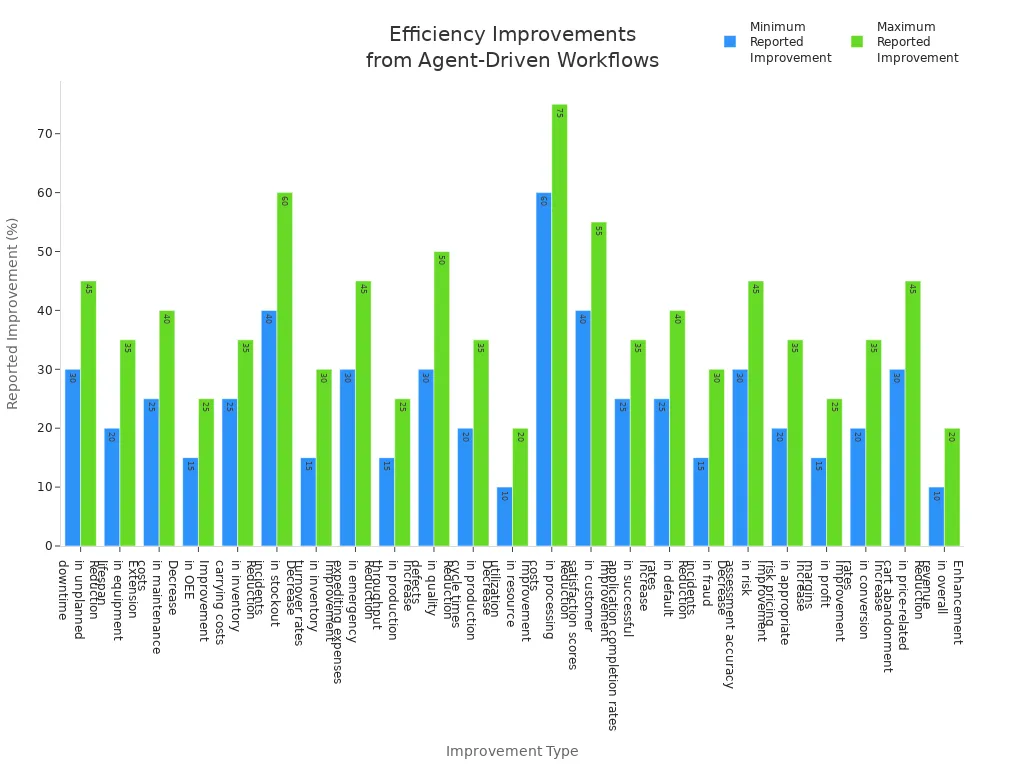
| Improvement Type | Reported Improvement Range |
|---|---|
| Reduction in unplanned downtime | 30-45% |
| Extension in equipment lifespan | 20-35% |
| Decrease in maintenance costs | 25-40% |
| Improvement in overall equipment effectiveness (OEE) | 15-25% |
| Reduction in inventory carrying costs | 25-35% |
| Decrease in stockout incidents | 40-60% |
| Improvement in inventory turnover rates | 15-30% |
| Reduction in emergency expediting expenses | 30-45% |
| Increase in production throughput | 15-25% |
| Reduction in quality defects | 30-50% |
| Decrease in production cycle times | 20-35% |
| Improvement in resource utilization | 10-20% |
| Reduction in processing costs | 60-75% |
| Improvement in customer satisfaction scores | 40-55% |
| Increase in successful application completion rates | 25-35% |
| Reduction in default rates | 25-40% |
| Decrease in fraud incidents | 15-30% |
| Improvement in risk assessment accuracy | 30-45% |
| Increase in appropriate risk pricing | 20-35% |
| Improvement in profit margins | 15-25% |
| Increase in conversion rates | 20-35% |
| Reduction in price-related cart abandonment | 30-45% |
| Enhancement in overall revenue | 10-20% |
Tip: You can unlock these benefits by adopting agent-driven workflows and focusing on intent-first automation. This approach lets you maximize efficiency and reduce errors in your software environment.
SaaS Model Impact
End of SaaS Subscription
You see the end of saas subscriptions as a direct result of agent-driven systems and the rise of cua. The old model linked software costs to the number of users. This approach made sense when people interacted with ui screens and dashboards. Now, you rely on cua to automate tasks and manage workflows. One agent can do the work of many employees. This shift breaks the connection between headcount and software spending.
You notice that traditional saas subscription models no longer fit your needs. Many companies find these models outdated and harmful to growth. Inflexible pricing structures fail to capture the real value of solutions. Profit margins shrink, and you lose the ability to invest in new areas. You want pricing that reflects the value you get from software, not just the number of seats you buy.
- Traditional saas subscriptions limit your flexibility.
- Outdated models erode profit margins and slow innovation.
- Inflexible pricing does not match the value you receive.
- New models must align with the value delivered by cua and agent-driven workflows.
You hear on the M365 FM podcast that the end of saas subscriptions is not just a trend. It is a response to the way you now use software. You need solutions that scale with your workflows, not with your headcount.
Consumption-Based Pricing
You see a new model taking shape as saas vendors move away from seat-based pricing. Consumption-based pricing links your costs to how much you use the software. This model fits the agent-driven world, where cua handle tasks and automate workflows. You pay for the value you receive, not for unused seats.
- SaaS vendors shift from seat-based to consumption-based pricing to match actual usage.
- By 2030, 40% of enterprise saas spending will move to usage- or outcome-based models.
- Traditional seat-based revenue will drop from 21% to 15%.
- Most AI-native saas companies now offer usage-based pricing.
- Consumption-based models create more variable costs, so you need better financial planning.
You notice that this model gives you more control over your spending. You can scale your software use up or down as your workflows change. You also see that vendors may add premiums, sometimes called an "AI tax," as they update contracts. This means you must watch your costs and plan for changes in value delivery.
| Evidence Type | Description |
|---|---|
| Market Prediction | By 2030, 40% of enterprise saas spending will shift to usage- and outcome-based models, while traditional models will decline from 21% to 15%. |
| Cost Structure | AI-driven systems create higher variable costs due to resource consumption, making budgeting less predictable than with traditional saas. |
| Vendor Behavior | Even as AI model costs drop, vendors often add a 20-37% premium on renewals, known as an 'AI tax'. |
You must adapt your budgeting and procurement strategies. You need to track how cua and agent-driven workflows change your software usage. This helps you capture the most value from your investments.
Workflow Capital
You gain a new advantage in the end of saas era: workflow capital. This concept means that the unique way you design and automate workflows becomes your competitive edge. You use cua to analyze data, spot patterns, and make better decisions. You see a 35-45% improvement in decision accuracy. Your response times drop by 60-80% for customer requests, which boosts satisfaction.
- Agent-driven workflows improve decision quality by finding patterns people might miss.
- You respond to customers faster, which increases satisfaction.
- You scale your operations without raising costs, thanks to cua and automation.
You realize that workflow capital is now more valuable than the software itself. The way you build and manage workflows sets you apart from competitors. You must focus on creating value through unique processes, not just buying the latest software.
You also face new challenges. Integration complexity can slow you down. Most enterprises see the need to connect cua with existing systems. Security remains a top concern for both practitioners and leaders. Many organizations find their current platforms only somewhat ready for the data demands of AI. You may need to connect to many data sources to unlock the full value of agent-driven workflows.
Note: You can build lasting value by investing in workflow capital. Focus on how cua and agent-driven systems help you create, automate, and scale unique workflows. This will prepare you for the future and give you an edge in the end of saas era.
Agent Ecosystems
API-First Architecture
You see agent ecosystems thrive when you adopt an API-first architecture. This approach lets you build software that connects agents, systems, and workflows with clarity and predictability. Stable APIs form the backbone of intelligent systems. Developers rely on these APIs to innovate without fear of disruptions. You gain extensibility, which helps you adapt to evolving requirements. Interoperability becomes foundational for secure, scalable, and decentralized agent environments. You reduce fragmentation and vendor lock-in by managing and orchestrating agents through APIs.
| Technical Requirement | Description |
|---|---|
| Interoperability | Enables agents to work across platforms, reducing fragmentation and vendor lock-in |
| Extensibility | Allows adaptation to new requirements and supports evolving agent capabilities |
| Secure, Composable Ecosystem | Provides a foundation for decentralized, scalable, and secure agent-driven environments |
Tip: You can future-proof your software by prioritizing stable APIs and extensible architecture.
Governance Challenges
You face new governance challenges as you deploy agent ecosystems. Decentralized environments often lead to agent sprawl and inconsistent permissions. Each agent increases the attack surface and can expose sensitive data if you lack clear access controls. OAuth and identity misconfigurations create complex access chains that are hard to audit. You must track agent actions to prevent blind spots and detect misuse.
| Challenge | Description |
|---|---|
| AI agent sprawl | Decentralized deployment leads to fragmented environments with duplicate agents and inconsistent permissions. |
| Uncontrolled agents | Each agent increases the attack surface and can expose sensitive data due to unclear access. |
| OAuth and identity misconfigurations | Excessive permissions via tokens create complex access chains that are hard to audit. |
| Lack of visibility and ownership | Untracked agents hinder auditing and create blind spots in detecting misuse or abnormal behavior. |
Agent Communication Standards
You need agent communication standards to ensure structured collaboration. Shared protocols, such as A2A, standardize agent-to-agent communication. Multi-channel support lets agents interact consistently across systems. Governed integration enables secure and vendor-agnostic connectivity. These standards prevent centralization and promote diverse development. Minimal interoperability allows independent development while participating in the ecosystem.
Lifecycle Management
You must manage the lifecycle of each agent. Lack of visibility into agent actions can lead to undetected policy violations and security breaches. Emergent behavior may cause operational disruptions or legal issues. Multi-agent coordination complexity can result in conflicts and cascading failures. You need effective governance to track, audit, and retire agents as needed.
- Track agent actions for auditing.
- Monitor for unpredictable behavior.
- Coordinate agents to prevent conflicts.
Vendor Collaboration
You see vendors collaborate to ensure interoperability and stability in agent-driven software ecosystems. Shared standards allow agents to work together without chaos. Vendors and enterprises co-create solutions to meet diverse needs. A composable environment enables coordinated execution and architectural consistency. Scalability improves as independent developers contribute.
| Key Points | Description |
|---|---|
| Shared Standards | Vendors emphasize the importance of shared standards to ensure interoperability. |
| Co-Creation | Collaboration among vendors and enterprises to co-create solutions that meet diverse needs. |
| Composable Environment | Establishing a composable environment allows agents to work together effectively without chaos. |
| Coordinated Execution | Enables agents to work together across environments while maintaining governance. |
| Architectural Consistency | Preserves consistency in the architecture of agent systems. |
| Scalability | Allows for ecosystem expansion by enabling independent developers to contribute. |
You adapt your organization to this new model. You focus on stable APIs, governance, and interoperability. You prepare for a future where cua and agent-driven software ecosystems drive innovation and efficiency.
Security & Identity
Securing Agent Workflows
You must protect your software as agent-driven workflows become the standard. Security starts before you deploy any agent. Assign unique credentials to every agent early. This step helps you track actions and prevent confusion. Record normal behavior for each agent. When you know what to expect, you can spot problems faster. Encrypt and validate all data that moves between tools. Logging every exchange gives you a clear record if something goes wrong.
You should automate your response to threats. Set rules that pause agent activity if the agent acts outside policy. Build security into your software from the start. Use authentication, authorization, and encryption at every stage. Keep human oversight in your workflows. Approval checkpoints and monitoring dashboards let you catch errors before they spread. Assign clear ownership for every decision an agent makes. Audit trails help you trace actions and fix issues quickly.
- Assign unique credentials to agents before deployment.
- Record normal agent behavior to detect anomalies.
- Encrypt, validate, and log all data exchanges.
- Automate isolation rules for policy deviations.
- Build secure-by-design architectures.
- Maintain human oversight with approval checkpoints.
- Assign clear accountability and keep audit trails.
- Embed risk controls and validate inputs and outputs.
- Add human-in-the-loop validation for sensitive tasks.
- Track agent versions and restrict self-modification.
Identity in CUA Systems
Identity plays a new role in agent-driven software. You no longer rely on user logins alone. Each agent needs a unique identity. This identity lets you control what the agent can do and see. You must manage these identities with care. If you lose track, you risk exposing sensitive data or losing control of your software. Use strong authentication and limit permissions. Regularly review agent access to keep your workflows safe.
Agent Trust & Compliance
You build trust in your software by following strong compliance frameworks. These frameworks guide how you manage agents and protect data. They help you prove that your workflows are fair, reliable, and secure. You can use the table below to see the main principles that support trust in agent-driven environments:
| Principle | Description |
|---|---|
| Governance | Ensures proper oversight and management of AI systems. |
| Trustworthiness | Builds confidence in AI outputs and processes. |
| Fairness | Promotes equitable treatment and outcomes in AI decision-making. |
| Reliability | Guarantees consistent performance and dependability of AI systems. |
| Data Protection | Safeguards sensitive information and ensures compliance with data regulations. |
Malicious Agent Prevention
You must stay alert for agents that act against your interests. Malicious agents can enter your software through weak controls. Use strong authentication and monitor agent behavior. Set up alerts for unusual actions. Isolate agents that show signs of risk. Regular updates and audits help you catch threats early.
Accountability
You need clear accountability in your software. Assign ownership for every agent and every action. Keep detailed logs of agent activity. If something goes wrong, you can trace the problem and fix it. This approach builds trust and keeps your workflows safe for the future.
End of SaaS Transformation
Rethinking Procurement
You see procurement changing as agent-driven saas solutions replace traditional models. You no longer rely on manual processes or static contracts. Instead, you use software that understands your spending history and preferences. This software identifies opportunities by analyzing market conditions and your internal data. You receive procurement strategy advice that combines past outcomes with current trends.
- Contextual understanding of your organization's spending history and preferences
- Proactive identification of opportunities based on market conditions and internal data
- Procurement strategy consultation that blends historical outcomes with current market conditions
You gain more control and flexibility. You can adjust your workflows quickly as new agent-driven saas options appear. You measure return on investment using clear metrics. For example, companies report a 57% increase in customer service capacity, a 33% higher deflection rate, and a drop in average resolution costs by more than 20%.
| Metric | Impact |
|---|---|
| Customer service capacity | 57% increase |
| Deflection rate | 33% higher |
| Average resolution costs | Drop by more than 20% |
You see cost savings, risk reduction, and revenue growth as you adopt agent-driven procurement software. Many organizations achieve a return on investment within weeks.
Upskilling for Agents
You prepare your workforce for the future by investing in upskilling. You segment your employees into groups with distinct learning needs. You embed AI training within existing workflows, making learning more effective. You conduct a skills gap analysis to tailor learning pathways for each role. You use tools like the Learning Agent, which provides personalized AI upskilling based on individual skills and work patterns. This ensures every employee receives training that fits their needs.
- Segment the workforce for targeted learning
- Embed AI training within current workflows
- Conduct skills gap analysis to tailor learning pathways
- Invest in learning and development practices for AI tools
- Focus on Natural Language Processing to understand chatbots and virtual assistants
You see organizations like the Writers Guild of America and SAG-AFTRA negotiating frameworks for AI use. These frameworks include training and oversight, showing a proactive approach to integrating AI while protecting worker interests. You recognize that upskilling prepares your team for new software and agent-driven workflows.
Adapting to Change
You adapt to rapid changes brought by agent-driven saas transformation by investing in data infrastructure and integration capabilities. You implement organizational change management and training programs. You establish security frameworks and governance structures. You develop performance monitoring and optimization systems.
An AI orchestration layer acts as the control center for intelligent automation. It routes requests between agents, determines which agent should perform a specific task, and manages the flow of information across systems.
You consolidate data sources, implement real-time data pipelines, and expose secure APIs for dynamic information retrieval. You map the friction in your workflows, clarify desired outcomes, select agent types, run tests, deploy incrementally, and monitor improvements over time.
- Consolidate data sources
- Implement real-time data pipelines
- Expose secure APIs for dynamic information retrieval
You identify where automation makes a real impact. You align AI capabilities with your business goals. You launch pilots quickly and scale confidently. You upskill teams while letting agents handle routine tasks. You see competitive advantages through faster decision-making, reduced operational costs, and improved customer experiences. Many organizations justify their investment within 12-18 months.
You see the transition from ui to intent-first, agent-driven systems changing the way you use software. You interact less with ui and more with intelligent agents like cua, which automate workflows and make your experience more conversational. Organizations must redesign workflows to include AI agents as collaborators, helping employees focus on strategic tasks. You gain agility by adopting adaptive structures and integrating workflows across departments. Industry leaders use insights from the M365 FM podcast to guide their transformation, emphasizing disciplined operating models and clear governance. You prepare for the future by embracing agent-driven efficiency and building workflow capital as your competitive advantage.
- Organizations redefine value in contracts and shift to outcome-based pricing.
- Advanced instrumentation and real-time data observability become essential for compliance.
- SaaS companies adapt to avoid obsolescence and unlock new growth opportunities.
- Pricing models evolve, requiring clear definitions of agent and outcome.
Tip: You can thrive by focusing on adaptive workflows, leveraging agent-driven systems, and preparing your organization for the next era of enterprise technology.
FAQ
What is a Computer-Using Agent (CUA)?
A Computer-Using Agent is an AI system that interacts with software on your behalf. You give instructions in natural language. The agent completes tasks, automates workflows, and reduces your need to use traditional user interfaces.
How does agent-driven software change my workflow?
You delegate routine tasks to agents. This lets you focus on higher-value work. Agents handle data entry, reporting, and process automation. You see faster results and fewer errors in your daily operations.
Will I need to learn new skills to work with CUAs?
You will benefit from learning how to communicate with agents. Basic understanding of natural language prompts and workflow design helps. Many organizations now offer training to help you adapt quickly.
How does consumption-based pricing affect my software costs?
You pay for what you use. Costs depend on the number of tasks or processes your agents complete. This model gives you more control and flexibility compared to traditional seat-based subscriptions.
What is workflow capital, and why does it matter?
Workflow capital is the unique way you design and automate your business processes. It gives you a competitive edge. You create value by building efficient, agent-driven workflows that others cannot easily copy.
How do I keep agent-driven systems secure?
You assign unique credentials to each agent. You monitor agent actions and set clear permissions. Regular audits and strong authentication protect your data and workflows from unauthorized access.
What role does the user interface play in the future?
You will interact less with traditional user interfaces. Agents will handle most tasks. You will focus on expressing intent and managing outcomes, not navigating menus or dashboards.
🎧 Listen to this episode
Want a practical explanation of Computer-Using Agents? This episode breaks down the topic in clear language and shows why it matters for Microsoft 365, Azure, Power Platform, security, AI, and modern work.
Listen to this episode if you want to:
- Understand the key concepts behind Computer-Using Agents
- See how it fits into the wider Microsoft technology ecosystem
- Learn where it can create practical value for your organization
You may also enjoy these related M365 FM episodes:
- From SaaS to AI Agents: Managing Enterprise Architecture Entropy
- AI Agents - Simply Explained
- From Data to Intelligent Agents: Building Trusted Enterprise AI with Microsoft AI Foundry with Shubhangi Goyal [MVP]
- Microsoft 365 Copilot Agents: Real Business Value with Steve Corey [MVP]
- Microsoft Entra Agent ID: Secure Identity for AI Agents
Discover more practical Microsoft conversations on M365 FM.
Last reviewed: July 2026.
Who Should Listen
This episode is for Microsoft administrators, architects, developers, security professionals, and business leaders who need a practical foundation before making implementation, operations, or governance decisions.
🎧 You Should Also Listen To
- AI Agents — A strongly related next step for extending this topic.
- Power Platform — A strongly related next step for extending this topic.
- Microsoft Graph Data Connect — A strongly related next step for extending this topic.
Apple Podcasts · Spotify · YouTube · YouTube Music
Host: Mirko Peters