 EN
EN Deutsch
 Español
 Français
 Italiano
 Português
 Nederlands
 Polski
 Bahasa Indonesia
 Русский
 Українська
 العربية
 עברית
עברית हिन्दी
 日本語
日本語 한국어
한국어2026-05-16 · Season 2
AI and Copilot in D365FO Finance with Billur Samdancioglu [MVP-MCT]
![AI and Copilot in D365FO Finance with Billur Samdancioglu [MVP-MCT]](https://d3wo5wojvuv7l.cloudfront.net/t_rss_itunes_square_1400/images.spreaker.com/original/77e0d66da09c924d97e0da0a1f0e644d.jpg)
You see the future of finance unfolding now with Microsoft Dynamics 365. Copilot and copilot cowork transform your daily operations by automating tasks and providing real-time insights. Copilot cowork lets you collaborate and make faster decisions, while AI in D365 Finance and Operations supports your business outcomes with predictive insight. You gain more accuracy, less manual work, and better decisions. Copilot cowork and D365 supply chain management give you the tools to act quickly and stay ahead in a fast-moving world. Embrace the future with copilot cowork and shape your finance strategy for lasting success.
Key Takeaways
- Copilot simplifies finance tasks by allowing you to use plain English for data retrieval and report generation.
- Automate repetitive tasks with Copilot to save time and reduce manual errors in your finance operations.
- Finance agents provide real-time monitoring of workflows, helping you quickly identify and resolve issues.
- Collaborate effectively with Copilot Cowork, which creates shared workspaces for team discussions and approvals.
- Integrate your ERP data with Microsoft 365 tools to streamline workflows and enhance productivity.
- Use AI-driven insights to make informed decisions and improve your financial strategy.
- Ensure data security and compliance by regularly reviewing permissions and monitoring access in your ERP system.
- Stay updated with new features and best practices through Microsoft’s community resources and training materials.
Core Features of Copilot & Agents
Copilot AI Capabilities
Natural Language Finance Tasks
You can use copilot in dynamics 365 to interact with your erp system using plain English. This means you do not need to remember complex commands or search through menus. Copilot lets you ask questions about your financial data, generate reports, and complete tasks just by typing or speaking. This natural language feature saves you time and makes your daily work easier.
| Key Feature | Description |
|---|---|
| Natural Language Interaction | You interact with copilot using plain English to retrieve data and perform tasks. |
| AI-Generated Summaries | Copilot analyzes data and gives you actionable insights and recommendations. |
| Task Automation | Copilot automates routine tasks like report creation and data reconciliation. |
| Contextual Assistance | Copilot provides insights based on your activity and trends, flagging anomalies. |
Automation and Contextual Assistance
Copilot in d365 brings powerful automation to your finance operations. You can automate repetitive tasks, such as reconciling accounts or preparing financial statements. Copilot also offers contextual assistance by analyzing your actions and suggesting next steps. This ai-driven support helps you spot trends, identify risks, and make better decisions. You gain more time to focus on strategy instead of manual work.
Finance Agents in D365FO
Workflow Monitoring
Finance agent tools in dynamics 365 monitor your erp workflows in real time. These agents track every step, alert you to delays, and help you resolve issues quickly. You get better visibility into your processes and can respond faster to changes or problems.
Anomaly Detection
Agents in d365 use ai to detect unusual patterns in your financial data. They flag anomalies, such as unexpected expenses or missing transactions, so you can act before small issues become big problems. This proactive approach improves accuracy and reduces errors.
| Benefit Description | Measurable Impact |
|---|---|
| Reduced manual effort | Automation of routine tasks leads to time savings |
| Faster issue detection | Continuous monitoring improves response times |
| Consistent decision-making | Data-driven insights enhance reliability |
| Improved accuracy | Reduction in human error increases precision |
| Better visibility | Enhanced tracking of risks and performance trends |
| Scalable support | Ability to manage global operations without increasing staff |
Copilot Cowork Functions
Collaborative Workspaces
Copilot cowork in dynamics 365 creates shared workspaces where you and your team can work together on financial tasks. You can review documents, approve transactions, and discuss data in real time. This collaboration improves communication and speeds up decision-making.
- Copilot cowork enhances collaboration across applications and teams.
- It streamlines workflows, reducing administrative overhead.
- Cowork automates tasks such as data analysis and report generation.
- You can transform raw data into executive-ready dashboards.
- Cowork accelerates critical processes like generating forecast scenarios and identifying budget discrepancies.
Task Automation in Microsoft 365
With copilot cowork, you can automate tasks directly in Microsoft 365. For example, you can set up workflows that move data from your erp to Excel or Teams. This integration lets you create reports, share insights, and manage approvals without switching between systems. You save time and reduce errors by keeping everything connected.
Tip: Use copilot cowork to bring together your erp data, ai insights, and team collaboration in one place. This approach helps you work smarter and achieve better results.
Integration with D365FO
Seamless User Experience
You experience a seamless workflow when you use Copilot, Agents, and Copilot Cowork within Dynamics 365 Finance & Operations. The system connects your finance tools, data, and AI-driven features without interruption. You move from task to task with ease. The Model Context Protocol (MCP) plays a key role. MCP lets AI agents discover available tools and pass context from Dynamics 365 records. You do not need to switch between screens or re-enter information. The AI understands your business intent and guides you through actions.
You benefit from a unified interface. Large language models (LLMs) reason about your goals before they take action. This means you get relevant suggestions and accurate results. Dataverse acts as an operational intelligence layer. It brings together your data and processes, making every step smarter and more efficient. You see practical applications every day. For example, plugins summarize pipeline changes or generate customer-ready proposals. You save time and reduce errors.
Tip: Use Copilot Cowork to collaborate with your team in real time. You can share insights, approve transactions, and review documents together. This approach keeps everyone on the same page and speeds up decision-making.
- MCP enables dynamic discovery of tools and context sharing.
- LLMs enhance business intent reasoning.
- Dataverse provides a secure intelligence layer.
- Plugins automate tasks like summarizing changes and creating proposals.
| Integration Feature | Benefit for Finance Teams |
|---|---|
| Unified Interface | Easy navigation and task completion |
| Context Sharing | No need to re-enter data |
| Real-Time Collaboration | Faster approvals and teamwork |
| Plugin Automation | Less manual work, more accuracy |
Security and Compliance
You trust Dynamics 365 Finance & Operations to protect your sensitive financial data. Security and compliance stand at the core of every integration. MCP ensures that AI agents execute actions through governed servers. This approach keeps your data safe and meets regulatory standards. You control access to information. The system tracks every action and maintains audit trails.
You benefit from built-in compliance features. The platform supports industry standards and regional regulations. You can set permissions for users and monitor activity. Dataverse strengthens security by acting as a central layer for data governance. You gain peace of mind knowing your financial operations stay protected.
- Governed servers execute AI actions securely.
- Audit trails track every change and approval.
- Permissions and monitoring tools help you manage access.
- Compliance features support global and local regulations.
Note: Always review your security settings and compliance requirements. Dynamics 365 gives you the tools to stay ahead of risks and maintain trust with stakeholders.
You see how seamless integration and strong security combine to support your finance team. You work smarter, faster, and safer with Copilot, Agents, and Copilot Cowork in D365FO.
Future of Finance with AI in D365FO

AI-Driven Transformation
From Legacy to Modern Finance
You stand at the edge of a new era in finance. The future of finance depends on how you use ai and automation in your erp. Dynamics 365 and d365 bring you tools that move your organization from legacy systems to modern, connected platforms. You no longer need to rely on manual processes. Copilot and generative ai help you automate repetitive tasks and answer questions using natural language. This transformation gives you more time for strategic work and less time spent on routine data entry.
- Copilot enables you to ask questions about your financial data and receive instant answers.
- Real-time analytics dashboards in d365 let you detect anomalies before they become problems.
- Streamlined bank reconciliation reduces errors and manual effort.
- Increased automation means you can focus on business outcomes, not just transactions.
Strategic Decision-Making
You use ai-driven decision-making to improve your business outcomes. Dynamics 365 and d365 provide seamless access to real-time data. You can adjust forecasts instantly by product, market, or timeframe. You evaluate unexpected changes and apply ai-suggested corrective actions. This level of innovation helps you stay ready for disruption and make better decisions faster.
Data Quality & Governance
Importance of Structured Data
You need high-quality, structured data to get the most from ai in your erp. Each critical data domain in dynamics 365 should have a business owner who defines quality thresholds and approves changes. Align your data to a common data model and master data management strategy. This ensures consistency across all your systems and supports better financial visibility.
- Assign ownership for each data domain.
- Align data to a common model.
- Define and track data lineage for trust and auditability.
- Embed data quality controls at the point of creation.
- Design security and access rights based on governance needs.
- Extend governance beyond dynamics 365 into Microsoft Fabric.
- Treat governance as an ongoing process, not a one-time project.
- Measure success by business outcomes, not just policy adoption.
Model Context Protocol
The Model Context Protocol in d365 acts as the operational backbone of modern businesses. It lets ai agents discover tools and share context across workflows. You benefit from seamless integration and secure data handling. This protocol supports ai-driven decision support and keeps your erp environment efficient and compliant.
Proactive Financial Management
Autonomous Agents
You use agent technology in dynamics 365 to monitor workflows and alert you to issues. These agents retrieve data instantly, generate custom reports, and provide automated insights. You get conversational analytics that simplify complex queries. Automated visualizations give you immediate understanding of trends.
| Feature | Benefit |
|---|---|
| Instant data retrieval | Quick access to critical information |
| Automated insights | Timely analysis without manual effort |
| Conversational analytics | Simple data querying for users |
| Automated visualizations | Immediate graphical representations |
| Proactive insights | Identify trends before they become issues |
| Custom report generation | On-demand reporting without IT |
| Real-time KPI calculation | Up-to-date business metrics |
Optimization Recommendations
You receive optimization recommendations from ai agents in d365. These suggestions help you improve workflows and reduce errors. You can act on insights before problems grow. This proactive approach leads to better financial visibility and stronger business outcomes.
Tip: Use copilot and agent features in dynamics 365 to automate workflows, improve decision-making, and drive your future of finance strategy.
Practical Scenarios & Use Cases
Invoice Processing with Copilot
Payables Agent Workflow
You can transform your accounts payable process with copilot in dynamics 365. When you open an invoice in the d365 invoice capture workbench, you start by asking the agent for suggestions. The agent retrieves historical postings and supplier patterns from your erp. You receive a summary with recommended general ledger accounts and dimension values for each line item. You can accept these suggestions, adjust them, or apply a bulk update across multiple lines. After you confirm the entries, the invoice moves through the normal approval and posting process. The agent learns from each transaction, improving future recommendations.
This workflow streamlines your daily tasks. You no longer need to search for past invoices or manually code each line. The agent provides instant insights, helping you make faster decisions and reducing the risk of errors. Your team can handle more invoices without increasing headcount, supporting better business outcomes.
Reducing Manual Tasks
Copilot and automation in d365 help you reduce manual work in your erp. You see faster coding, fewer errors, and higher consistency across accounts payable decisions. The agent automates repetitive steps, so you spend less time on data entry and more time on analysis. You can scale your invoice volume as your business grows, without adding extra staff.
| Benefit | Impact on Finance Operations |
|---|---|
| Faster invoice coding | Shorter processing times |
| Reduced rework | Fewer corrections and adjustments needed |
| Consistent decisions | Standardized handling of similar invoices |
| Scalable workflows | Manage more invoices with the same team |
Tip: Use copilot to ask questions about your invoices directly in the app. You get immediate insights and can resolve issues before they slow down your process.
Month-End Close Automation
Agents Orchestrating Processes
You can speed up your month-end close with agents in dynamics 365. The financial period close workspace in d365 lets you organize every step. Agents coordinate tasks, send reminders, and automate routine entries. You use close templates and notifications to ensure consistency. Recurring journals automate regular postings, and batch jobs handle tasks like currency revaluation and depreciation. Your erp runs these processes automatically, reducing oversight and freeing your team for higher-value work.
A manufacturer using this approach reduced their month-end close from two weeks to just four days. You can achieve similar results by structuring your workflows and using d365 tools to orchestrate each step.
Error Reduction
Automation in dynamics 365 helps you minimize errors during the close process. Agents ensure that every task follows the correct sequence. You receive timely reminders and see real-time status updates. Automated entries reduce manual data entry mistakes. You trust your numbers at month-end because the system enforces consistency and compliance.
As Microsoft summarizes, this approach helps teams "close faster, stay compliant, and actually trust their numbers at month-end."
You gain better business outcomes by closing your books quickly and accurately. Your team can focus on analysis and planning, not just reconciliation.
Copilot Cowork for Collaboration
Shared Approvals
Copilot cowork in dynamics 365 creates a collaborative workspace for your finance team. You can review documents, approve transactions, and discuss data together in real time. Shared approvals mean you do not wait for emails or chase down signatures. Everyone sees the same information in your erp, so you make decisions faster and with more confidence.
Cowork automates the approval process. You set up workflows that route documents to the right people. The system tracks every action, so you always know who approved what and when. This transparency supports compliance and builds trust across your organization.
Real-Time Data Insights
You use copilot cowork to access real-time insights from your erp. The system pulls data from dynamics 365 and presents it in dashboards or summaries. You see customer and vendor overviews, product performance, and order status at a glance. These insights help you spot trends, identify risks, and make informed decisions.
Cowork lets you share these insights instantly with your team. You can discuss findings, assign follow-up tasks, and update your plans—all within the same workspace. This level of collaboration leads to better business outcomes and keeps everyone aligned.
- Copilot cowork brings together erp data, ai insights, and team collaboration.
- You automate workflows, reduce manual steps, and gain actionable insight.
- Cowork supports faster approvals and real-time decision-making.
- You see the impact of your actions immediately, improving your finance operations.
- Copilot cowork helps you stay ahead in a fast-moving business environment.
Note: Use copilot cowork to transform your finance team into a proactive, insight-driven group. You achieve more together when you collaborate in real time and leverage the full power of your erp.
Custom AI Agents with Copilot Studio
Tailored Finance Solutions
You can create custom AI agents for your finance team using copilot studio. This tool lets you design solutions that fit your unique business needs. You do not have to settle for generic workflows. Instead, you build agents that handle your specific finance processes, such as reconciliations, reporting, or data validation.
Many organizations use copilot studio to automate complex finance workflows. For example, you can:
- Develop custom AI agents that manage invoice approvals or automate reconciliations.
- Integrate your agents with core banking systems to ensure compliance and security.
- Customize copilot to handle detailed finance tasks, such as multi-entity consolidations or regulatory reporting.
You see real results when you tailor AI to your business. BDO, a global accounting firm, used copilot studio to automate finance workflows. Their custom agents now handle half of all transactional tasks with 99% accuracy. This shift saves time and improves reliability. Dow Inc. built a custom copilot to analyze shipping invoices. Their solution identified discrepancies that could save millions each year. These examples show how tailored AI agents deliver measurable value.
Tip: Start by mapping your most repetitive finance tasks. Use copilot studio to build agents that automate these steps and free up your team for higher-value work.
Power Automate Integration
You can connect your custom AI agents to Microsoft Power Automate for even greater impact. This integration lets you trigger workflows across your finance systems. You set up flows that move data between Dynamics 365, Excel, Teams, and other applications. Your agents can start a workflow when they detect an anomaly or complete a task.
Here is how you benefit from integrating copilot studio with Power Automate:
| Integration Feature | Benefit for Finance Teams |
|---|---|
| Automated Data Movement | Transfer data between systems instantly |
| Triggered Workflows | Start processes based on agent insights |
| Error Reduction | Minimize manual entry and mistakes |
| Real-Time Notifications | Get alerts when key events occur |
You gain more control over your finance operations. Your team responds faster to changes and spends less time on manual work. You also ensure that your data stays consistent across all platforms.
Note: Use copilot studio and Power Automate together to build a connected finance ecosystem. You streamline your processes and unlock new levels of efficiency.
Costs, Licensing & Requirements
Licensing for Copilot & Cowork
Included Features vs. Add-Ons
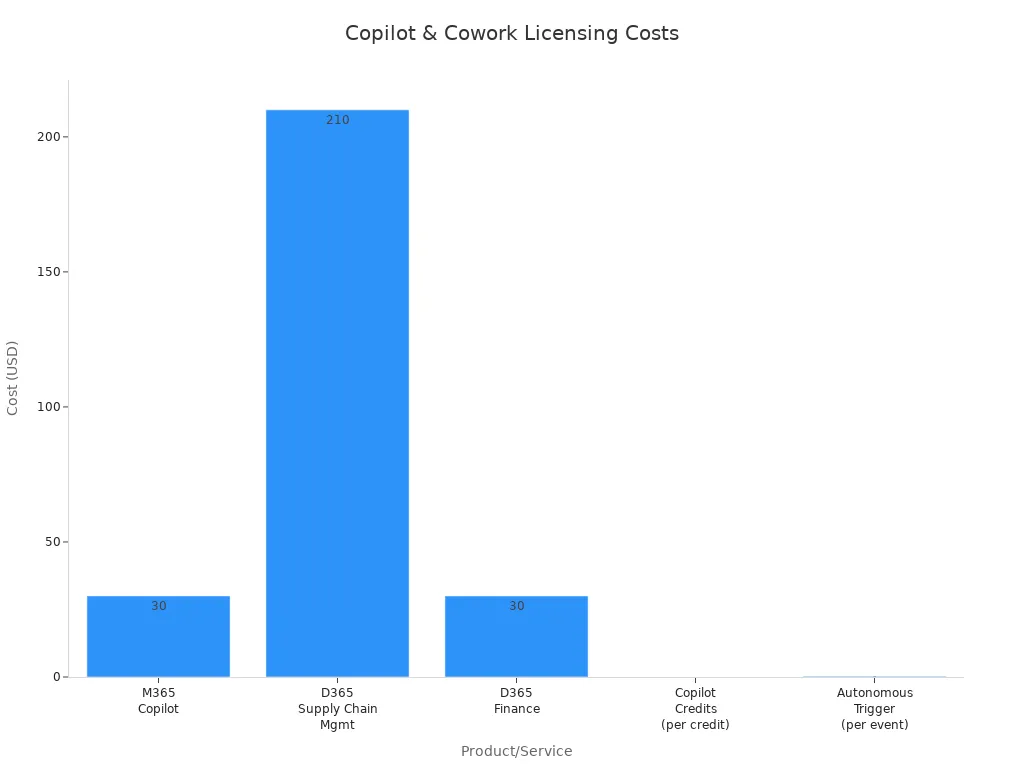
You need to understand what your licenses cover before you deploy Copilot and Copilot Cowork in your erp. Microsoft offers a clear structure for licensing. Some features come included, while others require add-ons or extra credits. The table below shows the main costs and what you get with each license:
| Product/Service | Cost per User/Month | Notes |
|---|---|---|
| Microsoft 365 Copilot | $30 | Required for Copilot Studio agent authoring and Cowork access. |
| D365 Supply Chain Management | $210 | Includes 1,000 Copilot Credits per month pooled at the tenant. |
| D365 Finance | $30 | Attach pricing gives a discount when running both Finance and SCM. |
| Total Fixed License Cost | $306 | Annual cost: $3,672. |
| Copilot Credits | $0.01 per credit | Most credit consumption is covered under B2E interactive use with M365 Copilot license. |
| Autonomous Trigger Cost | $0.25 per event | Every autonomous event incurs a charge, not covered by M365 Copilot license. |
| Cowork Cost | $0 | Included in the $30 M365 Copilot license, currently in early access. |
You receive Copilot Cowork as part of your Microsoft 365 Copilot license. This means you do not pay extra for Cowork if you already have the main license. D365 Finance and D365 Supply Chain Management each have their own costs. If you use both, you get a discount on the Finance license. Copilot credits cover most interactive use cases in your erp. Autonomous triggers, such as scheduled agent actions, have a small extra fee.
Note: Review your erp usage patterns to estimate how many credits and triggers you need each month.
Usage Limits
You must track your usage to avoid unexpected costs. Each tenant receives 1,000 Copilot credits per month with D365 Supply Chain Management. Most interactive tasks in your erp, such as asking Copilot for help or generating reports, use these credits. If you run out, you can buy more credits at $0.01 each. Autonomous triggers, like scheduled agent workflows, cost $0.25 per event. These are not included in the main license. Cowork features do not have separate usage limits while in early access.
You should monitor your erp activity to stay within your credit pool. Set up alerts if you approach your limit. This helps you control costs and plan for growth.
Technical Prerequisites
System & Integration Needs
You must meet certain technical requirements before you add Copilot and Copilot Cowork to your erp. The right setup ensures smooth operation and full feature access. The table below outlines which Dynamics 365 apps you need for each Copilot feature:
| Copilot feature | Required Dynamics 365 app |
|---|---|
| Generative help and guidance and the bot for the Copilot sidecar | Copilot for finance and operations apps |
| Copilot summaries in Supply Chain Management and Commerce | Copilot in Dynamics 365 Supply Chain Management |
| Copilot summaries in Finance | Copilot in Dynamics 365 Finance |
You must enable Power Platform Integration in Microsoft Dynamics Lifecycle Services. Install the required Dynamics 365 apps in your Power Platform environment. Make sure Bing Search is enabled. If your erp operates across regions, set up Dataverse for cross-region calls.
Tip: Work with your IT team to verify all prerequisites before you start your Copilot deployment.
Data Security
You protect your erp data by following Microsoft’s security standards. Copilot and Cowork use governed servers to process actions. Every action in your erp is tracked with audit trails. You control user permissions and monitor access. Dataverse acts as a secure layer for data governance. This setup helps you meet industry and regional compliance requirements.
You should review your security settings regularly. Update permissions as your team changes. Use built-in compliance tools to support audits and maintain trust.
Implementation Planning
Timeline & Resources
You need a clear plan to implement Copilot and Cowork in your erp. Start by setting a realistic timeline. Most organizations begin with a pilot phase. This phase lets you test features and train your team. You should allocate resources for IT support, user training, and change management.
- Assign a project lead for your erp rollout.
- Schedule hands-on training sessions for finance and IT staff.
- Monitor progress with regular check-ins.
- Adjust your plan based on feedback and usage data.
You can expect the initial setup to take a few weeks. Full adoption may take longer, depending on your erp complexity and team size.
Change Management
You drive successful adoption by preparing your team for change. Introduce Copilot’s capabilities with simple, role-specific examples. Offer live demos and workshops. Track how often your team uses Copilot in your erp. Identify any gaps in adoption and investigate why they exist. Create feedback loops to gather input from users. Refine prompts and use cases based on their suggestions.
Note: Change management is ongoing. Keep educating your team and updating your erp processes as new features become available.
You set your erp up for long-term success by planning carefully and supporting your team every step of the way.
Ongoing Support
Updates & Community Resources
You need ongoing support to keep your finance operations running smoothly with Copilot, Agents, and Cowork in Dynamics 365 Finance & Operations. Microsoft releases regular updates that bring new features, security improvements, and bug fixes. You can access these updates through the Dynamics 365 admin center. Staying current ensures you benefit from the latest AI capabilities and compliance tools.
You should check for updates every month. Microsoft posts release notes that explain what has changed. You can review these notes to see which features affect your finance workflows. If you use Copilot Cowork, you may see new collaboration tools or automation options. Updates often include enhancements for data security and integration with Microsoft 365.
Tip: Set a reminder to review update schedules and release notes. This habit helps you plan for changes and train your team on new features.
You also have access to a wide range of community resources. Microsoft provides official documentation, video tutorials, and learning paths. You can join the Dynamics 365 Community forum to ask questions and share experiences. Many users post solutions to common problems. You can learn from their insights and avoid mistakes.
Here are some key resources you can use:
- Microsoft Learn: Offers step-by-step guides and interactive modules.
- Dynamics 365 Community Forum: Connects you with other users and experts.
- Tech Support Portal: Lets you submit tickets and track issues.
- Release Notes Archive: Keeps you informed about past and upcoming changes.
- YouTube Tutorials: Shows you how to use Copilot and Cowork features.
| Resource Name | How It Helps You |
|---|---|
| Microsoft Learn | Guided learning and certifications |
| Community Forum | Peer support and troubleshooting |
| Tech Support Portal | Direct help from Microsoft |
| Release Notes Archive | Update planning |
| YouTube Tutorials | Visual step-by-step instructions |
You can join webinars and virtual events hosted by Microsoft. These events introduce new features and best practices. You can ask questions live and get answers from product experts. You can also subscribe to newsletters for regular updates.
Note: Encourage your team to participate in community forums and training sessions. This approach builds knowledge and confidence.
You gain more value from Copilot, Agents, and Cowork when you stay connected to Microsoft’s support network. You keep your finance processes efficient and secure. You also prepare your team for future changes and innovations.
Addressing Concerns & Misconceptions
Hidden Costs & ROI
Total Cost of Ownership
When you plan to add Copilot, Agents, and Copilot Cowork to your erp, you need to look beyond the basic license fees. You may face extra costs that are not always obvious at first. These costs can affect your total investment and the value you get from your erp.
Here is a table that shows some hidden costs you should consider:
| Hidden Cost Type | Description |
|---|---|
| Third-party model dependency | You may rely on outside models, which can affect your control, cost, and long-term stability. |
| Data exposure risks | Long-running agents can increase the risk of data leaks, so you need strong monitoring. |
| Unreliable outputs | Sometimes, outputs may not be accurate, so you must review them to avoid business risks. |
| Procurement friction | The cost per user can raise questions about return on investment, depending on your role. |
| Operational complexity for IT | Your IT team will have new tasks, such as managing agent profiles and monitoring activities. |
You should talk with your IT and finance teams to review these factors. This helps you understand the real cost of running Copilot and agents in your erp.
Value Assessment
You want to see a clear return on your investment. You can measure value by looking at time saved, fewer errors, and better business outcomes. When you use Copilot and Cowork, you can automate many tasks in your erp. This lets your team focus on analysis and decision making. You also gain more control over your data and processes. If you plan well, you can balance costs and benefits for your erp.
Copilot vs. Cowork vs. Agents
Feature Comparison
You may wonder how Copilot, Cowork, and Agents differ in your erp. Each tool has its own strengths. The table below helps you compare their main features and use cases:
| Feature/Use Case | Copilot | Cowork | Agents |
|---|---|---|---|
| Integration with ERP | Yes | Yes | N/A |
| Business Process Enhancement | Yes | Yes | N/A |
| Data Retrieval | Yes | Yes | N/A |
| User Control | Yes | Yes | N/A |
| Collaboration Tools | N/A | Yes | N/A |
| Decision Support | N/A | Yes | N/A |
You use Copilot for natural language tasks and automation in your erp. Cowork gives you tools for teamwork and shared decision making. Agents help you monitor workflows and spot issues in your erp.
Choosing the Right Tool
You should pick the tool that fits your needs. If you want to automate tasks and get quick answers in your erp, Copilot works best. If you need to work with others and make group decisions, Cowork is the right choice. For monitoring and alerts, you can rely on Agents. You can use all three together for a complete erp solution.
Data Privacy & Compliance
Microsoft’s AI Ethics
You trust Microsoft to protect your data in your erp. Microsoft follows strict AI ethics. The company designs its AI to respect privacy, fairness, and transparency. You can feel confident that your erp data stays safe.
User Control
You stay in control of your erp data. You set permissions and monitor who can access information. You can review audit trails and see every action in your erp. This helps you meet compliance rules and keep your business secure.
Tip: Review your erp security settings often. This keeps your data safe and supports your compliance goals.
Copilot Cowork Integration & Future Trends

Integration with Microsoft 365
Workflow Automation
You can use copilot cowork to connect your erp with Microsoft 365 applications like Excel, Outlook, PowerPoint, and Teams. This integration lets you automate finance workflows across your organization. You do not need to switch between systems. Copilot cowork links your erp data with tools you already use every day. For example, you can automate variance analysis and generate insights faster. Copilot cowork also connects with other enterprise systems, including Dynamics 365 Finance, Business Central, and SAP. You get tailored insights based on your erp data, not just generic answers. When you need to find the cause of a financial variance, copilot cowork can identify issues like delayed revenue or cost overruns. You save time and improve accuracy.
- Copilot cowork coordinates tasks across multiple applications.
- It operates within Microsoft 365’s security framework, so your data stays compliant and auditable.
- The plan-execute-review loop helps you oversee and adjust tasks as needed.
Actionable Plans
You can turn insights into action with copilot cowork. The system does not just show you data. It helps you create structured plans and follow through on tasks. You can assign responsibilities, track progress, and review outcomes—all within your erp and Microsoft 365 environment. This approach keeps your finance team aligned and focused on results.
Low-Code Solutions & Power Automate
MCP Server Role
You can use low-code solutions and Power Automate to speed up erp deployments in d365. Many organizations see integrations go live 4.5 times faster than with traditional methods. The Model Context Protocol (MCP) server role helps your agents discover tools and share context across workflows. This makes your erp more flexible and responsive. You can automate processes like invoice approvals and data synchronization without writing complex code. Power Automate connects your erp with other Microsoft products, improving data flow and collaboration.
Enhancing Productivity
You can build custom solutions with Power Apps to meet your unique business needs. These low-code tools lower your total cost of ownership and boost your return on investment. Many customers report higher profits and faster revenue growth after adopting low-code solutions in d365. You can automate repetitive tasks, reduce manual errors, and focus on higher-value work. Your finance team becomes more productive and agile.
Roadmap & Strategic Outlook
Upcoming Features
You can expect regular updates to copilot, agents, and copilot cowork in dynamics 365. The 10.0.47 update expands copilot-driven insights. New features will bring AI-powered innovations to sales, customer service, erp, and customer insights. You will see smarter finance and supply chain capabilities, better CRM connectivity, and more customizable agents. Soon, you will launch agents directly from Excel and other familiar tools. Dynamics 365 will move from reactive processing to predictive, self-correcting operations.
Building an AI-Ready Team
You need to prepare your team for the future of ai in erp. Focus on these strategies:
| Strategy | Description |
|---|---|
| Organizational maturity and trust in AI | Build trust and readiness for ai-based systems. |
| Quality, well-structured data | Ensure your erp data is accurate and organized. |
| Defined and stable processes | Document and standardize your finance workflows. |
| Clear governance over agent capabilities | Set rules for who can create and manage agents. |
| Licensing and cost strategy | Plan your resources to control costs and maximize value. |
You can lead your organization into the future by building an ai-ready finance team. With the right tools and strategies, you will unlock the full potential of copilot cowork, d365, and dynamics 365.
You see the future of finance evolving with copilot, agents, and copilot cowork in D365FO. These tools deliver actionable insights and streamline your daily work. Assess your finance processes for AI-driven improvement by planning early, involving stakeholders, and confirming readiness. Establish hypercare, support models, and robust documentation. Continuous learning keeps you competitive as hybrid jobs and AI governance reshape your industry. You gain new insight and adapt to change, unlocking deeper insights and strategic value for long-term success.
| Evidence | Description |
|---|---|
| Lifelong learning | Continuous learning is essential for staying relevant and competitive in an AI-driven economy. |
| Hybrid jobs | AI is changing how careers in finance are built and valued, emphasizing model fluency and critical reasoning over traditional expertise. |
FAQ
What is Copilot in Dynamics 365 Finance & Operations?
Copilot is an AI assistant that helps you automate finance tasks, generate reports, and analyze data using natural language. You can ask questions, get insights, and complete work faster without learning complex commands.
How do Copilot Cowork and Copilot differ?
Copilot helps you with individual tasks and automation. Copilot Cowork focuses on team collaboration. You use Cowork to share documents, approve transactions, and discuss data in real time. Both tools work together to improve your finance operations.
Do I need extra licenses for Copilot Cowork?
You get Copilot Cowork with your Microsoft 365 Copilot license. You do not pay extra if you already have this license. Some advanced features or extra usage may require additional credits or licenses.
How secure is my financial data with Copilot and Agents?
Your data stays protected by Microsoft’s security standards. You control access, set permissions, and monitor activity. The system tracks every action with audit trails. You meet compliance requirements and keep your information safe.
Can I customize AI agents for my finance team?
Yes! You can use Copilot Studio to build custom AI agents. These agents automate your unique finance workflows. You can also connect them to Power Automate for even more flexibility.
What are Copilot credits and how do I manage them?
Copilot credits measure your usage of AI features. You receive a monthly pool with your license. Most tasks use these credits. You can monitor usage in your admin center and buy more credits if needed.
How do I start using Copilot and Cowork in my ERP?
You begin by checking your system requirements and licenses. Work with your IT team to enable the features. Train your finance team with hands-on sessions. Start with simple tasks and expand as your team gains confidence.
Where can I find support and learning resources?
You can visit Microsoft Learn, join the Dynamics 365 Community Forum, or watch YouTube tutorials. These resources help you solve problems, learn new features, and connect with other users.
🎧 Listen to this episode
Want a practical explanation of AI and Copilot in D365FO Finance? This episode breaks down the topic in clear language and shows why it matters for Microsoft 365, Azure, Power Platform, security, AI, and modern work.
Listen to this episode if you want to:
- Understand the key concepts behind AI and Copilot in D365FO Finance
- See how it fits into the wider Microsoft technology ecosystem
- Learn where it can create practical value for your organization
You may also enjoy these related M365 FM episodes:
- Copilot for Dynamics 365 Finance and Operations - Simply Explained
- D365FO Integration Architecture with Anitha Eswaran [MVP-MCT]
- Microsoft Copilot Security Readiness with Åsne Holtklimpen [MVP-MCT]
- Protect Dynamics 365 Copilot Finance Controls
- EU AI Act Compliance for Copilot in HR and Finance
Discover more practical Microsoft conversations on M365 FM.
Official Microsoft MVP profile: Billur Samdancioglu on Microsoft MVP
Apple Podcasts · Spotify · YouTube · YouTube Music
Host: Mirko Peters